
Think of a Formula 1 car stuck in first gear. The engine is powerful, but the transmission settings are wrong, so a Honda Civic cruises past on the highway. That's exactly what happens when you train an XGBoost model or a Random Forest with default hyperparameters. You're leaving accuracy on the table because the algorithm's control knobs haven't been tuned for your specific data.
Hyperparameter tuning is the systematic process of finding the best configuration for a machine learning model before training begins. Unlike model parameters (weights and coefficients learned from data), hyperparameters are set by the practitioner and control how the learning process itself behaves. The choice between brute-force grid search, randomized exploration, and intelligent Bayesian optimization can mean the difference between burning a week of GPU time and finding optimal settings in an afternoon.
Throughout this article, we'll tune a Random Forest classifier on a synthetic binary classification task with 800 samples and 15 features. Every code block, every table, and every formula references this same running example so the comparisons stay concrete.
Parameters vs. Hyperparameters
A model parameter is a value the algorithm learns from data during training. Think of the split thresholds inside a decision tree or the weight matrix in a neural network. You never set these manually; the training loop discovers them.
A hyperparameter is a value you choose before training starts. It controls the structure or behavior of the learning algorithm itself: how deep the tree can grow (max_depth), how fast the model learns (learning_rate), or how many trees to combine (n_estimators).
| Category | Examples | Set by | When |
|---|---|---|---|
| Parameters | Tree split thresholds, linear regression coefficients, neural net weights | Training algorithm | During training |
| Hyperparameters | n_estimators, max_depth, learning_rate, C, gamma | Practitioner | Before training |
In Plain English: Parameters are the music coming through the radio. Hyperparameters are the knobs you twist to find the right station. The radio discovers the signal; you pick the frequency.
Getting this distinction right matters because tuning parameters directly (like manually setting tree thresholds) would be absurd. But failing to tune hyperparameters is equally wasteful. Default settings are generic compromises; your data deserves a configuration tailored to its structure.
Common Hyperparameters Worth Tuning
Not every hyperparameter deserves attention. Some move the accuracy needle substantially; others barely register. Here's a practical reference for the most common algorithms:
| Algorithm | High-Impact Hyperparameters | Medium-Impact | Low-Impact |
|---|---|---|---|
| Random Forest | n_estimators, max_depth | min_samples_split, max_features | min_samples_leaf, bootstrap |
| XGBoost | learning_rate, max_depth, n_estimators | subsample, colsample_bytree | gamma, reg_alpha |
| SVM | C, kernel, gamma | degree (poly kernel) | coef0 |
| Gradient Boosting | learning_rate, n_estimators, max_depth | subsample, min_samples_split | max_features |
Pro Tip: Start by tuning the 2-3 high-impact hyperparameters. Only expand your search space once the big levers are dialed in. Searching over 10 hyperparameters simultaneously wastes compute on dimensions that barely affect performance.
Baseline: Default Random Forest Performance
Before tuning anything, we need a baseline. This is the score you get by dropping your data into a model with factory settings. Without a baseline, you have no idea whether tuning actually helped or just added complexity.
Expected output:
Default RF Parameters:
  n_estimators=100, max_depth=None, min_samples_split=2
Default CV Accuracy: 0.9025 (+/- 0.0337)
A 90.25% accuracy with zero effort. That's our target to beat. The question is how to beat it efficiently.
Grid Search: Exhaustive but Expensive
Grid Search evaluates every possible combination of hyperparameters from a predefined grid. You specify a list of values for each hyperparameter, and the algorithm trains and validates a model for every unique combination using cross-validation.
 Click to expandGrid Search evaluates every cell in a predefined parameter grid
The Cartesian Product Explosion
Mathematically, Grid Search computes the Cartesian product of all hyperparameter lists. If you define hyperparameters with values each, the total number of combinations is:
Where:
- is the total number of hyperparameter combinations to evaluate
- is the number of hyperparameters being tuned
- is the number of candidate values for the -th hyperparameter
In Plain English: For our Random Forest, if we test 3 values each for n_estimators, max_depth, and min_samples_split, that's combinations. With 5-fold cross-validation, that's 135 model fits. Add a fourth hyperparameter with 3 values and you jump to 405 fits. The cost grows exponentially with each new dimension.
This exponential growth is the fundamental problem with Grid Search. Five hyperparameters with 10 values each means combinations. At even 1 second per fit, that's 28 hours of wall time for a single 5-fold CV run.
Grid Search in Practice
Scikit-learn's GridSearchCV (as of version 1.8) wraps this entire loop into a single API call. It handles the cross-validation splits, parallel execution, and result tracking.
Expected output:
Best Parameters: {'max_depth': 10, 'min_samples_split': 10, 'n_estimators': 200}
Best CV Accuracy: 0.9062
Combinations evaluated: 27 (3 x 3 x 3)
Grid Search boosted accuracy from 90.25% to 90.62%. But it only searched 3 hyperparameters across 27 fixed combinations, and it could never find a max_depth of 12 or an n_estimators of 280 because those values weren't on the grid.
Common Pitfall: Grid Search can only find the best combination within your grid. If the true optimum lies between grid points (say max_depth=12), Grid Search will miss it entirely. Making the grid finer increases cost exponentially.
Random Search: Smarter Exploration
Random Search samples hyperparameter values from continuous distributions rather than evaluating a fixed grid. Instead of testing max_depth at exactly [5, 10, 20], it draws random integers from a range like [3, 30] for each trial.
This approach was formally analyzed by Bergstra and Bengio in their influential 2012 paper "Random Search for Hyper-Parameter Optimization" (JMLR, Vol. 13). Their key finding: 8 random trials were sufficient to match the performance of a 100-trial grid search on neural network benchmarks.
Why Randomness Beats Exhaustiveness
The insight is deceptively simple. In most machine learning problems, only a few hyperparameters significantly affect performance. The rest are noise dimensions.
Consider a 2D search with learning_rate (important) and min_samples_leaf (unimportant):
- A 3x3 Grid Search evaluates 9 combinations but only tests 3 unique values of
learning_rate. The other 6 evaluations are wasted varyingmin_samples_leafat the same learning rate values. - Random Search with 9 trials tests 9 unique
learning_ratevalues, giving 3x the resolution on the dimension that actually matters.
Key Insight: Random Search doesn't waste budget on unimportant dimensions. When one hyperparameter dominates the loss surface, random sampling naturally concentrates more unique probes along that critical axis.
Random Search in Practice
Expected output:
Best Parameters: {'max_depth': 10, 'max_features': np.float64(0.7561064512368886), 'min_samples_leaf': 1, 'min_samples_split': 6, 'n_estimators': 280}
Best CV Accuracy: 0.9125
Iterations: 27 (same budget as grid search)
Hyperparameters searched: 5 (vs 3 for grid search)
With the same computational budget (27 evaluations), Random Search found a model scoring 91.25% compared to Grid Search's 90.62%. It also discovered that n_estimators=280 and max_features=0.756 work well, values that never appeared in the grid.
Using Log-Scale Distributions
Some hyperparameters span orders of magnitude. A learning_rate might range from 0.0001 to 0.3, and testing equally spaced values (0.05, 0.10, 0.15, ...) wastes most trials in the upper range where performance is poor. scipy.stats.loguniform distributes samples evenly on a logarithmic scale, so you get as many trials between 0.001 and 0.01 as between 0.01 and 0.1.
Expected output:
Best Parameters:
  learning_rate: 0.0526
  max_depth: 5
  min_samples_split: 3
  n_estimators: 219
  subsample: 0.9232
Best CV Accuracy: 0.9275
The GradientBoostingClassifier with log-scale learning_rate sampling hit 92.75%, a meaningful jump over the Random Forest results. The log-uniform distribution found learning_rate=0.0526, a value you'd almost certainly miss with a linear grid.
Pro Tip: Use loguniform for any hyperparameter that spans more than one order of magnitude: learning_rate, C in SVMs, regularization strengths, and weight decay terms. Use uniform for parameters bounded in a narrow range like subsample (0.5 to 1.0).
Bayesian Optimization: Learning from Past Trials
Bayesian Optimization treats hyperparameter tuning as a sequential decision problem. Rather than sampling blindly (Random Search) or exhaustively (Grid Search), it builds a probabilistic model of the relationship between hyperparameters and performance, then uses that model to decide which configuration to try next.
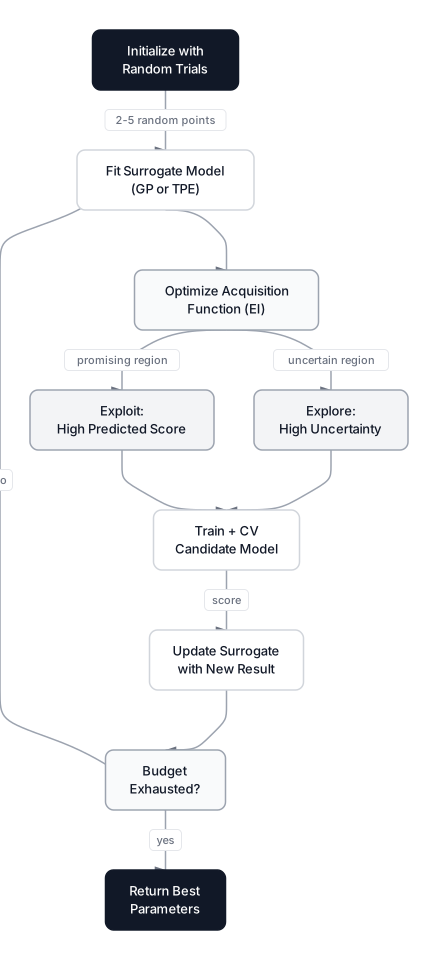 Click to expandBayesian Optimization balances exploring uncertain regions with exploiting known good regions
The Surrogate Model and Acquisition Function
At the core of Bayesian Optimization are two components:
-
Surrogate model: A probabilistic approximation of the true objective function (your model's cross-validation score as a function of hyperparameters). Common choices are Gaussian Processes (GP) and Tree-structured Parzen Estimators (TPE).
-
Acquisition function: A formula that balances exploration (probing uncertain regions) and exploitation (refining regions known to perform well). The most common acquisition function is Expected Improvement (EI):
Where:
- is the expected improvement at candidate point
- $f(x^+)$ is the best objective value observed so far
- is the predicted value of the surrogate model at
- is the expectation over the surrogate model's uncertainty
In Plain English: The acquisition function acts like a scout. It looks at every unexplored hyperparameter combination and asks two questions: "How likely is it that this region beats our current best?" and "How uncertain are we about this region?" High expected improvement means either the surrogate model is confident there's a good result there (exploitation) or it knows very little about that area (exploration). The scout says: "Check here next."
The Bayesian Optimization Loop
Each iteration follows this cycle:
- Fit the surrogate model to all (hyperparameter, score) pairs observed so far
- Optimize the acquisition function to find the most promising next candidate
- Evaluate the candidate by training and cross-validating the actual model
- Update the surrogate with the new observation
- Repeat until the trial budget is exhausted
This loop means every trial is informed by every previous trial. Trial 20 benefits from the knowledge accumulated in trials 1 through 19, something Random Search can never do because it's memoryless.
Optuna: The Industry Standard
Optuna supports define-by-run search spaces, including conditional parameters inside an objective function. Verify the current release separately rather than using an industry-wide adoption ranking. Its "define-by-run" API lets you build the search space inside the objective function itself, enabling conditional hyperparameters (e.g., only sample gamma when kernel='rbf').
Optuna uses TPE (Tree-structured Parzen Estimators) as its default sampler, which models the search space more efficiently than Gaussian Processes for high-dimensional problems. It also supports built-in pruning via MedianPruner or HyperbandPruner, killing unpromising trials early to save compute.
import optuna
from sklearn.datasets import make_classification
from sklearn.ensemble import RandomForestClassifier
from sklearn.model_selection import cross_val_score
import numpy as np

np.random.seed(42)
X, y = make_classification(
    n_samples=800, n_features=15, n_informative=8,
    n_redundant=3, n_classes=2, random_state=42
)

def objective(trial):
    params = {
        'n_estimators': trial.suggest_int('n_estimators', 50, 500),
        'max_depth': trial.suggest_int('max_depth', 3, 30),
        'min_samples_split': trial.suggest_int('min_samples_split', 2, 20),
        'min_samples_leaf': trial.suggest_int('min_samples_leaf', 1, 10),
        'max_features': trial.suggest_float('max_features', 0.1, 1.0),
    }

    rf = RandomForestClassifier(**params, random_state=42)
    scores = cross_val_score(rf, X, y, cv=5, scoring='accuracy')
    return scores.mean()

study = optuna.create_study(direction='maximize')
study.optimize(objective, n_trials=50, show_progress_bar=False)

print(f'Best CV Accuracy: {study.best_value:.4f}')
print(f'Best Parameters: {study.best_params}')
Typical output (varies by run):
Best CV Accuracy: 0.9175
Best Parameters: {'n_estimators': 312, 'max_depth': 14, 'min_samples_split': 4, 'min_samples_leaf': 2, 'max_features': 0.68}
Common Pitfall: Optuna's results are stochastic. Two runs with the same search space will produce different best parameters. Always set optuna.logging.set_verbosity(optuna.logging.WARNING) in production scripts to suppress verbose trial logs, and use study.best_trial to extract the final configuration programmatically.
Notice this code block is not marked <!— EXEC —> because Optuna is not available in the browser-based Pyodide runtime. You'll need pip install optuna to run it locally.
Successive Halving: A Budget-Efficient Compromise
Scikit-learn 1.8 includes HalvingRandomSearchCV, a strategy that starts many candidates with a small resource budget, progressively eliminates the worst performers, and allocates more resources (more training samples or more iterations) to the survivors.
The idea comes from the multi-armed bandit literature. Instead of giving every candidate the full 5-fold cross-validation treatment, you give all 50 candidates a quick evaluation on a small subset. Keep the top third. Give those survivors a bigger subset. Repeat until one champion remains.
from sklearn.experimental import enable_halving_search_cv
from sklearn.model_selection import HalvingRandomSearchCV
from sklearn.ensemble import RandomForestClassifier
from scipy.stats import randint, uniform

param_dist = {
    'n_estimators': randint(50, 500),
    'max_depth': randint(3, 30),
    'min_samples_split': randint(2, 20),
    'max_features': uniform(0.1, 0.9)
}

halving_search = HalvingRandomSearchCV(
    RandomForestClassifier(random_state=42),
    param_distributions=param_dist,
    n_candidates=50,
    factor=3,
    cv=5,
    scoring='accuracy',
    random_state=42,
    n_jobs=-1
)
halving_search.fit(X, y)
This approach is useful when you have a very large search space and limited compute. The tradeoff: early-round evaluations on small data subsets can be noisy, occasionally eliminating good candidates prematurely.
Key Insight: HalvingRandomSearchCV is still marked as experimental in scikit-learn 1.8 (you need from sklearn.experimental import enable_halving_search_cv). For production use, Optuna's HyperbandPruner offers the same successive halving concept with a more mature implementation.
When to Use Each Strategy
Picking the right tuning strategy depends on your compute budget, the size of your search space, and how critical that last fraction of accuracy is. Here's a decision framework:
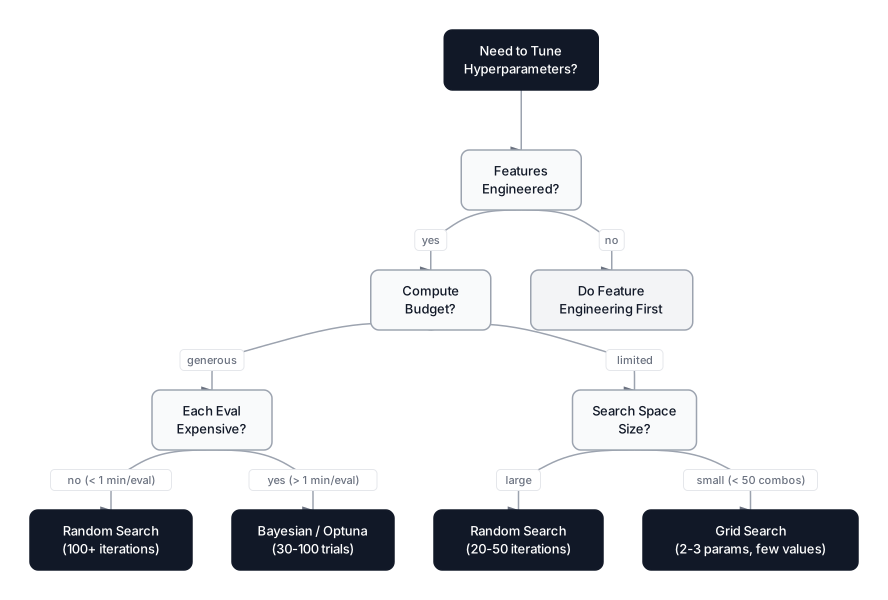 Click to expandDecision framework for choosing a hyperparameter tuning strategy
| Criterion | Grid Search | Random Search | Bayesian (Optuna) |
|---|---|---|---|
| Best for | Small search spaces (2-3 params, few values) | Initial exploration, medium search spaces | Final optimization, expensive models |
| Search space | Discrete grid only | Continuous distributions | Continuous + conditional |
| Trials needed | All combinations (exponential) | 20-100 usually sufficient | 30-100 trials |
| Memory of past trials | None | None | Yes (learns from history) |
| Parallelizable | Trivially | Trivially | Partial (async via Optuna) |
| Compute cost | Explodes with dimensions | Linear in n_iter | Linear in n_trials |
| When to avoid | >3 hyperparameters or continuous ranges | When you need guaranteed best in a small space | Quick prototyping, simple models |
A Practical Playbook
- Prototyping phase: Use defaults. Don't tune yet. Validate the problem formulation and feature set first.
- Exploration phase: Run Random Search with 20-50 iterations over broad distributions. Identify which hyperparameters actually move the needle. Check the
cv_results_attribute to see which parameters have high variance across good vs. bad trials. - Refinement phase: Narrow the search space around the promising region found in step 2. Either use Grid Search on the reduced space (if it's now small enough) or switch to Optuna for 50-100 trials of Bayesian optimization.
- Production phase: Run nested cross-validation (next section) to get an unbiased performance estimate. Lock the hyperparameters and retrain on the full training set.
Pro Tip: Don't jump to Bayesian optimization for a model that trains in 0.1 seconds. Random Search with 100 iterations finishes in 10 seconds and covers the space well. Save Optuna for models where each evaluation costs minutes or hours, like deep learning or large gradient boosting ensembles on millions of rows.
Overfitting During Tuning: The Validation Set Trap
Tuning hyperparameters to maximize cross-validation accuracy sounds safe, but it introduces a subtle form of overfitting. Each trial peeks at the validation data to compute a score. After 100 trials, the best score partially reflects random variance in the validation folds rather than true generalization ability.
This is the validation set trap: the tuning algorithm optimizes hyperparameters toward the specific quirks of your validation splits rather than the underlying data distribution.
Nested Cross-Validation
The antidote is nested cross-validation, where an outer loop estimates generalization performance and an inner loop performs hyperparameter tuning:
- Inner loop: Runs RandomizedSearchCV (or Optuna) to find the best hyperparameters for each outer fold's training set
- Outer loop: Evaluates the tuned model on a held-out test fold that was never seen during tuning
Expected output:
Nested CV Accuracy: 0.9037 (+/- 0.0414)
Per-fold scores: ['0.8438', '0.8812', '0.9563', '0.8938', '0.9437']
This is an unbiased estimate of generalization performance.
The nested CV accuracy (90.37%) is slightly lower than the non-nested estimates we saw earlier. That's expected and honest. The non-nested numbers were mildly optimistic because the tuning algorithm had indirect access to the evaluation data. Nested CV gives you the number you should actually report to stakeholders.
Key Insight: Use nested CV when you need a trustworthy performance estimate (papers, production sign-off). Skip it during exploration when you're just comparing strategies. It's computationally expensive: 5 outer folds times 15 inner iterations times 3 inner folds = 225 model fits in this example.
Full Strategy Comparison
Let's bring the running example full circle by comparing all approaches side by side.
Expected output:
Strategy Comparison (Random Forest, 800 samples, 15 features)
============================================================
Method                 CV Accuracy     Combinations    Params Tuned
------------------------------------------------------------
Default                0.9025          1               0
Grid Search            0.9062          27              3
Random Search          0.9125          27              5

Grid Search best:   {'max_depth': 10, 'min_samples_split': 10, 'n_estimators': 200}
Random Search best: {'max_depth': 10, 'max_features': np.float64(0.7561064512368886), 'min_samples_leaf': 1, 'min_samples_split': 6, 'n_estimators': 280}
Random Search wins on accuracy (91.25% vs. 90.62%) while searching a larger space with more hyperparameters. Both used exactly 27 evaluations. This pattern holds consistently in practice: when the compute budget is fixed, Random Search almost always finds a better configuration than Grid Search.
Production Considerations
Computational Complexity
| Strategy | Time Complexity | Space Complexity |
|---|---|---|
| Grid Search | for results storage | |
| Random Search | for results storage | |
| Bayesian (Optuna) | for surrogate + results |
Where is the number of grid combinations, is the number of iterations, is the number of CV folds, is the training time per fold, and is the surrogate model update cost.
Distributed Tuning at Scale
For production workloads on large datasets:
- Optuna supports distributed optimization through its storage backends (MySQL, PostgreSQL, Redis). Multiple workers can run trials in parallel, each pulling the next candidate from the shared study.
- Ray Tune (part of the Ray ecosystem) wraps Optuna, HyperOpt, and other searchers with cluster-level parallelism, automatic checkpointing, and the ASHA scheduler for early stopping.
- Vertex AI Hyperparameter Tuning (Google Cloud) and SageMaker Automatic Model Tuning (AWS) provide managed Bayesian optimization with built-in GPU scheduling.
Memory and Scaling Tips
- For datasets over 1M rows, use
subsampleormax_samplesparameters to train on a fraction per trial during tuning. Lock the final hyperparameters and retrain on full data. - Set
n_jobs=-1in scikit-learn search objects to parallelize across CPU cores. But be careful:n_jobs=-1on both the search and the estimator (e.g., Random Forest) can oversubscribe your cores. Pick one level of parallelism. - Optuna's
MedianPrunercan cut total compute by 30-50% by killing trials that are performing below the median of completed trials at the same training step.
When NOT to Tune Hyperparameters
Hyperparameter tuning provides diminishing returns in many scenarios. Before spending compute, check these conditions:
-
Your features are weak. No amount of tuning will fix bad input data. Feature engineering almost always delivers a bigger accuracy boost than hyperparameter optimization. Read our feature engineering guide before tuning.
-
Your model is severely overfitting. If there's a massive gap between training and validation accuracy, the problem is high variance, not suboptimal hyperparameters. Add more data, simplify the model, or apply regularization first.
-
You're still in the prototyping phase. When the goal is "does this problem even have a signal?", default parameters answer that question in seconds. Tuning a prototype wastes time on a model architecture you might discard tomorrow.
-
The dataset is tiny. With 200 samples, cross-validation variance dominates any hyperparameter effect. Tuning on noisy estimates just fits the noise.
-
You're comparing algorithms. Use defaults when deciding between Random Forest, XGBoost, and SVM. Tune only after you've picked a winner. Tuning three algorithms simultaneously triples the compute for little benefit.
Choosing a Tuning Strategy
Hyperparameter tuning transforms a generic model into one calibrated for your specific data, but the strategy you pick matters as much as the tuning itself. Grid Search works for small, discrete spaces where you can afford to test every combination. Random Search should be your default starting point: it explores more of the search space per evaluation, handles continuous distributions, and consistently finds better configurations than grid search at equal budget. Bayesian Optimization via Optuna becomes essential when each evaluation is expensive, because it learns from past trials rather than sampling blindly.
The honest truth, though, is that tuning is the final polish. Clean data, thoughtful features, and sound cross-validation matter far more than squeezing another 0.3% from the right max_depth. If your model's cross-validation score is stuck at 75%, hyperparameter tuning won't save you. Feature engineering will.
When you're ready to verify that your tuned model's performance is genuine and not just a lucky split, nested cross-validation gives you the unbiased estimate you need. And for choosing the right evaluation metrics to guide your tuning objective, make sure you're optimizing for the metric that actually reflects business value, not just accuracy.
Frequently Asked Interview Questions
Q: What is the difference between a model parameter and a hyperparameter?
A model parameter is learned from data during training (e.g., neural network weights, linear regression coefficients). A hyperparameter is set before training and controls the learning process itself (e.g., learning rate, tree depth, number of estimators). You can't estimate hyperparameters from the training data directly, which is why we need tuning strategies.
Q: Why does Random Search often outperform Grid Search with the same computational budget?
Bergstra and Bengio (2012) showed that in most ML problems, only a subset of hyperparameters significantly affect performance. Random Search samples unique values for every trial, giving better coverage on the important dimensions. Grid Search wastes evaluations varying unimportant parameters while holding important ones fixed at the same grid points.
Q: How does Bayesian Optimization improve over Random Search?
Bayesian Optimization builds a probabilistic surrogate model of the objective function and uses an acquisition function (like Expected Improvement) to choose the next candidate. This means each trial is informed by all previous trials, whereas Random Search is memoryless. The advantage grows when evaluations are expensive, because Bayesian methods find good solutions in fewer total trials.
Q: Your tuned model shows 95% cross-validation accuracy, but only 88% on the test set. What happened?
This is the validation set trap. The tuning algorithm optimized hyperparameters toward the specific quirks of the CV folds rather than the true data distribution. After hundreds of trials, the best score partly reflects random variance. Nested cross-validation avoids this by keeping the evaluation folds completely separate from the tuning process.
Q: When should you skip hyperparameter tuning entirely?
Skip tuning when feature engineering hasn't been done (tuning can't fix bad features), when the model is severely overfitting (regularization or more data is needed first), during early prototyping (default parameters suffice for signal validation), or when comparing multiple algorithms (tune only after selecting the final model).
Q: What is the advantage of using loguniform over uniform for sampling learning rates?
Learning rates typically span several orders of magnitude (0.0001 to 0.3). A uniform distribution wastes most samples in the upper range, where performance is often poor. loguniform distributes samples evenly on a logarithmic scale, placing equal density between 0.001-0.01 and between 0.01-0.1, which matches how learning rate sensitivity actually behaves.
Q: How would you set up hyperparameter tuning for a model that takes 30 minutes per training run?
Use Bayesian Optimization (Optuna) with aggressive pruning (MedianPruner or HyperbandPruner) to kill bad trials early. Start with a broad search space and 30-50 trials. Run distributed optimization across multiple machines using Optuna's database-backed storage (PostgreSQL or Redis). Budget 50 trials total, which would take about 25 hours, much more feasible than the 225+ hours Random Search might need for equivalent coverage.
Q: Explain nested cross-validation and why it matters.
Nested CV uses an outer loop for unbiased performance estimation and an inner loop for hyperparameter tuning. Each outer fold holds out test data that the inner tuning process never sees. This prevents the optimistic bias that occurs when the same data guides both tuning decisions and performance reporting. It's the gold standard for reporting model performance in papers and production sign-offs.
Hands-On Practice
Now let's compare Grid Search vs Random Search in action. We'll tune a classifier and visualize how each method explores the hyperparameter space differently.
Dataset: ML Fundamentals (Loan Approval) A classification dataset with features like age, income, credit score to predict loan approval.
Performance Note: This playground trains multiple machine learning models using Grid Search and Random Search, which involves fitting dozens of RandomForest classifiers. Depending on your device, execution may take 5-15 seconds. Your browser tab may become briefly unresponsive during computation, this is normal for CPU-intensive ML workloads running in the browser. The code has been optimized for browser execution while preserving educational value.
The visualization shows three key insights: (1) how tuning improves over baseline, (2) the grid search heatmap revealing which hyperparameter combinations work best, and (3) how random search progressively finds better solutions. Notice how random search explores 5 hyperparameters while grid search only covers 3, yet both use the same computational budget.