
A car engine doesn't burn fuel at a constant rate. At low RPM, efficiency climbs. Around mid-range, it plateaus. Push past the redline and consumption spikes. Plot engine RPM against fuel efficiency and you get a curve, not a line. Force a straight line through that data and your predictions will be wrong at every RPM range.
Polynomial regression solves exactly this problem. It extends ordinary linear regression by adding powers of the input variable (, , and beyond) as additional features, letting the model fit curves instead of lines. The real world is packed with curved relationships: diminishing returns on advertising spend, parabolic trajectories in physics, enzyme activity peaking at an optimal temperature. Whenever the data bends, polynomial regression gives you a principled way to bend with it while keeping the same Ordinary Least Squares (OLS) math that makes Linear Regression fast and well-understood.
Throughout this article, we'll model one scenario from start to finish: engine RPM versus fuel efficiency, where efficiency rises, peaks around 3,500 RPM, and drops at high RPM. Every formula, every code block, every table ties back to this example.
The polynomial model equation
Standard linear regression models the output as a straight-line function of the input:
Where:
- is the predicted output (fuel efficiency in km/L)
- is the intercept (baseline efficiency when RPM contribution is zero)
- is the slope (change in efficiency per unit RPM)
- is the input feature (engine RPM)
- is the noise term (measurement error and unmodeled factors)
In Plain English: This equation says fuel efficiency changes at a fixed rate as RPM increases. Every 1,000 RPM bump adds or subtracts the same amount of efficiency. That's clearly wrong for an engine; the relationship curves.
Polynomial regression generalizes this by adding higher powers of :
Where:
- is the degree of the polynomial (how many powers of we include)
- is the coefficient the model learns for the -th power of
- is the input feature raised to the -th power
In Plain English: Instead of a fixed rate of change, the model now says "the effect of RPM on efficiency depends on what RPM you're at." The term lets the curve bend once (a parabola), the term lets it bend twice (an S-shape), and so on.
The degree controls how flexible the curve is:
| Degree | Shape | Turning points | RPM-efficiency example |
|---|---|---|---|
| 1 (linear) | Straight line | 0 | Efficiency always goes up or always goes down |
| 2 (quadratic) | Parabola | 1 | Efficiency peaks at mid-RPM, drops at extremes |
| 3 (cubic) | S-curve | Up to 2 | Efficiency dips, rises, then falls again |
| 4+ | Increasingly wiggly | Up to | Rarely justified for physical processes |
For our RPM-efficiency data, degree 2 is the natural choice: one peak, one turning point.
Why polynomial regression is still a linear model
This trips up nearly everyone. The word "linear" in linear regression refers to linearity in the parameters ( values), not in the input features. Look at the degree-2 equation:
If RPM $= 3,000$, then . From the fitting algorithm's perspective, this is identical to:
Where and are just two ordinary numeric features. The algorithm doesn't know or care that is the square of . It finds , , and that minimize the sum of squared residuals, which is a standard linear algebra problem.
This means the OLS closed-form solution (the normal equation) still works:
Where:
- is the vector of estimated coefficients
- is the design matrix with columns for
- is the vector of observed outputs (measured fuel efficiencies)
- is the inverse of the Gram matrix
In Plain English: The model stacks RPM, RPM-squared, and RPM-cubed side by side as if they were completely separate measurements. Then it runs the exact same "find the best-fit line" math that linear regression uses, except now it's finding the best-fit curve.
Every theoretical guarantee from the Gauss-Markov theorem carries over: unbiased estimates, minimum variance among linear unbiased estimators, valid confidence intervals. Gradient descent also works without modification.
Key Insight: When someone says a model is "linear," always ask: linear in what? Polynomial regression is non-linear in the features but linear in the parameters. A model like is non-linear in the parameters and needs fundamentally different optimization algorithms (like Levenberg-Marquardt).
Why a straight line fails on curved data
Before writing code, let's understand concretely why linear regression breaks on non-linear data. When the true relationship curves, a straight-line fit produces systematic residuals: it overestimates in one region and underestimates in another. This pattern in the residuals is the diagnostic fingerprint of underfitting.
For our RPM-efficiency data, a straight line would predict that efficiency rises forever as RPM increases. It completely misses the peak and the decline past the sweet spot. The result isn't just inaccurate; it's misleading, because the error isn't random. It's structured.
 Click to expandPolynomial feature engineering pipeline for regression modeling
Here's the full comparison between a linear fit and a degree-2 polynomial fit on our synthetic RPM data:
Expected output:
Linear R²:     0.2852
Polynomial R²: 0.9919

Polynomial coefficients: [ 3.49169299e-02 -4.99325781e-06]
Polynomial intercept:    -26.07
The linear R-squared is under 0.29. The straight line captures some variance but misses the curvature entirely. The degree-2 polynomial captures over 99% of it. That gap is the cost of forcing a straight line through curved data.
Pro Tip: Always wrap PolynomialFeatures and the regressor inside a Pipeline. This guarantees that .predict() on new data applies the polynomial transformation automatically, preventing the silent bugs that happen when you transform training data but forget to transform test data.
The bias-variance tradeoff and polynomial degree
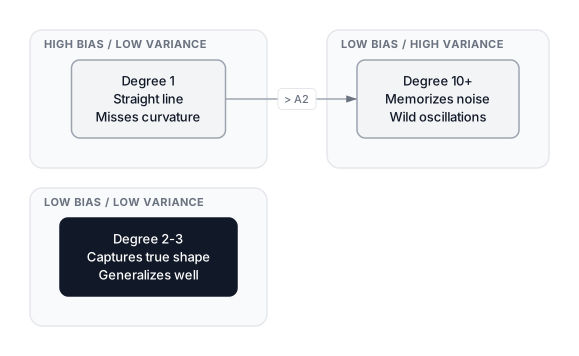
Choosing the polynomial degree is the single most important practical decision in polynomial regression. It's a direct instance of The Bias-Variance Tradeoff:
- Too low a degree (high bias): The model can't represent the true curvature. It underfits, producing high error on both training and test data.
- Too high a degree (high variance): The model has enough flexibility to memorize noise. It overfits, producing low training error but high test error.
- The right degree: Captures the true signal without chasing random noise.
 Click to expandBias-variance spectrum across polynomial degrees for regression
For our RPM-efficiency data, the true relationship is quadratic. A degree-1 model can't bend at all. A degree-20 model will thread through every noisy data point, producing wild oscillations between observations, especially at the boundaries. This boundary oscillation is a well-documented numerical phenomenon called Runge's phenomenon (Runge, 1901), where high-degree polynomial interpolation creates increasingly large swings near the edges of the data range.
Expected output:
Degree 1:  straight line, misses peak entirely
Degree 2:  smooth parabola, captures the real pattern
Degree 20: wild oscillations at boundaries (Runge's phenomenon)
The degree-20 plot shows the curve whipping up and down between data points, especially at the low-RPM and high-RPM edges. Its training R-squared might be near 1.0, but that "perfect" fit is an illusion. The model has memorized noise and will fail on any new observation.
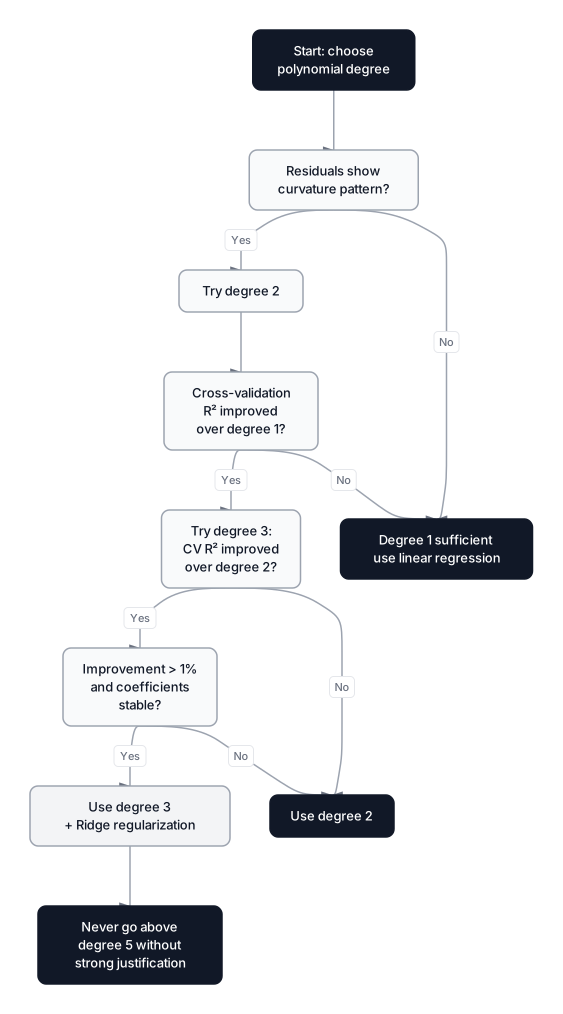
Cross-validation for degree selection
Eyeballing plots works for 2D data, but the principled method is k-fold cross-validation. The idea is simple: train on a subset of the data, test on the held-out portion, rotate, and average.
 Click to expandDecision flowchart for choosing the right polynomial degree
The procedure:
- Split the data into folds (typically $k = 5$ or $k = 10$).
- For each candidate degree, train on folds, score on the held-out fold.
- Repeat for all folds and average the scores.
- Pick the degree with the best average validation score.
This directly estimates generalization performance rather than training-set performance.
Expected output:
Degree | Mean CV R²  | Std
-------|-------------|------
   1   |   0.1932    | 0.1398
   2   |   0.9905    | 0.0028 <-- best
   3   |   0.9903    | 0.0027
   4   |   0.9903    | 0.0028
   5   |   0.9890    | 0.0022
   6   |   0.9814    | 0.0052
   7   |   0.8655    | 0.0832
   8   |   0.8257    | 0.1007
   9   |   0.7957    | 0.1096
  10   |   0.7746    | 0.1144
Degree 2 has the highest CV R-squared with the tightest spread. Degrees 3 through 5 are nearly identical, confirming the true relationship is quadratic. Beyond degree 6, performance drops and standard deviation climbs. By degree 7, the model's reliability falls off a cliff.
Pro Tip: When cross-validated R-squared is nearly identical for degree 2 and degree 3, always pick degree 2. Simpler models are more stable, easier to interpret, and far less likely to behave erratically on data you haven't seen yet.
Interaction terms in multivariate polynomial regression
When your input has multiple features, PolynomialFeatures doesn't just square each one individually. It also generates cross-product terms (interaction terms) between features. For two features and at degree 2, the transformer produces:
| Term | Meaning | RPM-efficiency example |
|---|---|---|
| $1$ | Bias (constant) | Baseline efficiency |
| Original feature A | Engine RPM | |
| Original feature B | Engine displacement (liters) | |
| Squared effect of A | Non-linear RPM effect | |
| Squared effect of B | Non-linear displacement effect | |
| Interaction: A's effect depends on B | A 2.0L engine and a 4.0L engine respond differently to the same RPM |
The total number of features after transformation follows the binomial coefficient formula:
Where:
- is the number of original input features
- is the polynomial degree
- The result includes all interaction and power terms up to degree
In Plain English: This formula counts every possible way to combine RPM and displacement (and any other features) up to the chosen degree. It grows fast. Surprisingly fast.
| Input features () | Degree () | Output features |
|---|---|---|
| 2 | 2 | 6 |
| 5 | 3 | 56 |
| 5 | 4 | 126 |
| 10 | 3 | 286 |
| 10 | 4 | 1,001 |
| 20 | 3 | 1,771 |
With 10 input features at degree 4, you go from 10 columns to 1,001. Most of those generated features are noise-catchers. This explosive growth is why polynomial regression on high-dimensional inputs runs headfirst into the curse of dimensionality: the model has far more parameters than the data can reliably constrain, and overfitting becomes nearly guaranteed unless you add regularization.
Common Pitfall: Don't blindly apply PolynomialFeatures(degree=3) to a 20-feature dataset. You'll create 1,771 features, most of which are interaction terms that add noise, not signal. If you only want power terms (no interactions), set interaction_only=False and consider using SplineTransformer instead. If you only want interactions without powers, set interaction_only=True.
Regularized polynomial regression
When using higher degrees or multiple features, coefficient values tend to blow up. The model compensates by assigning massive positive weights to some terms and massive negative weights to others, producing the wild oscillations we saw in the degree-20 plot. Regularization constrains coefficients to stay small, which smooths the curve.
Ridge regression (L2 penalty) adds the sum of squared coefficients to the loss:
Where:
- is the number of training samples
- is the residual (predicted minus actual efficiency)
- is the regularization strength (higher = more constraint)
- is the coefficient for the -th polynomial term
In Plain English: The model must not only fit the RPM-efficiency data well (first term), but also keep every coefficient close to zero (second term). A large forces the degree-10 curve to behave more like a gentle degree-2 parabola.
Lasso regression (L1 penalty) uses absolute values instead:
Where:
- The L1 penalty drives some coefficients to exactly zero
- This performs automatic feature selection: irrelevant polynomial terms get eliminated entirely
For a thorough comparison of Ridge, Lasso, and Elastic Net, see Ridge, Lasso, and Elastic Net: The Definitive Guide to Regularization.
Expected output:
Best alpha selected by RidgeCV: 0.001
Unregularized max |coefficient|: 2.72e+06
Ridge max |coefficient|:         5.93e+01
The unregularized degree-10 curve oscillates wildly. Ridge shrinks those massive coefficients by several orders of magnitude, and the resulting curve stays smooth, close to the true quadratic shape despite having 10 degrees of freedom. RidgeCV picks the best automatically through built-in generalized cross-validation, so you don't need a manual grid search.
Feature scaling before regularization
When you create polynomial features, the numeric ranges diverge dramatically. If RPM ranges from 1,000 to 7,000:
| Feature | Min | Max |
|---|---|---|
| (RPM) | 1,000 | 7,000 |
| 1,000,000 | 49,000,000 | |
| 1,000,000,000 | 343,000,000,000 |
These wildly different scales cause two problems:
-
Regularization is unfair. Ridge penalizes all coefficients equally. Without scaling, the coefficient for is already tiny (because is huge), so the penalty barely touches it, while the coefficient for gets crushed. The penalty doesn't distribute proportionally across features.
-
Gradient descent struggles. The loss surface becomes extremely elongated along high-magnitude dimensions, making convergence slow or unstable.
The correct pipeline order is always:
PolynomialFeaturesto generate the polynomial termsStandardScalerto normalize each term to zero mean, unit varianceRidgeorLassoto fit with regularization
from sklearn.pipeline import make_pipeline
from sklearn.preprocessing import PolynomialFeatures, StandardScaler
from sklearn.linear_model import Ridge

model = make_pipeline(
    PolynomialFeatures(degree=3, include_bias=False),
    StandardScaler(),
    Ridge(alpha=1.0)
)
model.fit(X, y)
Key Insight: Feature scaling is technically optional when using plain LinearRegression with the OLS closed-form solution, because OLS is scale-invariant. But it's mandatory when using Ridge, Lasso, or gradient descent. If you forget to scale before regularization, you'll get coefficients that look right but produce subtly wrong predictions (one of the hardest bugs to catch).
For more on scaling strategies, see Standardization vs Normalization.
The extrapolation trap
Polynomial models are uniquely dangerous for extrapolation: predicting outside the training data's range. A polynomial of degree is dominated by the term at extreme values. That term shoots toward positive or negative infinity depending on the sign of and whether is even or odd.
For our RPM data (trained on 1,000-7,000 RPM), here's what happens if we ask for predictions at 10,000 RPM:
Expected output:
Prediction at 3,500 RPM (in range):  35.0 km/L  -- reasonable
Prediction at 10,000 RPM (out of range): -176.2 km/L  -- physically impossible
Prediction at 15,000 RPM (far out):      -625.8 km/L  -- absurd
Negative fuel efficiency is physically meaningless, but the parabola doesn't know that. It just keeps curving downward because that's what does.
Warning: Never trust polynomial predictions for input values outside the min-max range of your training data. If you need extrapolation, consider bounded functions like logistic curves, saturating exponentials, or domain-specific physical models.
When to use polynomial regression (and when not to)
This decision framework will save you from the most common mistakes:
Use polynomial regression when:
- The relationship has clear curvature (residual plot from linear fit shows a U-shape or S-shape)
- The underlying process is genuinely polynomial (physics: projectile motion, power laws; economics: diminishing returns)
- You have 1-3 input features and need a quick, interpretable model
- The data is dense enough to support the number of parameters (rough rule: at least 10-20 observations per coefficient)
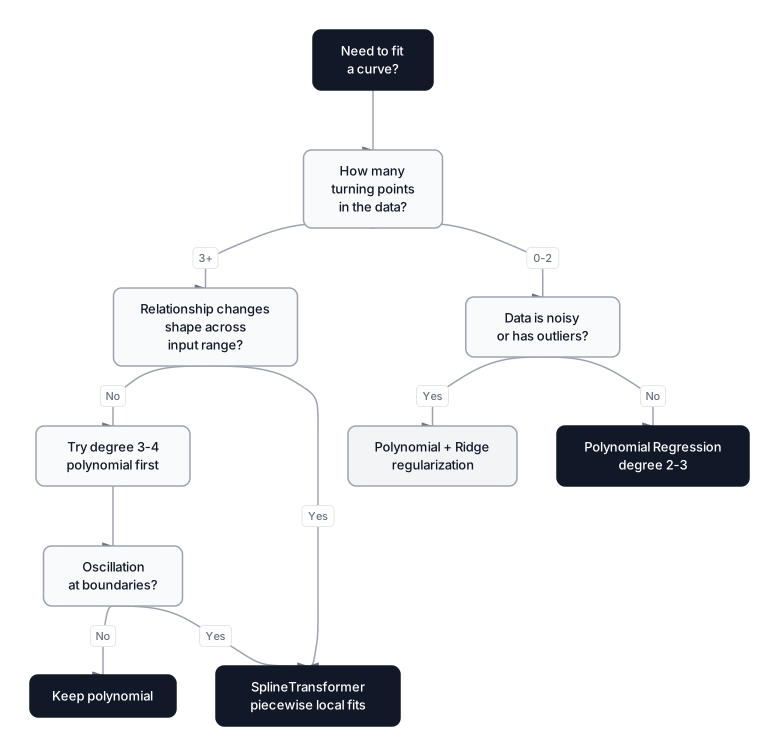
Do NOT use polynomial regression when:
- You have more than 5-10 input features (feature explosion makes it impractical)
- The curvature changes character across the input range (splines handle this better)
- You need predictions outside the training range (polynomials explode at the boundaries)
- The dataset is small and noisy (high-degree polynomials will memorize the noise)
- The relationship is periodic (use Fourier features or trigonometric terms instead)
 Click to expandDecision flowchart for choosing between polynomial and spline regression
Polynomials versus splines
Polynomial regression fits a single global polynomial across the entire input range. Spline regression fits separate low-degree polynomials to different segments of the data, joined smoothly at points called knots. This avoids several weaknesses of global polynomials.
| Aspect | Polynomial regression | Spline regression |
|---|---|---|
| Scope | Single polynomial over entire range | Piecewise polynomials joined at knots |
| Outlier sensitivity | One outlier shifts the entire curve globally | Local: outliers affect only nearby segments |
| High-degree stability | Wild oscillations (Runge's phenomenon) | Stable with low-degree pieces (usually cubic) |
| Hyperparameters | One: polynomial degree | Two: knot count and placement |
| Interpretability | Coefficients have global meaning | Coefficients are local to each segment |
| scikit-learn class | PolynomialFeatures | SplineTransformer (since v1.0) |
As of scikit-learn 1.8, SplineTransformer supports B-spline bases and works as a drop-in replacement for PolynomialFeatures inside a pipeline. The official documentation has solid examples comparing the two approaches.
My recommendation: Start with degree-2 polynomial regression. If it doesn't capture the pattern well and you find yourself reaching for degree 4+, switch to splines instead of increasing the degree. You'll get better fits with fewer numerical headaches.
Production considerations
When deploying polynomial regression in production systems, keep these practical concerns in mind:
| Concern | Details |
|---|---|
| Training complexity | for feature generation, for OLS where = samples, = features after expansion |
| Inference speed | Fast: just matrix multiplication. A degree-3 model with 5 features (56 terms) predicts in microseconds |
| Memory | The expanded feature matrix can be large. 1M rows with 10 features at degree 3 = 286M cells (roughly 2.3 GB in float64) |
| Numerical stability | High-degree terms cause floating-point overflow. Always scale features and prefer degree 2-3 |
| Serialization | Pipeline objects serialize cleanly with joblib. The polynomial transform is included automatically |
| Monitoring | Watch for input drift: if production RPM values shift outside training range, predictions become unreliable |
Pro Tip: For datasets larger than a few hundred thousand rows, consider SGDRegressor with polynomial features instead of the closed-form OLS. It uses stochastic gradient descent and streams through data in batches, keeping memory usage constant regardless of dataset size.
Linear versus polynomial regression at a glance
| Property | Linear regression | Polynomial regression |
|---|---|---|
| Model shape | Straight line / hyperplane | Curved surface |
| Bias risk | High (can't capture curvature) | Lower (captures non-linear patterns) |
| Variance risk | Low (few parameters) | Higher (more parameters, overfitting risk) |
| Interpretability | Coefficients directly map to feature effects | Coefficients harder to interpret at degree 3+ |
| Extrapolation | Relatively stable (linear trend continues) | Dangerous (curve diverges at boundaries) |
| Feature count after transform | Same as input | Grows combinatorially with degree |
| Regularization need | Optional (helps with multicollinearity) | Critical at degree 3+ or multivariate |
| Best for | Approximately linear relationships | Data with clear curvature or diminishing returns |
When Polynomial Regression Fits
Polynomial regression extends the straight-line model into curved territory by adding powers of the input variable as new features. Because it stays linear in its parameters, it inherits all the optimization machinery and statistical guarantees of ordinary linear regression while gaining the flexibility to fit parabolas, S-curves, and more complex shapes.
The practical playbook boils down to a few rules. Start with the lowest degree that captures the curvature; degree 2 handles a surprising number of real-world datasets, including our RPM-efficiency example. Use cross-validation to select the degree, because training error alone will always favor higher degrees and hide overfitting. Apply regularization (Ridge or Lasso) whenever the degree exceeds 2 or you're working with multiple features, as it keeps coefficients small and the fitted curve smooth. And never extrapolate: polynomial predictions outside the training range are unreliable because the highest-power term dominates and diverges.
If you find yourself reaching for degree 5 or higher, stop and consider splines instead. The scikit-learn SplineTransformer gives you the curvature-fitting power of polynomials without the numerical instability. For readers looking to strengthen the foundations this article builds on, Linear Regression covers OLS and gradient descent in full detail, and The Bias-Variance Tradeoff explains why degree selection matters so much.
Frequently Asked Interview Questions
Q: Polynomial regression is called "non-linear" but uses linear regression under the hood. How is that possible?
The word "linear" in linear regression refers to linearity in the parameters, not the features. Polynomial regression creates new features (, , etc.) through a non-linear transformation of the input, but the model is still a weighted sum of those features, which is linear in the coefficients. The OLS normal equation and all Gauss-Markov guarantees apply exactly as they do for plain linear regression.
Q: You've fitted a degree-5 polynomial and your training R-squared is 0.99, but your cross-validation R-squared is 0.45. What's happening?
The model is overfitting. A degree-5 polynomial has enough flexibility to memorize noise in the training data, which inflates training R-squared. The cross-validation score exposes this by testing on held-out data. The fix is to reduce the degree (try 2 or 3 first) or add Ridge/Lasso regularization to penalize large coefficients.
Q: When would you choose splines over polynomial regression?
Splines are better when the relationship changes shape across the input range. For instance, data that's flat on the left, steep in the middle, and flat on the right. A single polynomial would need a high degree to capture those local variations, which causes Runge's oscillation at the boundaries. Splines fit low-degree pieces locally, joined smoothly at knots, and avoid that instability entirely.
Q: Why is feature scaling mandatory before applying Ridge to polynomial features?
Polynomial features span vastly different numeric ranges ( vs can differ by many orders of magnitude). Ridge penalizes all coefficients equally, so without scaling, the penalty unfairly crushes the coefficient attached to the smaller-scale feature while barely constraining the one attached to the larger-scale feature. StandardScaler normalizes each feature to zero mean and unit variance, making the penalty fair across all terms.
Q: How does the number of features grow with polynomial degree, and why is that a problem?
For input features at degree , the output has features, which includes all power terms and interaction terms. With 10 features at degree 4, that's 1,001 columns. Most of those are cross-product terms that capture noise rather than signal. The model becomes severely over-parameterized relative to the number of training samples, leading to overfitting and numerical instability.
Q: Your residual plot from a linear regression shows a clear U-shaped pattern. What does that tell you, and what's your next step?
A U-shaped residual pattern means the model is systematically underfitting. It's missing curvature in the data. The linear model overestimates at the extremes and underestimates in the middle (or vice versa). The next step is to try a degree-2 polynomial, which adds one turning point to the fitted curve. If the U-shape disappears from the residuals, the quadratic term was the missing piece.
Q: Can polynomial regression handle categorical features?
Not directly. Polynomial regression operates on numeric inputs by raising them to powers. You'd first need to encode categoricals (one-hot, ordinal, or target encoding) and then apply PolynomialFeatures. But be careful: one-hot columns squared are still 0 or 1, so the power terms are redundant. The interaction terms between a one-hot column and a numeric column are useful, though, since they model how the numeric effect differs across categories.
Q: In production, what's the biggest risk with polynomial regression models?
Extrapolation. If incoming data drifts outside the range the model was trained on, polynomial predictions can explode to absurd values because the highest-power term dominates outside the training bounds. In production, you should add input validation that flags or rejects predictions when features fall outside the training min-max range, and set up monitoring dashboards for input distribution drift.
Hands-On Practice
While simple linear regression is a powerful tool, real-world e-commerce data often defies straight lines, spending habits don't always scale linearly with age or tenure. Hands-on practice with Polynomial Regression is crucial because it empowers you to uncover these hidden non-linear relationships, such as diminishing returns or exponential growth in customer value. You'll transform raw features from the E-commerce Transactions dataset into polynomial terms to build a model that accurately fits the curves of customer behavior. This dataset, with its rich demographic and transactional fields, provides the perfect playground for observing how higher-degree polynomials can capture complex patterns that a straight line would miss.
Dataset: E-commerce Transactions Customer transactions with demographics, product categories, payment methods, and churn indicators. Perfect for regression, classification, and customer analytics.
Now that you've modeled the relationship between age and spending, try changing the predictor variable to customer_tenure_days to see if loyalty follows a linear or curved trajectory. Experiment with degree=4 or higher on the tenure data, does the R² score improve meaningfully, or does the curve start to behave erratically? Finally, try splitting your data into training and testing sets using train_test_split to see how the high-degree models perform on unseen data, which will vividly demonstrate the concept of overfitting.