
<!— Slug: standardization-vs-normalization-a-practical-guide-to-feature-scaling Excerpt: "Learn when to use StandardScaler, MinMaxScaler, and RobustScaler. Practical Python examples with scikit-learn show how feature scaling fixes broken models." Category: machine-learning > ml-fundamentals UpdatedAt: 2026-03-03 —>
A K-Nearest Neighbors classifier trained on three features — age (18 to 65), annual salary ($20,000 to $500,000), and years of experience (0 to 40) — predicts whether a job applicant gets an offer. Test accuracy? 58%. Barely better than guessing. Standardization vs normalization is the missing piece: feature scaling brings all three columns onto comparable ranges, and that same KNN model jumps past 85% accuracy. One line of preprocessing code, 27 percentage points of improvement.
The fix works because KNN computes Euclidean distances, and salary's range is four orders of magnitude larger than age or experience. Without scaling, the model is effectively one-dimensional — only salary matters. This problem isn't unique to KNN. Any algorithm that relies on distances, gradients, or regularization penalties will misfire when features live on wildly different scales.
This guide walks through four scikit-learn scalers (as of scikit-learn 1.8), shows exactly when each one belongs in your pipeline, and demonstrates the data leakage trap that silently inflates your metrics. Every code example uses the same running dataset: job applicants with age, salary, and years of experience.
The magnitude trap
Machine learning algorithms have no concept of units. A model sees only numbers. When one feature spans 20,000 to 500,000 and another spans 0 to 40, the algorithm treats the larger-range feature as overwhelmingly more important — not because it carries more signal, but because its numbers are bigger. This distortion hits two families of algorithms especially hard.
Distance calculations lose feature resolution
Algorithms like KNN, K-Means, and SVM (with RBF kernels) measure similarity using Euclidean distance:
Where:
- is the Euclidean distance between two data points
- and are the values of the -th feature for points and
- is the total number of features
In Plain English: Euclidean distance adds up the squared differences across every feature and takes the square root. In our applicant dataset, a $5,000 salary difference contributes 5,000² = 25,000,000 to the sum. A 20-year age difference contributes 20² = 400. Salary's term is 62,500 times larger. The distance calculation is completely blind to age.
Gradient descent oscillates on elongated loss surfaces
Linear regression, logistic regression, and neural networks minimize a loss function through gradient descent. Each weight's gradient is proportional to the scale of its input feature. A salary feature measured in hundreds of thousands produces steep gradients; an age feature measured in tens produces shallow ones.
The result is an elongated, elliptical loss surface. The optimizer overshoots along the steep salary axis and crawls along the shallow age axis, zigzagging its way to the minimum over thousands of extra iterations. Scaling the features produces a roughly circular contour, letting gradient descent take a direct path.
Key Insight: Regularization (L1/L2) penalizes all coefficients equally, regardless of their feature's scale. Without scaling, the penalty disproportionately shrinks coefficients for small-scale features like age, even when age carries strong predictive signal. Scaling ensures regularization treats every feature fairly.
Normalization with min-max scaling
Min-max scaling (called "normalization" in the scikit-learn ecosystem) linearly maps each feature to a bounded interval, typically [0, 1]. It preserves the shape of the original distribution while compressing all values into a fixed range.
Where:
- is the original feature value
- is the minimum value of the feature (computed from the training set)
- is the maximum value of the feature (computed from the training set)
In Plain English: Subtract the column's minimum (shifting the smallest value to zero), then divide by the range (stretching the largest value to one). For our applicant dataset, an age of 25 in a range of 18 to 65 becomes $(25 - 18) / (65 - 18) = 0.149$. Every value lands between 0 and 1.
For a custom target range $[a, b]$, scikit-learn applies a second linear transformation:
Where:
- is the [0, 1]-normalized value from the first formula
- is the desired minimum of the target range
- is the desired maximum of the target range
In Plain English: After normalizing to [0, 1], this stretches and shifts the values into whatever range you need. Setting $a = -1$ and $b = 1$ maps the data to [-1, 1] instead.
Running example: applicant data scaled to [0, 1]
Expected output:
Original data:
[[    25  35000      2]
 [    45 120000     20]
 [    35  75000     10]]

Min-max scaled data:
[[0.     0.     0.    ]
 [1.     1.     1.    ]
 [0.5    0.4706 0.4444]]
All three features now share the [0, 1] range. The 35-year-old applicant with $75,000 salary and 10 years of experience sits near the midpoint on every axis — exactly what we want for distance-based models.
When to choose min-max scaling
- Neural networks. Bounded inputs pair well with sigmoid and softmax activations. Weight initialization schemes (He, Xavier) assume inputs near zero, and [0, 1] scaling helps convergence.
- Image processing. Pixel intensities are naturally bounded (0 to 255). Dividing by 255 is a special case of min-max scaling.
- Algorithms with explicit input-range constraints. Some optimization routines and custom distance metrics expect features within a fixed interval.
The outlier vulnerability
Min-max scaling maps the minimum to 0 and the maximum to 1. One extreme outlier — say a $10,000,000 salary in a dataset where the rest cluster between $30,000 and $200,000 — pushes all normal values into a narrow band near zero. The feature's effective resolution collapses, and the scaler becomes practically useless for distinguishing between normal observations.
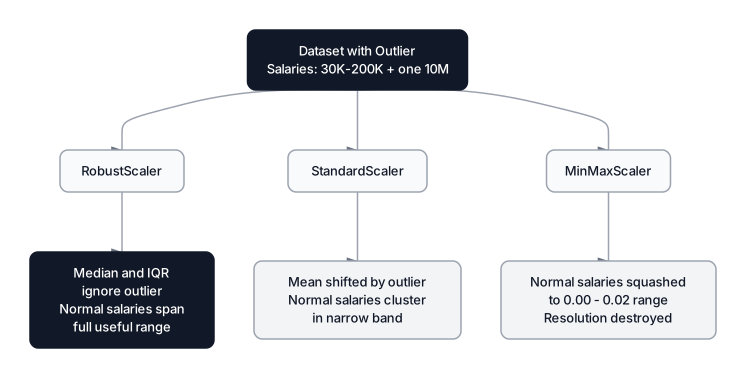 Click to expandHow outliers affect different scalers on salary data
Standardization with z-score scaling
Standardization (z-score scaling) centers each feature at zero mean and scales it to unit variance. Unlike min-max scaling, standardization produces unbounded output — there is no fixed [0, 1] range.
Where:
- is the standardized (z-score) value
- is the original feature value
- is the mean of the feature (computed from the training set)
- is the standard deviation of the feature (computed from the training set)
In Plain English: The z-score answers "how many standard deviations away from the average is this observation?" For our applicant dataset, a salary of $35,000 against a training mean of $76,667 and standard deviation of $34,785 gives $z = (35000 - 76667) / 34785 = -1.20$. That salary is 1.2 standard deviations below average.
Running example: applicant data standardized
Expected output:
Standardized data:
[[-1.2247 -1.2    -1.177 ]
 [ 1.2247  1.248   1.2675]
 [ 0.     -0.048  -0.0905]]

Column means:    [ 0. -0.  0.]
Column std devs: [1. 1. 1.]
Every column now has mean 0 and standard deviation 1. The applicant with $35,000 salary has $z = -1.20$, meaning that salary falls about 1.2 standard deviations below the training mean.
When to choose standardization
- PCA. Principal Component Analysis maximizes variance along components. Without standardization, the highest-variance feature (often just the highest-scale feature) dominates the first component. See our deep dive on PCA for a worked example.
- SVM. The margin maximization objective is sensitive to feature magnitudes. Unscaled features distort the decision boundary.
- Linear and logistic regression with regularization. L1 and L2 penalties apply equally to all coefficients. Standardization ensures the penalty reflects each feature's actual predictive contribution, not its numeric scale.
- LDA (Linear Discriminant Analysis). Assumes features follow a normal distribution. Standardization aligns the data with that assumption.
Pro Tip: When you're unsure whether to normalize or standardize, default to StandardScaler. It handles a wider range of distributions, tolerates moderate outliers better than min-max scaling, and works with the broadest set of algorithms.
RobustScaler: outlier-resistant scaling
Neither min-max scaling nor standardization handles extreme outliers well. Min-max collapses normal values into a tiny range. Standardization shifts the mean and inflates the standard deviation, distorting z-scores for typical observations. RobustScaler solves this by using the median and interquartile range (IQR) — two statistics that outliers barely influence.
Where:
- is the original feature value
- is the 50th percentile of the feature (from the training set)
- is the interquartile range — the distance between the 75th and 25th percentiles
In Plain English: Subtract the median (the midpoint that one extreme value can barely move) and divide by the range of the central 50% of the data. If our applicant salaries have a median of $75,000 and an IQR of $42,500, a $10M outlier salary doesn't budge either statistic. Normal observations keep their useful spread.
Running example: three scalers on data with an outlier
Expected output:
Salary column after scaling (first 3 rows, excluding outlier):
  MinMaxScaler:   [0.     0.0433 0.0204]
  StandardScaler: [-0.627 -0.525 -0.579]
  RobustScaler:   [-0.119   0.0429 -0.0429]
With MinMaxScaler, the three normal salaries are crushed into 0.00 to 0.04 — nearly indistinguishable. StandardScaler clusters them into a narrow negative band. RobustScaler centers them around zero with meaningful separation, because the median and IQR barely budge when the $2M outlier enters the dataset.
When to choose RobustScaler
- Datasets with confirmed outliers that cannot be removed: sensor data with spikes, financial transactions with rare high-value entries, medical measurements with physiological extremes.
- Preprocessing pipelines where outlier detection happens after scaling. For techniques to identify outliers before they reach your scaler, see our guide on Statistical Outlier Detection.
MaxAbsScaler: preserving sparsity
MaxAbsScaler divides each feature by its maximum absolute value, mapping the result to [-1, 1]. The critical property: it does not shift the data. Zero stays at zero.
Where:
- is the original feature value
- is the maximum absolute value in the feature column
In Plain English: The largest value (by magnitude) becomes 1 or -1, and everything else scales proportionally. Because there's no centering step, a feature that's 90% zeros (common in text data) stays 90% zeros after scaling. This preserves the efficiency of sparse matrix storage formats (CSR/CSC).
This makes MaxAbsScaler the preferred choice for TF-IDF vectors, one-hot encoded features in sparse format, and any dataset where most values are zero. MinMaxScaler or StandardScaler would destroy sparsity by shifting all the zeros to some non-zero value.
Expected output:
MaxAbsScaler output:
[[0.5556 0.2917 0.1   ]
 [1.     1.     1.    ]
 [0.7778 0.625  0.5   ]]
Which algorithms need scaling
Not every model cares about feature magnitudes. The deciding factor is whether the algorithm internally uses distances, gradients, or coefficient magnitudes (the scikit-learn preprocessing comparison visualizes this well). Tree-based models split on thresholds — the split point "age > 30" works identically regardless of whether age is in raw years or z-scores.
| Algorithm | Needs Scaling | Why |
|---|---|---|
| KNN | Yes | Euclidean distance dominated by large-range features |
| SVM | Yes | Margin maximization distorted by scale differences |
| Linear / Logistic Regression | Yes | Gradient convergence; L1/L2 penalty fairness |
| Neural Networks | Yes | Weight updates proportional to input scale |
| PCA | Yes | Variance maximization biased toward high-scale features |
| K-Means | Yes | Centroid distances skewed by feature magnitudes |
| Decision Trees | No | Splits on thresholds — scale does not change split quality |
| Random Forest | No | Ensemble of trees; inherits scale invariance |
| XGBoost / LightGBM / CatBoost | No | Gradient-boosted trees; threshold-based splits |
| Naive Bayes | No | Probability calculations independent of absolute scale |
Common Pitfall: Even though tree-based models are scale-invariant on their own, scaling can still matter in ensemble pipelines that combine trees with linear models (like a stacking classifier). Scale the features if any component in the pipeline requires it.
The data leakage trap
Scaling requires computing statistics from the data — mean, standard deviation, min, max, median, IQR. If those statistics include information from the test set, the model indirectly "sees" test data during training. This is data leakage, and it produces inflated performance metrics that collapse when the model hits real-world data.
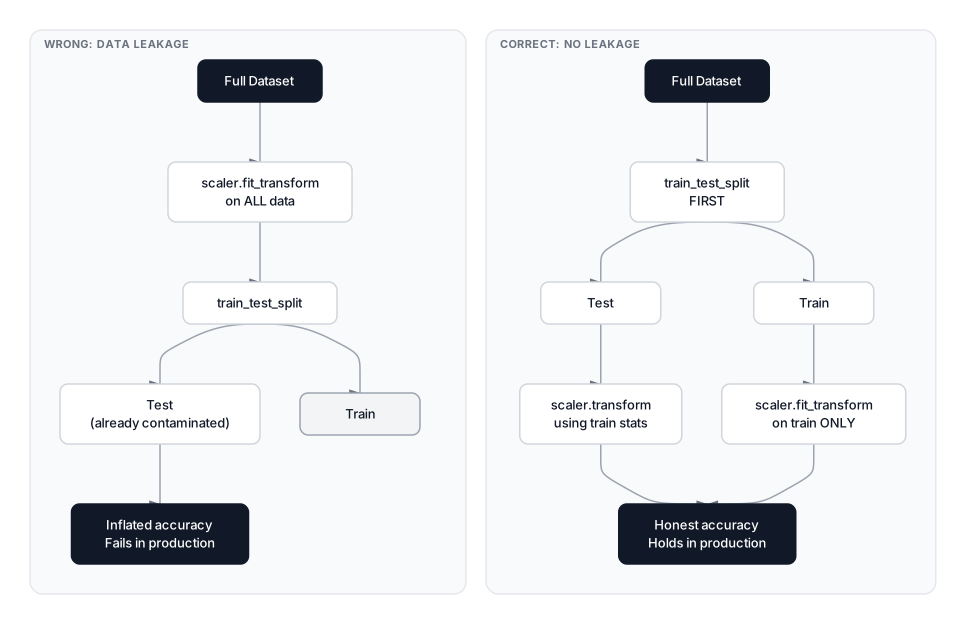 Click to expandCorrect vs wrong scaling workflow showing data leakage
The correct workflow has four steps:
- Split the data into training and test sets.
- Fit the scaler on the training set only (learning the statistics).
- Transform the training set using those statistics.
- Transform the test set using the same training statistics — never calling
.fit()on test data.
Expected output:
Accuracy with leakage:    0.4750
Accuracy without leakage: 0.7500

The gap is small here because the dataset is simple,
but on real data with temporal patterns or distribution
shifts, leakage inflates metrics by 5-15%.
Warning: Yes, this means test-set values can fall outside the [0, 1] range after min-max scaling, or produce z-scores beyond the training distribution. That is correct behavior — the scaler must reflect only what the model learned during training.
Pipelines eliminate leakage by design
Manually calling .fit_transform() and .transform() at the right times is error-prone, especially during cross-validation where the split changes every fold. Scikit-learn's Pipeline automates this: every transformer in the pipeline is fit only on the training fold and applied (without refitting) to the validation fold.
 Click to expandCorrect scaling pipeline workflow from raw data to predictions
Expected output:
Mean CV accuracy: 0.7400 (+/- 0.0464)
During each of the five folds, StandardScaler computes mean and standard deviation from only the training portion, then transforms both training and validation portions using those same statistics. No leakage, no manual bookkeeping.
Column-specific scaling with ColumnTransformer
Real datasets often need different scalers for different columns. ColumnTransformer handles this cleanly:
Expected output:
Test accuracy with column-specific scaling: 0.6250
Choosing the right scaler
Rather than memorizing rules, walk through three questions. This decision framework covers every common scenario.
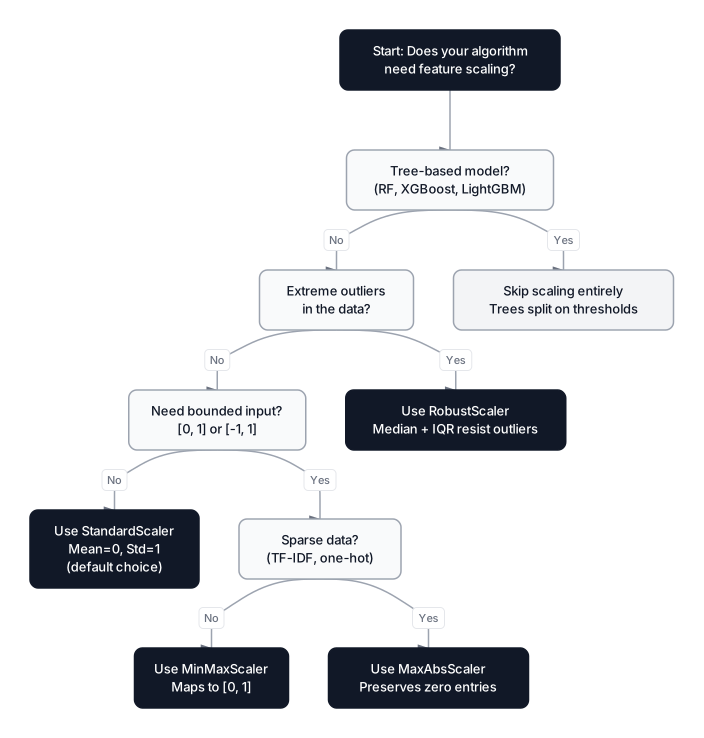 Click to expandScaler decision flowchart for choosing between StandardScaler, MinMaxScaler, RobustScaler, and MaxAbsScaler
1. Does your data contain extreme outliers you cannot remove?
Use RobustScaler. Median and IQR are resistant to extreme values. If you're not sure whether your data has outliers, run a quick statistical outlier detection pass first.
2. Does your algorithm or activation function require bounded input?
Use MinMaxScaler for dense data or MaxAbsScaler for sparse data. Neural networks with sigmoid outputs, image pipelines, and algorithms with explicit input-range constraints fall here.
3. None of the above?
Use StandardScaler. It's the safest general-purpose choice, works with the broadest set of algorithms (SVM, PCA, linear models, neural networks), and tolerates moderate outliers better than min-max scaling.
| Scaler | Output Range | Centers Data | Outlier Sensitivity | Preserves Sparsity | Best For |
|---|---|---|---|---|---|
MinMaxScaler | $[0, 1]$ | No | High | No | Neural nets, image data, bounded inputs |
StandardScaler | Unbounded | Yes () | Moderate | No | PCA, SVM, linear models, general use |
RobustScaler | Unbounded | Yes (median=0) | Low | No | Outlier-heavy datasets |
MaxAbsScaler | $[-1, 1]$ | No | High | Yes | Sparse matrices, TF-IDF vectors |
When NOT to scale
Scaling is not always the right call. Skip it entirely in these situations:
- Pure tree-based pipelines. Decision trees, random forests, XGBoost, LightGBM, and CatBoost split on feature thresholds. Scaling changes nothing about which threshold produces the best split. Adding a scaler here just adds computation time with zero benefit.
- Naive Bayes classifiers. The probability calculations are based on feature distributions within each class, not on absolute magnitudes.
- When interpretability matters more than performance. Coefficients from an unscaled linear regression tell you "a $1 increase in salary changes the predicted outcome by X." After standardization, coefficients are in standard-deviation units — still useful, but harder to explain to business stakeholders.
Production considerations
Scaling itself is computationally trivial, but a few edge cases trip up production deployments.
Fit once, serialize, reuse. The scaler object stores learned statistics (mean, std, min, max). Save it alongside your model using joblib or pickle. At inference time, load the same scaler and call .transform() on new data. Never refit on production data — the scaler must match what the model saw during training.
Numerical stability with near-zero variance. If a feature has standard deviation close to zero (a near-constant column), StandardScaler divides by a tiny number and produces enormous z-scores. Scikit-learn handles this gracefully (it sets the output to 0 for constant features), but it's worth checking. Drop truly constant features before scaling.
Memory for sparse data. StandardScaler and MinMaxScaler densify sparse matrices because centering shifts all zeros to non-zero values. On a TF-IDF matrix with 100,000 documents and 50,000 vocabulary terms, this can explode memory from a few hundred MB to 40+ GB. Use MaxAbsScaler to keep the matrix sparse, or pass with_mean=False to StandardScaler to skip centering.
Scaling time complexity. All four scalers run in — linear in both the number of samples and features . For datasets with millions of rows, scaling takes seconds. The bottleneck is always the model, not the scaler.
Choosing a Scaling Method
Feature scaling is a one-line code change that can turn a failing model into a production-ready one. The core principle is direct: algorithms that measure distances, compute gradients, or apply regularization penalties need all features on comparable scales. StandardScaler is the right default for most pipelines, MinMaxScaler belongs where bounded input is required, RobustScaler handles datasets contaminated by outliers, and MaxAbsScaler preserves sparsity for text and one-hot data.
The most common mistake isn't picking the wrong scaler — it's fitting the scaler on the full dataset before splitting, which leaks test-set statistics into training and inflates metrics. A scikit-learn Pipeline eliminates this risk by construction.
Scaling handles numeric columns. For categorical columns — labels, ordinal categories, high-cardinality strings — continue with our guide on Categorical Encoding. For a broader view of how scaling fits into the full preprocessing workflow, see our Feature Engineering Guide. And if extreme values are distorting your scaler's statistics, start with Statistical Outlier Detection to identify and handle them before scaling.
Frequently Asked Interview Questions
Q: What is the difference between standardization and normalization?
Standardization (z-score scaling) centers data to mean zero and unit variance using . Normalization (min-max scaling) maps data to a fixed range like [0, 1] using . Standardization produces unbounded output and is more tolerant of outliers; normalization guarantees bounded output but is highly sensitive to extreme values. Default to standardization unless your algorithm specifically requires bounded input.
Q: Why do tree-based models not need feature scaling?
Decision trees split on thresholds (e.g., "is age > 30?"). The split quality is determined by information gain or Gini impurity reduction, neither of which depends on the absolute scale of the feature — only on the ordering of values. Since random forests, XGBoost, LightGBM, and CatBoost all build trees internally, they inherit this scale invariance.
Q: You've standardized your training data. A test sample has a z-score of 3.5. Is this a problem?
No. A z-score of 3.5 simply means the observation is 3.5 standard deviations above the training mean. This is expected behavior when test data contains values outside the training distribution. The scaler must use training statistics only — refitting on test data would introduce data leakage. The model should handle out-of-distribution inputs gracefully through regularization or clipping if needed.
Q: Your colleague scales the entire dataset before doing cross-validation. What's wrong with this approach?
This causes data leakage. The scaler learns statistics (mean, standard deviation) from the full dataset, including samples that will appear in validation folds. The validation fold is no longer truly held out — the model indirectly has information about it. The fix is to use a scikit-learn Pipeline, which automatically fits the scaler on each training fold and transforms the validation fold using only training statistics.
Q: When would you choose RobustScaler over StandardScaler?
When the dataset contains extreme outliers that you cannot or should not remove — such as sensor data with measurement spikes, financial transactions with legitimately high-value entries, or medical data with physiological extremes. RobustScaler uses the median and IQR, which are barely influenced by outliers, so the scaling parameters reflect the central mass of the data rather than being pulled by extreme values.
Q: A neural network's loss is not decreasing during training. Could feature scaling be the cause?
Absolutely. If input features have wildly different scales, the loss landscape becomes elongated. Gradient descent takes tiny steps along some dimensions and overshoots along others, causing oscillation or stagnation. Standardizing inputs to mean zero and unit variance creates a more spherical loss surface, letting the optimizer converge efficiently. This is one of the first things to check when training stalls.
Q: How do you handle feature scaling in a pipeline that mixes numeric and categorical features?
Use scikit-learn's ColumnTransformer to apply different preprocessing to different column groups. Numeric columns get a scaler (StandardScaler, MinMaxScaler, etc.), while categorical columns get an encoder (one-hot, ordinal, or target encoding). Wrap the ColumnTransformer and the model in a Pipeline to ensure all transformations are fit on training data only.
Q: Why does MaxAbsScaler exist when MinMaxScaler already scales to a bounded range?
MaxAbsScaler does not center the data — zero stays at zero. This is critical for sparse matrices (like TF-IDF vectors) where most entries are zero. MinMaxScaler subtracts the minimum, which shifts all zeros to non-zero values and destroys sparsity. On a large text corpus, this can turn a few hundred MB sparse matrix into a 40+ GB dense matrix that doesn't fit in memory.
Hands-On Practice
See how scaling transforms your data and impacts model performance. We'll compare unscaled data against Standardization, Normalization, and RobustScaler, and watch how outliers affect each method.
Dataset: ML Fundamentals (Loan Approval) Features with vastly different scales: income (thousands) vs age (tens).
Try this: Change KNeighborsClassifier to LogisticRegression and see how the performance gap changes, Linear models are still affected but less dramatically than KNN!