
<!— slug: categorical-encoding-a-practical-guide-to-one-hot-label-and-target-methods —> <!— excerpt: Master categorical encoding for machine learning. Compare one-hot, ordinal, target, and CatBoost encoding with a real car-sales dataset and production-ready Python code. —>
Machine learning models are mathematical functions. They multiply inputs by weights, compute gradients, and minimize loss functions. None of that works when an input column contains the string "BMW" instead of a number. Feed raw categorical data into model.fit() and scikit-learn 1.8 raises a ValueError before training even starts.
Categorical encoding converts text categories into numerical representations that preserve the information your model needs. But the conversion is never neutral. Assign BMW=1, Toyota=2, Honda=3 and a linear model treats Honda as three times BMW. That false arithmetic relationship corrupts predictions in ways that never surface as an explicit error message.
This guide covers every major encoding strategy, from simple ordinal mapping to CatBoost's ordered target statistics, using a single car-sales dataset so you can compare each transformation side by side.
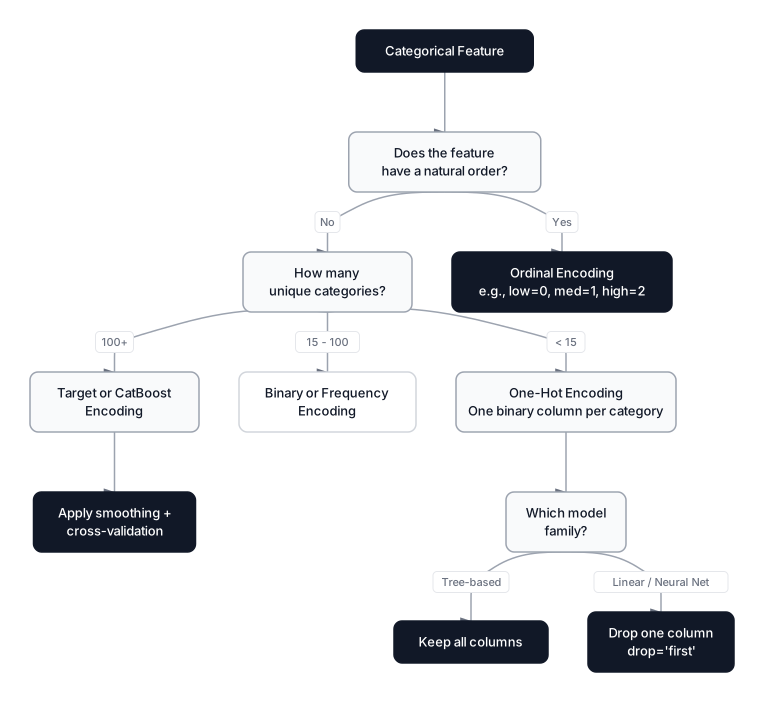 Click to expandChoosing the right categorical encoding method based on ordinality, cardinality, and model type
The car-sales dataset
Every encoding example in this guide transforms the same five-row dataset. A single consistent example makes it easy to see exactly what each method does to the data and how the outputs differ.
Expected Output:
    brand  color fuel_type  condition  price
0     BMW    red  gasoline        new  45000
1  Toyota   blue    diesel       used  28000
2   Honda  black  electric  certified  32000
3     BMW   blue    diesel        new  48000
4  Toyota    red  gasoline  certified  26000
    brand  color  fuel_type  condition  price
0     BMW    red   gasoline        new  45000
1  Toyota   blue     diesel       used  28000
2   Honda  black   electric  certified  32000
3     BMW   blue     diesel        new  48000
4  Toyota    red   gasoline  certified  26000
The condition column has a natural order (used < certified < new). The brand, color, and fuel_type columns do not. This distinction drives every encoding decision that follows.
Why models need numbers, not strings
Every mainstream ML algorithm requires a numeric input matrix. A linear regression predicts car price as a weighted sum:
Where:
- is the predicted price
- is the learned weight for feature
- is the numeric value of feature
- is the bias (intercept) term
- is the total number of features
In Plain English: The model multiplies each feature by a weight and sums the results. If the input is the string "BMW", there's no number to multiply. The math simply breaks.
Each must be a number so the model can multiply it by and compute partial derivatives during gradient descent. Strings have no multiplication operator, no gradient, and no distance metric. Neural networks, SVMs, logistic regression, and K-Nearest Neighbors all share this constraint: the input matrix must be numeric.
Tree-based models (decision trees, random forests, XGBoost) can technically split on arbitrary category labels, but scikit-learn's implementations still require numeric input. Only CatBoost and LightGBM handle raw string categories natively.
Label and ordinal encoding
Label encoding maps each unique category to an integer. Scikit-learn's LabelEncoder assigns integers alphabetically, while OrdinalEncoder lets you specify the exact mapping. The distinction matters more than it looks.
When order matters
The condition column has a meaningful rank: used < certified < new. Encoding this as 0, 1, 2 preserves that relationship, and a model can learn that higher condition values correlate with higher car prices.
Expected Output:
   condition  condition_encoded
0        new                  2
1       used                  0
2  certified                  1
3        new                  2
4  certified                  1
   condition  condition_encoded
0        new                  2
1       used                  0
2  certified                  1
3        new                  2
4  certified                  1
The mapping respects the real-world ordering: used=0, certified=1, new=2.
When order destroys signal
Apply the same technique to brand and the model sees BMW=0 < Honda=1 < Toyota=2. It computes (BMW + Toyota) / 2 = Honda, a completely meaningless arithmetic relationship. For linear models, this false ordinality biases coefficients. For distance-based models like KNN, it warps the distance metric so that BMW and Honda appear closer than BMW and Toyota.
Common Pitfall: Label encoding nominal features is one of the most frequent beginner mistakes. The model won't throw an error. It will silently learn from a fake numerical relationship, and you'll only notice when test-set accuracy drops without explanation.
The ordinal encoding formula
For a categorical variable with distinct values , ordinal encoding defines a mapping:
Where:
- is the encoded integer for category
- is the -th category in the specified order
- is the total number of distinct categories
- is the zero-indexed position in the ordering
In Plain English: Each category gets an integer based on its position in your specified order. For car conditions, "used" sits at position 0, "certified" at 1, and "new" at 2. The gap between any two positions is treated as meaningful distance, so only use this when that distance reflects reality.
This creates an implicit metric: becomes a "distance" between categories. That distance is only meaningful when the categories have a genuine ordinal relationship.
Pro Tip: Use OrdinalEncoder over LabelEncoder for pipeline-compatible workflows. LabelEncoder is designed for target columns (single 1D arrays), while OrdinalEncoder handles multiple feature columns and integrates cleanly with scikit-learn's ColumnTransformer.
One-hot encoding
One-hot encoding creates a binary column for each unique category. A row gets a 1 in the column matching its category and 0 everywhere else. No column is numerically "greater" than another, so the model cannot infer a false ordering.
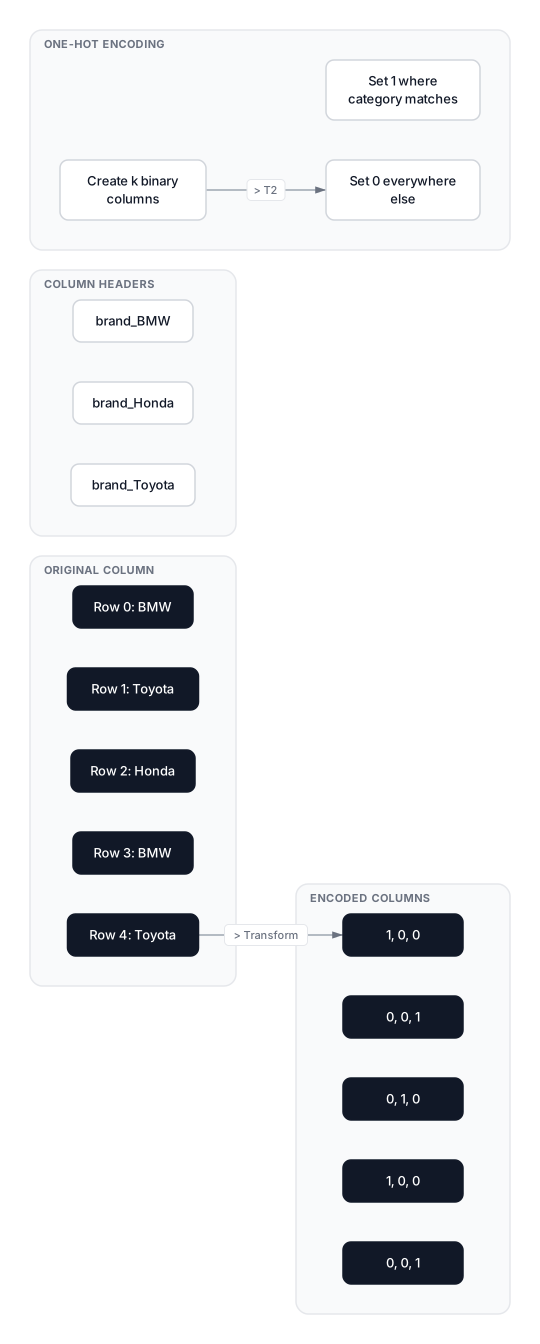 Click to expandHow one-hot encoding transforms a single brand column into k binary columns
Transforming the brand column
Expected Output:
    brand  brand_BMW  brand_Honda  brand_Toyota
0     BMW          1            0             0
1  Toyota          0            0             1
2   Honda          0            1             0
3     BMW          1            0             0
4  Toyota          0            0             1
    brand  brand_BMW  brand_Honda  brand_Toyota
0     BMW          1            0             0
1  Toyota          0            0             1
2   Honda          0            1             0
3     BMW          1            0             0
4  Toyota          0            0             1
Each brand is now equidistant from every other brand: the Euclidean distance between any two one-hot vectors is always .
The dummy variable trap
If you know brand_BMW=0 and brand_Honda=0, then brand_Toyota must be 1. The third column is a perfect linear combination of the first two. In linear regression, this perfect multicollinearity makes the design matrix singular, so the normal equation has no unique solution.
The fix: drop one column. The dropped category becomes the "reference" that the model implicitly represents when all remaining columns are zero.
Expected Output:
   brand_Honda  brand_Toyota
0            0             0
1            0             1
2            1             0
3            0             0
4            0             1
   brand_Honda  brand_Toyota
0            0             0
1            0             1
2            1             0
3            0             0
4            0             1
BMW is the implicit reference category (all zeros).
Pro Tip: Tree-based models (random forests, gradient boosting) are not affected by multicollinearity. Drop a column only when using linear regression, logistic regression, or neural networks. Keeping all columns gives tree models more clean split points.
Sparse matrices and high cardinality
One-hot encoding a column with categories adds (or ) columns to the feature matrix. For a zip_code column with 40,000 unique values, that means 40,000 new columns where each row has exactly one non-zero entry. Scikit-learn's OneHotEncoder returns a scipy.sparse.csr_matrix by default (sparse_output=True), which stores only the non-zero values. This reduces memory from to .
Expected Output:
Shape: (5, 3)
Stored values: 5 (instead of 15)
Shape: (5, 3)
Stored values: 5 (instead of 15)
Even with sparse storage, one-hot encoding columns with thousands of categories produces extremely wide feature matrices that slow down training and invite overfitting. When cardinality exceeds roughly 15-20 categories, consider frequency encoding, target encoding, or binary encoding instead.
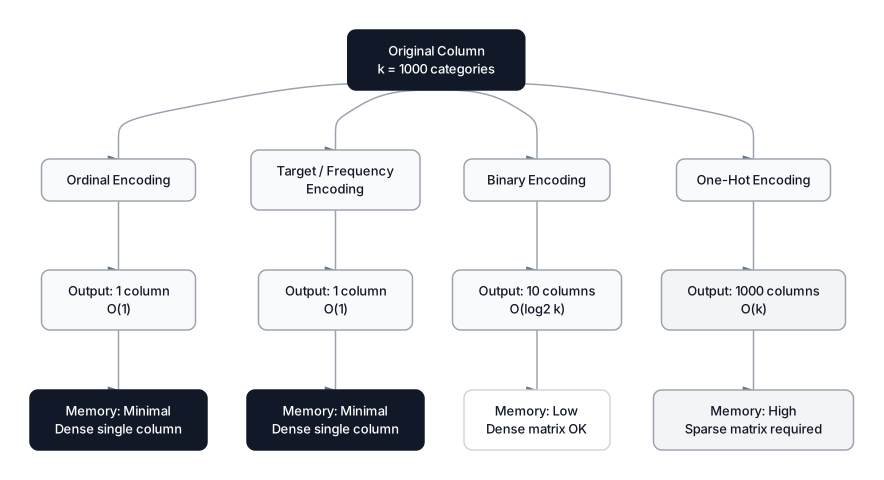 Click to expandHow output dimensionality scales across encoding methods for a column with 1000 categories
Frequency encoding
Frequency encoding replaces each category with its relative frequency (proportion of rows) in the training set. Categories that appear often get higher values, and the encoding naturally captures the distribution of the data without requiring the target variable.
Expected Output:
    brand  brand_freq
0     BMW         0.4
1  Toyota         0.4
2   Honda         0.2
3     BMW         0.4
4  Toyota         0.4
    brand  brand_freq
0     BMW         0.4
1  Toyota         0.4
2   Honda         0.2
3     BMW         0.4
4  Toyota         0.4
Strengths and limitations
Frequency encoding produces a single numeric column regardless of cardinality, so it handles 40,000 zip codes as easily as 3 brands. It requires no target variable, which means zero leakage risk. For a deeper treatment of frequency-based approaches, see Mastering Frequency Encoding.
The main limitation is collision: categories with the same frequency get the same encoded value. In our car dataset, BMW and Toyota both appear twice, so they both encode to 0.4. The model cannot distinguish between them. For datasets where frequency collisions are common, combine frequency encoding with another method (such as hashing) or use target encoding instead.
Key Insight: Frequency encoding is often the best first-pass encoding for high-cardinality features during exploratory analysis. It takes one line of code, introduces no leakage, and gives you a quick signal-to-noise check before investing in more complex methods.
Target encoding (mean encoding)
Target encoding replaces each category with the mean of the target variable for rows in that category. First formalized by Micci-Barreca (2001), this approach produces a single column that directly captures the predictive relationship between the feature and the target.
Basic target encoding on the car dataset
Expected Output:
    brand  price  brand_target
0     BMW  45000       46500.0
1  Toyota  28000       27000.0
2   Honda  32000       32000.0
3     BMW  48000       46500.0
4  Toyota  26000       27000.0
    brand  price  brand_target
0     BMW  45000       46500.0
1  Toyota  28000       27000.0
2   Honda  32000       32000.0
3     BMW  48000       46500.0
4  Toyota  26000       27000.0
BMW's two sales averaged $46,500, Toyota's averaged $27,000, and Honda's single sale gives exactly $32,000.
The target leakage problem
The calculation above uses all rows to compute category means, then applies those means back to the same rows. This is data leakage: the encoding for row 0 was influenced by row 0's own target value. During training, the model sees information it should not have, inflating apparent accuracy. At inference time on genuinely unseen data, that advantage vanishes and performance drops.
The leakage is most severe for rare categories. Honda appears only once, so its target encoding equals its exact price. The model memorizes rather than generalizes.
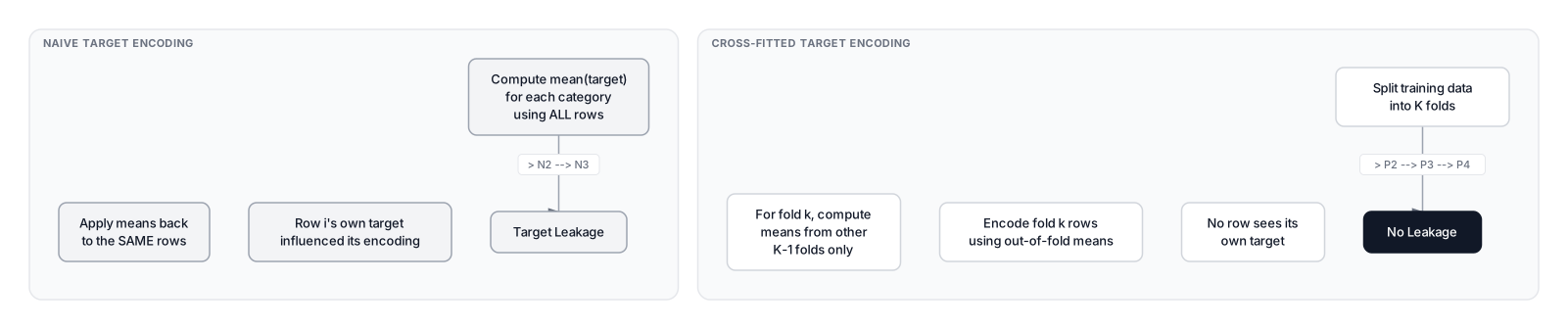 Click to expandNaive target encoding vs cross-fitted target encoding and their impact on leakage
Smoothing (regularization)
Smoothing blends the category-specific mean with the global mean, pulling rare categories toward the population average:
Where:
- is the smoothed target encoding for category
- is the mean target value for category
- is the global mean target across all rows
- is a weight between 0 and 1 that increases with sample count
- is the number of training rows belonging to category
In Plain English: Think of smoothing as a trust dial. For BMW (2 sales), we partly trust its own average price and partly fall back to the overall average. For a category with 10,000 sales, we almost entirely trust its own average. For Honda (1 sale), we barely trust its individual price and lean heavily on the global mean of $35,800.
A common sigmoid form for the weight:
Where:
- is the weight applied to the category-specific mean
- is the number of samples for that category
- is the midpoint (sample count at which )
- is the steepness parameter controlling the transition speed
- is Euler's number (~2.718)
In Plain English: When a brand has many sales ( large), approaches 1 and the category's own average dominates. When a brand has few sales ( small), approaches 0 and the global average takes over. The parameters and let you tune exactly how many samples you need before trusting a category's private statistics.
Proper implementation with category_encoders
The category_encoders library (version 2.9) applies smoothing automatically and integrates with scikit-learn pipelines:
# pip install category_encoders==2.9.0
from category_encoders import TargetEncoder
from sklearn.model_selection import train_test_split

# Split first to prevent leakage
X_train, X_test, y_train, y_test = train_test_split(
    df[["brand"]], df["price"], test_size=0.4, random_state=42
)

encoder = TargetEncoder(cols=["brand"], smoothing=10.0)
X_train_encoded = encoder.fit_transform(X_train, y_train)
X_test_encoded = encoder.transform(X_test)

print("Training set:")
print(pd.concat([
    X_train.reset_index(drop=True),
    X_train_encoded.add_suffix("_encoded").reset_index(drop=True)
], axis=1))
Scikit-learn's native TargetEncoder
As of scikit-learn 1.3, there's a built-in TargetEncoder that uses internal cross-fitting (cv=5 by default) to prevent leakage during fit_transform:
from sklearn.preprocessing import TargetEncoder as SklearnTargetEncoder

sk_encoder = SklearnTargetEncoder(smooth=10.0, cv=5, random_state=42)
# fit_transform uses cross-fitting internally to prevent leakage
df["brand_target_sk"] = sk_encoder.fit_transform(
    df[["brand"]], df["price"]
)
Warning: fit(X, y).transform(X) does NOT equal fit_transform(X, y) for scikit-learn's TargetEncoder. The fit_transform path uses internal cross-validation to prevent leakage, while fit + transform uses the full training set means. Use fit_transform for training data and fit + transform for test data.
The key difference: calling fit_transform applies cross-validation internally so that each fold's encoding is computed without seeing that fold's targets. Calling fit followed by transform separately uses the full training set means (appropriate for encoding a held-out test set).
Binary encoding
Binary encoding converts each category to its integer index, then represents that integer as a binary number across multiple columns. A column with 8 categories needs only 3 binary columns () instead of 8 one-hot columns.
import pandas as pd
from category_encoders import BinaryEncoder

df = pd.DataFrame({
    "brand":     ["BMW", "Toyota", "Honda", "BMW", "Toyota"],
})

be = BinaryEncoder(cols=["brand"])
df_binary = be.fit_transform(df[["brand"]])
print(pd.concat([df[["brand"]], df_binary], axis=1))
    brand  brand_0  brand_1  brand_2
0     BMW        0        0        1
1  Toyota        0        1        0
2   Honda        0        1        1
3     BMW        0        0        1
4  Toyota        0        1        0
BMW encodes as binary 001, Toyota as 010, Honda as 011. The dimensionality grows as instead of , making binary encoding practical for columns with hundreds of categories where one-hot would be prohibitively wide.
Common Pitfall: Binary encoding creates artificial proximity between categories whose binary representations differ by a single bit. Honda (011) appears "close" to both BMW (001) and Toyota (010). This proximity is arbitrary and can mislead distance-based models like KNN or SVMs with RBF kernels.
Leave-one-out encoding
Leave-one-out (LOO) encoding is a variant of target encoding that excludes the current row's target value when computing the category mean. This reduces the self-influence that causes overfitting in naive target encoding.
For row belonging to category :
Where:
- is the leave-one-out encoded value for row
- is the target value (price) of row
- is the total number of rows in category
- The sum runs over all rows in category except row itself
In Plain English: For each car, compute the average price of all other cars of the same brand, excluding the current car. Row 0 is a BMW priced at $45,000, so its LOO encoding is the average price of the other BMW (row 3 at $48,000) = $48,000. Honda has only one row, so it falls back to the global mean.
import pandas as pd
from category_encoders import LeaveOneOutEncoder

df = pd.DataFrame({
    "brand":     ["BMW", "Toyota", "Honda", "BMW", "Toyota"],
    "price":     [45000, 28000, 32000, 48000, 26000]
})

loo = LeaveOneOutEncoder(cols=["brand"], random_state=42)
df["brand_loo"] = loo.fit_transform(df[["brand"]], df["price"])["brand"]
print(df[["brand", "price", "brand_loo"]])
    brand  price  brand_loo
0     BMW  45000    48000.0
1  Toyota  28000    26000.0
2   Honda  32000    35800.0
3     BMW  48000    45000.0
4  Toyota  26000    28000.0
Row 0 (BMW, price=$45,000) gets $48,000: the mean of all other BMW prices (just row 3). Honda has only one row, so its LOO value falls back to the global mean ($35,800).
The sigma parameter adds Gaussian noise during training to further reduce overfitting. At transform time (inference), no noise is added.
Pro Tip: LOO encoding still uses target information and carries leakage risk. Always fit on training data only and call transform (not fit_transform) on test data.
CatBoost encoding (ordered target statistics)
CatBoost encoding solves the target leakage problem by processing rows sequentially. For row , the encoding uses only the target values of rows $1$ through :
Where:
- is the encoded value for row
- is an indicator function (1 if row has the same category as row , else 0)
- is the target value of row
- is typically the global target mean, ensuring valid output for the first occurrence
- The denominator counts how many preceding rows share the same category, plus 1
In Plain English: Imagine scanning through the car dataset from top to bottom. When you reach row 3 (BMW, $48,000), the encoding only considers row 0 (BMW, $45,000) because that's the only preceding BMW row. No future information leaks backward.
import pandas as pd
from category_encoders import CatBoostEncoder

df = pd.DataFrame({
    "brand":     ["BMW", "Toyota", "Honda", "BMW", "Toyota"],
    "price":     [45000, 28000, 32000, 48000, 26000]
})

cbe = CatBoostEncoder(cols=["brand"], random_state=42)
df["brand_catboost"] = cbe.fit_transform(df[["brand"]], df["price"])["brand"]
print(df[["brand", "price", "brand_catboost"]])
Because each row only sees preceding data, there is no leakage by construction. Multiple random permutations of the training data can be averaged to reduce variance, which is exactly what the CatBoost library does internally during training.
CatBoost encoding is particularly effective when paired with gradient-boosted tree models, and it handles both low and high cardinality features without manual tuning.
Key Insight: CatBoost encoding is the only target-based method that prevents leakage without requiring cross-validation. This makes it faster to compute on large datasets and simpler to implement in production pipelines where cross-fitting adds complexity.
Handling unseen categories at inference time
Production models inevitably encounter categories that did not appear in the training data. A model trained on brand values BMW, Toyota, and Honda will fail if a test row contains "Ford". Each encoder handles this differently:
| Encoder | handle_unknown | Default behavior |
|---|---|---|
OrdinalEncoder | "error" or "use_encoded_value" | Raises error; set unknown_value=-1 to assign a sentinel |
OneHotEncoder | "error", "ignore", "infrequent_if_exist" | Raises error; "ignore" produces an all-zeros row |
TargetEncoder (sklearn) | Built-in | Maps unseen categories to the global target mean |
TargetEncoder (category_encoders) | Built-in | Maps unseen categories to the prior (global mean) |
Expected Output:
   brand_BMW  brand_Honda  brand_Toyota
0          0            0             0
1          1            0             0
   brand_BMW  brand_Honda  brand_Toyota
0          0            0             0
1          1            0             0
Ford produces an all-zeros row: the model treats it as "none of the known brands." This is often a reasonable default but can degrade predictions when unseen categories are frequent. For high-cardinality features in production, consider:
- A fallback "OTHER" category trained on rare categories from the training set
- Target encoding, which naturally maps unseen categories to the global mean
- Periodic retraining to incorporate new categories
Warning: Scikit-learn's OneHotEncoder with handle_unknown="error" (the default) will crash your production pipeline the moment a new category appears. Always set handle_unknown="ignore" or "infrequent_if_exist" in production deployments.
Choosing the right encoding method
The encoding decision depends on three factors: whether the feature is ordinal, how many unique values it has (cardinality), and which model family you are using.
Decision framework
- Is the feature ordinal? (has a meaningful rank like low/medium/high)
- Yes: Use ordinal encoding with explicitly specified category order.
- No: Continue to step 2.
- How many unique categories?
- Low cardinality (under 15): Use one-hot encoding. Drop one column for linear models; keep all columns for tree-based models.
- Medium cardinality (15-100): Use binary encoding or frequency encoding. Binary keeps dimensionality at ; frequency produces a single column.
- High cardinality (100+): Use target encoding (with smoothing and proper cross-validation) or CatBoost encoding. These produce a single column regardless of cardinality.
- Which model are you using?
- Linear models: Avoid label encoding on nominal features (false ordinality). Use one-hot with
drop="first", or target encoding. - Tree-based models: Can use ordinal encoding even for nominal features because trees split on thresholds and do not assume linear relationships. However, one-hot encoding with high cardinality creates sparse splits that reduce tree efficiency.
- Neural networks: One-hot or target encoding. For very high cardinality, consider entity embeddings (learned during training).
Quick-reference encoding table
| Scenario | Recommended encoding | Reason |
|---|---|---|
condition (3 ordered values) | Ordinal | Preserves natural rank |
color (5 nominal values) | One-hot | Low cardinality, no false ordering |
brand (20 nominal values) | Binary or frequency | Moderate cardinality, compact representation |
zip_code (40,000 values) | Target or CatBoost | Single column, captures predictive signal |
user_id (millions of values) | Target with heavy smoothing, or hashing | Extreme cardinality, most categories are rare |
When NOT to encode
Not every categorical column needs encoding. Sometimes the right move is to drop the feature entirely:
- Unique identifiers (order IDs, transaction hashes): These carry no generalizable signal. Even target encoding them just memorizes individual rows.
- Free-text categories with tens of thousands of unique values and no frequency pattern: Consider text preprocessing or embeddings instead of encoding.
- Columns with 95%+ missing values: Encoding the non-null categories won't help if most rows are NaN. Handle missing data first.
Production considerations
Encoding choices that work fine on a Jupyter notebook with 1,000 rows can break at scale. Here's what to watch for.
Computational complexity
| Method | Fit time | Transform time | Memory (per column) |
|---|---|---|---|
| Ordinal | for the mapping dict | ||
| One-hot | dense, sparse | ||
| Frequency | for the frequency dict | ||
| Target (cross-fitted) | for the means dict | ||
| Binary | |||
| CatBoost | per permutation |
Where is the number of rows, is the number of unique categories, is the number of cross-validation folds, and is the number of random permutations.
Scaling behavior
One-hot encoding a column with 100,000 categories on a dataset of 10M rows produces a matrix with potential entries. Even as a sparse matrix, this can exceed available RAM on a 64 GB machine depending on the number of other features. Target encoding the same column produces a single dense column: 80 MB (10M float64 values). That's a factor of ~1,000x memory reduction.
Pro Tip: In production, serialize your fitted encoder alongside the model using joblib or pickle. This ensures the exact same category-to-number mapping is applied at inference time. Category drift (new categories appearing in production) is a common failure mode that a monitoring system should flag.
Pipeline integration
A clean production setup uses scikit-learn's ColumnTransformer to apply different encodings to different columns in a single pipeline:
from sklearn.compose import ColumnTransformer
from sklearn.preprocessing import OrdinalEncoder, OneHotEncoder, TargetEncoder
from sklearn.pipeline import Pipeline
from sklearn.ensemble import GradientBoostingRegressor

preprocessor = ColumnTransformer([
    ("ordinal", OrdinalEncoder(categories=[["used", "certified", "new"]]), ["condition"]),
    ("onehot", OneHotEncoder(handle_unknown="ignore", sparse_output=False), ["color", "fuel_type"]),
    ("target", TargetEncoder(smooth=10.0), ["brand"]),
])

pipe = Pipeline([
    ("preprocess", preprocessor),
    ("model", GradientBoostingRegressor(n_estimators=200, random_state=42))
])
# pipe.fit(X_train, y_train)
Conclusion
Categorical encoding is not a one-size-fits-all preprocessing step. Ordinal encoding preserves rank for ordered features but invents false hierarchies for nominal ones. One-hot encoding eliminates ordinality bias at the cost of dimensionality. Target encoding compresses high-cardinality features into a single predictive column but demands careful regularization to avoid leaking target information into the training set. Binary encoding and CatBoost encoding offer middle-ground solutions that balance dimensionality, leakage risk, and predictive power.
The choice always comes back to three questions: does the feature have a natural order, how many unique categories exist, and what model family consumes the features. Answer those, and the encoding method follows directly.
Encoding is just one step in a larger data preparation workflow. To see how it fits into the full picture, read the Feature Engineering Guide. Once your categories are numeric, the next question is whether to scale them, which is covered in Standardization vs Normalization. And if your dataset has messy, inconsistent category names (like "bmw", "BMW", "B.M.W."), clean those up first with the techniques in Data Cleaning.
Frequently Asked Interview Questions
Q: When would you use ordinal encoding versus one-hot encoding?
Ordinal encoding is appropriate when categories have a natural, meaningful order (e.g., education levels: high school < bachelor's < master's < PhD). One-hot encoding is the safer default for nominal categories with no inherent ranking (e.g., color, brand, country). Applying ordinal encoding to nominal data introduces a fake arithmetic relationship that linear and distance-based models will treat as real, degrading predictions silently.
Q: What is the dummy variable trap, and how do you avoid it?
The dummy variable trap occurs when one-hot encoding produces columns that are perfectly linearly dependent (the last column is fully determined by the others). This causes multicollinearity in linear regression, making the normal equation unsolvable. The fix is to drop one column using drop="first" in scikit-learn's OneHotEncoder. Tree-based models are immune to this issue and don't require the drop.
Q: How does target encoding cause data leakage, and what's the fix?
Naive target encoding computes the mean target per category using all training rows, then applies those means back to the same rows. Each row's own target value leaks into its encoded feature. The fix is cross-fitted target encoding: split training data into K folds, compute means from the other K-1 folds, and encode each fold using only out-of-fold statistics. Scikit-learn's TargetEncoder does this automatically during fit_transform.
Q: Your dataset has a city column with 50,000 unique values. How do you encode it?
One-hot encoding would create 50,000 sparse columns, which is impractical. Target encoding with smoothing is the best choice here because it produces a single column that captures the predictive relationship between city and the target. The smoothing parameter prevents rare cities (with only a handful of rows) from overfitting to their small sample mean. CatBoost encoding is an equally valid alternative that avoids leakage without cross-validation overhead.
Q: A categorical feature has 4 categories with frequencies 40%, 40%, 10%, 10%. What encoding would you pick?
Frequency encoding would fail here because both 40% categories and both 10% categories collide to the same value, losing discriminative power. One-hot encoding works well since cardinality is only 4 (low). Target encoding is another option if the target distributions across categories differ meaningfully. The right choice depends on whether the frequency collision actually costs you signal in practice.
Q: How do you handle a brand-new category that appears at inference time but wasn't in training data?
Set handle_unknown="ignore" for OneHotEncoder (produces an all-zeros row) or handle_unknown="use_encoded_value" with unknown_value=-1 for OrdinalEncoder. Target encoders map unseen categories to the global target mean by default. In production, you should also monitor for category drift and retrain periodically when unseen categories become frequent enough to affect prediction quality.
Q: Why do tree-based models handle label-encoded nominal features better than linear models?
Decision trees split on thresholds ("is brand <= 1.5?"), effectively treating each integer as a boundary. The split brand <= 0.5 separates BMW from Honda and Toyota, which is a valid partition regardless of the arbitrary ordering. Linear models, by contrast, fit a single coefficient to the encoded column, which assumes the numeric distance between categories is meaningful. That assumption is false for nominal data.
Q: What is CatBoost encoding, and why is it considered leakage-free?
CatBoost encoding processes rows in a random order and computes each row's encoded value using only the target values of preceding rows. Row never sees its own target or any future target values, so there is no self-influence. This sequential construction eliminates leakage by design, without needing cross-validation folds. The tradeoff is that the encoding depends on row order, so CatBoost averages over multiple random permutations to reduce variance.
Hands-On Practice
See why Label Encoding nominal data is dangerous. We'll encode the same categorical feature two ways and watch how it affects model performance.
Dataset: ML Fundamentals (Loan Approval) We'll compare Label vs One-Hot encoding on a nominal categorical feature.
Try this: Change cat_col to 'education' - notice education IS ordinal (has natural order), so Label Encoding makes more sense there!