
A pharma company runs a 90-day clinical trial testing a new drug. On Day 80, Patient #47 is still sick. Do you record her as "did not recover" and move on? That would be wrong. She survived at least 80 days without recovery, and that partial observation carries real information. Throwing it away, or pretending she recovered on Day 80, introduces bias that standard regression cannot fix.
Survival analysis is the branch of statistics built for exactly this problem. It models how long it takes for an event to occur while properly accounting for incomplete observations. Unlike logistic regression, which answers "will it happen?", and linear regression, which answers "how much?", survival analysis answers "how long until it happens?"
Throughout this article, we follow one running example: a clinical trial comparing a new drug against a placebo, tracking days until patient recovery. Every formula, code block, and diagram ties back to this scenario.
The Censoring Problem Breaks Standard Regression
Censoring is the defining challenge of survival analysis, and the reason standard regression models break down on duration data. In the landmark Kaplan and Meier (1958) paper, this concept was formalized as "incomplete observations."
Consider two patients in our clinical trial:
- Patient A recovered on Day 12. We know the exact event time.
- Patient B was still sick when the 90-day study ended. We know recovery takes at least 90 days, but not the true duration.
Patient B is right-censored. The event hasn't happened yet, but it will eventually. This partial information is valuable, and throwing it away introduces serious bias.
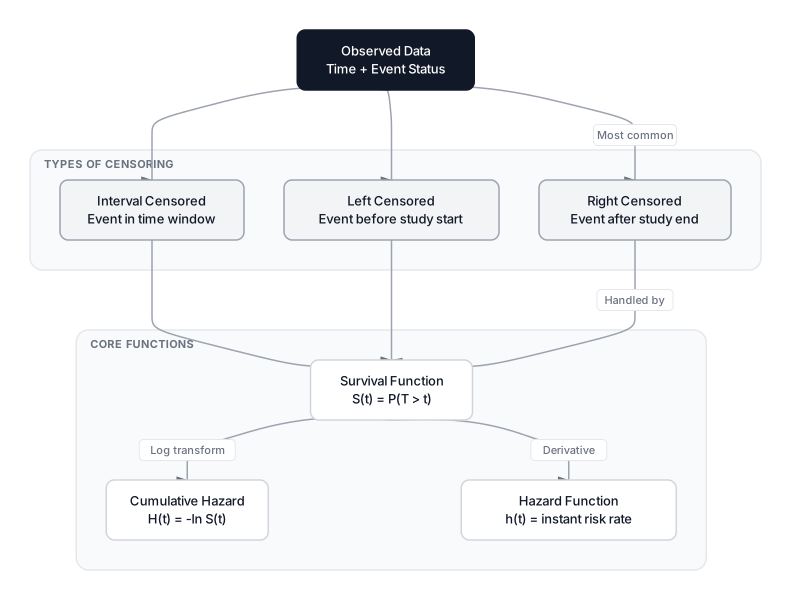 Click to expandSurvival analysis concepts showing censoring types and core survival functions
Three Types of Censoring
| Type | Definition | Clinical Trial Example |
|---|---|---|
| Right censoring | Event happens after observation ends | Patient still sick when study concludes |
| Left censoring | Event happened before observation began | Patient already recovered before enrollment |
| Interval censoring | Event happened between two check-ins | Patient was sick at week 2 visit, recovered by week 4 visit |
Right censoring is by far the most common in practice. Left and interval censoring arise in specific study designs (periodic health screenings, warranty claims checked at service intervals).
Why Standard Regression Fails
If you try to predict days_to_recovery with standard regression, you face two traps:
- The Drop Trap. Delete all censored patients. Now you've thrown away the healthiest subjects (those who survived the full study), biasing your model toward artificially short recovery times.
- The Plug-In Trap. Set Patient B's time to 90 days. You're telling the model they recovered on day 90 when they didn't. This creates false data points that distort every coefficient.
Survival analysis handles censored observations natively. It learns from Patient B that "recovery takes at least 90 days" without fabricating a specific event time.
Key Insight: Censoring isn't missing data in the usual sense. It's partial information. Survival analysis extracts maximum value from these observations rather than discarding or corrupting them.
The Survival Function and Hazard Function
Two mathematical functions form the foundation of every survival model. Understanding their relationship is essential before touching any code.
The Survival Function S(t)
The survival function gives the probability that the event has not yet occurred by time .
Where:
- is the survival probability at time
- is the random variable representing the true event time
- is a specific time point of interest
In Plain English: In our clinical trial, $S(30) = 0.43$ means there's a 43% chance a patient is still sick after 30 days. The curve always starts at $S(0) = 1$ (everyone starts sick) and decreases over time. A steeper drop means faster recovery.
Key properties of :
- $S(0) = 1$ (at the start, no events have occurred)
- (eventually, all events occur)
- is monotonically non-increasing (it only goes down, never up)
The Hazard Function h(t)
The hazard function measures the instantaneous risk of the event occurring at time , given that the subject has survived up to that point.
Where:
- is the hazard rate at time (not a probability; it can exceed 1)
- is the true event time
- is an infinitesimally small time interval
- The conditional means "given survival up to time "
In Plain English: Think of the hazard as a speedometer for risk. If tells you how much fuel is left in the tank, tells you how fast you're burning it right now. For our clinical trial, a high hazard at day 10 means patients who made it to day 10 have a strong chance of recovering in the next instant. A low hazard means they're likely to remain sick for a while longer.
The survival and hazard functions are mathematically linked through the cumulative hazard :
Where:
- is the cumulative hazard (total accumulated risk up to time )
- is the exponential function
- The integral sums up instantaneous hazard over the interval $[0, t]$
This relationship means you can always convert between the two. Knowing one gives you the other.
The Kaplan-Meier Estimator
The Kaplan-Meier (KM) estimator is the most widely used non-parametric method for estimating . "Non-parametric" means it makes no assumptions about the shape of the survival curve. It just follows the data.
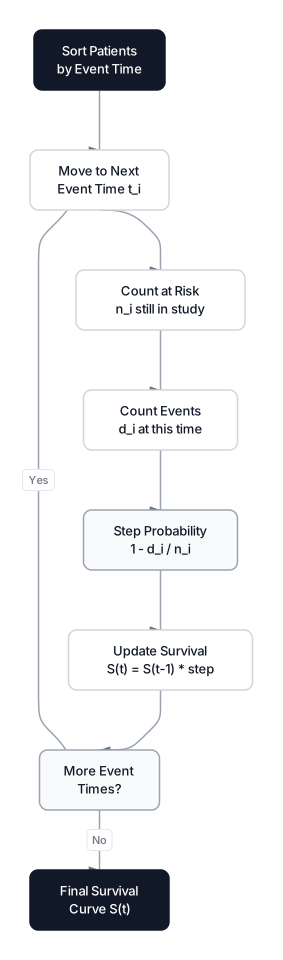 Click to expandKaplan-Meier estimation step-by-step process
The KM formula computes survival as a running product of conditional probabilities at each event time:
Where:
- is the estimated survival probability at time
- is each unique time where at least one event occurs
- is the number of events (recoveries) at time
- is the number of subjects still "at risk" just before time
- The product multiplies these step probabilities across all event times up to
In Plain English: At each point where a patient recovers, the KM estimator asks: "Of the patients still sick right now, what fraction just recovered?" It multiplies these fractions together to build the staircase-shaped survival curve. Censored patients reduce the at-risk count for future steps without counting as events themselves.
Building a Kaplan-Meier Curve from Scratch
Here's the KM estimator applied to a 20-patient arm of our trial. This block computes every step manually so you can see exactly how censoring affects the calculation.
Expected Output:
Patients: 20 | Events: 14 | Censored: 6

  Day   Risk   d_i      S(t)
----------------------------
    3     20     1    0.9500
    5     19     1    0.9000
    7     18     1    0.8500
    8     16     1    0.7969
   12     15     1    0.7438
   15     13     1    0.6865
   18     12     1    0.6293
   22     10     1    0.5664
   25      9     1    0.5035
   30      7     1    0.4315
   33      5     1    0.3452
   35      4     1    0.2589
   45      2     1    0.1295
   50      1     1    0.0000

Median survival time: 30 days (S = 0.4315)
Notice what happens at day 7: one patient recovers and one is censored. The censored patient doesn't appear in the column, but they do reduce the at-risk count from 18 to 16 before day 8. That's censoring in action.
Pro Tip: The median survival time is where first drops below 0.5. In our Placebo arm, that's 30 days. This single number is often the most quoted statistic from a survival analysis because it's easy to interpret: "half the patients recovered within 30 days."
Plotting Survival Curves with lifelines
In production, you'll use the lifelines library (v0.30.3) rather than implementing KM manually. Here's how to fit and visualize curves for two treatment groups:
import pandas as pd
import matplotlib.pyplot as plt
from lifelines import KaplanMeierFitter

# Load clinical trial data
df = pd.read_csv("clinical_trial.csv")
survival_df = df[['treatment_group', 'days_to_event', 'event_occurred']].copy()

kmf = KaplanMeierFitter()
plt.figure(figsize=(10, 6))

for group in ['Placebo', 'Drug_B']:
    subset = survival_df[survival_df['treatment_group'] == group]
    kmf.fit(subset['days_to_event'], subset['event_occurred'], label=group)
    kmf.plot_survival_function(linewidth=2)

plt.title('Recovery Curves: Placebo vs Drug B')
plt.xlabel('Days')
plt.ylabel('P(Still Sick)')
plt.grid(alpha=0.3)
plt.show()

# Point estimate: probability of being sick after 30 days
kmf_placebo = KaplanMeierFitter()
placebo = survival_df[survival_df['treatment_group'] == 'Placebo']
kmf_placebo.fit(placebo['days_to_event'], placebo['event_occurred'])
print(f"P(still sick at day 30, Placebo): {kmf_placebo.predict(30):.2%}")
The plot produces the classic staircase shape. Drug B's curve drops faster than Placebo, suggesting faster recovery. But is the difference statistically significant? That's what the Log-Rank test answers.
The Log-Rank Test for Comparing Survival Curves
The Log-Rank test is the standard hypothesis test for comparing two survival curves. It checks whether the observed number of events in each group differs from what we'd expect if both groups had identical survival distributions.
The test statistic follows a chi-squared distribution with 1 degree of freedom:
Where:
- is the observed number of events in group 1 at time
- is the expected events in group 1 under the null hypothesis
- is the total events across both groups at time
- and are the at-risk counts for group 1 and overall
- is the hypergeometric variance at time
In Plain English: The Log-Rank test walks through every time point where a recovery occurs and asks: "If both treatments were equally effective, how many recoveries would we expect in the Placebo group versus what we actually observed?" If the accumulated discrepancy is large enough, we reject the null hypothesis that both curves are the same.
Manual Log-Rank Test Implementation
Expected Output:
Placebo: 60 patients, 47 recovered, 13 censored
Drug B:  60 patients, 59 recovered, 1 censored

Log-Rank chi-squared: 21.4713
P-value:              0.000004
Reject null at 0.05?  Yes

Conclusion: Drug B produces significantly faster recovery (p = 0.000004)
The p-value of 0.000004 leaves no doubt: Drug B's recovery curve is significantly different from Placebo. Notice how the censoring counts reflect reality. Placebo has 13 censored patients (still sick at study end) versus only 1 for Drug B, which itself tells a story.
Common Pitfall: The Log-Rank test has maximum power when the proportional hazards assumption holds (the hazard ratio between groups stays constant over time). If one drug works early but fades later, causing the survival curves to cross, the Log-Rank test can miss a real difference. In such cases, consider the Wilcoxon (Breslow) test or a restricted mean survival time approach.
Using lifelines, this same test takes two lines:
from lifelines.statistics import logrank_test

results = logrank_test(
    durations_A=placebo['days_to_event'],
    event_observed_A=placebo['event_occurred'],
    durations_B=drug_b['days_to_event'],
    event_observed_B=drug_b['event_occurred']
)
print(f"Log-Rank p-value: {results.p_value:.5e}")
Cox Proportional Hazards Regression
Kaplan-Meier and the Log-Rank test handle one variable at a time. But in our clinical trial, age and disease severity also affect recovery. The Cox Proportional Hazards model, introduced in Cox (1972), handles multiple covariates simultaneously. It remains the most cited semi-parametric survival model in statistics.
Where:
- is the hazard at time for a subject with covariates
- is the baseline hazard (the hazard when all covariates are zero)
- is the coefficient for covariate
- is the hazard ratio for a one-unit increase in
- The model estimates without specifying (hence "semi-parametric")
In Plain English: Cox regression separates how risk changes over time (the baseline hazard ) from how covariates shift that risk (the exponential multiplier). Think of as the default recovery trajectory, and each covariate as a volume knob that scales instantaneous risk up or down. Drug B might double the recovery hazard (), meaning at any moment, Drug B patients are twice as likely to recover as Placebo patients.
Interpreting Hazard Ratios
The hazard ratio (HR) is the primary output of Cox regression, and it's frequently misinterpreted.
| Hazard Ratio | Meaning (Event = Recovery) | Example |
|---|---|---|
| HR = 1.0 | No effect on recovery speed | Gender has no impact |
| HR = 1.8 | 80% faster instantaneous recovery rate | Drug B vs Placebo |
| HR = 0.98 | 2% slower instantaneous recovery rate per unit | Each additional year of age |
Common Pitfall: A hazard ratio of 2.0 does not mean "twice as likely to recover overall." It means that at any given instant, the rate of recovery is double. This is a subtle but critical distinction. HR operates on instantaneous rates, not cumulative probabilities.
Fitting Cox Regression with lifelines
from lifelines import CoxPHFitter
import pandas as pd

# Prepare data: encode treatment_group and gender
cols = ['days_to_event', 'event_occurred', 'treatment_group', 'age', 'gender']
cox_data = df[cols].copy()
cox_data = pd.get_dummies(cox_data, columns=['treatment_group', 'gender'],
                          drop_first=True)

# Fit the model
cph = CoxPHFitter()
cph.fit(cox_data, duration_col='days_to_event', event_col='event_occurred')
cph.print_summary()

# Key output columns:
# exp(coef) = Hazard Ratio
# p = statistical significance
# Example: treatment_group_Drug_B  exp(coef)=1.82  p<0.001
#   -> Drug B patients recover 82% faster (instantaneous rate)
The print_summary() output gives you (the hazard ratio), confidence intervals, and p-values for each covariate. In our trial, you'd expect Drug B to show a hazard ratio well above 1.0 (faster recovery), age to show a ratio slightly below 1.0 (older patients recover slower), and gender to be non-significant.
Checking the Proportional Hazards Assumption
The "proportional" in Cox Proportional Hazards is an assumption, not a guarantee. It states that the hazard ratio between any two subjects remains constant over time.
Valid assumption: Drug B is always 1.8x faster than Placebo, whether at day 5 or day 50.
Violated assumption: Drug B works great for the first 20 days but becomes no better than Placebo afterward. The survival curves would cross, and the constant hazard ratio assumption breaks down.
Testing the Assumption
Lifelines provides a built-in diagnostic:
# Check proportional hazards assumption
cph.check_assumptions(cox_data, p_value_threshold=0.05, show_plots=True)
This runs Schoenfeld residual tests for each covariate. If a covariate's p-value is below 0.05, the proportional hazards assumption is violated for that variable.
When the assumption fails, you have options:
- Stratification. Split the analysis by the violating variable. For example, if gender violates PH, fit separate baseline hazards for each gender while sharing covariate effects.
- Time-varying coefficients. Allow to change over time using extended Cox models (
lifelines.CoxTimeVaryingFitter). - Accelerated Failure Time (AFT) models. These parametric alternatives (Weibull, log-normal, log-logistic) model time directly rather than hazard rates, and don't require proportional hazards.
Pro Tip: In practice, mild violations of proportional hazards rarely destroy your analysis. Focus on covariates with large effects and strong significance. If the main treatment variable satisfies PH, minor violations in control variables like age or gender are usually acceptable.
When to Use Survival Analysis (and When Not To)
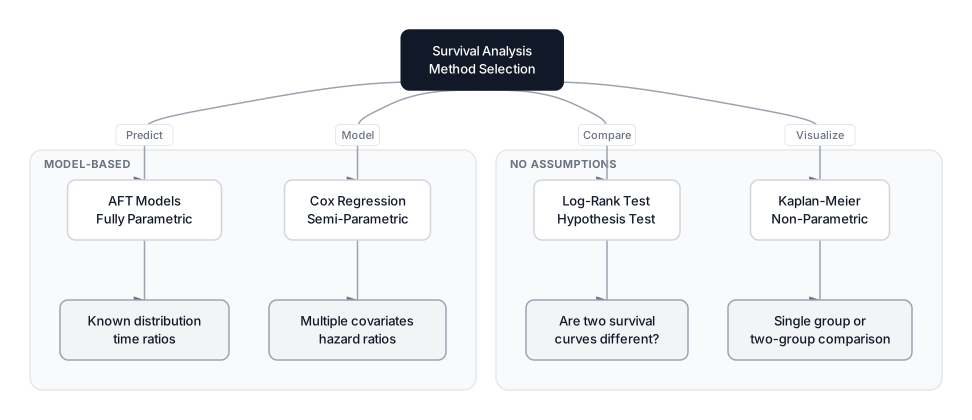 Click to expandComparison of survival analysis methods from non-parametric to semi-parametric
Use Survival Analysis When
- You care about timing, not just occurrence. Customer churn prediction, time-to-failure for equipment, clinical trial endpoints.
- Your data has censoring. Subjects drop out, studies end, or follow-up windows vary. This is the killer feature.
- You need to compare groups over time. KM curves and Log-Rank tests are standard for A/B testing with time-based outcomes.
- You want hazard ratios. Cox regression gives you interpretable effect sizes that clinicians, product managers, and executives understand.
Do NOT Use Survival Analysis When
- There's no censoring and you just need a regression. If every subject experiences the event and you observe all times, ordinary regression on log-transformed times might suffice.
- The event is recurring. Survival analysis (in its standard form) models time to the first event. For recurring events (multiple purchases, repeated hospital visits), you need recurrent event models or counting process formulations.
- You need causal effect estimates with confounding. Survival analysis describes associations. For causal claims, combine it with causal inference techniques like inverse probability weighting or instrumental variables.
- Your time variable is discrete with very few levels. If time is just "week 1, week 2, week 3," discrete-time models (logistic regression at each time point) may be simpler and equally effective.
Production Considerations
Computational complexity. Kaplan-Meier is (dominated by sorting). Cox regression uses Newton-Raphson iteration on the partial likelihood, scaling roughly per iteration where is the number of covariates. For datasets under 1M rows, lifelines handles this comfortably. Beyond that, consider R's survival package or PySpark-based implementations.
Time-varying covariates. Real-world data often has covariates that change over time (a patient's blood pressure, a customer's engagement score). lifelines supports this through CoxTimeVaryingFitter, but it requires restructuring your data into start-stop format with one row per time interval per subject.
Competing risks. If patients can either recover or die (two competing events), standard survival analysis treats death as censoring, which inflates recovery estimates. Use the Fine-Gray subdistribution hazard model or cause-specific hazard models instead. lifelines doesn't support competing risks natively; the cmprsk package in R or the scikit-survival library in Python are better choices here.
Model selection. Start with Kaplan-Meier for exploration, use the Log-Rank test for simple comparisons, and move to Cox regression when you need multivariate adjustment. Only reach for parametric AFT models when you have domain knowledge about the event-time distribution (Weibull for mechanical failures, log-normal for economic durations).
Conclusion
Survival analysis fills a gap that no other statistical framework covers: modeling when events happen while respecting the reality that some observations are incomplete. The Kaplan-Meier estimator gives you a visual, assumption-free view of how survival probability evolves over time. The Log-Rank test tells you whether two groups truly differ. And Cox regression lets you quantify the effect of multiple covariates through interpretable hazard ratios.
In our clinical trial, we found that Drug B significantly accelerates recovery compared to Placebo, with patients reaching median recovery roughly twice as fast. We confirmed this with a Log-Rank p-value of 0.000004. These are the kinds of precise, actionable findings that survival analysis makes possible.
If you're new to the hypothesis testing concepts behind the Log-Rank test, start with Mastering Hypothesis Testing. For designing the experiments that generate survival data, see A/B Testing Design and Analysis. And for understanding the probability distributions that underpin parametric survival models (Weibull, exponential, log-normal), that guide covers every distribution you'll encounter.
The next time someone asks "will the customer churn?", ask the better question: "when?"
Frequently Asked Interview Questions
Q: What is censoring in survival analysis, and why does it matter?
Censoring occurs when the exact event time is unknown for some subjects. The most common type is right censoring, where a subject hasn't experienced the event by the end of the study. It matters because ignoring censored observations (dropping them or treating them as events) introduces systematic bias. Survival analysis models extract valid information from these partial observations.
Q: How do you interpret a hazard ratio of 0.6 for a treatment variable?
A hazard ratio of 0.6 means the treatment group experiences the event at 60% the rate of the reference group at any given time. In a mortality study, this means 40% lower instantaneous risk of death. In a recovery study, it would mean 40% slower instantaneous recovery. The interpretation depends entirely on whether the event is desirable or undesirable.
Q: When would you choose Cox regression over Kaplan-Meier?
Kaplan-Meier is non-parametric and works well for visualizing survival curves and comparing one or two groups. Cox regression is necessary when you need to adjust for multiple covariates simultaneously (age, treatment, severity) and quantify each covariate's independent effect through hazard ratios. If you only have a single categorical grouping variable, KM with a Log-Rank test is sufficient.
Q: What happens if the proportional hazards assumption is violated?
The hazard ratios from Cox regression become misleading because the model assumes a constant ratio over time. You can detect violations using Schoenfeld residual tests. Solutions include stratified Cox models (separate baseline hazards per group), time-varying coefficients, or switching to Accelerated Failure Time models that don't require this assumption.
Q: How is the Log-Rank test different from a t-test on survival times?
A t-test on raw survival times ignores censoring entirely, treating censored observations either as events (biased) or excluding them (also biased). The Log-Rank test properly accounts for censoring by comparing observed versus expected events at each time point across the entire follow-up period. It also doesn't assume normally distributed survival times.
Q: What is the difference between the survival function and the hazard function?
The survival function gives the probability of not experiencing the event by time . It's a cumulative measure that starts at 1 and decreases. The hazard function gives the instantaneous rate of the event occurring at time , conditional on survival up to that point. They're mathematically related: .
Q: Your Cox model shows a covariate with HR = 1.02 and p = 0.85. What do you conclude?
This covariate has no meaningful effect on the event rate. The hazard ratio of 1.02 suggests a trivially small 2% increase, and the p-value of 0.85 indicates this is well within random noise. You'd likely drop this covariate from the model. However, always check if it's a confounder for other variables before removing it.
Q: How would you handle a situation where patients can experience multiple events?
Standard survival analysis models time to the first event. For recurrent events, you'd use extensions like the Andersen-Gill model (treats each event as independent), the Prentice-Williams-Peterson model (conditions on event order), or frailty models (adds a random effect for subject-level heterogeneity). The choice depends on whether you believe event history affects future event risk.
Hands-On Practice
Survival Analysis is essential when we care about 'time-to-event' rather than just binary outcomes. Standard regression fails here because of 'censoring', we know some patients survived at least until the study ended, but not when they would have eventually recovered. While the lifelines library is the industry standard for this, understanding the underlying mathematics is powerful. We'll implement the Kaplan-Meier Estimator and the Log-Rank Test from scratch using pandas and scipy to visualize and quantify recovery rates in a clinical trial.
Dataset: Clinical Trial (Statistics & Probability) Clinical trial dataset with 1000 patients designed for statistics and probability tutorials. Contains treatment groups (4 levels) for ANOVA, binary outcomes for hypothesis testing and A/B testing, confounders for causal inference, time-to-event data for survival analysis, and pre-generated distribution samples.
By building the Kaplan-Meier estimator from scratch, we visualized the 'survival' (or in this case, non-recovery) probability over time without relying on black-box libraries. The steep drop in the Drug B curve compared to Placebo indicates faster recovery, and our manual Log-Rank test confirmed this difference is statistically significant. This 'time-to-event' perspective provides much richer actionable insights than simple binary classification.