
Your e-commerce team just changed the checkout button from gray to green, and conversions jumped 12% the following week. Time to celebrate? Not yet. A marketing campaign launched the same week. A competitor's site went down for two days. And it was payday for half your user base. Any of those factors, alone or combined, could explain the lift. The only way to isolate the button's true effect is a properly designed A/B test.
A/B testing is the application of randomized controlled experiments to product and business decisions. It's the same scientific method that proves a drug works in clinical trials, adapted for websites, apps, and machine learning systems. At companies running thousands of experiments each year (Microsoft runs over 10,000, and Spotify reported a 64% learning rate across its experimentation platform in 2025), it's the backbone of evidence-based product development. But the majority of A/B tests run at smaller companies are flawed in ways that silently produce misleading results.
We'll use one running example throughout: an e-commerce company testing whether changing its checkout button from gray to green increases the purchase conversion rate from its 5% baseline.
 Click to expandA/B test lifecycle from hypothesis through analysis to shipping decision
Randomization is what makes causality possible
Random assignment is the single mechanism that separates A/B testing from correlational analysis. When users are randomly allocated to a control group (gray button) or treatment group (green button), every confounding variable (device type, time of day, purchase intent, geography, mood) gets distributed equally across both groups in expectation. The only systematic difference between groups is the button color.
This principle comes from the Rubin Causal Model, formalized by Donald Rubin in the 1970s and detailed in his 2005 paper "Causal Inference Using Potential Outcomes". Each user has two potential outcomes: their behavior if shown the gray button, and their behavior if shown the green button. We can never observe both for the same person; that's the "fundamental problem of causal inference." But randomization ensures the average outcome in each group is an unbiased estimator of the average potential outcome for the entire population.
Without randomization, you're stuck with observational comparisons that can always be challenged by unmeasured confounders. If you rolled out the green button to mobile users only and compared against desktop users still seeing gray, any difference could reflect mobile-vs-desktop behavior rather than button color. This is exactly the problem that causal inference methods attempt to solve when experiments aren't feasible.
Key Insight: Randomization doesn't eliminate confounders; it distributes them evenly. With 50,000 users per group, the proportion of iPhone users, bargain hunters, and midnight shoppers will be nearly identical in control and treatment. The green button becomes the only explanation for any systematic difference in outcomes.
Formulating a testable hypothesis
Every A/B test starts with two competing claims:
The Null Hypothesis (): The green checkout button produces the same conversion rate as the gray button. Any observed difference is due to random sampling variation.
The Alternative Hypothesis (): The green checkout button produces a different conversion rate than the gray button.
This is a two-sided test: we're looking for any difference, positive or negative. Many teams prefer a one-sided test (: green > gray) when they have strong directional priors. A one-sided test gives you more statistical power because the entire rejection region sits in one tail. But the choice must be locked in before data collection begins; switching after seeing results invalidates the analysis entirely.
For a deep dive on the logic of null hypothesis significance testing, see Mastering Hypothesis Testing.
Pro Tip: Write your hypothesis and analysis plan in a shared document before launching. This "pre-registration" prevents post-hoc rationalization, the subtle tendency to pick whichever metric or subgroup happens to look significant after the fact. Kohavi, Tang, and Xu formalize this practice in Trustworthy Online Controlled Experiments (Cambridge University Press, 2020).
Choosing the right test statistic
The test statistic you select depends on the metric type you're measuring. Here's a quick reference:
| Metric Type | Test | When to Use | Python Function |
|---|---|---|---|
| Binary (converted/didn't) | Two-proportion z-test | Conversion rates, click-through rates | statsmodels.stats.proportion.proportions_ztest |
| Continuous (equal variance) | Two-sample t-test | Revenue per user when variances are similar | scipy.stats.ttest_ind |
| Continuous (unequal variance) | Welch's t-test | Revenue per user, session duration | scipy.stats.ttest_ind(equal_var=False) |
| Categorical (3+ variants) | Chi-square test | A/B/C/D tests with categorical outcomes | scipy.stats.chi2_contingency |
For our checkout button test, conversion is binary, so we need the two-proportion z-test. The z-statistic measures how many standard errors the observed difference lies from zero:
Where:
- is the observed conversion rate of the green button (treatment)
- is the observed conversion rate of the gray button (control)
- is the pooled conversion rate across both groups (total conversions / total users)
- and are the number of users in each group
In Plain English: The numerator is the signal: how much the green button's conversion rate differs from the gray button's. The denominator is the noise: how much random variation you'd expect given your sample sizes. A large z-score means the signal overwhelms the noise, and the difference probably isn't a fluke.
Sample size calculation through power analysis
Running an experiment without a pre-calculated sample size is the single most common mistake in A/B testing. Without it, a "non-significant" result is ambiguous: it could mean the treatment has no effect, or it could mean you simply didn't collect enough data to see the effect.
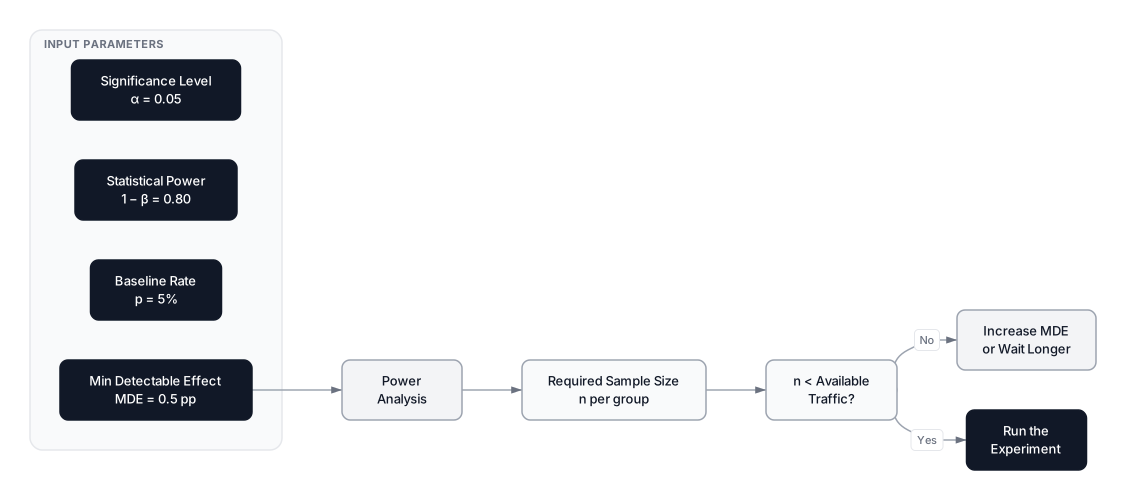 Click to expandPower analysis inputs and decision flow for A/B test sample size calculation
Power analysis answers the question: "How many users do I need per group to reliably detect an improvement of a given size?" It balances four interconnected parameters:
| Parameter | Symbol | Typical Value | Controls |
|---|---|---|---|
| Significance level | 0.05 | Max false positive rate (Type I error) | |
| Statistical power | 0.80 | Probability of detecting a real effect | |
| Min Detectable Effect | MDE | Business decision | Smallest improvement worth detecting |
| Baseline variance | From historical data | Natural variability in the metric |
The sample size formula for comparing two proportions is:
Where:
- is the number of users needed per group
- is the critical value for the significance level (1.96 for , two-sided)
- is the critical value for the desired power (0.84 for 80% power)
- is the average of the two expected proportions
- is the absolute difference you want to detect (the MDE)
In Plain English: Think of this like deciding how many coin flips you need to detect a rigged coin. If the coin lands heads 51% of the time instead of 50%, you'll need thousands of flips to prove it's unfair. But a coin landing heads 70% of the time? A hundred flips will do. The smaller the effect you're hunting for, the more data you need, and it scales with the square of the inverse. Half the effect size means four times the sample.
The checkout button calculation
Our gray button converts at 5%. We want to detect a lift to 5.5% (a 0.5 percentage point absolute increase, or 10% relative) with and power = 0.80:
That's roughly 31,200 users per group, or about 62,400 total. At 1,000 daily visitors, this test needs over two months. Halving the MDE to 0.25 percentage points would require approximately 122,000 per group, nearly a year of traffic.
Common Pitfall: Teams often set their MDE too small because they want to "catch everything." But a tiny MDE means enormous sample sizes and month-long experiments that block other tests. Set the MDE based on the minimum lift that would actually justify the engineering cost of shipping the change. If a 0.1pp lift isn't worth the deployment effort, don't design your test to detect it.
For a deeper exploration of how power, sample size, and effect size interrelate, see Statistical Power: How to Design Experiments That Actually Find the Truth.
What p-values actually mean (and what they don't)
The p-value is the probability of observing a test statistic as extreme as (or more extreme than) the one you calculated, assuming the null hypothesis is true.
Read that again. It is not the probability that the null hypothesis is true. It is not the probability that the result happened by chance. It is not the probability that your treatment works.
When we obtain $p = 0.03$ for the checkout button test, the correct interpretation is: "If the green button truly has no effect on conversions, there's a 3% probability we'd see a difference this large or larger due to random sampling alone." Since 3% is below our pre-specified threshold of 5%, we reject the null hypothesis.
A common trap: treating $1 - p$ as the probability the treatment works. A p-value of 0.01 does not mean 99% confidence that the green button is better. The p-value says nothing about the magnitude or practical importance of the effect. That's what confidence intervals and effect sizes are for.
Type I and Type II errors in the real world
Every statistical decision carries two possible errors, and understanding them in concrete business terms is what separates good experimenters from sloppy ones.
| H0 is actually true (no real effect) | H0 is actually false (real effect exists) | |
|---|---|---|
| Reject H0 (declare winner) | Type I Error (false positive) | Correct decision (power = ) |
| Fail to reject H0 (no winner) | Correct decision | Type II Error (false negative, ) |
Type I error (false positive): You ship the green button company-wide, only to discover months later that conversion didn't actually change. The cost: wasted engineering effort, potential UX degradation, and an opportunity cost: you could have been testing something that actually works. Probability bounded by .
Type II error (false negative): You keep the gray button and never realize the green one would have lifted conversion by 10%. The cost: revenue left on the table, indefinitely. Probability is , controlled by your power .
These errors trade off directly. Lowering (being more cautious about false alarms) increases (making you more likely to miss real effects), unless you compensate with more data. That's precisely why power analysis exists.
Key Insight: Teams often focus on visible false positives, while underpowered tests can quietly discard useful changes as false negatives. If a platform-level benchmark is retained, cite the exact Bing study and describe its population and period.
Effect size: when statistical significance isn't enough
Statistical significance tells you whether an effect exists. Effect size tells you whether the effect matters. With a large enough sample, even a 0.01 percentage point improvement becomes statistically significant, but no one would re-engineer their checkout flow for that.
Cohen's h is the standard effect size measure for comparing two proportions:
Where:
- is the treatment group's conversion rate
- is the control group's conversion rate
- is the inverse sine (arcsine) function
In Plain English: Raw percentages are misleading because the same absolute difference means different things at different baselines. Going from 5% to 6% is a bigger deal than going from 50% to 51%, even though both are 1 percentage point. The arcsine transformation accounts for this. Cohen's benchmarks: $|h| = 0.2$ (small), $|h| = 0.5$ (medium), $|h| = 0.8$ (large).
For continuous metrics like revenue per user, Cohen's d fills the same role: , where is the pooled standard deviation.
Always report both significance and effect size to stakeholders. Compare these two summaries:
| Report Style | Example |
|---|---|
| Bad | "The result was statistically significant." |
| Good | "The green button increased conversion by 0.5pp (95% CI: 0.1pp to 0.9pp, $p = 0.02$, Cohen's $h = 0.23$)." |
The second version tells the reader the direction, magnitude, uncertainty, and practical relevance—everything needed to make a ship/no-ship decision.
Confidence intervals tell you more than p-values
A confidence interval estimates the plausible range for the true difference between groups. For the difference between two proportions:
Where:
- is the observed difference in conversion rates
- is the critical value (1.96 for a 95% CI)
- The square root term is the standard error of the difference
In Plain English: The confidence interval says "we observed a 0.5pp lift, but the true lift is probably somewhere between 0.1pp and 0.9pp." If the interval doesn't cross zero, the effect is significant. If the lower bound exceeds your minimum business threshold, you can ship with confidence in both statistical and practical significance.
For a thorough treatment of confidence interval construction and interpretation, see Why Point Estimates Lie (And How Confidence Intervals Fix It).
Multiple testing correction
When a single A/B test evaluates multiple metrics simultaneously (conversion rate, revenue per user, bounce rate, average order value), each metric introduces a separate chance for a false positive. With 20 metrics at :
That's a 64% chance of declaring a false win on at least one metric. Two correction methods dominate in practice:
| Method | Controls | Adjusted Threshold (20 metrics) | Best For |
|---|---|---|---|
| Bonferroni | Family-wise error rate (FWER) | $0.05 / 20 = 0.0025$ | Small number of pre-specified metrics |
| Benjamini-Hochberg | False discovery rate (FDR) | Varies by rank | Large exploratory metric sets |
The Bonferroni correction is the simplest: divide by the number of comparisons.
Where:
- is the original significance level
- is the number of comparisons
The tradeoff: Bonferroni is conservative. With many metrics, it becomes very hard to detect real effects. Benjamini-Hochberg offers a less aggressive alternative by controlling the expected fraction of false positives among rejected hypotheses, rather than preventing any false positive at all.
Pro Tip: Designate one primary metric (your "Overall Evaluation Criterion" or OEC) before the test launches. Apply corrections only to secondary and guardrail metrics. This preserves full statistical power on the metric that matters most while still protecting against spurious secondary findings.
Sequential testing for valid early stopping
Classical fixed-horizon tests require you to wait until the full sample is collected. But business pressure demands checking results early. The peeking problem is real: looking at results 10 times during an experiment can inflate the actual Type I error from 5% to nearly 20%.
Sequential testing solves this by adjusting significance thresholds at each interim analysis to maintain the overall . The O'Brien-Fleming spending function is the most widely used approach:
| Interim Look | % of Sample | O'Brien-Fleming Threshold |
|---|---|---|
| 1st | 33% | $p < 0.0005$ |
| 2nd | 66% | $p < 0.014$ |
| Final | 100% | $p < 0.045$ |
The logic: early on, when data is scarce and estimates are noisy, you need overwhelming evidence to stop. As data accumulates, the threshold relaxes toward the standard 0.05.
Modern experimentation platforms implement this by default. Spotify's Confidence platform uses always-valid p-values based on the work of Johari et al. (2017), which remain valid regardless of when or how often you check. Netflix's sequential testing framework keeps the world streaming by enabling tests to stop early when effects are large, freeing up experimentation bandwidth for the next idea.
Bayesian A/B testing provides a different lens
Frequentist testing asks: "What's the probability of seeing this data if the null hypothesis is true?" Bayesian testing inverts the question: "Given this data, what's the probability that the green button is actually better?"
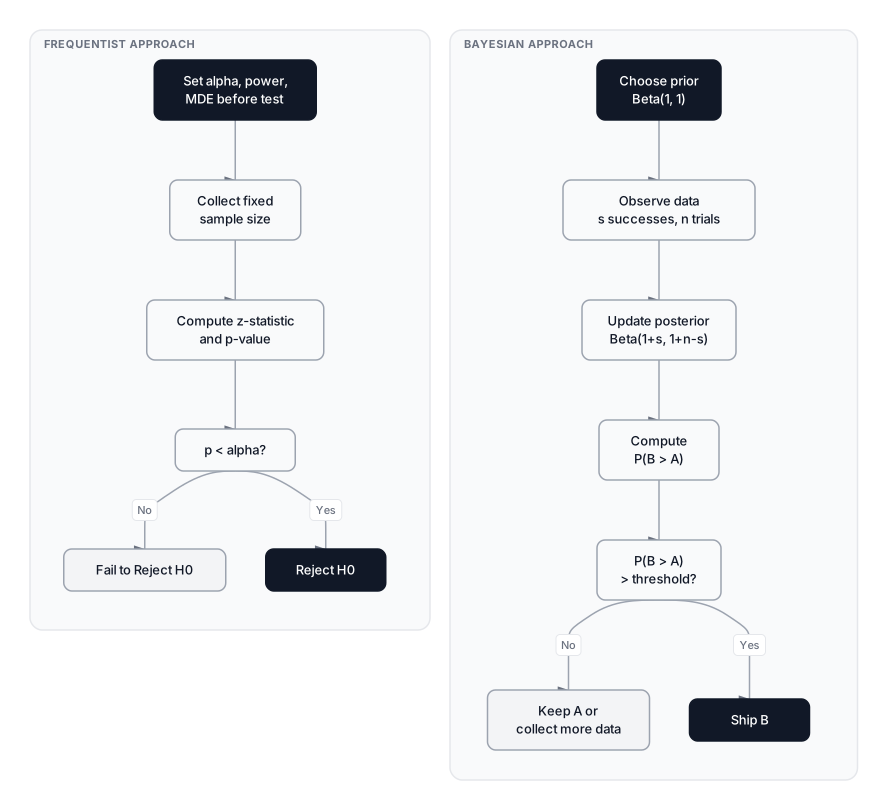 Click to expandFrequentist vs Bayesian A/B testing workflow comparison
For conversion rates, the Bayesian approach models each group's rate as a Beta distribution. Before collecting data, you specify a prior: . A common uninformative prior is , a uniform distribution saying "any conversion rate between 0% and 100% is equally likely."
After observing conversions out of users, the posterior updates to:
Where:
- is the prior's alpha parameter plus observed successes
- is the prior's beta parameter plus observed failures
- is the number of conversions (purchases)
- is the total number of users in the group
In Plain English: Imagine starting with a blank slate about the green button's conversion rate. Every purchase updates your belief upward; every non-purchase updates it downward. After 10,000 users, you have a sharp bell curve centered on the true rate. The Bayesian answer to "is green better?" is a direct probability: "there's a 97% chance the green button outperforms gray," which is what stakeholders actually want to hear.
To compare variants, draw thousands of samples from each posterior and count how often B exceeds A. This fraction is the probability that B is better, far more intuitive than a p-value. For more on the Bayesian framework, see Bayesian Statistics: The Scientific Art of Changing Your Mind.
One caution: Bayesian methods aren't immune to the peeking problem. Stopping the moment "P(B > A) > 95%" can still inflate error rates, because posteriors fluctuate wildly when data is scarce. Responsible Bayesian testing uses either a fixed stopping rule or a formal sequential decision boundary.
CUPED: reducing variance with pre-experiment data
CUPED (Controlled-experiment Using Pre-Existing Data), introduced by Deng et al. at Microsoft in 2013, is the most impactful technique for speeding up A/B tests at scale. The idea: not all variance in an experiment is random noise. Much of it comes from pre-existing differences between users that have nothing to do with the treatment.
CUPED adjusts the experiment metric by removing variance explained by a pre-experiment covariate (typically the same metric measured before the test started):
Where:
- is the metric observed during the experiment
- is the same metric measured before the experiment (the covariate)
- is the mean of the covariate across all users
- is the coefficient that minimizes variance, computed as
In Plain English: Suppose User A bought 20 items last month and User B bought 1. During the experiment, User A buys 22 items and User B buys 2. Without CUPED, the huge gap between them inflates your metric's variance. CUPED says: "we expected User A to buy around 20 and User B to buy around 1—let's subtract that baseline and focus on the change." The adjusted metric has far less noise.
CUPED can reduce variance when the pre-experiment covariate is strongly related to the outcome. Quantify the expected reduction from the experiment's own data, and cite primary engineering sources for any named company implementations. If you're running A/B tests on a product with returning users, there's almost no reason not to use it.
When to run an A/B test (and when not to)
A/B testing isn't always the right tool. Here's a decision framework:
Run an A/B test when:
- You need to prove a causal relationship between a change and a metric
- You have enough traffic to reach statistical significance within a reasonable timeframe
- The change is reversible (you can roll back if it loses)
- The unit of randomization is independent (one user's experience doesn't affect another's)
- You have a clear primary metric defined before the test
Don't run an A/B test when:
- Traffic is too low. If power analysis says you need 100,000 users and you get 500 per week, the test will take years. Consider a pre-post analysis with causal inference methods instead.
- The change is irreversible. Pricing changes, brand redesigns, or infrastructure migrations can't be easily rolled back. Use holdout groups or geo-experiments.
- Network effects dominate. In two-sided marketplaces (riders and drivers, buyers and sellers), treating one user affects others. Use cluster or switchback randomization.
- You already know the answer. If usability research, user interviews, and prior experiments all point the same direction, sometimes it's better to ship and measure long-term impact.
- The metric is too slow. If the outcome you care about takes 6 months to materialize (e.g., annual retention), an A/B test with a 2-week window won't capture it.
Common pitfalls that invalidate experiments
Peeking and stopping early. Checking results daily and stopping when $p < 0.05$ inflates false positives dramatically. The "significant" result you found is likely noise. Use sequential testing if you need interim looks.
Underpowered experiments. Running a test with 1,000 users when power analysis says 30,000 virtually guarantees you'll miss real effects. Worse, if you do get a significant result from an underpowered test, it's likely an inflated estimate, a phenomenon called the "winner's curse."
Simpson's paradox. Aggregate data might show variant A winning, while variant B wins in every user segment individually. This happens when traffic splits are uneven across segments. If 80% of variant A's traffic comes from high-converting mobile users while variant B's traffic skews toward desktop, the aggregate comparison is misleading.
Novelty and primacy effects. Users may click the green button simply because it's new, not because it's better. This initial spike fades within days. Run experiments for at least one full business cycle (typically two weeks) to let transient effects wash out.
SUTVA violations. The Stable Unit Treatment Value Assumption says that one user's assignment doesn't affect another user's outcome. This breaks in social networks (treated users invite control-group friends), two-sided marketplaces (treatment users consume shared supply), and viral content experiments. Solutions: cluster randomization by geographic market or social cluster, and switchback testing that randomizes by time period.
Practical implementation in Python
Let's put the full framework into practice. We'll walk through every step—from loading data through power analysis—using a clinical trial dataset that mirrors the structure of our checkout button experiment: two groups, one binary metric, one hypothesis.
import pandas as pd
import numpy as np
from statsmodels.stats.proportion import proportions_ztest, proportion_effectsize
from statsmodels.stats.power import NormalIndPower
import scipy.stats as stats

# Load the clinical trial dataset
# Control = Placebo, Treatment = Drug_B, Metric = responded_to_treatment
url = "https://learnds.com/datasets/playground/lds_stats_probability.csv"
df = pd.read_csv(url)

# Filter for the A/B test groups
ab_df = df[df['treatment_group'].isin(['Placebo', 'Drug_B'])].copy()

# Step 1: Inspect the data
print("=" * 50)
print("STEP 1: Data Overview")
print("=" * 50)
group_counts = ab_df['treatment_group'].value_counts()
print(f"Sample sizes:\n{group_counts}\n")

# Step 2: Calculate observed conversion rates
conversion = ab_df.groupby('treatment_group')['responded_to_treatment'].agg(
    ['count', 'sum', 'mean']
)
conversion.columns = ['Total', 'Responded', 'Rate']
print("=" * 50)
print("STEP 2: Observed Conversion Rates")
print("=" * 50)
print(conversion)

p_control = conversion.loc['Placebo', 'Rate']
p_variant = conversion.loc['Drug_B', 'Rate']
lift = (p_variant - p_control) / p_control
print(f"\nControl (Placebo): {p_control:.2%}")
print(f"Variant (Drug_B):  {p_variant:.2%}")
print(f"Absolute lift:     {p_variant - p_control:.2%}")
print(f"Relative lift:     {lift:.2%}")

# Step 3: Two-proportion z-test (one-sided: Drug_B > Placebo)
successes = np.array([
    conversion.loc['Drug_B', 'Responded'],
    conversion.loc['Placebo', 'Responded']
])
nobs = np.array([
    conversion.loc['Drug_B', 'Total'],
    conversion.loc['Placebo', 'Total']
])

z_stat, p_value = proportions_ztest(count=successes, nobs=nobs, alternative='larger')

print("\n" + "=" * 50)
print("STEP 3: Two-Proportion Z-Test (one-sided)")
print("=" * 50)
print(f"Z-statistic: {z_stat:.4f}")
print(f"P-value:     {p_value:.6e}")

alpha = 0.05
if p_value < alpha:
    print(f"Result: REJECT H0 at alpha={alpha}. Drug B significantly outperforms Placebo.")
else:
    print(f"Result: FAIL TO REJECT H0 at alpha={alpha}.")

# Step 4: Confidence interval and effect size
diff = p_variant - p_control
se_diff = np.sqrt(
    p_control * (1 - p_control) / nobs[1] +
    p_variant * (1 - p_variant) / nobs[0]
)
margin = 1.96 * se_diff
ci_lower = diff - margin
ci_upper = diff + margin

h = proportion_effectsize(p_variant, p_control)
magnitude = "large" if abs(h) >= 0.8 else "medium" if abs(h) >= 0.5 else "small"

print("\n" + "=" * 50)
print("STEP 4: Confidence Interval & Effect Size")
print("=" * 50)
print(f"Absolute difference: {diff:.2%}")
print(f"95% CI: [{ci_lower:.2%}, {ci_upper:.2%}]")
print(f"Cohen's h: {h:.4f} ({magnitude} effect)")

# Step 5: Power analysis -- was the test adequately powered?
power_analysis = NormalIndPower()
required_n = power_analysis.solve_power(
    effect_size=h, alpha=0.05, power=0.80,
    ratio=1.0, alternative='larger'
)

print("\n" + "=" * 50)
print("STEP 5: Power Analysis")
print("=" * 50)
print(f"Required n per group (for observed effect): {int(np.ceil(required_n))}")
print(f"Actual n per group: 250")
print(f"Adequately powered: {'Yes' if 250 >= required_n else 'No -- UNDERPOWERED'}")

# What about a much smaller effect? (2pp lift: 40% -> 42%)
small_h = proportion_effectsize(0.42, 0.40)
required_n_small = power_analysis.solve_power(
    effect_size=small_h, alpha=0.05, power=0.80,
    ratio=1.0, alternative='larger'
)
print(f"\nFor a 2pp lift (40% -> 42%), required n per group: {int(np.ceil(required_n_small))}")
print("  -> At 1,000 users/day, that's ~15 days of traffic")
Expected Output:
==================================================
STEP 1: Data Overview
==================================================
Sample sizes:
treatment_group
Placebo    250
Drug_B     250
Name: count, dtype: int64

==================================================
STEP 2: Observed Conversion Rates
==================================================
                 Total  Responded      Rate
treatment_group
Drug_B             250        162     0.648
Placebo            250        100     0.400

Control (Placebo): 40.00%
Variant (Drug_B):  64.80%
Absolute lift:     24.80%
Relative lift:     62.00%

==================================================
STEP 3: Two-Proportion Z-Test (one-sided)
==================================================
Z-statistic: 5.5518
P-value:     1.413327e-08
Result: REJECT H0 at alpha=0.05. Drug B significantly outperforms Placebo.

==================================================
STEP 4: Confidence Interval & Effect Size
==================================================
Absolute difference: 24.80%
95% CI: [16.32%, 33.28%]
Cohen's h: 0.5019 (medium effect)

==================================================
STEP 5: Power Analysis
==================================================
Required n per group (for observed effect): 50
Actual n per group: 250
Adequately powered: Yes

For a 2pp lift (40% -> 42%), required n per group: 7477
  -> At 1,000 users/day, that's ~15 days of traffic
The z-statistic of 5.55 is well beyond the critical value of 1.645 for a one-sided test. The p-value is on the order of , effectively zero. The 95% CI of [16.3%, 33.3%] doesn't cross zero, and even at the lower bound, the effect is substantial. Cohen's h of 0.50 classifies this as a medium effect.
The power analysis confirms 250 users per group was more than sufficient for this effect size; only 50 were needed. But notice what happens when the expected lift shrinks to just 2 percentage points: we'd need 7,477 per group. This is why power analysis before launch is non-negotiable.
Bayesian comparison
Expected Output:
Bayesian A/B Test Results
==================================================
Posterior mean (Control): 0.4008
Posterior mean (Variant): 0.6468
P(Variant > Control):    1.0000
Expected lift:           0.2461
95% credible interval:   [0.1608, 0.3292]
The Bayesian result is unambiguous: there's essentially a 100% posterior probability that Drug B outperforms Placebo. The 95% credible interval for the lift, [16.1%, 32.7%], is remarkably close to the frequentist confidence interval, which is typical when using uninformative priors.
Production considerations at scale
When you move from textbook examples to production experimentation platforms handling millions of users, several practical concerns emerge:
| Concern | Impact | Mitigation |
|---|---|---|
| Metric computation lag | Revenue metrics may take 24-72h to finalize | Use surrogate metrics for interim checks |
| Bot traffic | Inflates sample size, dilutes effects | Filter by session patterns before analysis |
| Cookie churn | Same user gets re-randomized | Use persistent user IDs, not cookies |
| Interaction effects | Multiple concurrent tests interfere | Use orthogonal randomization layers |
| Long-term effects | Short tests miss retention impacts | Run 1-2% holdback groups for months |
Computational complexity. The z-test and t-test are both , a single pass through the data. Power analysis is once you have the parameters. The bottleneck at scale isn't statistics; it's data pipeline latency and metric computation.
CUPED at scale. Computing the CUPED adjustment adds one regression step per metric: for the covariate adjustment. On 100M user experiments, this still completes in seconds with vectorized operations in pandas or Spark.
Memory. For per-user metrics, you need two columns (metric + assignment) times user count. A 50M user experiment with two float64 columns uses roughly 800MB, trivial for modern infrastructure.
Conclusion
A/B testing bridges the gap between product intuition and causal proof. The framework boils down to five non-negotiable steps: define a clear hypothesis before data collection, calculate sample size through power analysis, randomize users properly, select the right test statistic, and interpret results through both statistical significance (p-value) and practical significance (effect size and confidence interval). Skip any one of these and your results are suspect.
The most common failures aren't mathematical; they're procedural. Peeking at results before reaching the planned sample size, ignoring the multiple testing problem across dozens of metrics, confusing a statistically significant 0.01pp lift with a business-relevant improvement. Sequential testing and Bayesian methods offer principled alternatives for teams that need flexibility, and CUPED can cut test duration in half by removing pre-existing variance.
If the hypothesis testing fundamentals here felt fast, Mastering Hypothesis Testing goes deeper into the logic of null hypothesis significance testing. For the probability distributions that underpin z-tests and t-tests, see Probability Distributions: The Hidden Framework Behind Your Data. And if your data doesn't meet the normality assumptions required by parametric tests, Non-Parametric Tests covers distribution-free alternatives that still deliver valid inference.
The best experimentation teams don't just run tests; they build a culture where every product change has to earn its way into production with evidence. Start with one well-designed test, get the rigor right, and scale from there.
Frequently Asked Interview Questions
Q: You run an A/B test and get p = 0.03. A stakeholder says "so there's a 97% chance our new feature works." How do you respond?
That's a common misinterpretation. The p-value of 0.03 means: if the feature truly had zero effect, there's a 3% chance we'd see data this extreme or more extreme. It doesn't tell us the probability the feature works. To get at that question, we'd need either a Bayesian analysis (which directly computes the probability one variant is better) or we'd combine the p-value with the effect size and confidence interval to assess practical significance.
Q: Your A/B test shows a statistically significant result with p = 0.04 and a 0.02 percentage point lift in conversion. Should you ship?
Probably not. Statistical significance only means the effect isn't zero; it says nothing about whether the effect is large enough to matter. A 0.02pp lift is real but tiny. You need to weigh the engineering cost of shipping against the expected revenue impact. This is the distinction between statistical significance and practical significance, and it's why you should always report confidence intervals and effect sizes alongside p-values.
Q: You're designing an A/B test for a feature that might increase revenue per user. Baseline is $12.50 with a standard deviation of $45. How would you approach sample size calculation?
Revenue per user is continuous and highly right-skewed (a few big spenders drive most of the variance), so I'd use Welch's t-test and compute sample size based on Cohen's d. With that $45 standard deviation, detecting even a $1 lift (Cohen's d = 1/45 = 0.022) requires enormous sample sizes, likely hundreds of thousands per group. I'd consider log-transforming revenue or capping outliers to reduce variance, and I'd strongly recommend CUPED with pre-experiment revenue as the covariate, which could cut the required sample by 30-50%.
Q: You've been running an A/B test for two weeks and the product manager asks you to check results early. What's the risk, and how do you handle it?
The risk is the peeking problem. Every time you check for significance during data collection, you inflate the false positive rate. Checking 10 times can push the real Type I error from 5% to nearly 20%. The fix is sequential testing: methods like the O'Brien-Fleming spending function that adjust the significance threshold at each interim look so the overall alpha stays at 0.05. If the platform supports always-valid p-values, those remain valid regardless of when you look.
Q: Explain Simpson's paradox in the context of A/B testing. Give an example.
Simpson's paradox occurs when a trend present in several subgroups reverses when the groups are combined. In A/B testing: imagine variant B wins in both mobile and desktop segments, but variant A wins overall. This happens when the traffic mix differs. Maybe 90% of A's traffic is mobile (which has higher baseline conversion) while B's traffic skews desktop. The aggregate comparison is confounded by the unequal segment distribution. Proper randomization should prevent this, but real-world issues like differential loading times or geo-targeting bugs can create uneven splits.
Q: When would you choose Bayesian A/B testing over frequentist, and vice versa?
Bayesian testing is better when stakeholders want a direct probability statement ("92% chance B is better"), when you have meaningful prior information from past experiments, or when you need to make decisions under uncertainty without a rigid sample size commitment. Frequentist testing is better when you need strict false positive guarantees (regulated industries), when the analysis plan is fixed and pre-registered, or when you're working with a team that's more comfortable with p-values and confidence intervals. In practice, many mature platforms run both in parallel.
Q: What is CUPED, and why does it matter for experimentation velocity?
CUPED stands for Controlled-experiment Using Pre-Existing Data. It reduces metric variance by subtracting the portion explained by a pre-experiment covariate, typically the same metric measured before the test. For example, if you're testing a checkout change and User A usually spends $50/week while User B spends $5, CUPED adjusts for that baseline difference so you're comparing the incremental change caused by the treatment. This typically reduces confidence interval width by 20-50%, meaning experiments reach significance in roughly half the time. At companies running thousands of experiments, that's a massive increase in experimentation throughput.
Q: Your test has 250 users per group and fails to find significance. The PM wants to just add more users until it becomes significant. What's wrong with this approach?
This is a form of optional stopping, which inflates the false positive rate. The sample size should be determined by power analysis before the test launches, not adjusted based on interim results. If the test was properly powered and found no significant effect, that's a valid result. The treatment likely doesn't have an effect large enough to matter. If the PM suspects the effect is smaller than originally assumed, the correct approach is to design a new test with a larger pre-specified sample size, not to extend the current one until something "sticks."
Hands-On Practice
A/B testing is the backbone of data-driven decision making, but relying on tools that automatically calculate 'significance' can leave you blind to the underlying mathematics. We'll manually implement the rigorous statistical framework described in the article using Python. We will calculate the Z-score and p-value from scratch using scipy and numpy (bypassing the black-box statsmodels functions) to truly understand the mechanics of causality. Finally, we'll perform a Power Analysis to determine if our sample size was sufficient.
Dataset: Clinical Trial (Statistics & Probability) Clinical trial dataset with 1000 patients designed for statistics and probability tutorials. Contains treatment groups (4 levels) for ANOVA, binary outcomes for hypothesis testing and A/B testing, confounders for causal inference, time-to-event data for survival analysis, and pre-generated distribution samples.
In this simulated example, the z-test rejects the null hypothesis at the stated threshold. The accompanying power calculation indicates that roughly 250 observations per group would be sufficient for an effect of about 25% under the assumptions used; a 2% effect would require a larger sample.