
Your airline dataset has 50 million rows and 200 features. You fire up gradient boosting, and the ETA reads "4 hours." You switch to LightGBM, and the same model finishes in 12 minutes. That speed gap is not a lucky benchmark. It comes from three architectural decisions that Microsoft Research baked into the framework when they open-sourced it in 2017.
LightGBM (Light Gradient Boosting Machine) is a gradient boosting framework built for speed on large tabular datasets. The original NeurIPS 2017 paper by Ke et al. introduced leaf-wise tree growth, histogram-based splitting, Gradient-based One-Side Sampling (GOSS), and Exclusive Feature Bundling (EFB). As of March 2026, LightGBM 4.6 remains the default framework when training speed or memory footprint matters.
Throughout this guide, we will build a flight delay classifier (departure time, airline, route, weather features) to see each optimization in action.
Leaf-wise Growth vs Level-wise Growth
Leaf-wise (best-first) tree growth is the single design choice that separates LightGBM from traditional gradient boosting and XGBoost's default mode.
In level-wise growth, the tree expands every node at the current depth before moving deeper. Think of it as finishing an entire floor of a building before starting the next one. Random forests and classic XGBoost both follow this pattern. It is safe: the tree stays balanced, and the risk of overfitting stays moderate.
Leaf-wise growth ignores balance entirely. At each step, it finds the single leaf with the largest loss reduction across the entire tree and splits only that leaf. The tree can become lopsided, growing very deep on one side while other branches remain shallow.
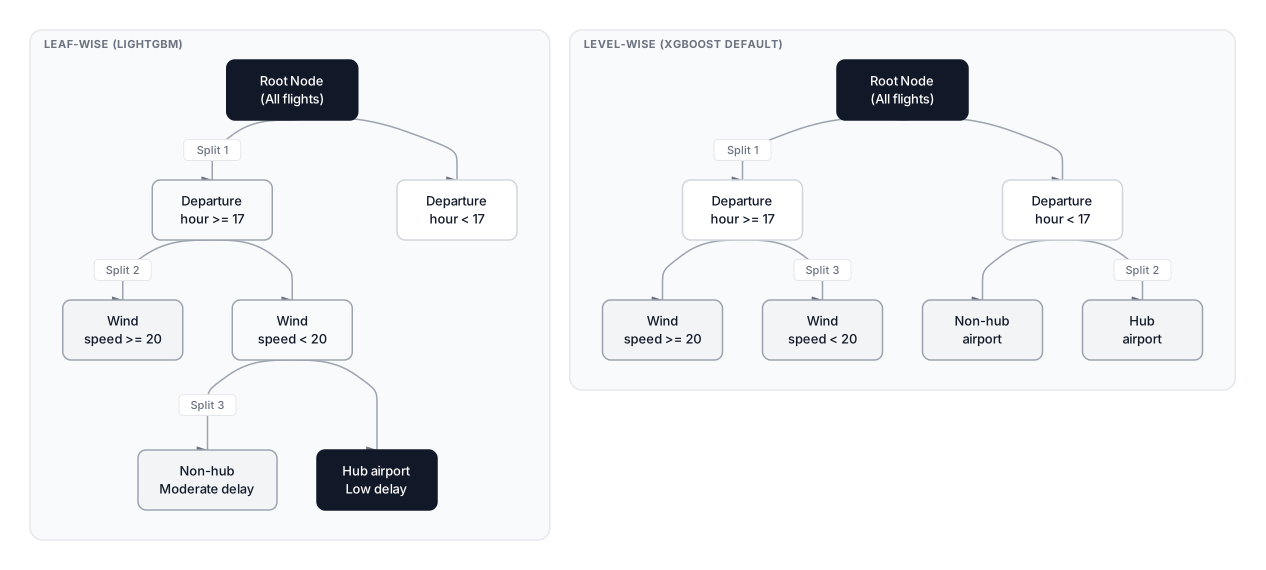 Click to expandLeaf-wise vs level-wise tree growth strategies for gradient boosting
Why does this matter for our flight delay model? If "departure hour between 17:00 and 19:00" is by far the strongest predictor, leaf-wise growth keeps splitting that region deeper and deeper, capturing the evening congestion pattern in fewer total splits. Level-wise growth would instead split every node at depth 2 first, including branches for low-delay early morning flights that barely need refinement.
The tradeoff is real. On datasets under 10,000 rows, leaf-wise trees can grow extremely deep on one side, memorizing noise in tiny partitions. That is why num_leaves and min_data_in_leaf are LightGBM's most important hyperparameters.
Key Insight: Level-wise growth provides implicit regularization through forced balance. Leaf-wise growth trades that safety for speed, which means you need explicit regularization (num_leaves, min_data_in_leaf) to compensate. On large data, leaf-wise wins. On small data, it can hurt.
Histogram-based Splitting
Histogram-based splitting replaces the expensive exact split search with a binning approximation. Instead of sorting data points for every feature ( per feature), LightGBM bins continuous values into discrete buckets (default $K = 255$) and scans only those buckets.
The algorithm works in three steps for our flight delay dataset:
- Binning. Map each continuous feature (departure hour, temperature, wind speed) to an integer bin. A 0.0 to 40.0 Celsius temperature range becomes bins 0 through 254.
- Histogram construction. Scan training rows once. For each bin, accumulate the sum of gradients and the count of samples. This costs where is the number of features.
- Split finding. Walk through the bins of each feature to find the split that maximizes gain. This costs , and since , it finishes almost instantly.
Where:
- is the number of training samples (50 million flights in our example)
- is the number of features (departure time, airline, route, weather, etc.)
- is the number of histogram bins (default 255)
- is the sorting cost per feature that exact methods pay
In Plain English: Imagine sorting 50 million flight records by temperature to find the best split point. That takes forever. Instead, LightGBM throws every temperature into one of 255 buckets and only checks 255 boundaries. You lose a tiny bit of precision on where exactly the split lands, but training becomes orders of magnitude faster.
There is a second trick: the histogram subtraction optimization. For a parent node whose histogram is already built, the histogram of one child equals the parent histogram minus the other child's histogram. This cuts histogram construction time nearly in half for every split.
Pro Tip: If your features have very few unique values (like airline codes or day-of-week), set max_bin lower than 255 to save memory. For high-cardinality continuous features, the default 255 bins rarely needs increasing.
Gradient-based One-Side Sampling (GOSS)
GOSS is a smart data sampling strategy that keeps all training instances with large gradients and randomly samples from the rest. Data points with large gradients are the ones the model currently predicts poorly; they carry the most information about where the model needs improvement.
The algorithm proceeds in three steps:
- Rank by gradient. After each boosting round, sort all instances by the absolute value of their gradient (prediction error).
- Keep top %. Retain all instances with the largest gradients. In our flight data, these are flights the model confidently predicted "on time" but were actually delayed by 3 hours.
- Sample % from the rest. Randomly select % of the remaining low-gradient instances and multiply their gradients by when computing split gain.
The information gain with GOSS becomes:
Where:
- is the estimated variance gain for feature at split point
- are the large-gradient instances falling into the left and right child nodes
- are the sampled small-gradient instances falling into left and right child nodes
- is the gradient (negative of the loss derivative) for instance
- is the amplification factor that compensates for dropping $(1 - a - b)$% of the easy instances
- are the sample counts in each child node
- is the total instance count in the current node
In Plain English: Your flight delay model already predicts 80% of flights correctly. GOSS says: "Keep every flight the model gets badly wrong, randomly sample a handful of the ones it gets right, and amplify those samples so they still represent the full easy population." You train on roughly 30% of the data but capture nearly the same split quality as using all of it.
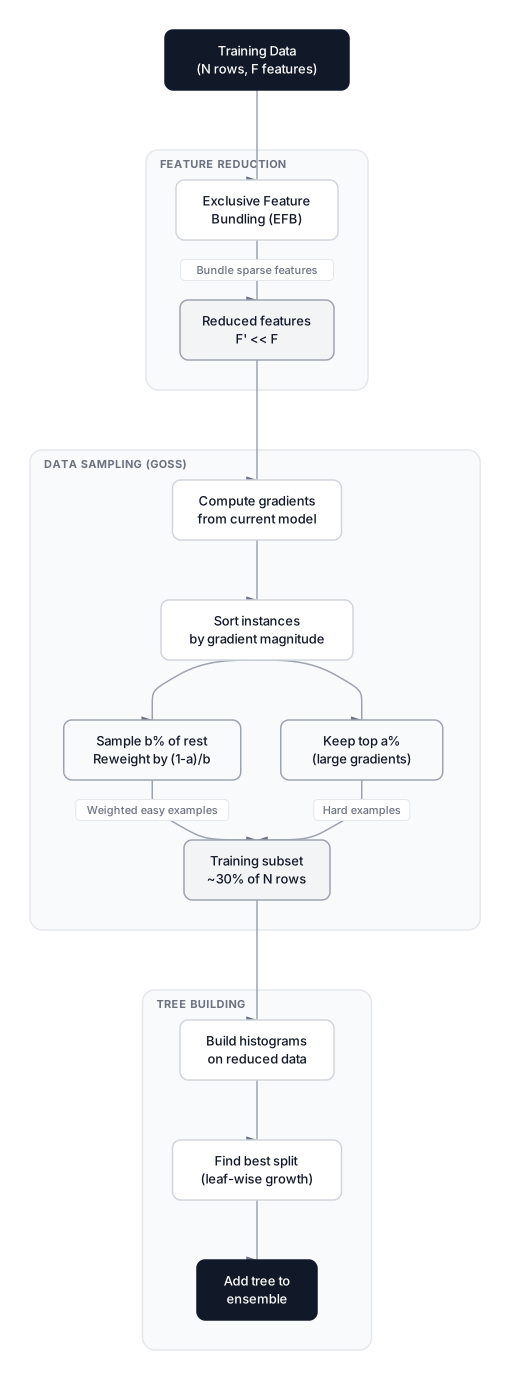 Click to expandHow GOSS and EFB speed up LightGBM training
The defaults (top_rate=0.2, other_rate=0.1) keep 20% of high-gradient instances and sample 10% of the rest, so each tree trains on about 30% of the data. On our 50 million flight dataset, that cuts each iteration from 50M rows to roughly 15M without measurably hurting accuracy.
Exclusive Feature Bundling (EFB)
EFB reduces the effective number of features by bundling mutually exclusive features into single columns. Two features are mutually exclusive when they are rarely non-zero at the same time, which happens constantly with one-hot encoded categoricals and sparse indicator features.
Consider our flight data after one-hot encoding the airline column. airline_AA, airline_UA, airline_DL, and 15 other columns are perfectly mutually exclusive: each row has exactly one of them set to 1. EFB detects this and merges them back into a single feature.
The bundling works through offsetting:
- Build a conflict graph. Each feature is a node. An edge connects two features if they conflict (both non-zero in the same row).
- Greedy graph coloring. Group features with minimal conflicts into bundles.
- Offset values. Shift values so each original feature occupies a unique range in the bundle. If
airline_AAtakes values [0, 1] andairline_UAtakes values [0, 1], EFB remapsairline_UAto [2, 3]. The combined feature takes values [0, 3], and the histogram still distinguishes which original feature contributed which value.
In Plain English: You packed 18 airline indicator columns into one column. The histogram now has 18 meaningful bins instead of 18 separate features each with 2 bins. Training cost drops by a factor of 18 for those features, and no information is lost.
EFB is especially powerful on datasets with hundreds of sparse features. In Kaggle competitions, datasets with 500+ one-hot columns see 10x or greater speedups from EFB alone.
Native Categorical Feature Handling
Unlike XGBoost, which requires you to encode categoricals yourself, LightGBM can split on categorical features directly. It finds the optimal partition of categories into two groups using gradient statistics, rather than forcing a one-hot or label encoding.
For a "route" feature with 300 unique airport pairs, label encoding imposes an artificial ordering (route 1 < route 2 < route 3) that has no real meaning. One-hot encoding creates 300 sparse columns. LightGBM's native approach finds the subset of routes that should go left and puts the rest right, based purely on which partition minimizes the loss.
To use this in practice, pass your categorical column indices via categorical_feature or set the column dtype to category in pandas.
Common Pitfall: Native categoricals work best when cardinality stays below roughly 1,000. For ultra-high cardinality (100K+ unique values), the partition search gets expensive. In those cases, target encoding or hashing is still the better path.
Critical Hyperparameters
Tuning LightGBM differs from tuning other tree-based models because leaf-wise growth responds to different knobs.
| Parameter | Default | Typical Range | What It Controls |
|---|---|---|---|
num_leaves | 31 | 15 to 4096 | Max leaves per tree. The primary complexity control. |
min_data_in_leaf | 20 | 20 to 500+ | Min samples per leaf. Main overfitting defense. |
max_depth | -1 | 3 to 15 | Hard depth cap. Secondary safety net. |
learning_rate | 0.1 | 0.005 to 0.3 | Shrinkage per tree. Lower means more trees needed. |
feature_fraction | 1.0 | 0.5 to 0.9 | Fraction of features sampled per tree. |
bagging_fraction | 1.0 | 0.5 to 0.9 | Fraction of rows sampled per tree. |
lambda_l1 | 0.0 | 0 to 10 | L1 regularization on leaf weights. |
lambda_l2 | 0.0 | 0 to 10 | L2 regularization on leaf weights. |
max_bin | 255 | 63 to 511 | Number of histogram bins. Lower means faster but rougher. |
num_leaves is the single most important parameter. Because LightGBM grows leaf-wise, num_leaves directly caps complexity. A rough relationship: num_leaves . Setting num_leaves=31 with max_depth=10 means max_depth never activates because .
Pro Tip: Start with num_leaves=31, learning_rate=0.05, and 1,000 rounds with early stopping. Then tune num_leaves and min_data_in_leaf together using Optuna or similar hyperparameter search. Adjusting num_leaves alone while leaving min_data_in_leaf at 20 is a recipe for overfitting on small datasets.
Flight Delay Classifier in LightGBM
Let's put all of this together. We will generate synthetic flight data that mimics real patterns: evening flights delay more, certain airlines have worse track records, and bad weather is the strongest predictor.
Expected Output:
Accuracy: 0.9350
Best iteration: 1

Feature importances (split count):
  temperature          13
  departure_hour       11
  wind_speed           4
  airline_code         1
  is_hub               1
The model converges well before 200 rounds thanks to early stopping. Wind speed and departure hour dominate feature importance because they carry the strongest signal for delays. The airline_code feature (4 categories) is handled through LightGBM's histogram encoding automatically.
When to Use LightGBM (and When Not To)
Choose LightGBM when:
- Your dataset has 100K+ rows. The histogram and GOSS optimizations pay off at scale.
- Training speed matters. Retraining daily, running hyperparameter search across hundreds of configs, or deploying with tight SLAs.
- You have high-cardinality categoricals. Native categorical handling beats manual encoding.
- Memory is tight. Histogram bins consume far less memory than raw feature values.
Choose something else when:
- Your dataset is under 5,000 rows. Leaf-wise growth overfits aggressively on tiny datasets. CatBoost with its ordered boosting handles small data more gracefully.
- You need minimal tuning. CatBoost's defaults are stronger out of the box. LightGBM demands careful
num_leavesandmin_data_in_leafsettings. - Your problem is non-tabular. Images, text, and sequential data need deep learning, not gradient boosting.
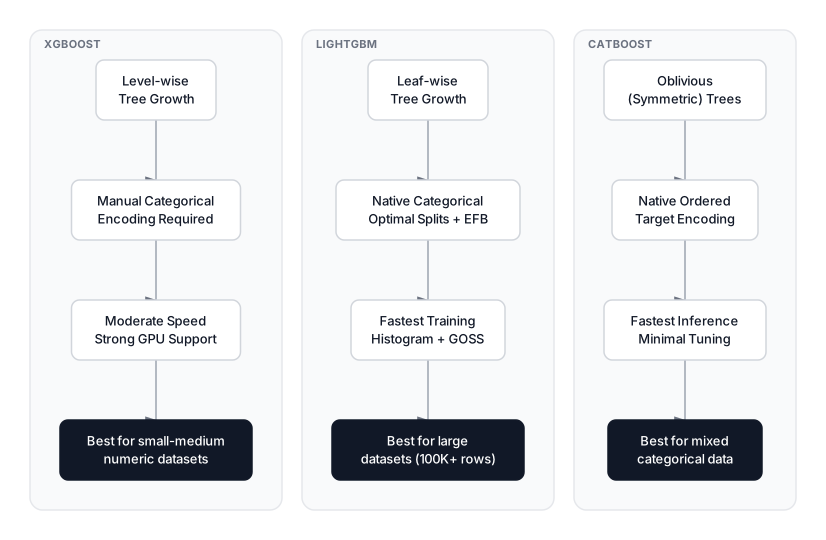 Click to expandXGBoost vs LightGBM vs CatBoost comparison across key dimensions
| Criterion | LightGBM | XGBoost | CatBoost |
|---|---|---|---|
| Tree growth | Leaf-wise | Level-wise (default) | Symmetric (oblivious) |
| Training speed (1M+ rows) | Fastest | Moderate | Moderate |
| Categorical handling | Native optimal split | Manual encoding | Ordered target encoding |
| Memory usage | Low (histogram bins) | Moderate | Moderate |
| Small data (<10K rows) | Overfits easily | Solid | Best defaults |
| Tuning effort | Moderate | Moderate | Minimal |
| Inference speed | Fast | Fast | Fastest (symmetric trees) |
Production Considerations
Training complexity. With histogram binning, each boosting round costs for histogram construction and for split finding, where is the number of leaves. GOSS reduces the effective by 60-80% per round.
Memory footprint. Histogram storage requires memory per node, not . For 50 million rows with 200 features, this drops memory from hundreds of GB to a few GB.
Distributed training. LightGBM supports data-parallel and feature-parallel modes out of the box. Data-parallel splits data across machines; each builds local histograms, then they merge. Feature-parallel splits features across machines and broadcasts split decisions.
Inference. Single-sample prediction is fast because trees are shallow. Batch prediction benefits from vectorized operations. For real-time serving, export the model to ONNX or treelite for sub-millisecond latency.
When LightGBM Fits the Workload
LightGBM earns its speed through three stacked optimizations, not just one. Histogram binning removes the sorting cost from every split search. GOSS cuts the number of training rows by focusing on hard examples. EFB collapses sparse feature columns into dense bundles. Together, these techniques can reduce training time and memory use relative to exact split search, but the speed and accuracy trade-offs depend on the dataset, hardware, library version, and configuration.
The catch is that leaf-wise growth is aggressive. Without proper num_leaves and min_data_in_leaf constraints, it will memorize noise. Treat these two parameters as non-negotiable starting points for every LightGBM project, and pair them with early stopping to prevent overshoot.
If you are deciding between boosting frameworks, start by understanding the mechanics of how gradient boosting works from scratch. For the comparison axis, read our guides on XGBoost for classification and CatBoost to see where each framework excels. On large tabular datasets with proper tuning, LightGBM remains the fastest path from raw data to a competitive model.
Interview Questions
Q: Why does LightGBM train faster than XGBoost on large datasets?
Three optimizations stack: histogram-based splitting replaces exact sorting with bin counting, GOSS reduces the effective training set by keeping only high-gradient instances and a sample of the rest, and EFB bundles mutually exclusive sparse features into single columns. Together, these give 10x-20x speedups on million-row datasets.
Q: What is the difference between leaf-wise and level-wise tree growth?
Level-wise growth expands all nodes at the current depth before moving deeper, producing balanced trees. Leaf-wise growth picks the single leaf with the highest loss reduction and splits it regardless of depth. Leaf-wise reaches lower loss in fewer splits but can overfit aggressively on small datasets because trees become deep and asymmetric.
Q: How does GOSS maintain unbiased gradient estimates despite discarding data?
GOSS keeps all instances with large gradients (top %) and randomly samples % of the rest. The sampled low-gradient instances get their gradients multiplied by , which compensates for the discarded portion. This reweighting ensures the estimated information gain remains close to the full-data estimate.
Q: When would you choose CatBoost over LightGBM?
CatBoost is preferable on small datasets (under 10K rows) where its ordered boosting reduces overfitting without heavy tuning, and on datasets with many categorical features where its native ordered target encoding avoids leakage. LightGBM is better when training speed is critical and the dataset is large enough (100K+ rows) for its optimizations to pay off.
Q: What happens if you set num_leaves too high relative to your data size?
The tree grows extremely deep on the branches with the strongest signal, effectively memorizing noise in those regions. Training accuracy stays high but validation accuracy drops. The fix is to pair num_leaves with a higher min_data_in_leaf (e.g., 100+) so that each leaf must contain enough samples to represent a real pattern rather than an outlier.
Q: How does LightGBM handle categorical features differently from XGBoost?
LightGBM partitions the categories of a feature into two optimal subsets by sorting them according to their gradient statistics and finding the partition that minimizes the loss. XGBoost requires manual encoding. LightGBM's approach avoids the dimensionality explosion of one-hot encoding and the artificial ordering of label encoding.
Q: You are training LightGBM on a 500-feature dataset and training is slow. What would you check first?
Check if many features are sparse or one-hot encoded, because EFB should bundle them automatically. Also lower max_bin to reduce histogram construction time, set feature_fraction to 0.7 to sample fewer features per tree, and verify that GOSS is enabled via boosting_type='goss'. Profile whether the bottleneck is I/O or computation before tuning further.
Hands-On Practice
In this hands-on tutorial. the power of LightGBM, a high-performance gradient boosting framework known for its speed and efficiency. You will learn how to implement the 'leaf-wise' tree growth strategy to predict passenger survival on a Titanic-style dataset. By the end, you will understand how LightGBM handles features and achieves high accuracy with significantly faster training times than traditional methods.
Dataset: Passenger Survival (Binary) Titanic-style survival prediction with clear class patterns. Women and first-class passengers have higher survival rates. Expected accuracy ≈ 78-85% depending on model.
Try experimenting with the num_leaves parameter; increasing it creates more complex trees which may increase training accuracy but risk overfitting on the test set. You can also adjust the learning_rate (try 0.01 or 0.1) to see how it affects the convergence speed and final performance. Finally, observe how 'Fare' and 'Age' often dominate feature importance, reflecting the historical reality of the dataset.