
A retail chain notices daily sales climbing over two years, but the CFO's revenue forecast misses by 15% every quarter. The issue isn't the forecasting model. It's that nobody looked at the data properly first. Time series exploratory data analysis is the diagnostic step that separates accurate forecasts from expensive guesses, and skipping it is the single most common reason models fail in production.
Standard EDA treats every row as independent. Shuffle a customer table and the distributions stay the same. Shuffle a time series and you destroy the signal entirely. The temporal ordering is the information. Every observation carries a memory of what came before it, and that memory determines which models will work and which will collapse.
Throughout this article, we'll use one consistent example: a synthetic retail dataset with 730 days of daily sales data containing an upward trend, monthly seasonality, and random noise. Every formula, every code block, and every diagram ties back to this same dataset.
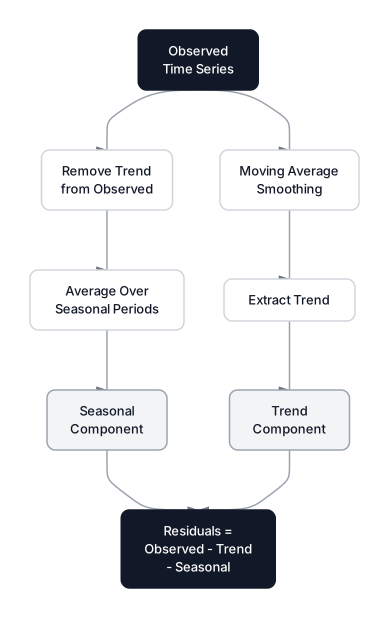 Click to expandTime series decomposition pipeline showing how observed data splits into trend, seasonal, and residual components
Time series data requires a different analytical mindset
Time series EDA differs from standard exploratory data analysis in one critical way: the order of observations carries statistical meaning. Standard EDA asks "what does the distribution look like?" Time series EDA asks "how does the past influence the present?"
In a standard dataset, observations are independent and identically distributed (i.i.d.). Row 50 has no relationship to row 49. In time series, row 50 exists because of row 49. This dependency structure, called autocorrelation, is the foundation of every time series model from ARIMA to LSTMs.
Pro Tip: If you can shuffle your dataframe rows and your plots still make sense, you're not dealing with time series data. You're dealing with a distribution.
The goal of time series EDA is to answer four questions before touching any model:
| Question | Tool | What It Reveals |
|---|---|---|
| What long-term direction exists? | Decomposition | Trend component |
| Are there repeating patterns? | Decomposition | Seasonal component |
| Is the series statistically stable? | ADF test | Stationarity |
| How far back does memory extend? | ACF/PACF | Lag structure |
Structural components of a time series
Every time series can be decomposed into three fundamental signals: Trend, Seasonality, and Residuals. Understanding these components tells you which forecasting approach to reach for. A strong trend calls for differencing. Clear seasonality points toward SARIMA or Holt-Winters. And the residual pattern reveals whether you've captured all the signal or left information on the table.
- Trend (): The long-term direction. Our retail sales climb from $200/day to $350/day over two years.
- Seasonality (): Repeating patterns at fixed intervals. Monthly purchase cycles create predictable peaks and valleys.
- Residuals (): Whatever remains after extracting trend and seasonality. Ideally, this looks like white noise.
Additive vs. multiplicative decomposition
The two primary decomposition models differ in how these components combine.
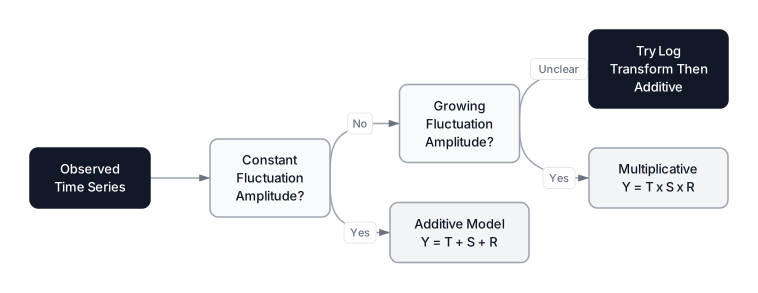 Click to expandDecision flow for choosing between additive and multiplicative decomposition models
Additive Model applies when seasonal fluctuations stay constant regardless of the trend level:
Where:
- is the observed value at time
- is the trend component at time
- is the seasonal component at time
- is the residual (noise) at time
In Plain English: The daily sales figure equals the baseline trend plus a fixed seasonal bump plus random noise. If the monthly sales cycle always swings by $30 whether the trend is at $200 or $350, the additive model fits.
Multiplicative Model applies when seasonal fluctuations grow or shrink proportionally with the trend:
Where:
- , , , have the same meanings as above
- and are now expressed as ratios (e.g., 1.12 means 12% above trend)
In Plain English: If the monthly swing is 12% of the current trend, then at $200 the swing is $24, but at $350 it's $42. The percentage stays constant while the dollar amount grows. This pattern is extremely common in financial data and growing businesses.
The following code demonstrates the difference with our retail dataset:
Expected output:
Additive model: seasonal amplitude stays constant
  First 6 months std:  24.8
  Last 6 months std:   25.1

Multiplicative model: seasonal amplitude grows with trend
  First 6 months std:  22.1
  Last 6 months std:   30.8
Notice how the additive model's standard deviation stays nearly identical between the first and last six months (24.8 vs. 25.1), while the multiplicative model's std jumps from 22.1 to 30.8 as the trend increases. This is the diagnostic clue: if your data's oscillation amplitude grows over time, reach for the multiplicative model.
Key Insight: When in doubt, apply a log transform to your data and use the additive model. Since , logging a multiplicative series converts it to an additive one. This transformation is a useful diagnostic when seasonal variation grows with the series level, but it should be checked against the observed data.
Decomposition with statsmodels
The seasonal_decompose function from statsmodels (stable release 0.14.6, dev release 0.15.0 as of March 2026) implements classical decomposition using moving averages. For more advanced decomposition, statsmodels also offers STL (Seasonal-Trend decomposition using LOESS) and MSTL for multiple seasonal patterns.
Expected output:
A four-panel plot showing the observed noisy signal, a clean ascending trend line, a repeating sinusoidal seasonal pattern, and scattered residual dots centered on zero.
Observed range: 160.5 to 392.7
Trend range:    200.1 to 345.8
Seasonal range: -25.3 to 26.7
Residual std:   15.7
If you see patterns in the residuals plot (waves, clusters, or drifting), the decomposition hasn't captured all the signal. Residuals should look like random static.
Common Pitfall: The period parameter in seasonal_decompose must match the actual seasonality in your data. Setting period=30 on data with weekly seasonality (period=7) will produce a meaningless decomposition. Always verify the period against domain knowledge or an autocorrelation plot before decomposing.
When to use classical decomposition (and when not to)
| Situation | Use Classical Decomposition? | Better Alternative |
|---|---|---|
| Quick visual diagnostic | Yes | N/A |
| Single clear seasonal period | Yes | N/A |
| Multiple overlapping seasons | No | MSTL or STL |
| Seasonal shape changes over time | No | STL with robust=True |
| Missing data present | No | STL (handles gaps) |
| Production forecasting pipeline | No | Model-based decomposition |
Classical decomposition is a diagnostic tool, not a forecasting method. Use it to understand your data, then choose a proper model. For production forecasting, check our guides on ARIMA or Prophet.
Stationarity is the gatekeeper for forecasting models
Stationarity means that the statistical properties of a time series do not change over time. The mean stays flat, the variance stays constant, and the autocorrelation structure remains the same whether you look at January or July. Most classical forecasting models, including all variants of ARIMA, assume stationarity. Feeding non-stationary data into these models produces unreliable forecasts because the model learns "rules" that keep changing.
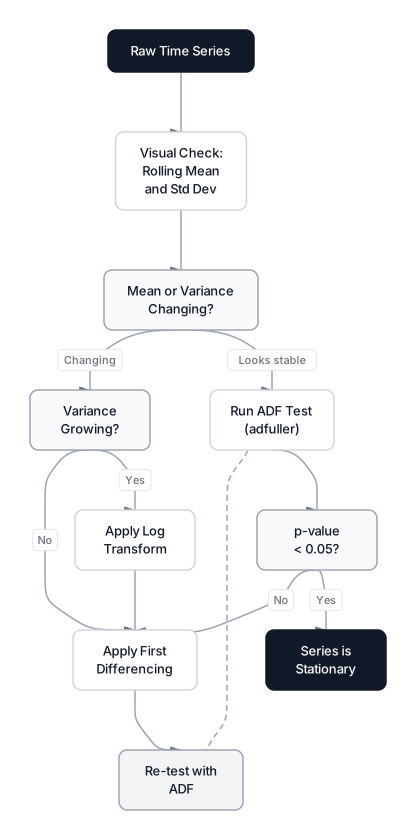 Click to expandStationarity testing decision tree from visual check through ADF test to differencing
Formal definition of weak stationarity
A process is weakly stationary if these three conditions hold:
Where:
- means the expected value is constant across all time points
- means the variance does not depend on
- means the autocovariance depends only on the lag , not on the specific time
In Plain English: In our retail data, if the average daily sales is $275 in the first year and also $275 in the second year, condition 1 holds. If the day-to-day volatility is the same in both years, condition 2 holds. And if the correlation between today's sales and yesterday's sales is identical no matter which month you measure it in, condition 3 holds. Our synthetic data fails condition 1 because of the upward trend.
Common Pitfall: Don't confuse stationarity with "nothing happening." A stationary series can fluctuate wildly (like stock returns). It just fluctuates around a fixed average with consistent volatility. White noise is the simplest stationary process.
The Augmented Dickey-Fuller test for stationarity
Visual inspection is subjective. The Augmented Dickey-Fuller (ADF) test, introduced by Said and Dickey (1984), provides a formal statistical answer. The test fits a regression model and checks for the presence of a unit root, which indicates non-stationarity.
- Null Hypothesis (): The series has a unit root (non-stationary).
- Alternative Hypothesis (): The series is stationary.
If the p-value falls below 0.05, reject the null and conclude stationarity. The ADF test also reports critical values at 1%, 5%, and 10% significance levels; the test statistic must be more negative than these thresholds to reject .
Expected output:
=== ADF Test: Original Series (non-stationary) ===
Test Statistic: -0.6415
p-value:        0.8613
Lags Used:      20
Critical Value (1%): -3.4396
Critical Value (5%): -2.8656
Critical Value (10%): -2.5689

=== ADF Test: After First Differencing (stationary) ===
Test Statistic: -16.9549
p-value:        0.000000
Lags Used:      20
Critical Value (1%): -3.4396
Critical Value (5%): -2.8656
Critical Value (10%): -2.5689
The original series has a p-value of 0.8613, meaning we cannot reject the null hypothesis of non-stationarity. The test statistic (-0.6415) is far less negative than even the 10% critical value (-2.5689). After first differencing (subtracting each value from its predecessor), the test statistic plummets to -16.9549 with a p-value of essentially zero. One round of differencing was sufficient.
Pro Tip: If first differencing doesn't achieve stationarity, try second differencing. In practice, you'll rarely need more than $d = 2$. If you need more, the data likely has structural breaks rather than a smooth trend, and you should consider regime-switching models instead.
Rolling statistics as a visual stationarity check
Before running the ADF test, a rolling mean and rolling standard deviation plot gives an immediate visual diagnostic. If the rolling mean drifts upward or the rolling standard deviation fans out, you're dealing with non-stationarity.
Expected output:
A plot showing the original sales data as a faint background, with the rolling mean climbing steadily from around 200 to 346 (confirming the trend), and the rolling std fluctuating between 18 and 28.
Rolling mean range: 200.1 to 346.0
Rolling std range:  18.4 to 28.1
The climbing rolling mean immediately signals non-stationarity. The rolling standard deviation fluctuates but doesn't systematically expand, which tells us the variance is roughly stable and we're dealing with an additive process rather than a multiplicative one.
Autocorrelation measures time series memory
Autocorrelation quantifies how strongly past values predict future values. If today's sales are highly correlated with yesterday's, the series has strong short-term memory. If sales from 30 days ago still correlate with today, there's a monthly pattern. Understanding this memory structure is essential for selecting the right model order when fitting ARIMA or related models.
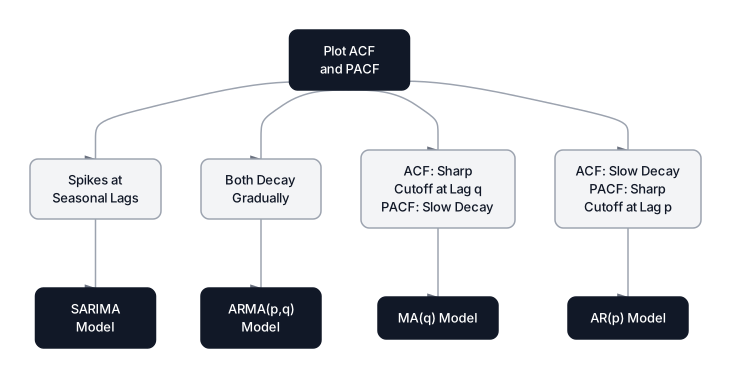 Click to expandACF and PACF interpretation guide mapping pattern types to model selections
The Autocorrelation Function (ACF)
ACF measures the Pearson correlation between a series and a lagged copy of itself:
Where:
- is the autocorrelation at lag
- is the observed value at time
- is the overall mean of the series
- is the total number of observations
- is the number of time steps between the two values being compared
In Plain English: The ACF at lag 30 answers: "Does the sales figure from 30 days ago tell me anything useful about today's sales?" In our retail data, lag 30 should show significant correlation because of the monthly seasonal cycle. Lags 1, 2, and 3 will also be significant because of the trend: yesterday's sales predict today's sales simply because both sit on the same upward slope.
The catch with ACF is that it captures indirect effects. If day 1 influences day 2, and day 2 influences day 3, the ACF at lag 2 picks up both the direct day-1-to-day-3 effect and the indirect chain through day 2.
Partial Autocorrelation Function (PACF)
PACF isolates the direct effect of lag by removing the influence of all intermediate lags. It answers: "After accounting for lags 1 through , does lag still directly predict the current value?"
This distinction matters for model selection. The PACF tells you how many AR terms you need, because each significant PACF lag represents a direct dependency your model must capture.
| Pattern | ACF Behavior | PACF Behavior | Suggested Model |
|---|---|---|---|
| Pure autoregressive | Slow exponential decay | Sharp cutoff at lag | AR() |
| Pure moving average | Sharp cutoff at lag | Slow exponential decay | MA() |
| Mixed process | Both decay gradually | Both decay gradually | ARMA(, ) |
| Seasonal pattern | Spikes at seasonal lags | Spikes at seasonal lags | SARIMA |
Expected output:
Two stacked plots. The ACF shows significant spikes at lags near 15 and 30 (corresponding to the monthly cycle), with values outside the blue confidence band at these seasonal lags. The PACF drops off sharply after the first few lags, with smaller spikes reappearing at seasonal multiples.
Significant ACF lags visible at multiples of ~30 (monthly seasonality)
PACF shows sharp dropoff after first few lags
Key Insight: Always compute ACF and PACF on the differenced (stationary) series, not the raw data. Running these functions on non-stationary data produces a slowly decaying ACF that reflects the trend, not the autocorrelation structure. The trend dominates everything and hides the seasonal patterns you're trying to find.
Handling noise and missing data in temporal sequences
Real-world time series come with gaps, outliers, and high-frequency noise that can mask the true signal. The temporal structure adds an extra constraint: you can't simply drop or impute rows the way you would with tabular data, because that distorts the time axis.
Resampling to reduce noise
When data is too granular (minute-level server logs, tick-level market data), noise overwhelms the signal. Resampling aggregates observations to a coarser frequency. The choice of aggregation function matters: use .sum() for counts and revenue (total weekly sales), .mean() for measurements (average daily temperature), and .last() for snapshot metrics (end-of-day portfolio value).
Common Pitfall: Be careful with the aggregation method. Using .mean() on sales data masks the total revenue. Using .sum() on temperature data produces meaningless numbers. Match the aggregator to the business definition of the metric.
Handling gaps in time series
Missing data in time series requires temporal awareness. Forward-fill (ffill) carries the last known value forward and works well for slow-moving series like daily temperatures. Linear interpolation fits a straight line between known points and works for smoothly varying signals. Neither approach is appropriate for large gaps (more than 5% of the series length), where you should flag the gap and consider modeling the segments separately.
Production considerations
For time series EDA at scale, keep these practical points in mind:
- Computational cost of decomposition: Classical decomposition runs in time. STL is due to LOESS smoothing. Both are fast enough for millions of observations on modern hardware.
- Memory for ACF computation: The full ACF up to lag requires storing the entire series in memory. For very long series (billions of ticks), compute ACF on a downsampled version or use FFT-based computation via
np.correlate. - Stationarity testing at scale: The ADF test fits an OLS regression with lags, making it in time complexity. For series over 10 million rows, consider the KPSS test as a faster alternative, and note that it uses the opposite null hypothesis (KPSS null = stationarity).
Conclusion
Time series EDA is the diagnostic foundation that determines whether your forecasting model will fly or crash. Every minute spent decomposing, testing stationarity, and reading ACF/PACF plots saves hours of debugging a model that was doomed from the start.
The decomposition step reveals the structural anatomy of your data. A clear trend tells you differencing is needed. Seasonal patterns guide you toward models with seasonal components. And clean residuals confirm you've extracted all the signal there is to extract. When combined with the ADF test for stationarity and ACF/PACF analysis for lag structure, these tools give you a complete diagnostic picture before you write a single line of modeling code.
For your next step, take these EDA insights directly into model building. If you found strong seasonality and a trend, ARIMA with seasonal differencing is the natural starting point. For complex multi-horizon problems, explore multi-step forecasting strategies. And if your data spans multiple aggregation levels (store, region, country), hierarchical time series methods ensure consistency across all levels.
Frequently Asked Interview Questions
Q: Why can't you shuffle a time series dataset the way you shuffle tabular data?
Time series data has temporal dependencies: each observation is influenced by its predecessors. Shuffling destroys this autocorrelation structure, which is the primary source of predictive signal. Models trained on shuffled time series would learn nothing about trends, seasonality, or momentum because the ordering that encodes those patterns would be gone.
Q: A series passes the ADF test (p < 0.05) but the rolling mean is clearly climbing. How do you reconcile this?
The ADF test can produce false negatives when the series has structural breaks, a deterministic trend with enough noise, or an insufficient number of lags. Always pair the ADF test with visual diagnostics (rolling mean/std plots) and consider supplementing with the KPSS test, which has the opposite null hypothesis. If visual evidence contradicts the ADF result, trust the visual evidence and investigate further.
Q: Explain the difference between ACF and PACF. When does each one matter?
ACF measures the total correlation between the series and its lagged values, including indirect effects passed through intermediate lags. PACF measures only the direct correlation at lag after removing the influence of lags 1 through . PACF matters most when selecting the order of an AR model: the lag where PACF cuts off indicates the AR order. ACF's cutoff similarly indicates the MA order.
Q: How do you decide between additive and multiplicative decomposition?
Plot the raw series and examine whether the amplitude of seasonal fluctuations stays constant (additive) or grows with the trend (multiplicative). A more quantitative approach: compute the standard deviation of the series in early and late segments. If the standard deviation increases proportionally with the level, use multiplicative. If it stays roughly the same, use additive. When uncertain, apply a log transform and use additive decomposition.
Q: Your ARIMA model produces poor forecasts despite achieving good in-sample fit. What EDA step did you likely skip?
The most common cause is failing to verify stationarity. ARIMA assumes the differenced series is stationary. If the original series has changing variance (heteroscedasticity) or structural breaks that differencing doesn't fix, the model will overfit to the training window and fail on new data. Another frequent culprit: not checking ACF/PACF residuals of the fitted model to verify no remaining autocorrelation.
Q: What is a unit root and why does the ADF test check for one?
A unit root means the time series is integrated of order 1 or higher: past shocks have a permanent effect on the series level rather than decaying over time. Mathematically, in the model , a unit root means , so the process is a random walk. The ADF test checks whether is significantly less than 1. If it is, shocks are temporary and the series is stationary.
Q: When would you use STL decomposition instead of classical seasonal decomposition?
STL (Seasonal-Trend decomposition using LOESS) is preferable when the seasonal pattern changes shape over time (time-varying seasonality), when outliers are present (STL resists outlier influence with robust=True), when you have missing values, or when you need to handle multiple seasonal periods using MSTL. Classical decomposition assumes the seasonal pattern is exactly the same in every cycle, which is rarely true in real-world data.
Hands-On Practice
Time series data requires a fundamental shift in how we approach Exploratory Data Analysis (EDA). Unlike standard datasets where rows are independent, time series data is defined by the dependency of the present on the past. We'll manually decompose a retail dataset into its core components, Trend, Seasonality, and Residuals, and visualize its stationarity properties using Pandas and Matplotlib, bypassing the need for specialized statistical libraries like statsmodels.
Dataset: Retail Sales (Time Series) 3 years of daily retail sales data with clear trend, weekly/yearly seasonality, and related features. Includes sales, visitors, marketing spend, and temperature. Perfect for ARIMA, Exponential Smoothing, and Time Series Forecasting.
By decomposing the time series, we revealed a steady upward trend and a distinct weekly seasonal pattern. The residual plot helps us verify if any signal remains 'hidden' (random noise implies we extracted everything). Finally, the high R² score in our simple model confirms that these structural components, seasonality and trend drivers, are indeed the key predictors for this data.