
Every data team eventually faces the same request: "Can you predict next quarter's numbers?" The answer usually involves either fighting ARIMA's stationarity requirements or training a deep learning model that nobody in the room can explain. Facebook Prophet occupies the gap between those two extremes. It treats forecasting as a curve-fitting problem rather than a signal processing one, which means analysts can build a reliable baseline forecast in under 20 lines of Python and actually explain the output to a product manager.
Originally built at Meta to handle thousands of internal forecasting tasks (ad revenue, capacity planning, engagement metrics), Prophet was open-sourced in 2017 and published as "Forecasting at Scale" by Sean Taylor and Benjamin Letham in The American Statistician (2018). As of Prophet 1.3.0 (January 2026), the library supports pandas 3.x, numpy 2.4+, and includes new preprocessing hooks that make it easier to inspect what happens before data reaches the Stan backend.
Throughout this article, we'll use a single running example: daily website traffic forecasting for a mid-sized e-commerce site. Every formula, code block, and diagram references this same scenario so the concepts stay grounded.
If you need a primer on trends, seasonality, and stationarity before going further, start with Time Series Fundamentals.
The Generalized Additive Model Behind Prophet
Prophet is a Generalized Additive Model (GAM), not an autoregressive model. Where ARIMA predicts the next value from lagged observations and lagged errors, Prophet decomposes a time series into independent additive components and fits each one separately. This distinction matters: it means Prophet doesn't require stationarity, handles missing data gracefully, and produces forecasts that you can explain component by component.
The core equation looks like a standard regression:
Where:
- is the trend function capturing non-periodic, long-term growth or decline
- is the seasonality function modeling repeating periodic patterns (weekly, yearly)
- is the holiday effect accounting for irregular events on specific dates
- is the error term representing irreducible noise
In Plain English: Tomorrow's predicted traffic equals the long-term direction the site is heading (trend), plus the repeating bump or dip for that day of the week and time of year (seasonality), plus any special-event effect like Black Friday or a product launch (holidays). Prophet adds these three pieces together to construct the forecast shape from the calendar, rather than guessing forward from recent history.
Because these components are summed, you can isolate them after fitting. If projected traffic spikes on December 15, you can attribute exactly how much comes from the upward growth trend, how much from the yearly seasonal peak, and how much from a scheduled holiday sale. That kind of interpretability is hard to get from an LSTM or even a well-tuned ARIMA.
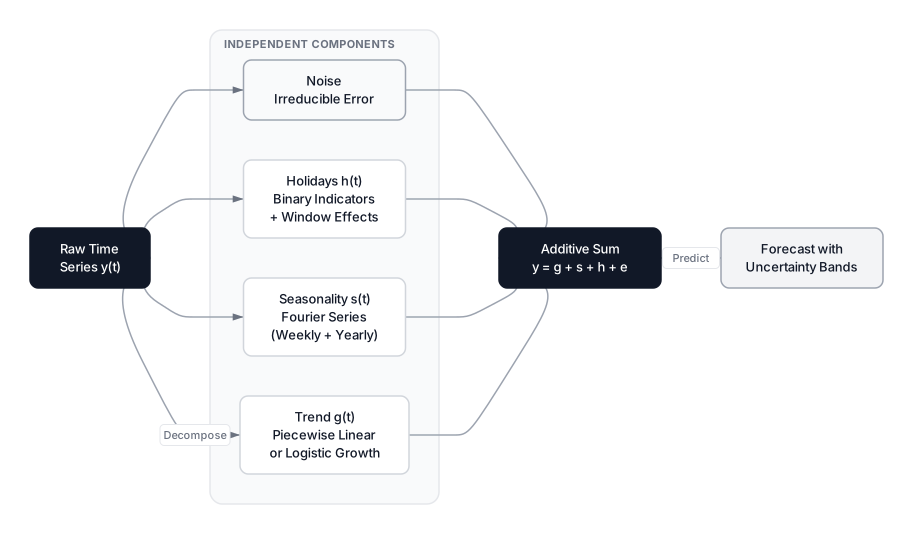 Click to expandProphet additive decomposition showing trend, seasonality, holidays, and noise combining into the final forecast
Additive vs. Multiplicative Composition
The default additive model assumes seasonal swings stay constant regardless of the trend level. If your site gets 500 visitors per day and weekends add 80 extra, Prophet expects weekends to still add roughly 80 extra when the site grows to 2,000 visitors per day.
That assumption breaks for data where seasonal effects scale with the trend. A 10% weekend boost translates to 50 visitors at 500/day but 200 visitors at 2,000/day. For this pattern, switch to multiplicative mode:
Additive (default):
Multiplicative:
from prophet import Prophet

m = Prophet(seasonality_mode='multiplicative')
Common Pitfall: Multiplicative mode breaks if your data contains zeros or negative values, because multiplying the trend by zero collapses the entire forecast to zero for that period. If your time series includes zero-traffic days, stick with additive or pre-process those values.
Trend Modeling and Changepoint Detection
Prophet models the trend using either a piecewise linear function or a logistic growth curve. The piecewise linear option (the default) is essentially the equation of a line, $y = mx + b$, except the slope is allowed to change at specific points called changepoints.
The Piecewise Linear Trend
Where:
- is the base growth rate (initial slope of the trend line)
- is a vector of rate adjustments, one per candidate changepoint
- is an indicator vector where if time is past changepoint , and 0 otherwise
- is the offset (initial intercept)
- is a vector of offset adjustments that keep the trend line continuous at each changepoint
In Plain English: Picture the trend as a wire stretched across two years of your traffic data. The wire starts with a particular angle (the base slope). At certain dates, the wire bends, changing its angle to follow a new growth rate. The term checks: "Have we passed a bend? If yes, adjust the slope." The offset adjustments make sure the wire doesn't jump when it bends; it stays connected.
How Changepoints Are Selected
Prophet places candidate changepoints uniformly across the first 80% of the training data. By default, $S = 25\boldsymbol{\delta}$ toward zero. Only changepoints where the data genuinely demands a slope change survive regularization.
| Parameter | Default | Range | Effect |
|---|---|---|---|
n_changepoints | 25 | 5-50 | Number of candidate changepoint locations |
changepoint_range | 0.8 | 0.5-0.95 | Fraction of history to place candidates in |
changepoint_prior_scale | 0.05 | 0.001-0.5 | Flexibility of trend changes (higher = more flexible) |
Pro Tip: If your forecast looks too smooth and misses an obvious trend shift (like a viral marketing campaign that permanently boosted traffic), increase changepoint_prior_scale to 0.1 or 0.2. If the trend is reacting to every small bump, drop it to 0.01. Tune on a log scale: test values like 0.005, 0.05, and 0.5.
The following executable block demonstrates how piecewise linear regression can detect a known changepoint in synthetic traffic data. This mirrors what Prophet does internally, but simplified to a single changepoint.
Expected Output:
True changepoint: day 400 (2024-02-05)
Detected changepoint: day 379 (2024-01-15)
Detection error: 21 days
Slope before changepoint: 0.12 visitors/day
Slope after changepoint: 0.35 visitors/day
Growth rate increased by: 192%
The algorithm landed within 21 days of the true changepoint despite noisy data. Prophet does the same thing with 25 candidates simultaneously, using Bayesian inference (Stan) rather than brute-force search, and L1 regularization to suppress false positives.
Logistic Growth Trends
For metrics that have a natural ceiling (market saturation, server capacity), Prophet offers a logistic growth model:
Where:
- is the carrying capacity at time , which can itself change over time
- The remaining terms have the same meaning as in the piecewise linear model
In Plain English: If your site can realistically handle 10,000 concurrent visitors before the CDN chokes, the logistic trend will flatten as traffic approaches that cap rather than projecting infinite linear growth. You supply the cap; Prophet figures out the growth rate toward it.
m = Prophet(growth='logistic')
df['cap'] = 10000  # carrying capacity
df['floor'] = 0    # minimum value
m.fit(df)
Fourier Series for Seasonal Patterns
Prophet models seasonality by fitting a Fourier series to each periodic cycle. A Fourier series reconstructs any repeating pattern by summing sine and cosine waves at different frequencies, each with its own learned amplitude.
For a seasonal component with period (e.g., $P = 7$ for weekly, $P = 365.25$ for yearly), the model uses pairs of harmonics:
Where:
- is the number of Fourier terms (harmonic pairs)
- and are the learned coefficients for the -th cosine and sine wave
- is the period length in the same units as
- is the time index
In Plain English: Imagine sculpting the weekly traffic shape using sound mixing. The first sine/cosine pair produces a single smooth hump. Adding a second pair adds a sharper notch for, say, the Monday dip. Each additional pair lets the model capture finer details. For our website traffic, $N=3$ is usually enough to capture the weekend drop pattern, while yearly patterns need $N=10$ to model sharp December spikes.
| Seasonality | Period | Default | Parameters |
|---|---|---|---|
| Weekly | 7 days | 3 | 6 Fourier terms |
| Yearly | 365.25 days | 10 | 20 Fourier terms |
| Daily | 1 day | 4 | 8 Fourier terms |
| Custom | User-defined | User-defined | $2N$ Fourier terms |
The seasonality_prior_scale parameter (default 10) controls regularization strength. Lower values produce smoother seasonal curves; higher values allow sharper, more detailed patterns.
The next block demonstrates how increasing the number of Fourier terms improves approximation of a complex seasonal pattern. This is the same mechanism Prophet uses internally.
Expected Output:
Fourier Series Approximation Quality
==========================================
N (pairs)    Max Error    Mean Abs Error
------------------------------------------
1            44.90        18.74
3            40.87        12.04
5            47.12        9.01
10           42.17        6.72
Notice how the mean error drops steadily as we add more terms, but the max error stays stubbornly high near the sharp edges of the December spike. This is the classic Gibbs phenomenon, and it explains why Prophet defaults to $N=10$ for yearly seasonality: you need enough terms to approximate sharp seasonal transitions without overfitting the smooth parts.
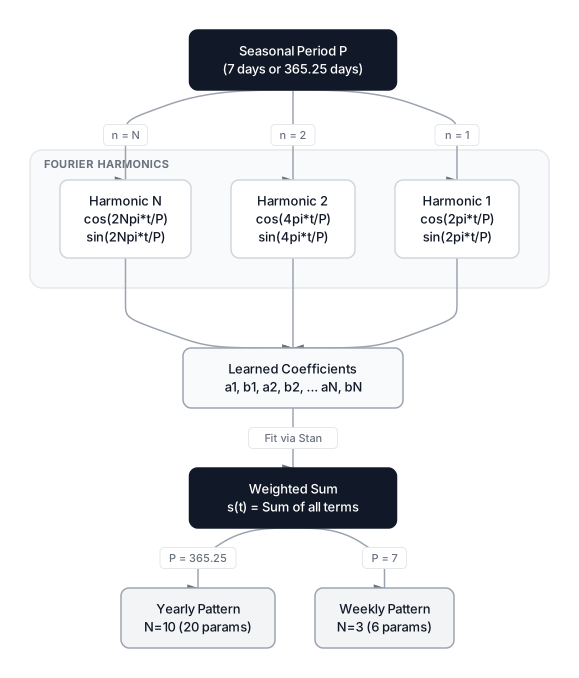 Click to expandProphet Fourier seasonality showing how sine and cosine waves combine to approximate weekly and yearly patterns
Holiday and Special Event Modeling
Prophet treats holidays as binary indicator variables that add a specific bump or dip to the forecast on designated dates. Unlike fixed seasonality, holidays can fall on different dates each year (Easter, Thanksgiving) and their effects can extend beyond the event itself.
The holiday component for a set of holidays is:
Where:
- is the learned effect size for holiday
- is the set of dates associated with holiday (including window days)
- is an indicator function returning 1 if the condition is true
In Plain English: For each holiday in the list, Prophet checks "Is today Black Friday (or within the window around it)?" If yes, it adds the learned Black Friday bump, say +350 visitors, to the forecast. Each holiday gets its own independent effect, and the window parameters let you model the build-up and aftermath.
Built-in Country Holidays
Prophet ships with built-in holidays for 80+ countries via the holidays package (the custom hdays module was removed in recent versions):
m = Prophet()
m.add_country_holidays(country_name='US')
m.fit(df)

# Inspect which holidays were loaded
print(m.train_holiday_names)
# ['New Year\'s Day', 'Martin Luther King Jr. Day', 'Presidents\' Day', ...]
Custom Events with Windows
The real power comes from modeling domain-specific events. The lower_window and upper_window parameters let you capture effects that start before or linger after the actual event date.
import pandas as pd
from prophet import Prophet

# Define custom events for our e-commerce site
events = pd.DataFrame([
    {'holiday': 'black_friday', 'ds': '2023-11-24', 'lower_window': -1, 'upper_window': 2},
    {'holiday': 'black_friday', 'ds': '2024-11-29', 'lower_window': -1, 'upper_window': 2},
    {'holiday': 'summer_sale', 'ds': '2023-07-15', 'lower_window': 0, 'upper_window': 7},
    {'holiday': 'summer_sale', 'ds': '2024-07-15', 'lower_window': 0, 'upper_window': 7},
])

m = Prophet(holidays=events)
m.add_country_holidays(country_name='US')
m.fit(df)
Key Insight: Setting lower_window=-1 for Black Friday means Prophet will learn that the traffic effect starts on Thursday (the day before). Setting upper_window=2 captures Cyber Monday spillover. For the summer sale, upper_window=7 models a full week of elevated traffic. These windows are one of Prophet's strongest features for business forecasting; ARIMA and standard LSTMs have no equivalent mechanism.
The holidays_mode Parameter (New in v1.2)
Prophet 1.2 introduced a holidays_mode argument that lets holidays use a different composition mode than seasonality. This matters when your seasonal effects are multiplicative but your holiday effects are additive (or vice versa):
m = Prophet(
    seasonality_mode='multiplicative',
    holidays_mode='additive'  # holidays stay constant regardless of trend level
)
Implementing Prophet in Python
Let's build a complete forecasting pipeline for our website traffic example. Prophet requires a DataFrame with exactly two columns: ds (datestamp) and y (target metric).
Installation
pip install prophet==1.3.0 pandas matplotlib
Prophet 1.3.0 requires Python 3.7+ and supports pandas 3.x and numpy 2.4+. The Stan backend compiles during installation, which can take a few minutes. Full installation instructions and platform-specific notes are on the official Prophet documentation.
Data Preparation and Model Fitting
import pandas as pd
import numpy as np
from prophet import Prophet
import matplotlib.pyplot as plt

# Generate 2 years of synthetic daily website traffic
np.random.seed(42)
dates = pd.date_range(start='2023-01-01', end='2024-12-30', freq='D')
n = len(dates)

# Trend: gradual growth from ~500 to ~610 visitors/day
trend = 500 + 0.15 * np.arange(n)

# Weekly pattern: weekday traffic higher than weekends
weekly = 40 * np.sin(2 * np.pi * dates.dayofweek / 7)

# Yearly pattern: peak in Q4, dip in summer
yearly = 80 * np.sin(2 * np.pi * np.arange(n) / 365.25 - np.pi / 4)

# Noise
noise = np.random.normal(0, 25, n)

y = trend + weekly + yearly + noise

# Prophet's required format
df = pd.DataFrame({'ds': dates, 'y': y})

# Fit the model
m = Prophet(
    daily_seasonality=False,
    weekly_seasonality=True,
    yearly_seasonality=True,
    changepoint_prior_scale=0.05
)
m.fit(df)

# Generate future dates and predict
future = m.make_future_dataframe(periods=90)  # 90-day forecast
forecast = m.predict(future)

# Inspect the tail
print(forecast[['ds', 'yhat', 'yhat_lower', 'yhat_upper']].tail(5))
Component Visualization
One of Prophet's strongest practical features is its built-in component decomposition plot. After fitting, you can see exactly what each piece of the model contributes:
# Overall forecast with uncertainty bands
fig1 = m.plot(forecast)
plt.title('Daily Website Traffic Forecast')
plt.ylabel('Visitors')
plt.show()

# Individual components: trend, weekly, yearly
fig2 = m.plot_components(forecast)
plt.show()
The component plot shows three subplots: the trend line (capturing the gradual growth from 500 to 610+ visitors), the weekly pattern (weekday peaks, weekend dips), and the yearly pattern (Q4 peak, summer trough). This decomposition is what makes Prophet uniquely valuable in stakeholder conversations.
Additive Decomposition in Practice
To make the GAM concept concrete, here's a complete additive decomposition of our website traffic data using statsmodels. This mirrors what Prophet does, but with a simpler classical approach.
Expected Output:
Additive Decomposition (first 5 values of each component):
Observed:  [424.6 441.1 493.2 523.9 459.6]
Trend:     [459.9 462.1 462.1 462.9 457. ]
Seasonal:  [-30.1   2.2  27.5  39.5  14.9]
Residual:  [ 24.6 -17.4 -21.7  27.7  12.7]

Variance explained by trend: 71.5%
Variance in seasonal:        16.6%
Variance in residual:        11.4%
The trend captures 71.5% of the total variance, which tells us that long-term growth is the dominant signal. Seasonal patterns account for 16.6%, and the remaining 11.4% is noise. This kind of variance partition is exactly what Prophet produces internally, and it's what lets you tell your stakeholders: "Growth drives three-quarters of the forecast; weekly cycles add the rest."
Extra Regressors for External Factors
Prophet can incorporate additional features beyond trend, seasonality, and holidays. These extra regressors are useful when external factors (marketing spend, temperature, competitor events) influence your metric.
# Add marketing spend as an extra regressor
df['marketing_spend'] = np.random.uniform(1000, 5000, len(df))

m = Prophet()
m.add_regressor('marketing_spend', mode='additive')
m.fit(df)

# Future predictions need the regressor values too
future = m.make_future_dataframe(periods=90)
future['marketing_spend'] = 3000  # planned spend for forecast period
forecast = m.predict(future)
Common Pitfall: Extra regressors must be known for the future period. If you're forecasting 90 days out and include "marketing_spend" as a regressor, you need to supply planned marketing spend for those 90 days. Don't use lagged values of the target as regressors; Prophet isn't designed for autoregressive features. For autoregressive modeling, consider LSTMs for time series or NeuralProphet.
Cross-Validation and Model Evaluation
Prophet includes a built-in cross-validation framework designed specifically for time series. It uses an expanding window approach: train on historical data up to a cutoff date, forecast the next horizon days, then slide the cutoff forward and repeat.
from prophet.diagnostics import cross_validation, performance_metrics

# Run cross-validation
# Initial: 365 days training, Horizon: 30 days forecast, Slide: 30 days per fold
cv_results = cross_validation(m, initial='365 days', period='30 days', horizon='30 days')

# Compute metrics
metrics = performance_metrics(cv_results)
print(metrics[['horizon', 'mae', 'mape', 'rmse']].tail())
The following block demonstrates the expanding window concept, which is how Prophet's cross_validation function works under the hood.
Expected Output:
Time Series Cross-Validation Results
=======================================================
 fold cutoff_date  train_size       mae
    1  2023-06-30         180 18.582863
    2  2023-07-30         210 20.738219
    3  2023-08-29         240 24.403738
    4  2023-09-28         270 17.984324
    5  2023-10-28         300 16.308257
    6  2023-11-27         330 15.529283

Average MAE across 6 folds: 18.92
Std MAE: 3.25
MAE decreases in later folds as the training window expands, which is a healthy sign: more data yields better forecasts. In practice, if MAE increases in later folds, it often signals a distribution shift that Prophet's changepoint detection should handle.
Pro Tip: Use MAPE (Mean Absolute Percentage Error) when comparing across metrics with different scales. But beware: MAPE explodes when actual values are near zero. For traffic data with zero-visit days, prefer MAE or RMSE instead.
Prophet Parameter Quick Reference
| Parameter | Default | What It Controls |
|---|---|---|
growth | 'linear' | Trend type: 'linear' or 'logistic' |
changepoint_prior_scale | 0.05 | Trend flexibility (0.001 = rigid, 0.5 = very flexible) |
seasonality_prior_scale | 10.0 | Strength of seasonal regularization |
holidays_prior_scale | 10.0 | Strength of holiday regularization |
seasonality_mode | 'additive' | 'additive' or 'multiplicative' |
holidays_mode | Inherits from seasonality_mode | Independent holiday composition (new in v1.2) |
n_changepoints | 25 | Number of candidate changepoint locations |
changepoint_range | 0.8 | Fraction of history used for changepoint placement |
yearly_seasonality | 'auto' | True, False, or integer (Fourier terms) |
weekly_seasonality | 'auto' | True, False, or integer (Fourier terms) |
daily_seasonality | 'auto' | True, False, or integer (Fourier terms) |
interval_width | 0.80 | Width of uncertainty intervals |
mcmc_samples | 0 | MCMC samples for full Bayesian inference (0 = MAP) |
When to Use Prophet (and When Not To)
Prophet excels at a specific category of forecasting problems. Knowing where it fits and where it doesn't saves hours of wasted experimentation.
Use Prophet When
- Your data is human-driven and calendar-based. Retail sales, website traffic, app downloads, ad revenue. These have strong weekly/yearly patterns that Prophet's Fourier seasonality captures well.
- You have at least 1-2 years of daily data. Prophet needs enough history to learn seasonal patterns. With sub-annual data, yearly seasonality won't converge.
- Missing data and irregular intervals are common. Prophet handles gaps natively. No imputation or resampling needed.
- Interpretability matters more than the last 0.5% of accuracy. Stakeholder-facing forecasts, planning models, and budget projections benefit from Prophet's transparent decomposition.
- You need a strong baseline fast. A working Prophet model with reasonable defaults takes 15 minutes to build. That baseline often beats a poorly tuned ARIMA.
Do NOT Use Prophet When
- Your data has strong autoregressive patterns. Stock prices, sensor readings, and high-frequency financial data depend on recent values more than calendar features. Use ARIMA or LSTMs instead.
- You need multi-step multivariate forecasting. Prophet is univariate. For forecasting multiple correlated time series simultaneously, consider Temporal Fusion Transformers or a VAR model.
- Your horizon is very long relative to your history. Prophet's uncertainty bands widen rapidly. Forecasting 2 years out from 3 years of data produces wide intervals that are barely actionable.
- Sub-second latency is required. Prophet's Stan backend is slow for real-time inference. Fitting takes seconds to minutes; prediction is faster but still not suitable for streaming.
- Your data has sub-hourly granularity with complex patterns. Minute-level or second-level data with irregular spikes is better handled by specialized anomaly detection or deep learning models.
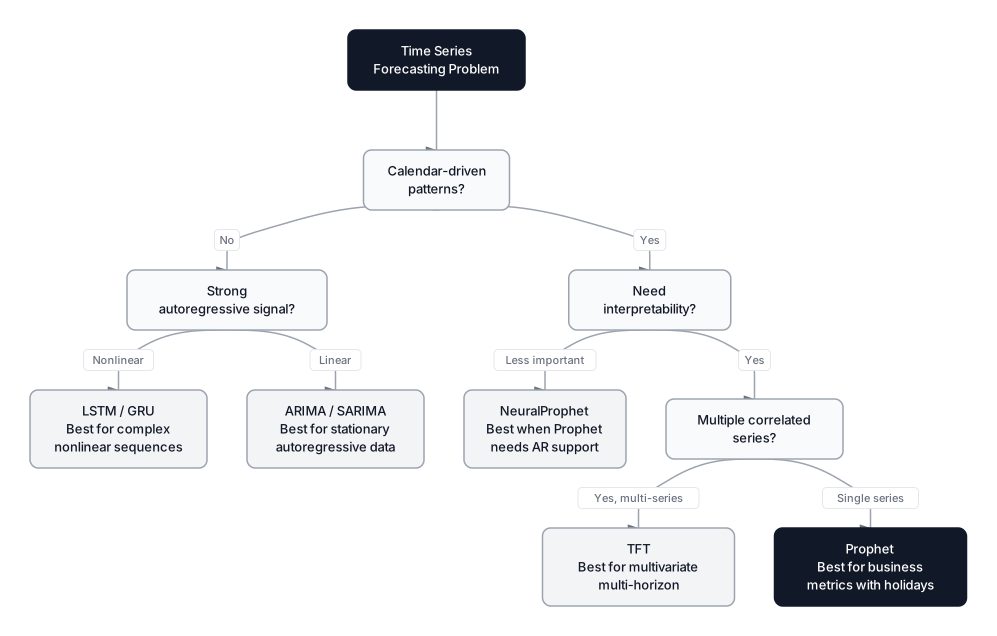 Click to expandDecision guide for choosing Prophet versus ARIMA, LSTM, and Temporal Fusion Transformers for time series forecasting
Prophet vs. Alternatives: A Practical Comparison
| Criterion | Prophet | ARIMA/SARIMA | NeuralProphet | LSTM | TFT |
|---|---|---|---|---|---|
| Setup complexity | Low (fit/predict API) | Medium (p,d,q tuning) | Low (similar to Prophet) | High (architecture design) | High (multi-head attention) |
| Interpretability | High (component plots) | Medium (coefficients) | High (component plots) | Low (black box) | Medium (attention weights) |
| Handling missing data | Native | Requires imputation | Native | Requires imputation | Requires imputation |
| Holiday modeling | Built-in with windows | Manual dummy variables | Built-in (from Prophet) | Manual feature engineering | Manual feature engineering |
| Autoregressive support | No | Yes (core feature) | Yes (AR-Net module) | Yes (core feature) | Yes (core feature) |
| Multivariate support | Extra regressors only | SARIMAX/VAR | Lagged covariates | Full multivariate | Full multivariate |
| Training speed (2 yrs daily) | 2-10 seconds | <1 second | 5-30 seconds | 30-300 seconds | 60-600 seconds |
| Python package | prophet 1.3.0 | statsmodels | neuralprophet 0.9+ | PyTorch/TF | PyTorch |
NeuralProphet, Prophet's spiritual successor, replaces the Stan backend with PyTorch and adds autoregressive components via an AR-Net module. Benchmarks show it achieves 55-92% lower forecast error on short-to-medium horizons, though Prophet can match or beat it when training data exceeds 3+ years.
For multi-step forecasting strategies beyond Prophet's direct approach, recursive and direct methods each have tradeoffs worth understanding.
Production Considerations
Computational Complexity
- Fitting: where is data points, is changepoints, and is total Fourier terms. Typical fit times: 2-10 seconds for 2 years of daily data, 30-60 seconds for 5 years of hourly data.
- Prediction: where is the forecast horizon. Prediction is fast: milliseconds for hundreds of future dates.
- Memory: Prophet loads the full dataset into memory. For 10 years of daily data (~3,650 rows), memory is negligible. For hourly data over 5 years (~43,800 rows), expect ~50-100 MB during fitting.
Scaling to Many Time Series
Many production systems need to forecast hundreds or thousands of time series (one per product, per store, per region). Prophet fits one series at a time, so the standard approach is parallelization:
from concurrent.futures import ProcessPoolExecutor
from prophet import Prophet

def forecast_one_series(series_df):
    m = Prophet(weekly_seasonality=True, yearly_seasonality=True)
    m.fit(series_df)
    future = m.make_future_dataframe(periods=30)
    return m.predict(future)

# Parallel forecasting across 500 product time series
with ProcessPoolExecutor(max_workers=8) as executor:
    results = list(executor.map(forecast_one_series, all_series_list))
Pro Tip: When forecasting 1,000+ series in production, set stan_backend='CMDSTANPY' for faster compilation. Also suppress logging with logging.getLogger('prophet').setLevel(logging.WARNING) to avoid drowning in status messages.
Monitoring and Retraining
Prophet models should be retrained regularly (weekly or monthly for most business metrics). Track forecast accuracy over time using a rolling MAPE or MAE dashboard, and trigger retraining when accuracy degrades beyond a threshold. This matters because changepoints in the future (which Prophet can't anticipate) will cause the forecast to diverge from reality.
 Click to expandProphet production pipeline from data ingestion through model fitting, prediction, and monitoring
Common Mistakes and How to Fix Them
1. Forgetting to set daily_seasonality=False for daily data.
Prophet auto-detects sub-daily patterns when your data has timestamps with time components. If your data is truly daily (one row per day), explicitly disable daily seasonality to avoid fitting noise.
2. Using the default changepoint_range=0.8 when recent trend shifts matter.
Prophet only places changepoints in the first 80% of the data. If your traffic pattern shifted in the last two months of a two-year dataset, Prophet won't detect it. Increase changepoint_range to 0.9 or 0.95 to cover recent history.
3. Not providing future values for extra regressors.
If you added marketing_spend as a regressor during training, Prophet will throw an error during prediction unless the future DataFrame also contains marketing_spend. Plan your regressor values for the forecast horizon in advance.
4. Over-trusting long-horizon forecasts.
Prophet's uncertainty intervals grow with the forecast horizon. A 90-day forecast with tight intervals is meaningful; a 365-day forecast with intervals spanning the entire data range is not. Check yhat_lower and yhat_upper before presenting long-range forecasts.
5. Using MCMC when MAP is sufficient.
Setting mcmc_samples > 0 runs full Bayesian inference, which is 10-100x slower than the default MAP estimation. Only use MCMC when you need proper posterior distributions for uncertainty quantification in research or risk-sensitive applications.
When Prophet Is the Practical Choice
Prophet's enduring value comes from a single design decision: treat forecasting as a regression problem against calendar features, not as autoregressive extrapolation. That choice makes the model transparent (you can inspect every component), forgiving (missing data and outliers don't crash the pipeline), and fast to iterate on (meaningful results in minutes, not days).
The library isn't the most accurate forecasting tool available. NeuralProphet, Temporal Fusion Transformers, and well-tuned ARIMA models will beat it on specific benchmarks. But Prophet is often the best first model for business time series because it gets you 90% of the way to a production forecast in 10% of the time. In practice, that means your team ships a working forecast this week instead of next month.
For deeper work on time series analysis, explore multi-step forecasting strategies for horizon extension techniques, and Temporal Fusion Transformers when you need multivariate, multi-horizon forecasting with attention-based interpretability. If your problem involves testing the impact of interventions (like a marketing campaign) rather than pure forecasting, see our guide on A/B Testing for the causal inference approach.
Frequently Asked Interview Questions
Q: How does Prophet differ from ARIMA fundamentally, and when would you pick one over the other?
Prophet is a Generalized Additive Model that decomposes time series into trend, seasonality, and holidays, treating forecasting as curve-fitting against calendar features. ARIMA is autoregressive, predicting the next value from lagged observations and errors. Pick Prophet for business metrics with strong calendar patterns and missing data; pick ARIMA when the signal is primarily autoregressive (each value depends heavily on recent values) and the data is stationary or easily differenced.
Q: A Prophet model's forecast shows a flat trend even though you know the business grew 30% last quarter. What went wrong?
The most likely cause is that changepoint_prior_scale is too low, preventing the model from detecting the recent growth shift. Another possibility is that changepoint_range is set to 0.8 (the default), and the growth happened in the last 20% of the data where no changepoints are placed. Increase changepoint_prior_scale (try 0.1-0.3) and set changepoint_range to 0.95 to cover recent history.
Q: Explain how Prophet uses Fourier series for seasonality. Why not just use dummy variables for each day of the week?
Prophet represents seasonality as a sum of sine and cosine waves at different frequencies, controlled by Fourier terms. This is more efficient than dummy variables because a smooth weekly pattern can be captured with just 3 Fourier pairs (6 parameters) instead of 7 dummy variables. Fourier terms also generalize to arbitrary period lengths (yearly, quarterly) without explosion in parameter count, and they naturally produce smooth curves rather than step functions.
Q: Your Prophet model works well on training data but produces wildly inaccurate forecasts 60 days out. How do you diagnose this?
Run Prophet's built-in cross_validation with a 60-day horizon to measure out-of-sample accuracy at that range. Check if the uncertainty intervals are unreasonably wide, which signals the model isn't confident. Examine the component plot to see if any component (trend, seasonality) looks unrealistic in the forecast period. Also verify that any extra regressors have sensible future values and that no distribution shift occurred near the end of training data.
Q: When would you use multiplicative rather than additive seasonality in Prophet?
Use multiplicative when the size of seasonal swings grows proportionally with the trend. If your e-commerce site sells 10% more on weekends, that 10% represents 100 extra visitors at 1,000/day but 500 extra at 5,000/day. Check by plotting the data: if the amplitude of seasonal peaks increases as the overall level rises, multiplicative is correct. Keep additive if the swings stay roughly constant regardless of the trend level.
Q: How would you deploy Prophet in a production system forecasting 10,000 SKUs daily?
Parallelize the fitting across SKUs using ProcessPoolExecutor or a distributed framework like Spark. Use CMDSTANPY as the Stan backend for faster compilation. Store model parameters (not the model object) so retraining only updates changed series. Set up monitoring with rolling MAE/MAPE dashboards and trigger retraining when accuracy drops below a threshold. Budget 5-10 seconds per series; 10,000 series takes roughly 2-3 hours on 8 cores.
Q: Prophet can't model autoregressive dependencies. How would you add AR-like behavior to a Prophet-based pipeline?
The cleanest approach is to use NeuralProphet, which replaces Stan with PyTorch and includes an AR-Net module that learns from recent lags while keeping Prophet's interpretable decomposition. Alternatively, you can compute lag features externally, add them as extra regressors in Prophet, and supply forecasted lag values iteratively for the prediction period. This is hacky and error-prone, so NeuralProphet or a dedicated LSTM model is usually the better choice.
Q: What is the changepoint_prior_scale parameter doing mathematically?
It controls the variance of the Laplace prior placed on the rate change vector . A smaller value (e.g., 0.01) produces a tighter prior centered at zero, meaning the model requires strong evidence to allow any slope change. A larger value (e.g., 0.5) relaxes the prior, letting the trend respond to smaller fluctuations. This is equivalent to L1 regularization strength: low prior scale = strong regularization = fewer effective changepoints.
Hands-On Practice
Forecasting real-world business data requires more than just fitting a line; it requires understanding the complex interplay of trends, seasonal patterns, and special events. We'll apply the concepts behind Facebook Prophet, specifically its additive model structure, to forecast retail sales. Using a rich retail dataset, we will manually construct a Generalized Additive Model (GAM) approach to visualize how trend, seasonality, and holidays combine to create a prediction, mirroring the core mechanics of Prophet.
Dataset: Retail Sales (Time Series) 3 years of daily retail sales data with clear trend, weekly/yearly seasonality, and related features. Includes sales, visitors, marketing spend, and temperature. Perfect for ARIMA, Exponential Smoothing, and Time Series Forecasting.
By decomposing the time series into explicit components, you have recreated the logical foundation of Prophet. Experiment with this code by adding 'marketing_spend' as an extra regressor to see if it improves the fit (mimicking Prophet's 'additional regressors' feature). You can also try changing the trend component to a quadratic function to model non-linear growth.