
You train a Random Forest, tune the hyperparameters, get a good RMSE, and push the model to production. Three weeks later, a colleague asks which run produced that model and what parameters were used. You stare at a folder full of model_v2_final_FINAL.pkl files and realize you have no idea.
MLflow exists precisely to prevent that scenario. It's an open-source platform that tracks every training run, packages models in a standard format, and manages the full lifecycle from experiment to production deployment. As of MLflow 3.10 (March 2026), MLflow has expanded well beyond classical ML into GenAI agent observability, LLM tracing, multi-turn conversation evaluation, and cost tracking — making it the most comprehensive open-source ML lifecycle platform available.
Every example in this article uses the same running scenario: a house price prediction model. We'll track experiments, compare runs, register the best model, and promote it through Staging to Production.
Why Experiment Tracking Matters
Experiment tracking is the practice of systematically recording every detail of a training run — hyperparameters, metrics, code version, data version, and the resulting model artifact — so you can reproduce, compare, and audit your work.
Without tracking, ML development degrades into what practitioners call "notebook archaeology": manually comparing accuracy numbers across dozens of ad-hoc scripts, with no reproducible path back to any specific model. According to Databricks' 2024 State of Data + AI report, teams without structured experiment tracking spend an average of 34% of their ML engineering time reproducing past results rather than building new ones.
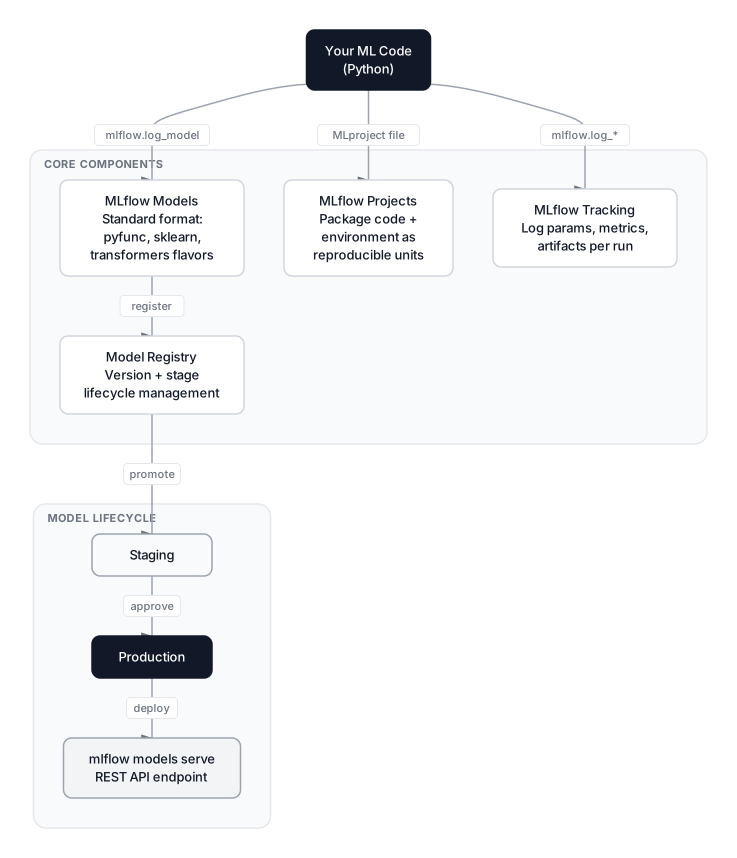
MLflow solves this with four integrated components that together cover the entire model lifecycle.
 Click to expandMLflow four-component architecture showing Tracking, Projects, Models, and Registry
The Four MLflow Components
MLflow is four things in one: a tracking server, a project packaging system, a model serialization format, and a model registry. Understanding what each component does — and does not do — saves a lot of confusion.
MLflow Tracking is the core logging API. You call mlflow.log_param(), mlflow.log_metric(), and mlflow.log_artifact() from your training code, and everything gets written to a central store. Every call belongs to a run: a single training execution with a unique ID, a start timestamp, and optional tags.
MLflow Projects is a convention for packaging ML code into reusable, reproducible units. A MLproject file defines the entry point and Conda or Docker environment, so anyone can run your training code with mlflow run and get the same result.
MLflow Models defines a standard packaging format called flavor. A model saved with mlflow.sklearn.log_model() includes a serialized model file plus a MLmodel YAML file describing how to load it. The pyfunc flavor provides a universal loader — any MLflow-saved model can be loaded with mlflow.pyfunc.load_model(), regardless of the original framework.
Model Registry sits on top of Tracking and adds lifecycle management. Once a run's model is registered, it gets a version number and can be promoted through stages: None → Staging → Production → Archived. Annotations, approval comments, and lineage back to the originating run are all preserved.
Setting Up MLflow
MLflow has three deployment modes, each appropriate for a different team size.
Local mode (zero setup): MLflow writes everything to a ./mlruns folder. Fine for solo experimentation.
pip install mlflow
mlflow ui  # opens http://127.0.0.1:5000
Self-hosted tracking server: For teams, point all clients to a shared server with a real database backend and remote artifact storage.
mlflow server \
  --backend-store-uri postgresql://user:pass@db-host:5432/mlflow \
  --artifacts-destination s3://my-bucket/mlflow-artifacts \
  --host 0.0.0.0 \
  --port 5000
The backend store holds metadata (parameters, metrics, tags) — PostgreSQL or MySQL work best; the default SQLite is fine for small teams. The artifact store holds large binary files like model weights, plots, and datasets. Amazon S3, Azure Blob Storage, and Google Cloud Storage are all supported.
Databricks Managed MLflow: If your team already uses Databricks, managed MLflow is built in. No server to provision, automatic scaling, enterprise RBAC, and the Model Registry integrates into the Unity Catalog workspace UI. In MLflow 3.x on Databricks, the default registry URI is databricks-uc, meaning Unity Catalog is the registry backend automatically.
import mlflow
mlflow.set_tracking_uri("databricks")
mlflow.set_experiment("/Users/[email protected]/house-prices")
MLflow 3.10 multi-workspace support: The 3.10 release adds multi-workspace environments, allowing organizations to organize experiments, models, and prompts with coarser granularity across business units while keeping them logically isolated on a single tracking server. Teams can share models across workspaces without duplicating infrastructure.
Pro Tip: Set MLFLOW_TRACKING_URI as an environment variable rather than calling mlflow.set_tracking_uri() in every script. This makes the same code work locally and in CI without changes.
Logging Parameters, Metrics, and Artifacts
The tracking API is intentionally minimal. Here's a complete training run for our house price model:
import mlflow
import mlflow.sklearn
from sklearn.ensemble import RandomForestRegressor
from sklearn.model_selection import train_test_split
from sklearn.metrics import mean_squared_error, mean_absolute_error, r2_score
import numpy as np
import pandas as pd
import matplotlib.pyplot as plt

np.random.seed(42)

# Generate house price dataset
n = 300
sqft = np.random.uniform(800, 4000, n)
bedrooms = np.random.randint(1, 6, n).astype(float)
age = np.random.uniform(0, 40, n)
distance_km = np.random.uniform(1, 30, n)
price = 120 * sqft + 15000 * bedrooms - 800 * age - 2000 * distance_km + np.random.normal(0, 15000, n)

df = pd.DataFrame({'sqft': sqft, 'bedrooms': bedrooms, 'age_years': age,
                   'distance_km': distance_km, 'price': price})
X = df.drop('price', axis=1)
y = df['price']
X_train, X_test, y_train, y_test = train_test_split(X, y, test_size=0.2, random_state=42)

mlflow.set_experiment("house-price-prediction")

with mlflow.start_run(run_name="rf-depth8"):
    # Parameters
    params = {"n_estimators": 100, "max_depth": 8, "min_samples_split": 5}
    mlflow.log_params(params)

    # Train
    model = RandomForestRegressor(**params, random_state=42)
    model.fit(X_train, y_train)
    preds = model.predict(X_test)

    # Metrics
    rmse = np.sqrt(mean_squared_error(y_test, preds))
    mae = mean_absolute_error(y_test, preds)
    r2 = r2_score(y_test, preds)
    mlflow.log_metric("rmse", rmse)
    mlflow.log_metric("mae", mae)
    mlflow.log_metric("r2", r2)

    # Artifact: feature importance plot
    importances = pd.Series(model.feature_importances_, index=X.columns)
    fig, ax = plt.subplots()
    importances.sort_values().plot(kind='barh', ax=ax)
    ax.set_title("Feature Importances")
    fig.savefig("/tmp/feature_importances.png")
    mlflow.log_artifact("/tmp/feature_importances.png")
    plt.close()

    # Log model
    mlflow.sklearn.log_model(model, "random_forest_model")
    print(f"Run complete. RMSE: {rmse:.0f}, R2: {r2:.4f}")
The with mlflow.start_run() context manager automatically ends the run when the block exits, even if an exception occurs. Notice the separation: log_params records what you set before training; log_metric records what you measured after. This distinction matters when you're comparing dozens of runs and need to trace metrics back to their hyperparameters.
Key Insight: Log metrics at each epoch or iteration with mlflow.log_metric("loss", value, step=epoch) when training deep learning models. The step parameter lets you plot training curves in the MLflow UI, not just final values.
 Click to expandMLflow experiment tracking workflow from run start through model logging to the UI
MLflow Autolog: Automatic Tracking
Autolog is MLflow's highest-productivity feature. One call before your training code captures everything MLflow can infer without boilerplate.
import mlflow
import mlflow.sklearn
from sklearn.ensemble import RandomForestRegressor
from sklearn.model_selection import train_test_split
import numpy as np

np.random.seed(42)

# Data
X = np.random.randn(300, 4)
y = 120_000 + 50_000 * X[:, 0] + 20_000 * X[:, 1] + np.random.randn(300) * 10_000
X_train, X_test, y_train, y_test = train_test_split(X, y, test_size=0.2, random_state=42)

# Autolog — must be called BEFORE creating the estimator
mlflow.sklearn.autolog()

with mlflow.start_run():
    rf = RandomForestRegressor(n_estimators=100, max_depth=6, random_state=42)
    rf.fit(X_train, y_train)
    # MLflow automatically logs: all params, training_score, test_score,
    # feature importances, and the serialized model
Here's exactly what each library's autolog captures:
| Library | Parameters | Metrics | Artifacts |
|---|---|---|---|
| scikit-learn | All get_params() values (including defaults) | training_score, test_score | Fitted model, feature importance (trees) |
| XGBoost | All booster params | Eval metric per boosting round | Model weights, feature importance plot |
| LightGBM | All LightGBM params | Per-iteration eval metrics | Model, feature importance (split + gain) |
| PyTorch Lightning | All trainer params | Per-epoch train/val metrics | Model checkpoints |
| TensorFlow/Keras | Model config, optimizer config | Per-epoch loss and metrics | Model as SavedModel |
The practical rule: use autolog during exploration to capture everything without boilerplate. Switch to manual logging in production pipelines where you need precise control over what gets stored and how artifacts are named.
Common Pitfall: Autolog captures ALL hyperparameters, including internal sklearn defaults you never set explicitly. This clutters the parameter comparison view with noise. In production, combine autolog with selective mlflow.log_param() calls to highlight the parameters you actually tuned.
Comparing Runs in the MLflow UI
After running several experiments with different configurations, the MLflow UI's experiment view shows all runs in a filterable, sortable table. Every column is a logged parameter or metric. Sort by rmse ascending to find the best run in one click.
The parallel coordinates plot is particularly useful for hyperparameter analysis: it draws one vertical axis per parameter and one for the target metric, connecting each run as a line. Runs with good RMSE tend to cluster in visible patterns — you can see at a glance that shallow trees consistently produce high RMSE, regardless of n_estimators.
You can also query runs programmatically using the tracking API. This is essential for CI pipelines that need to find the best run automatically:
import mlflow

client = mlflow.MlflowClient()

# Find the best run by RMSE in the house-price experiment
experiment = client.get_experiment_by_name("house-price-prediction")
runs = client.search_runs(
    experiment_ids=[experiment.experiment_id],
    filter_string="metrics.rmse < 30000",
    order_by=["metrics.rmse ASC"],
    max_results=5
)

for run in runs:
    print(f"Run {run.info.run_id[:8]}: RMSE={run.data.metrics['rmse']:.0f}, "
          f"depth={run.data.params.get('max_depth', 'auto')}")
The filter_string uses a SQL-like syntax — you can filter on any logged metric, parameter, or tag. In CI/CD, this is how you automate the decision of which model to promote.
Model Registry and Lifecycle Stages
The Model Registry is where experiments become assets. Once you have a run whose metrics meet your bar, register the model:
import mlflow

client = mlflow.MlflowClient()

# Register from a specific run URI
run_id = "your-best-run-id-here"
model_uri = f"runs:/{run_id}/random_forest_model"

registered = mlflow.register_model(
    model_uri=model_uri,
    name="house-price-rf"
)
print(f"Registered as version {registered.version}")

# Transition to Staging
client.transition_model_version_stage(
    name="house-price-rf",
    version=registered.version,
    stage="Staging"
)
 Click to expandModel Registry version lifecycle from training run through Staging to Production to Archived
The four stages map directly to a real deployment workflow:
| Stage | Meaning | Who acts on it |
|---|---|---|
| None | Freshly registered, unreviewed | ML engineer |
| Staging | Under validation: integration tests, shadow traffic | QA / MLOps team |
| Production | Live, serving real requests | Deployment automation |
| Archived | Superseded by a newer version | Automated or manual |
Loading a model from the Registry uses the same pyfunc interface regardless of the framework that created it:
import mlflow.pyfunc

# Load by stage — always gets the current Production version
model = mlflow.pyfunc.load_model("models:/house-price-rf/Production")
predictions = model.predict(X_new)

# Or load a specific version for reproducibility
model_v3 = mlflow.pyfunc.load_model("models:/house-price-rf/3")
The stage-based URI (/Production) is the right choice for serving code — the pointer updates automatically when you promote a new version. The version-pinned URI (/3) is the right choice for audit trails and debugging.
Model Aliases in Unity Catalog
If your team runs on Databricks, the Model Registry in Unity Catalog uses aliases instead of stages. Setting stages is unsupported in UC; aliases are the recommended replacement. The concept is the same — a named mutable reference pointing to a specific version — but aliases are more flexible because you can define any name, not just the four fixed stages.
client = mlflow.MlflowClient()

# Set a "champion" alias on version 3
client.set_registered_model_alias(
    name="house-price-rf",
    alias="champion",
    version="3"
)

# Load by alias in serving code
model = mlflow.pyfunc.load_model("models:/house-price-rf@champion")
This is particularly useful when you want custom aliases like "shadow", "canary", or "rollback" in addition to the standard champion/challenger pattern. The MLflow Model Registry documentation covers the full alias lifecycle API.
Key Insight: MLflow 3.x introduced the LoggedModel concept, which elevates the model from a run artifact into a first-class object. A LoggedModel has its own ID, can be linked to evaluation runs independently of the training run that produced it, and persists in the Registry even after its training run is deleted. This clean separation matters for long-running production systems where training runs accumulate over months.
MLflow for LLMs and GenAI Agents
MLflow 3.0 (released mid-2024) substantially expanded MLflow's GenAI capabilities, and MLflow 3.10 (March 2026) brings multi-turn evaluation, trace cost tracking, and a redesigned UI. For LLM workloads, MLflow now provides two capabilities classical ML tracking didn't need: tracing and prompt versioning.
Tracing LLM Applications
MLflow Tracing is built on OpenTelemetry and captures every intermediate step of an LLM call chain — prompt construction, LLM invocation, tool calls, memory retrievals — with inputs, outputs, latency, and token counts at each step.
import mlflow
from openai import OpenAI

mlflow.openai.autolog()  # one line enables full tracing

client = OpenAI()

with mlflow.start_run():
    response = client.chat.completions.create(
        model="gpt-4o",
        messages=[
            {"role": "system", "content": "You are a real estate expert."},
            {"role": "user", "content": "What factors determine house prices?"}
        ]
    )
    # MLflow automatically captures: prompt, response, tokens used,
    # latency, model name, and cost estimate
    print(response.choices[0].message.content)
For custom inference logic that isn't covered by autolog, use the @mlflow.trace decorator:
import mlflow

@mlflow.trace(name="house_price_agent_step")
def analyze_property(sqft: float, location: str) -> str:
    """This function's inputs, outputs, and latency get captured automatically."""
    # ... LLM call logic ...
    return analysis_result
The @mlflow.trace decorator wraps any function and logs its inputs, outputs, and wall-clock latency as a trace span. Nested decorated functions produce nested spans, giving you a full call tree view in the MLflow UI.
The same one-line autolog pattern works for LangChain (mlflow.langchain.autolog()), LlamaIndex, DSPy, and AutoGen. MLflow 3.10 calculates token costs automatically from model pricing tables and renders them in the trace view, with aggregate cost breakdowns in the Overview tab — making it practical to track LLM spend across a team.
Multi-Turn Conversation Evaluation
MLflow 3.10 introduced session-level scorers for evaluating conversational agents. You can evaluate an existing conversation log or simulate a new conversation to test a different agent version:
import mlflow

# Evaluate an existing conversation session
mlflow.evaluate(
    data=conversation_dataset,
    model_type="databricks-agent",
    evaluators="default",
    extra_metrics=[mlflow.metrics.genai.relevance()]
)
The session UI shows quality scores across all turns, making it possible to spot where a multi-turn agent starts degrading — something that single-turn evaluation misses entirely.
Logging Transformer Models
For fine-tuned HuggingFace models, MLflow's transformers flavor handles the full bundle natively:
from transformers import pipeline
import mlflow

# Fine-tune your model, then log it
summarizer = pipeline("summarization", model="facebook/bart-large-cnn")

with mlflow.start_run():
    mlflow.transformers.log_model(
        transformers_model=summarizer,
        artifact_path="summarizer",
        task="summarization",
        input_example={"inputs": "House prices in Q1 2026 rose 4.2%..."}
    )
The logged model bundles the tokenizer, model weights, and inference configuration. Load it back with mlflow.pyfunc.load_model() and it behaves as a standard Python function — no HuggingFace-specific code needed in your serving layer. This is the recommended approach over mlflow.pyfunc for HuggingFace models because mlflow.transformers captures the full pipeline configuration automatically.
If you're building agents that combine LLM calls with retrieval, the Agentic RAG: Self-Correcting Retrieval article covers how MLflow tracing integrates with RAG pipelines for end-to-end observability.
MLflow vs Weights & Biases in 2026
Neptune.ai, which was long the third major player in this space, was acquired by OpenAI and shut down its SaaS platform in March 2026. That leaves two serious contenders for most teams.
| Criterion | MLflow 3.10 | Weights & Biases |
|---|---|---|
| License | Open source (Apache 2.0) | SaaS (free tier available) |
| Self-hosting | Yes, full control | Limited (private cloud tier) |
| UI quality | Good, functional | Best-in-class |
| LLM / GenAI | MLflow 3.x native tracing | W&B Weave |
| Model Registry | Full lifecycle + UC aliases | Basic |
| Compute integration | Databricks native | CoreWeave GPU cloud (2025) |
| Best for | Full lifecycle control, open-source orgs | Developer experience, research teams |
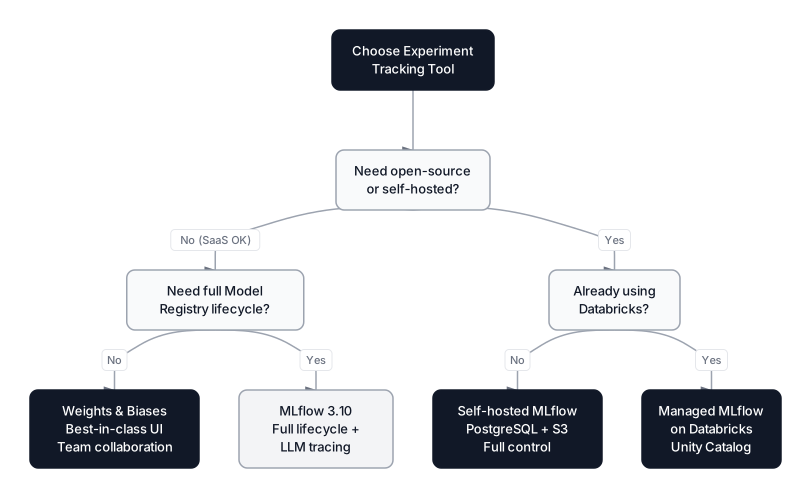
The decision is simpler than it looks. If your organization runs on Databricks, or needs full open-source control over the ML lifecycle without vendor lock-in, MLflow is the natural fit. If you want the best experiment visualization and team collaboration UI with minimum setup friction — and you don't mind a SaaS dependency — Weights & Biases wins.
A practical note from production experience: many teams run MLflow alongside W&B. MLflow owns the Model Registry and deployment pipeline; W&B handles interactive visualization during research. The logging APIs are similar enough that wrapping them in a thin abstraction layer keeps the code clean.
 Click to expandExperiment tracking tool selection guide based on open-source needs, scale, and developer experience
Production Patterns with MLflow
Tagging Runs for Searchability
Tags are string key-value pairs attached to runs. Unlike parameters (fixed at run start) and metrics (numbers), tags can be set at any point and hold arbitrary metadata:
with mlflow.start_run() as run:
    mlflow.set_tags({
        "team": "pricing",
        "data_version": "v2026-03",
        "triggered_by": "weekly_retrain",
        "git_commit": "a3f8b2c"
    })
    # ... training code ...
Tags make runs searchable across experiments: client.search_runs(filter_string="tags.data_version = 'v2026-03'") finds every run trained on that data version across the entire tracking server. This is invaluable after a data pipeline incident — you can instantly identify every model trained on the affected data.
Programmatic Promotion in CI/CD
A complete CI/CD pipeline for MLflow looks like this:
import mlflow
from mlflow.tracking import MlflowClient

def promote_best_model(experiment_name: str, model_name: str, metric: str = "rmse"):
    """Find the best run and promote it to Staging."""
    client = MlflowClient()
    experiment = client.get_experiment_by_name(experiment_name)

    runs = client.search_runs(
        experiment_ids=[experiment.experiment_id],
        order_by=[f"metrics.{metric} ASC"],
        max_results=1
    )

    if not runs:
        raise ValueError(f"No runs found in {experiment_name}")

    best_run = runs[0]
    best_metric_value = best_run.data.metrics[metric]
    run_id = best_run.info.run_id

    # Register and stage
    model_uri = f"runs:/{run_id}/model"
    result = mlflow.register_model(model_uri, model_name)
    client.transition_model_version_stage(
        name=model_name,
        version=result.version,
        stage="Staging"
    )

    print(f"Promoted v{result.version} to Staging ({metric}: {best_metric_value:.0f})")
    return result.version
This pattern plugs directly into GitHub Actions, Jenkins, or any CI system. After nightly retraining, the CI job calls promote_best_model() — if the new model beats the current Production model's metrics, it moves to Staging for integration tests before the next manual or automated Production promotion.
For the broader story of how this fits into data drift monitoring, rollback strategies, and serving infrastructure, the Production MLOps Guide covers exactly this.
Setting a Remote Tracking URI in Production
In deployed services, point clients to the tracking server without modifying code:
export MLFLOW_TRACKING_URI=http://mlflow.internal:5000
export MLFLOW_EXPERIMENT_NAME=house-price-production
Any script that calls mlflow.log_metric() automatically sends data to the shared server. This is how you get visibility into production retraining jobs without embedding server URLs in application code.
For LLM serving in production, MLflow 3.10 also ships mlflow-tracing, a lightweight package that installs only the tracing SDK without the full MLflow server dependencies — reducing the installation footprint for serving containers significantly.
When to Use MLflow — and When Not To
MLflow excels in four situations:
- Long-lived projects with dozens of experiments across weeks or months — the Registry's version history becomes invaluable
- Multi-person teams where experiment isolation and searchability prevent "who trained that model?" confusion
- Production ML pipelines where you need audit trails for compliance (model version, data version, training timestamp all captured automatically)
- Polyglot ML stacks where some models are sklearn and others are PyTorch or HuggingFace transformers — MLflow's flavor system handles all of them with the same loading API
MLflow is overkill or a poor fit when:
- You're prototyping for a few days and will throw the code away — local
.pklfiles are faster - Your model is a one-off analysis with no retraining — tracking infrastructure has ongoing maintenance cost
- Your team is already deep in Weights & Biases — migrating tracking infrastructure mid-project has limited upside
- You're building a pure LLM application with no classical ML — Langfuse or Arize Phoenix may be lighter-weight options focused specifically on LLM observability
When MLflow Fits the Workflow
MLflow brings order to the inherently chaotic process of ML experimentation. The tracking API takes seconds to add to existing code; the Model Registry replaces ad-hoc file naming conventions with a structured lifecycle; the pyfunc flavor standardizes model loading across frameworks; and MLflow 3.x's GenAI tracing extends the same discipline to LLM applications and agents.
The core habit MLflow builds is treating experiments as code artifacts — version-controlled, reproducible, comparable. Once that habit is in place, questions like "which run produced the current production model?" have deterministic answers. MLflow 3.10's multi-workspace support and LLM cost tracking mean that habit now extends to every layer of the modern AI stack, from Random Forests to multi-agent systems.
For teams building on the Databricks ecosystem, managed MLflow with Unity Catalog removes the infrastructure overhead and adds cross-workspace model sharing. For open-source organizations or teams with strict data governance requirements, self-hosting on PostgreSQL and S3 gives full control. The MLflow official documentation at version 3.10 is well-maintained and reflects the latest API changes.
If you're thinking about the broader production story, the Production MLOps Guide covers how MLflow fits into CI/CD pipelines, data drift monitoring, and rollback strategies. For the model evaluation techniques MLflow's LLM judges implement, see LLM Evaluation with RAGAS and LLM-as-Judge. And if you're building agents that MLflow Tracing can observe end-to-end, Building AI Agents with ReAct, Planning, and Tool Use is the right next read.
Start with mlflow.autolog(), run five experiments, and open the UI. That first side-by-side run comparison — where you can see exactly which hyperparameters produced which RMSE without digging through notebooks — is when MLflow's value becomes obvious.
Interview Questions
What is MLflow and what problem does it solve in ML development?
MLflow is an open-source platform for managing the ML lifecycle, including experiment tracking, model packaging, and model registry. It solves the reproducibility problem: without it, teams lose track of which hyperparameters produced which model, can't reliably reproduce past results, and have no systematic way to manage the transition from development to production. MLflow 3.x extends this discipline to LLM and GenAI applications with tracing, cost tracking, and multi-turn conversation evaluation.
What is the difference between MLflow parameters, metrics, and tags?
Parameters are hyperparameters set before training — fixed scalars like n_estimators=100 or learning_rate=0.01. Metrics are numeric measurements from training or evaluation, like RMSE or AUC, and can include a step index for time-series values like per-epoch loss. Tags are arbitrary string key-value pairs that can be set at any point during a run; they hold metadata like team name, git commit hash, or data version that you want to search and filter on later.
Explain the Model Registry lifecycle in MLflow.
The Registry has four stages: None (freshly registered, awaiting review), Staging (under integration testing or shadow evaluation), Production (live, serving real traffic), and Archived (superseded or retired). You use MlflowClient.transition_model_version_stage() to move versions between stages programmatically. The models:/model-name/Production URI always resolves to whichever version is currently in Production, so your serving code doesn't need to be updated on model promotion. On Databricks with Unity Catalog, stages are replaced by named aliases like "champion" and "challenger".
What is the pyfunc flavor and why is it useful?
pyfunc (Python function) is MLflow's universal model flavor — a common interface that wraps any framework-specific model. Any MLflow-logged model can be loaded with mlflow.pyfunc.load_model() and used via .predict(), regardless of whether the underlying model is sklearn, XGBoost, or a HuggingFace transformer. This is critical for serving infrastructure: your prediction service only needs MLflow, not the original training framework, and the serialized model bundle contains its own dependency specifications.
When would you use autolog vs manual logging?
Autolog is ideal during exploration and research: one line captures everything without boilerplate. Manual logging is better for production pipelines where you want precise control — you may only care about five specific metrics rather than the 40+ sklearn autolog captures, and you want to attach business-specific tags that autolog doesn't know about. A practical hybrid: start with autolog to establish what's worth tracking, then switch to manual log_params and log_metric calls when the code matures toward production.
How does MLflow handle distributed training runs across multiple workers?
In distributed training (e.g., multi-GPU PyTorch with torch.distributed), only the main process (rank 0) should call mlflow.log_metric() and mlflow.end_run(). If all workers log simultaneously, you get duplicate and conflicting metric entries. The standard pattern is to check if dist.get_rank() == 0: before any MLflow logging call. PyTorch Lightning's MLflow logger integration handles this automatically.
What is MLflow Tracing and how does it differ from standard experiment tracking?
Standard experiment tracking captures aggregate metrics from a completed training run — final RMSE, best epoch accuracy. MLflow Tracing captures the full execution tree of an LLM or agent call at inference time: each prompt, each LLM response, each tool invocation, with timestamps, token counts, and latency at every step. Tracing is for debugging inference pipelines; experiment tracking is for comparing training configurations. MLflow 3.x unified both under one UI, built on OpenTelemetry, and MLflow 3.10 adds automatic cost aggregation across all traced LLM calls.
How would you implement automated model promotion in a CI/CD pipeline?
After nightly retraining, the CI job queries the tracking server for the best run in the current experiment using client.search_runs() with order_by=["metrics.rmse ASC"]. It registers that run's model, transitions it to Staging, and runs integration tests against the Staging endpoint. If tests pass and the new model's RMSE is at least 2% better than the current Production version, the CI job calls transition_model_version_stage() to promote to Production. The improvement threshold is important — it prevents automatic promotion of a model that's only marginally better, which could introduce noise into the production serving path.