
You've trained 47 model variants over three weeks. Somewhere in that pile is your best model — but you can't remember which learning rate you used for run 31, the CSV you exported at the time got overwritten, and your notes say "tried 0.001 I think." This is the spreadsheet problem that every ML practitioner hits, and it kills reproducibility.
Weights & Biases (W&B) exists to replace that chaos with a systematic record of every experiment: hyperparameters, metrics, code version, dataset version, and system stats — all logged automatically. Over 500,000 ML practitioners and teams at companies like OpenAI, Toyota Research, NVIDIA, and Samsung use the platform as their experiment tracking backbone. This guide walks through everything from the first wandb.init() call to production-scale artifact management, hyperparameter sweeps, W&B Launch for running training jobs on cloud infrastructure, and LLM observability with Weave.
The Core Mental Model: Runs, Projects, and Artifacts
W&B organizes your work into three layers.
A Run is a single execution of your training script. Every metric, hyperparameter, file, and system stat logged during that execution belongs to that run. Runs are immutable once finished: what you logged is what you logged.
A Project groups related runs. All your experiments trying to improve a fraud detection model belong to one project. The W&B dashboard lets you compare every run in a project side by side, plot metrics on shared axes, and filter to the runs that matter.
Artifacts are versioned, content-addressed files. A training dataset is an artifact. A trained model checkpoint is an artifact. Log one with a name, and W&B tracks the lineage: which dataset produced which model, which model was used for which inference run.
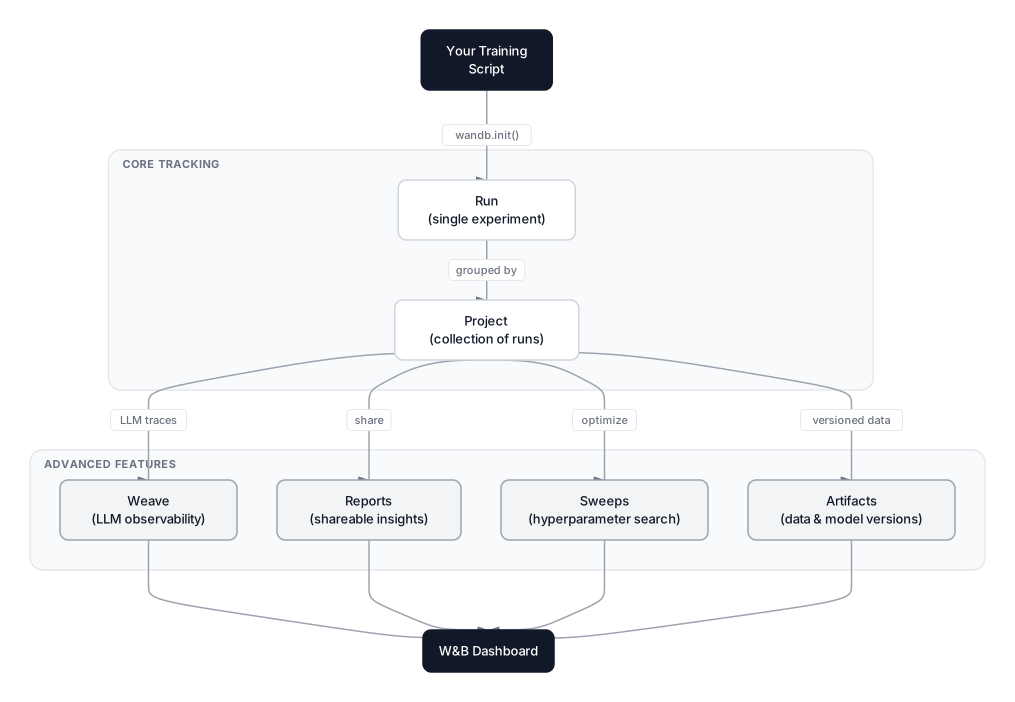 Click to expandW&B platform architecture showing Runs, Projects, Artifacts, Sweeps, Reports, and Weave
Key Insight: W&B records the full provenance chain, not only the outcome. Given any model checkpoint, you can trace back to the exact dataset version, code commit, and hyperparameter configuration that produced it.
Getting Started: The First Three Functions
Install W&B and authenticate once:
pip install wandb
wandb login
Then add three lines to any training script:
import wandb

# 1. Start a run
run = wandb.init(
    project="fraud-detection",
    name="gbt-lr0.05-depth3",
    config={
        "learning_rate": 0.05,
        "n_estimators": 200,
        "max_depth": 3,
        "dataset": "transactions_v2"
    }
)

# 2. Log metrics inside your training loop
for epoch in range(num_epochs):
    loss, accuracy = train_one_epoch(model, train_loader)
    val_loss, val_acc = evaluate(model, val_loader)

    wandb.log({
        "train/loss": loss,
        "train/accuracy": accuracy,
        "val/loss": val_loss,
        "val/accuracy": val_acc,
        "epoch": epoch
    })

# 3. Finish the run
wandb.finish()
That's the complete basic workflow. W&B also automatically captures the Git commit hash, hostname, Python version, and GPU/CPU use — no extra code needed.
Pro Tip: Use prefixes like train/loss and val/loss in your metric names. W&B groups metrics with the same prefix into a single chart panel, making training vs. validation curves appear together automatically.
What wandb.init() Actually Does
wandb.init() starts a background process that streams your logs to W&B servers in real time. You can watch your metrics update in the browser while training is still running. Each call creates a new run with a unique ID, so calling it again (after wandb.finish()) starts a fresh run with no connection to the previous one.
The config parameter is how you record hyperparameters. Pass a dictionary, a namespace, or an argparse object — W&B stores the whole thing. Later, when comparing runs in the dashboard, you can filter by any config key.
# Three equivalent ways to pass config
wandb.init(config={"lr": 0.01, "epochs": 50})
wandb.init(config=args)         # argparse.Namespace
wandb.init(config=dataclasses.asdict(cfg))  # dataclass

# Access config values inside the run (useful for sweeps)
lr = wandb.config.learning_rate
Logging Beyond Scalars
wandb.log() accepts more than numbers. Log images, audio, videos, tables, matplotlib figures, and Plotly charts — all rendered natively in the dashboard.
import wandb
import matplotlib.pyplot as plt

# Log a confusion matrix image
fig, ax = plt.subplots()
ax.imshow(conf_matrix, cmap="Blues")
wandb.log({"confusion_matrix": wandb.Image(fig)})
plt.close(fig)

# Log a prediction table with actual vs. predicted values
table = wandb.Table(columns=["transaction_id", "actual", "predicted", "confidence"])
for tid, actual, pred, conf in predictions:
    table.add_data(tid, actual, pred, conf)
wandb.log({"predictions": table})

# Log model gradients and weights (PyTorch)
wandb.watch(model, log="all", log_freq=100)
wandb.watch() hooks into PyTorch's autograd system and logs gradient norms and weight histograms every log_freq steps. This catches gradient explosion and vanishing gradients early, without any manual histogram code.
The W&B Dashboard: Comparing Runs at Scale
The real value of W&B becomes apparent the first time you compare twenty runs. Open your project and the dashboard shows every run as a row, with all logged metrics as columns. Sort by val/auc and the best run floats to the top.
The Parallel Coordinates plot is the fastest way to understand hyperparameter interactions. Each vertical axis represents one hyperparameter or metric, and each line represents one run. Brush the val/auc axis to select only your top-10% runs — the lines that pass through the brushed region reveal which hyperparameter combinations drove the best results.
The Scatter Plot and Bar Chart panels let you build custom views. Want to see how training duration correlates with validation accuracy across all your runs? Two clicks.
Common Pitfall: Don't log metrics at every batch step during training unless you genuinely need that resolution. Logging every step on large datasets generates millions of data points that slow down the dashboard. Log per epoch for most metrics; per step only for things like learning rate schedules where the step-level signal matters.
Hyperparameter Sweeps: Systematic Search at Scale
A W&B Sweep automates hyperparameter search across your entire project. You define the search space and strategy in a config dictionary, then W&B's controller coordinates multiple agents running in parallel, each trying a different combination.
 Click to expandW&B Sweeps workflow showing controller, agents, and Bayesian optimization loop
Defining a Sweep
sweep_config = {
    "method": "bayes",          # or "grid", "random"
    "metric": {
        "name": "val/auc",
        "goal": "maximize"
    },
    "early_terminate": {
        "type": "hyperband",
        "min_iter": 3
    },
    "parameters": {
        "learning_rate": {
            "distribution": "log_uniform_values",
            "min": 1e-4,
            "max": 1e-1
        },
        "n_estimators": {
            "values": [100, 200, 400]
        },
        "max_depth": {
            "values": [2, 3, 4, 5]
        },
        "subsample": {
            "distribution": "uniform",
            "min": 0.6,
            "max": 1.0
        }
    }
}

sweep_id = wandb.sweep(sweep_config, project="fraud-detection")
Running Agents
def train():
    run = wandb.init()
    cfg = wandb.config  # populated automatically by the sweep controller

    model = GradientBoostingClassifier(
        learning_rate=cfg.learning_rate,
        n_estimators=cfg.n_estimators,
        max_depth=cfg.max_depth,
        subsample=cfg.subsample,
        random_state=42
    )
    model.fit(X_train, y_train)
    probs = model.predict_proba(X_val)[:, 1]
    auc = roc_auc_score(y_val, probs)
    wandb.log({"val/auc": auc})

# Launch agent — run 50 experiments, then stop
wandb.agent(sweep_id, function=train, count=50)
Spin up multiple agents pointing at the same sweep_id on different machines and they coordinate automatically. No distributed training infrastructure required.
Bayesian vs. Grid vs. Random Search
The "method" field determines how configurations are generated:
| Method | How It Works | Best For |
|---|---|---|
random | Sample from distributions independently | Quick exploration, large spaces |
grid | Exhaustive combination of all values | Small discrete spaces (<100 combos) |
bayes | Gaussian process models performance surface | Continuous parameters, expensive training |
Bayesian search learns from previous runs. After 10 to 20 runs, it's making informed guesses about where good regions are, rather than sampling randomly. For expensive models — LLMs, deep networks, anything taking hours per run — the reduction in wasted compute is significant. This is covered in depth in the Hyperparameter Tuning guide.
The early_terminate Hyperband setting kills low-performing runs early, freeing compute for promising configurations. A run that's clearly underperforming at epoch 3 won't waste 50 more epochs.
Pro Tip: Start with random for 20 runs to explore the space, then switch to bayes for 30 more runs to exploit what you've learned. W&B supports running additional agents on an existing sweep, so this two-phase approach is practical and requires no config changes.
W&B Artifacts: Dataset and Model Versioning
Artifact versioning solves the reproducibility problem at the data level. Every artifact is content-addressed: W&B computes a hash of the files you log. Upload the same dataset twice and it stores it once. Change one row and you get a new version with full history preserved.
Logging an Artifact
# Log a dataset
run = wandb.init(project="fraud-detection", job_type="data-prep")

artifact = wandb.Artifact(
    name="transactions-dataset",
    type="dataset",
    description="Credit card transactions, preprocessed with outlier removal",
    metadata={"n_rows": 245000, "n_features": 28, "positive_rate": 0.00172}
)
artifact.add_file("data/transactions_train.parquet")
artifact.add_file("data/transactions_val.parquet")

run.log_artifact(artifact)
wandb.finish()
Consuming an Artifact
run = wandb.init(project="fraud-detection", job_type="training")

# Always use the latest version, or pin to "v3" for reproducibility
artifact = run.use_artifact("transactions-dataset:latest")
data_dir = artifact.download()  # downloads files, returns local path

# Now train using data_dir/transactions_train.parquet
W&B automatically draws a lineage graph in the UI. Click any model artifact and trace back through the training run that produced it, to the dataset version it consumed, to the data-prep run that created that dataset. This lineage is invaluable when a model starts misbehaving in production: you can check whether the dataset it trained on has drifted from the current version.
For model checkpoints:
# At end of training — log the best checkpoint
model_artifact = wandb.Artifact("fraud-gbt-model", type="model")
model_artifact.add_file("checkpoints/best_model.pkl")
model_artifact.metadata = {"val_auc": 0.9847, "trained_on": "transactions-dataset:v5"}
run.log_artifact(model_artifact)
Key Insight: The artifact type ("dataset", "model", "results") is a plain string used for organization. W&B uses it to group artifacts in the UI and to render the lineage graph correctly. Pick a consistent naming convention for your team before your first run — renaming conventions mid-project is more painful than it sounds.
Integrating W&B with the Hugging Face Trainer
For LLM fine-tuning and transformer training workflows, the Hugging Face Trainer class has first-class W&B support. Set one argument and every training metric flows to W&B automatically:
from transformers import TrainingArguments, Trainer

training_args = TrainingArguments(
    output_dir="./fraud-llm-finetuned",
    num_train_epochs=3,
    per_device_train_batch_size=8,
    per_device_eval_batch_size=16,
    learning_rate=2e-5,
    warmup_steps=500,
    weight_decay=0.01,
    logging_dir="./logs",
    logging_steps=50,
    evaluation_strategy="epoch",
    save_strategy="epoch",
    load_best_model_at_end=True,
    report_to="wandb",          # This is all you need
    run_name="llama3-fraud-v1"
)

trainer = Trainer(
    model=model,
    args=training_args,
    train_dataset=train_dataset,
    eval_dataset=eval_dataset,
)
trainer.train()
The Trainer automatically logs training loss, evaluation loss, learning rate schedule, and hardware use at each logging_steps interval. For LLM fine-tuning specifically, pay attention to these metrics in the W&B dashboard:
| Metric | What It Tells You | Watch For |
|---|---|---|
train/loss | Cross-entropy on training set | Decreasing slowly? Learning rate too low |
eval/loss | Cross-entropy on validation set | Diverging from train loss? Overfitting |
train/grad_norm | Gradient magnitude | Spikes indicate instability |
train/learning_rate | LR schedule progress | Verify warmup and decay |
| GPU memory (auto) | Peak memory per device | Near limit? Reduce batch size |
The TRL library (used for RLHF and DPO training) also inherits this integration since it wraps the Hugging Face Trainer. For LoRA and QLoRA fine-tuning patterns, see the Fine-Tuning LLMs with LoRA and QLoRA guide.
Pro Tip: Set WANDB_WATCH=gradients in your environment before running to also log gradient histograms from the Trainer without any code changes. This is equivalent to calling wandb.watch(model, log="gradients") manually.
W&B Launch: Running Training Jobs on Cloud Infrastructure
W&B Launch extends beyond local experiment tracking — it's a job orchestration layer that packages your training code and sends it to cloud compute, Kubernetes clusters, or managed platforms like AWS SageMaker and Google Vertex AI.
The core idea: a Launch Queue points to a compute target (a GKE cluster, an AWS batch queue, a local Docker daemon). You push jobs to the queue, and a Launch agent on that compute picks them up and executes them. Multiple agents can serve the same queue in parallel.
# Create a launch queue pointing at a Kubernetes cluster (done once in the UI or CLI)
# wandb launch-agent --queue my-k8s-queue --max-jobs 4

# Submit a job from code
import wandb

wandb.launch_add(
    uri="https://github.com/your-org/fraud-model",   # Git repo
    job_type="train",
    queue_name="my-k8s-queue",
    project="fraud-detection",
    config={
        "learning_rate": 0.05,
        "n_estimators": 400,
        "max_depth": 4
    }
)
This is particularly useful for hyperparameter sweeps on expensive hardware. Instead of running all sweep agents on your laptop, you define the sweep and push each trial to a GPU node in your Kubernetes cluster — W&B Launch handles the container build, job submission, and result collection.
A common production pattern: the data team's CI/CD pipeline triggers a Launch job on every new dataset artifact version. The job trains the model, logs results as a new artifact, and the W&B pipeline continues with evaluation. Human review happens at the end, not in the middle.
For a full picture of how Launch fits into a production ML system, see the Production MLOps Guide.
W&B Weave: LLM Observability
Weave is W&B's observability layer for LLM applications, released in 2024 and significantly expanded through 2025. It addresses a problem distinct from traditional experiment tracking: once you've deployed an LLM-based feature, how do you know if it's working?
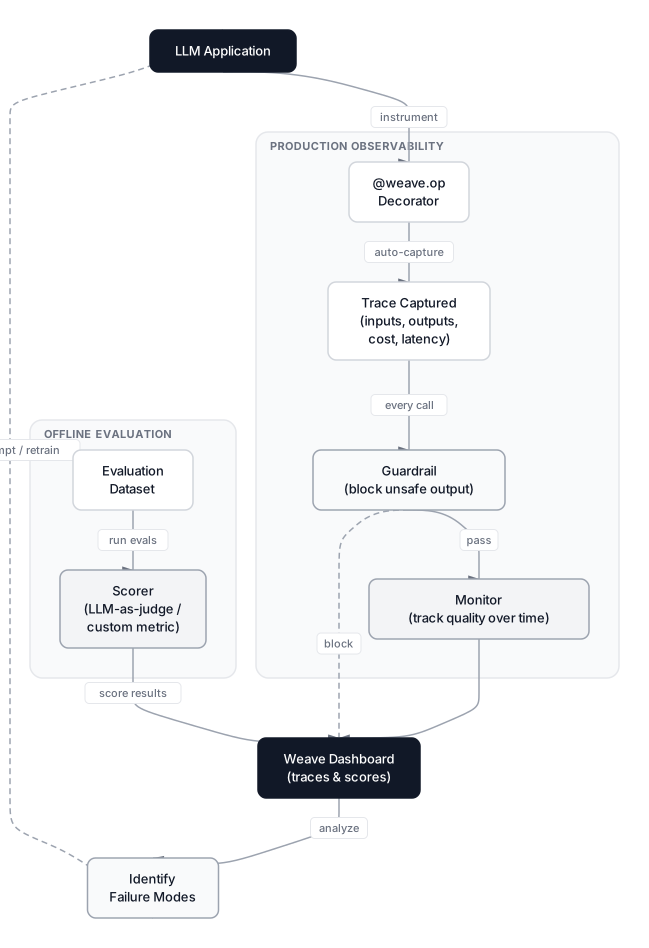 Click to expandW&B Weave LLM observability flow from application instrumentation to evaluation and improvement
Automatic Tracing
The @weave.op decorator instruments any Python function, capturing inputs, outputs, latency, and for LLM calls, token counts and cost:
import weave

weave.init("fraud-llm-explainer")

@weave.op
def explain_fraud_flag(transaction: dict) -> str:
    """Call an LLM to explain why a transaction was flagged."""
    response = openai_client.chat.completions.create(
        model="gpt-4o",
        messages=[
            {"role": "system", "content": "You explain credit card fraud flags in plain English."},
            {"role": "user", "content": f"Transaction: {transaction}"}
        ]
    )
    return response.choices[0].message.content

# Every call to explain_fraud_flag is now traced automatically
result = explain_fraud_flag({"amount": 4200, "merchant": "UNKNOWN_INTL", "country": "XX"})
Every decorated call appears in the Weave dashboard with full input/output, timestamps, model used, tokens consumed, and cost. No manual logging code anywhere. Weave also auto-patches popular LLM libraries — with OpenAI, just calling weave.init() before your first API call is enough to start tracing.
Starting in 2025, Weave auto-logs Model Context Protocol (MCP) agent traces with a single line of code, making it straightforward to trace multi-step agentic pipelines where an LLM calls tools, retrieves context, and decides next actions. This matters for debugging RAG systems (covered in the RAG guide) where a bad retrieval step can cause a good model to produce wrong answers.
Structured Evaluation
Weave's evaluation framework runs structured assessments across a labeled dataset. Define a scorer function, point it at an evaluation dataset, and Weave handles execution and aggregation:
@weave.op
def relevance_scorer(transaction: dict, output: str) -> dict:
    """Score whether the explanation actually addresses the fraud indicator."""
    has_amount_mention = str(transaction["amount"]) in output
    has_risk_word = any(w in output.lower() for w in ["unusual", "suspicious", "flagged", "risk"])
    return {"mentions_amount": has_amount_mention, "addresses_risk": has_risk_word}

eval_dataset = weave.Dataset(
    name="fraud-explanation-evals",
    rows=[
        {"transaction": {"amount": 4200, "merchant": "UNKNOWN_INTL"}, "expected_flag": "high_amount"},
        {"transaction": {"amount": 12, "merchant": "STARBUCKS"}, "expected_flag": "none"},
    ]
)

evaluation = weave.Evaluation(dataset=eval_dataset, scorers=[relevance_scorer])
results = asyncio.run(evaluation.evaluate(explain_fraud_flag))
Teams using Weave evaluations have identified systematic prompt failures that standard A/B testing would have missed — cases where the LLM performed well on average but failed consistently on a specific transaction pattern. The evaluation framework is what enables that kind of segmented analysis.
Guardrails and Production Monitors
Weave's scorers serve double duty: the same scorer you use for offline evaluation can run as a guardrail in production, blocking or modifying outputs before they reach users. And every scorer result is stored automatically, so guardrails become monitors at no extra cost.
@weave.op
def pii_guardrail(output: str) -> dict:
    """Block outputs containing card numbers or account IDs."""
    import re
    has_card_number = bool(re.search(r'\b\d{4}[\s-]?\d{4}[\s-]?\d{4}[\s-]?\d{4}\b', output))
    return {"passed": not has_card_number, "reason": "PII detected" if has_card_number else "clean"}

# Use as a guardrail: check the result before returning to the user
result = explain_fraud_flag(transaction)
guard_check = pii_guardrail(result)
if not guard_check["passed"]:
    result = "Unable to generate explanation. Please contact support."
The monitor view in Weave aggregates these checks over time, showing you pass rates, failure trends, and which inputs trigger failures most often. This is the feedback loop that makes iterative LLM improvement systematic rather than reactive.
W&B Reports: Sharing Experiments with Stakeholders
Reports are W&B's answer to the "how do I explain this to a non-engineer" problem. A Report is a collaborative document that embeds live W&B charts alongside markdown text.
# Reports are created in the UI, but you can share a run via the API
run = wandb.init(project="fraud-detection")
# ... training ...
print(f"View this run: {run.url}")
In the Report editor, you drag charts from any project run into the document, write narrative context in markdown, and share via URL. The charts stay live — readers see current metric values, not screenshots. When the model is retrained next week, the Report automatically reflects the new run if you link to latest.
Reports work well for experiment comparison narratives: "We tried three architectures. The gradient boosting model achieved AUC 0.9847 vs. the neural network's 0.9612, but the neural network trains 4x faster, making it the better choice for daily retraining." Product managers and compliance teams can read these without touching the terminal.
W&B vs. Competing Platforms
W&B doesn't exist in a vacuum. The MLOps tooling landscape shifted meaningfully in 2025: Neptune.ai was acquired by OpenAI and has stopped accepting new sign-ups, effectively removing it as an option for new projects.
 Click to expandW&B vs MLflow feature comparison showing hosting model, visualizations, sweeps, and pricing
| Feature | W&B | MLflow | Comet ML |
|---|---|---|---|
| Hosting | Cloud (self-host: W&B Server) | Self-hosted (open source) | Cloud |
| Cost | Free (100 GB storage), $50/user/mo Teams | Free | Free tier, paid plans |
| Dashboards | Rich, real-time, live | Basic MLflow UI | Good |
| Built-in sweeps | Yes (Bayesian, Hyperband) | No (use Optuna separately) | Basic |
| Artifact lineage | Full provenance graph | Model registry only | Basic |
| LLM observability | Weave (full: tracing, evals, guardrails) | Experimental plugin | Limited |
| Agent tracing (MCP/A2A) | Yes (2025) | No | No |
| Launch (job orchestration) | Yes (cloud/k8s) | No | No |
| Open source | Partially (wandb client) | Fully open source | No |
The choice often comes down to one question: does your data leave your infrastructure? If your company can't send training metadata outside its VPC, MLflow self-hosted is the practical answer despite its weaker dashboard and missing sweeps. For teams that ship models iteratively and value speed of iteration, W&B's hosted offering eliminates weeks of infrastructure setup. For LLM-heavy applications, Weave has no real equivalent in MLflow as of early 2026.
Common Pitfall: Switching experiment tracking systems mid-project is painful. Historical runs from your old system don't transfer. Pick your tooling before you start the project, not after you have 200 runs you'd like to compare.
When to Use W&B (and When Not To)
Use W&B when:
- You're iterating rapidly across hyperparameter configurations and need to compare results quickly
- Your team works collaboratively and needs shared visibility into experiment results
- You want artifact lineage from raw data through to deployed model
- You're building LLM applications and need tracing, structured evaluation, and guardrails (Weave)
- Compute resources are shared and you need sweep coordination across multiple machines
- You're fine-tuning LLMs and need to track gradient norms, loss curves, and evaluation metrics in one place
Avoid W&B when:
- Your data governance policies prohibit sending training metadata to external cloud services and W&B Server is too much overhead — MLflow is simpler
- You have a single, well-defined model that only needs periodic retraining — a structured log file may be sufficient
- Your team is a solo researcher running fewer than 20 total experiments — the onboarding overhead isn't worth it
- Your organization blocks external cloud services entirely — MLflow on-premises fits better
A production MLOps pipeline at scale typically combines W&B with other tools: W&B for experiment tracking and artifact versioning, a separate feature store for online feature serving, and a model serving layer like Ray Serve or Seldon. If you're working on AWS SageMaker or Google Vertex AI, both platforms have native W&B integrations that let you track managed training jobs alongside local experiments in the same dashboard.
A Real Production Workflow
Here's how a fraud detection team at a mid-sized fintech might use W&B across their full development cycle:
Day 1 — Baseline:
The data engineer logs the raw transactions dataset as a W&B artifact (transactions-dataset:v1). The model engineer runs a baseline GBT, logging it to the fraud-detection project. Baseline AUC: 0.967.
Days 2 to 4 — Sweep: A 60-run Bayesian sweep across learning rate, depth, and subsample finds a configuration that hits AUC 0.984. The sweep results are captured in a Report shared with the team lead and the product manager.
Day 5 — Model Promotion:
The best sweep run's checkpoint is logged as fraud-gbt-model:v1 with a lineage link back to transactions-dataset:v1. The artifact metadata includes val AUC and training duration.
Day 6 — LLM Layer: An explainability feature is added using GPT-4o. Weave instruments the prompt calls. The team runs a 200-example evaluation, discovers the LLM fails to mention risk context for micro-transactions under $5, and improves the system prompt. A PII guardrail is added that also doubles as a production monitor.
Week 3 — Data Refresh:
New transaction data is logged as transactions-dataset:v2. A Launch job triggered by the new artifact retrains the model automatically. The Report updates to show AUC over time, and the lineage graph makes clear which model version was trained on which data.
Month 2 — Compliance Audit: The compliance team asks "what data trained the model currently in production?" The answer is two clicks in the artifact lineage graph — no manual documentation required.
This workflow keeps every decision auditable without extra process. The system is the documentation.
When W&B Fits the Team
W&B turns the "which experiment was that again?" problem into a non-problem. The core API — wandb.init(), wandb.log(), wandb.finish() — takes ten minutes to add to any training script, and from that point every run is recorded. The compounding benefits come later: sweeps that find better configurations without wasted compute, artifacts that make reproducibility automatic, Launch that moves training from laptops to GPU clusters without rewriting infrastructure, and Weave that extends the same observability discipline to LLM applications.
For teams moving models to production, pairing W&B with a solid MLOps framework matters. The Production MLOps Guide covers the infrastructure side — serving, monitoring, and drift detection — that W&B's experiment tracking feeds into. If your pipeline involves LLMs heavily, the RAG guide covers how to build and evaluate retrieval systems, which Weave can then monitor in production. And for LLM evaluation methodologies beyond what Weave covers, the LLM Evaluation with RAGAS and LLM-as-Judge guide goes deeper on scoring frameworks.
The spreadsheet dies on day one. Your future self — the one debugging a production regression two months from now — will be grateful.
Interview Questions
What problem does W&B solve that a simple logging library like Python's logging module doesn't?
W&B provides structured, queryable experiment metadata with automatic hyperparameter capture, metric visualization across runs, and artifact versioning with lineage tracking. A logging library records text to a file; W&B records structured data you can query, sort, filter, and visualize across hundreds of experiments from a single dashboard. It also captures system metrics, Git state, and environment info automatically.
Explain the difference between a W&B Run, Project, and Artifact.
A Run is a single execution of a training script, containing all metrics and configs logged during that execution. A Project groups related runs for comparison. An Artifact is a versioned, content-addressed file (dataset, model, results) with lineage tracking. Runs consume and produce Artifacts; Projects organize Runs.
How does W&B's Bayesian sweep differ from grid search, and when would you choose each?
Bayesian search builds a probabilistic model of the hyperparameter-to-performance relationship using a Gaussian process, using previous run results to suggest the most promising next configuration. Grid search exhaustively tries every combination. Choose Bayesian when parameters are continuous or when training is expensive — it finds good regions faster. Choose grid when the space is small and discrete, say 3 values each for 2 parameters, where exhaustive search across all 9 combinations is fine.
What is W&B Artifact lineage and why does it matter for production ML?
Artifact lineage is the provenance graph connecting raw data through preprocessing, training, and evaluation to the final model. Given any deployed model artifact, you can trace back to the exact dataset version that trained it. This matters for debugging (did a production regression correlate with a data version change?), compliance (proving what data trained a regulated model), and reproducibility (retraining from an identical starting point).
How does W&B Weave differ from standard experiment tracking?
Standard experiment tracking records training-time signals: loss curves, validation metrics, hyperparameters. Weave instruments inference-time LLM calls, capturing inputs, outputs, token costs, and latency for every call in production. It also supports structured evaluations against labeled datasets and guardrails that block unsafe outputs. The two systems complement each other: W&B for model training, Weave for the application layer built on top.
Your sweep ran 50 experiments but the best run only improved AUC from 0.967 to 0.971. What would you investigate?
First, check the Parallel Coordinates plot to see if the AUC axis is relatively flat across all hyperparameter values — if so, the limiting factor is probably data quality or model capacity, not hyperparameters. Check whether the search space boundaries were tight (minimum learning rate too high, insufficient depth range). Look at whether runs with extreme hyperparameter values underperformed or hit the search space walls. Also consider that a 0.004 AUC improvement may be real and significant: in fraud detection at 0.17% positive rate, this can represent thousands of additional true positives per million transactions.
How would you use W&B Artifacts to ensure a model retrained next month uses the identical preprocessing pipeline?
Log the preprocessing script, configuration, and output data files as separate artifacts at each step. When the retraining job runs, it calls use_artifact("preprocessing-config:v3") to download the identical configuration. W&B records this consumption in the lineage graph, making the dependency explicit and auditable. If preprocessing logic changes, log it as a new artifact version rather than overwriting, so old models remain traceable to old pipelines.
When would you choose MLflow over W&B for experiment tracking?
MLflow is the better choice when data governance policies prohibit sending training metadata to external cloud services, when your team needs fully open-source infrastructure with no vendor dependency, or when you're in a large enterprise already running MLflow on-premises as part of a standardized data platform. W&B is better when dashboard quality, built-in sweeps, team collaboration, and Weave's LLM observability matter more than infrastructure control. Neptune was previously a strong middle option, but its 2025 acquisition by OpenAI and shutdown of new sign-ups makes it a non-starter for new projects.