
A chatbot answers questions. An AI agent answers questions it doesn't know the answer to yet. The difference is deceptively small and enormously consequential.
Consider a research assistant that needs to write a literature review on transformer architectures. A chatbot regurgitates what it memorized during training. An agent searches for papers, reads abstracts, cross-references citations, identifies gaps, and synthesizes a summary from what it actually found. The chatbot is a library; the agent is a librarian.
This distinction matters because AI agents have moved from research novelty to production infrastructure. Every major AI lab ships an agent framework: OpenAI's Agents SDK, Google's ADK, Anthropic's Claude Agent SDK, and Microsoft's unified Agent Framework (Release Candidate as of March 2026). But the frameworks are the easy part. Understanding the reasoning patterns, failure modes, and architectural decisions underneath is what separates agents that work from agents that spin in circles burning tokens.
Core Properties of AI Agents
An AI agent is an LLM that can take actions, observe results, and decide what to do next in a loop. Four components make this work: a reasoning engine (the LLM), tools it can call, a control loop that governs execution, and memory that persists across steps.
Strip away any one of these and you lose the "agent" property. An LLM without tools is a chatbot. An LLM with tools but no loop is a single-shot function caller. An LLM with tools and a loop but no memory forgets what it already tried and repeats itself.
The research assistant needs all four. Its LLM reasons about which papers to find. Available tools include a paper search API, a citation graph explorer, and a text extractor. A control loop decides when to search, when to extract findings, and when to stop. Scratchpad memory tracks which papers have been reviewed to avoid redundant searches.
Key Insight: The quality of an agent depends more on the design of its reasoning loop and tool interfaces than on the raw capability of the underlying model. A mediocre model with good scaffolding outperforms a frontier model with bad scaffolding.
The ReAct Pattern
ReAct (Reasoning and Acting) is the foundational pattern behind most production agents today. Introduced by Yao et al. in 2022, it interleaves three phases in a loop: the model thinks about what to do next (Thought), takes an action like calling a tool (Action), and processes the result (Observation). Then it loops.
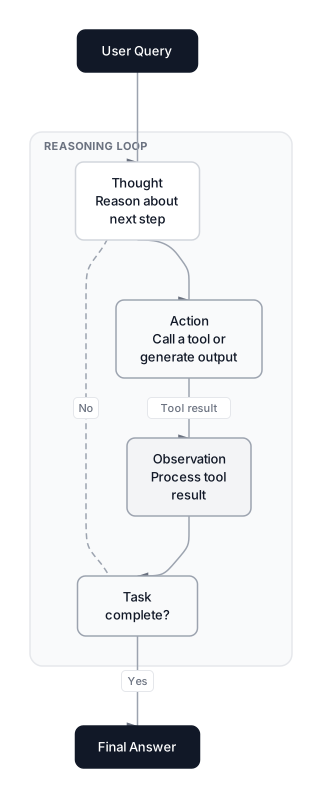 Click to expandReAct reasoning loop showing Thought, Action, Observation cycle with task completion check
The pattern has evolved since the original paper. LangGraph made ReAct modular by modeling agent steps as nodes in a directed graph with shared state. Complementary patterns like Reflexion now let agents analyze why an observation failed and try an entirely different approach, rather than just retrying the same strategy.
Here's what the research assistant's ReAct loop looks like in practice:
Expected output:
Query: ReAct agents

Step 1:
  Thought: I need to search for papers on 'ReAct agents'
  Action:  search_papers('ReAct agents')
  Observe: [{'title': 'ReAct: Synergizing Reasoning and Acting', 'year': 2022, 'citations': 2800}, {'title': 'Toolformer: LMs Can Teach Themselves to Use Tools', 'year': 2023, 'citations': 1500}]

Step 2:
  Thought: Found 2 papers. Let me extract findings from the top one.
  Action:  extract_findings('ReAct: Synergizing Reasoning and Acting')
  Observe: Interleaving reasoning traces with actions yields +34% success rate on ALFWorld and +10% on WebShop over prior methods.

Step 3:
  Thought: I have enough information to summarize.
  Action:  finish(None)
  Result:  Task complete. Found 2 papers.

Total steps: 3
Papers found: 2
Tools called: 2
Notice the structure: each step has a Thought (reasoning), an Action (tool call), and an Observation (result). The agent decides on its own when to stop. This is the core pattern every agent framework implements under the hood.
What makes ReAct powerful is the Thought trace. Without it, you get a tool-calling LLM that picks actions without explaining why. With it, you get an auditable reasoning chain that shows exactly where reasoning went wrong when failures happen.
Pro Tip: Always log the full Thought-Action-Observation trace in production. When an agent fails (and it will), the trace is the only way to debug it. Tools like LangFuse and LangSmith exist for exactly this. According to the LangChain State of Agent Engineering report, 94% of teams with agents in production run observability, and 71.5% have full step-level tracing.
Planning Strategies for Complex Tasks
ReAct works step-by-step, deciding the next move after each observation. This is great for exploratory tasks but expensive for structured ones. If the agent needs to review 20 papers across 5 subtopics, pure ReAct re-plans at every single step, burning tokens on repeated reasoning.
Several planning strategies have emerged, each with distinct tradeoffs.
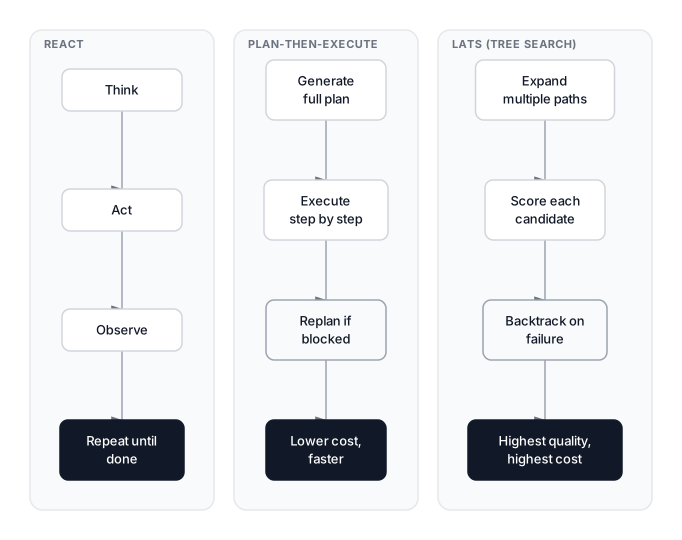 Click to expandSide-by-side comparison of ReAct, Plan-then-Execute, and LATS planning strategies
ReAct (step-by-step) reasons and acts in alternation. It's adaptive but expensive for long tasks because the full history grows with every step. The agent thinks before each paper search, which adds latency but allows pivoting when early results shift the research direction.
Plan-then-execute generates a complete plan upfront, then executes each step without re-reasoning. This uses far fewer tokens because planning happens once. The tradeoff is rigidity: if step 2 reveals a topic shift, the remaining plan may be wrong. Modern implementations add re-planning checkpoints where the agent evaluates progress periodically and adjusts. This hybrid approach dominates enterprise deployments in 2026.
LATS (Language Agent Tree Search) treats the action space as a tree and explores multiple branches simultaneously, inspired by Monte Carlo Tree Search. It tries several query formulations in parallel, scores the results, and backtracks from dead ends. It produces the highest quality results but at 3-5x the cost of ReAct. The LATS paper (Zhou et al., 2023) showed this approach outperforms ReAct on tasks requiring multi-step reasoning.
| Strategy | Token Cost | Adaptability | Best For |
|---|---|---|---|
| ReAct | Medium | High | Exploratory tasks, unknown paths |
| Plan-then-Execute | Low | Low | Structured tasks, known workflows |
| LATS | High | Very High | High-stakes tasks, complex reasoning |
In practice, most production agents use ReAct with a planning preamble: generate a rough plan, then execute step-by-step with freedom to deviate. Gartner predicts that 40% of enterprise applications will include task-specific AI agents by end of 2026, and most will follow this hybrid pattern.
Tool Integration and Selection
Tools are what separate agents from chatbots. An agent's capabilities are defined entirely by its tool set, and how it selects among them determines whether it succeeds or loops forever.
This is where function calling becomes critical. Modern LLMs like Claude, GPT-4o, and Gemini support structured function calling natively, returning JSON tool invocations that your orchestrator can execute. The Model Context Protocol (MCP) standardizes how agents discover and invoke tools across providers. MCP surpassed 97 million monthly SDK downloads in early 2026 with backing from Anthropic, OpenAI, Google, and Microsoft. Over 10,000 active public MCP servers now cover everything from developer tools to Fortune 500 deployments. The survey by Wang et al. (2024) provides a comprehensive taxonomy of LLM-based agent architectures, including tool-use patterns.
The most common tool selection patterns in production:
Direct selection gives the LLM all available tools and lets it pick. Works well with fewer than 15 tools. Beyond that, models start hallucinating tool names or picking suboptimal ones.
Two-stage selection first asks the LLM to categorize the task ("this is a search task"), then provides only the tools for that category. This scales to hundreds of tools by narrowing the selection window.
Parallel execution runs independent tool calls simultaneously. If the agent needs to search three databases, there's no reason to do it sequentially. OpenAI's Agents SDK and LangGraph both support this out of the box.
Common Pitfall: Giving an agent too many tools is worse than too few. Each additional tool increases the probability of wrong selection. Start with 3-5 tools, prove the agent works, then expand. Agents exposed to 40 or more tools can spend excessive steps selecting the wrong tool instead of completing the task.
Error recovery matters as much as tool selection. When a tool call fails, the agent needs a strategy: retry with different parameters, fall back to an alternative tool, or ask the user for help. Without explicit error handling, agents enter the dreaded "retry loop" where they call the same failing tool with the same parameters indefinitely.
Memory Architecture for Agents
Memory is what makes an agent's second step smarter than its first. Without it, every reasoning cycle starts from zero, leading to redundant searches and lost context. For more depth, see the AI Agent Memory Architecture guide.
Short-term memory is the conversation history: the sequence of thoughts, actions, and observations from the current task. This is what the LLM's context window holds. The constraint is context length; a long research session can exceed even 200K-token windows. Dedicated agent memory layers are becoming standard infrastructure in 2026, much as vector databases became standard in 2024.
Working memory (scratchpad) is a structured buffer the agent writes to explicitly. Instead of stuffing raw conversation into the prompt, the agent maintains a summary: "Papers reviewed: 12. Key findings: [list]. Gaps identified: [list]." This keeps the prompt focused. It's the difference between an agent that degrades after 20 steps and one that stays sharp after 100.
Long-term memory persists across sessions using a vector store or database. The agent remembers papers it reviewed last week and retrieves previous findings instead of re-searching. This connects directly to Agentic RAG, where the agent queries its own past work as a knowledge source.
Key Insight: The scratchpad pattern is the most underappreciated memory technique. Raw tool outputs can fill the context window, displace the original instructions, and degrade an agent's later decisions. Compress aggressively. Your agent should write summaries of what it found, not dump raw API responses into the prompt.
Agent Reliability and Failure Modes
Agents fail often, silently, and in ways that are hard to predict. The gap between a working demo and a reliable production system is where most projects die. A Gartner report projects that over 40% of agentic AI projects will be canceled by 2027. The APEX-Agents benchmark (Mercor, January 2026) tested leading models on complex professional tasks; the best model (Gemini 3 Flash with extended thinking) completed just 24% of tasks on the first attempt.
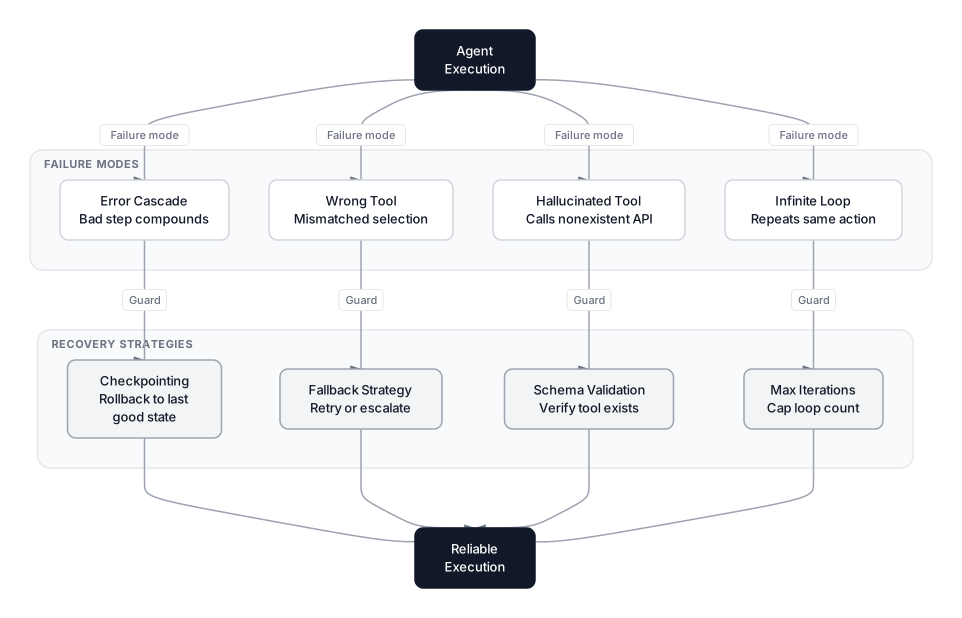 Click to expandAgent failure modes mapped to their corresponding recovery strategies
The four most common failure modes:
Infinite loops. The agent calls the same tool with the same arguments, gets the same result, and tries again. It might search for "quantum computing papers" repeatedly if it can't find what it expected. Fix: cap maximum iterations (10-15 for most tasks) and detect repeated actions.
Hallucinated tool calls. The agent invokes a tool that doesn't exist or passes invalid arguments. A model might call search_arxiv() when the actual tool is search_papers(). Fix: validate every tool call against a schema before execution.
Wrong tool selection. The agent picks a valid tool but the wrong one for the task. It uses extract_findings() before searching for papers. Fix: include precondition checks in tool descriptions ("requires: paper_id from a previous search").
Error cascading. One bad step corrupts subsequent reasoning. The agent retrieves a paper about chemistry instead of computer science, extracts irrelevant findings, then writes a summary about chemical reactions. Fix: add checkpointing so it can roll back to the last known-good state.
SWE-bench Verified shows the best coding agents (Claude Opus 4.5, Claude Opus 4.6, and Gemini 3.1 Pro all scoring above 80%) resolving the majority of real GitHub issues. But the APEX results tell a different story: on unstructured professional tasks, even top agents fail three out of four times. Benchmarks measure ceiling performance; production reliability is about the floor.
Pro Tip: Build a "confidence check" into your agent loop. After each step, have the agent rate its confidence (high/medium/low). On "low," escalate to a human or try an alternative approach. This single pattern prevents more cascading failures than any other guardrail.
Production Considerations
Running agents in production introduces constraints absent from demos. Cost, latency, and observability become primary concerns.
Cost compounds fast. A ReAct agent making 8 tool calls generates 8 LLM invocations, each carrying the full conversation context. A single query might consume 50K-100K tokens. At GPT-4o pricing ($2.50 per million input, $10 per million output as of March 2026), that's roughly $0.15-0.30 per query. Mitigation: use cheaper models for simple steps (routing), cache repeated tool outputs, and compress context with scratchpad summaries.
Latency adds up. Each LLM call takes 1-3 seconds. Eight sequential calls mean 8-24 seconds before the user sees a result. Parallel tool execution helps, but reasoning steps are inherently sequential. Choose architecture based on acceptable latency.
Observability is non-negotiable. According to the LangChain report, 89% of organizations building agents have implemented observability, and 62% have detailed step-level tracing. You need structured logging of every Thought-Action-Observation cycle, latency metrics, cost tracking, and error rate monitoring by tool.
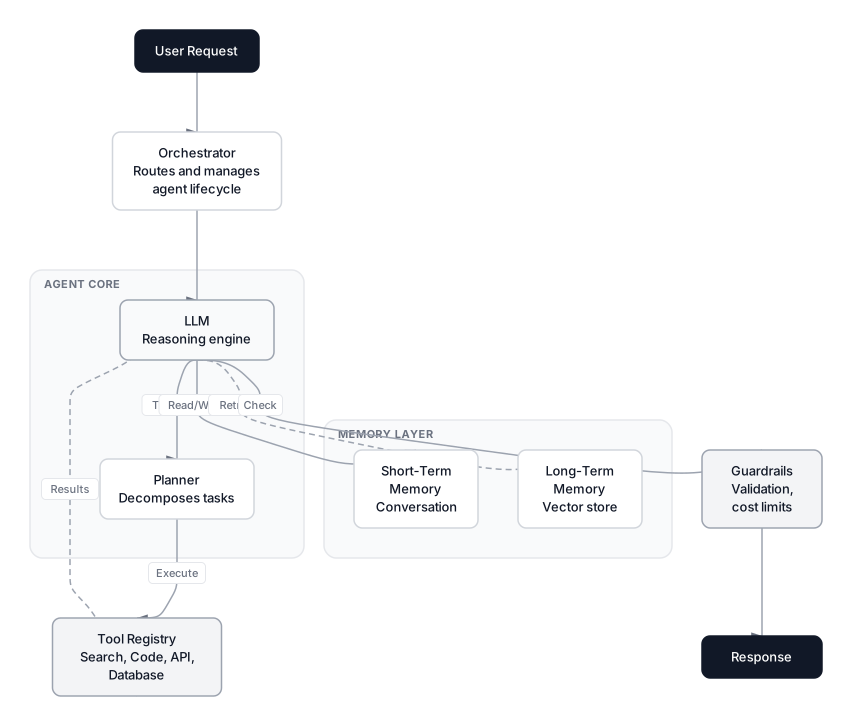 Click to expandComplete agent system architecture showing LLM core, tools, memory, and guardrails
Human-in-the-loop is not a compromise; it's a design pattern. For high-stakes actions (sending emails, modifying databases, publishing content), require explicit human approval. Most agent frameworks support interrupt-and-resume patterns for this.
Security requires action-level validation. The root cause of many agent failures is that the system authenticates who made the call but never verifies what action is being performed. Every agent action should be logged with timestamp, target system, data accessed, and reasoning chain.
Multi-Agent Architectures
Everything above covers a single agent acting alone. In practice, most enterprise deployments in 2026 involve multiple agents working together. Over 57% of organizations already deploy multi-step agent workflows, and the trend is accelerating as teams discover that splitting complex tasks across specialized agents outperforms a single agent trying to do everything.
The dominant pattern is orchestrator-worker: a coordinator agent receives a task, breaks it into subtasks, delegates each to a specialized worker agent (one for research, another for code generation, a third for review), and synthesizes the results. This maps naturally onto the research assistant example. Instead of one agent that searches, extracts, and summarizes, you'd have a search agent, an extraction agent, and a synthesis agent, each tuned for its role with its own tools and prompts.
Communication between agents is where Google's Agent-to-Agent (A2A) protocol enters the picture. While MCP standardizes how agents discover and call tools, A2A standardizes how agents discover and communicate with each other. Built on HTTP, JSON-RPC, and Server-Sent Events, A2A lets agents publish "Agent Cards" describing their capabilities, then exchange tasks without sharing internal memory or proprietary logic. Originally developed by Google and now housed at the Linux Foundation with over 50 technology partners, A2A is becoming the standard for inter-agent communication the same way MCP became the standard for agent-tool communication.
Key Insight: Multi-agent systems introduce coordination overhead. Two agents that each succeed 90% of the time don't produce a 90% system; error rates compound. Start with a single agent, prove it works, and only split into multiple agents when a single agent's context window or tool set becomes the bottleneck.
When to Use Agents (and When Not To)
Not every problem needs an agent. Agents add complexity, cost, latency, and failure modes. Use them only when the benefits outweigh these costs.
Use an agent when:
- The task requires multiple steps with conditional logic
- The next step depends on the result of the previous step
- The task involves gathering information from multiple sources and synthesizing it
- You need the system to handle unexpected situations without pre-programmed rules
Do NOT use an agent when:
- A single LLM call with the right prompt solves the problem
- The workflow is fixed and predictable (use a pipeline instead)
- Latency requirements are under 2 seconds
- The task doesn't require tool use
- You can't tolerate occasional failures
The decision framework is straightforward: if you can draw a fixed flowchart of the task, use a pipeline. If the flowchart has branches that depend on runtime data, use an agent. If the flowchart is unknowable until execution, you have no choice.
Conclusion
Building reliable AI agents comes down to three decisions: which reasoning pattern fits your task (ReAct for exploration, plan-then-execute for structured workflows, LATS for high-stakes problems), how to design your tool interfaces (fewer tools, clear schemas, error handling), and where to invest in guardrails (iteration caps, schema validation, confidence checks, human approval gates).
The research assistant example throughout this article shows why these patterns matter. An agent that can search papers, extract findings, and write summaries is only useful if it can reason about what to search next, recover from bad results, and know when it's done. The reasoning loop is the product.
For deeper coverage of the building blocks, explore how LLMs actually work to understand the reasoning engine, context engineering to understand prompt design for agents, and LLM sampling to understand why temperature settings affect agent consistency.
Start with ReAct and three tools. Get it working reliably for one use case. Then expand. The teams shipping agents successfully in 2026 aren't the ones with the most sophisticated architectures. They're the ones who got the basics right.
Frequently Asked Interview Questions
Q: What is the ReAct pattern and why has it become the default for production agents?
ReAct interleaves reasoning (Thought) with tool use (Action) and result processing (Observation) in a loop. Unlike chain-of-thought, which only generates internal reasoning, ReAct gathers new information during execution through tool calls. It became the default because frameworks like LangGraph implement it natively, and the Thought trace provides the auditability production systems require.
Q: You're designing an agent for a financial compliance workflow. Would you pick ReAct, plan-then-execute, or LATS?
Plan-then-execute with re-planning checkpoints. Compliance workflows have predictable steps (retrieve regulations, check transactions, flag exceptions, generate reports), making plan-then-execute token-efficient. Re-planning checkpoints after each major phase let the agent adjust if early steps reveal unexpected conditions. LATS would be overkill on cost, and pure ReAct wastes tokens re-reasoning at each step.
Q: How does the Model Context Protocol (MCP) change agent tool integration?
MCP standardizes how agents discover, authenticate with, and invoke tools regardless of framework. Before MCP, every framework had its own tool definition format, creating vendor lock-in. With 97 million monthly SDK downloads and backing from all major AI labs, MCP lets you write a tool once and have it work with any compliant agent, similar to how USB-C standardized device connectivity.
Q: An agent works in development but fails 40% of the time in production. Walk through your debugging process.
Start with observability traces to identify the dominant failure mode: looping, wrong tool selection, or context overflow. Check whether production queries differ from dev queries in length or ambiguity. Verify tool APIs return the same response format in production. Inspect failure rate per tool to isolate unreliable components.
Q: What is the scratchpad memory pattern and when would you use it over raw conversation history?
The scratchpad is a structured buffer where the agent writes compressed progress summaries instead of keeping the full conversation in context. Use it whenever the agent runs for more than 10-15 steps, because raw history fills the context window with verbose tool outputs, eventually pushing out original instructions. The agent writes "Papers reviewed: 12. Key findings: [list]" instead of retaining all 12 raw API responses.
Q: How would you evaluate an AI agent before deploying to production?
Test on a held-out set of realistic tasks with known correct outcomes, measuring success rate, average step count, and cost per task. Run adversarial tests: ambiguous queries, failing tools, tasks exceeding the iteration cap. The APEX benchmark showed even top models complete only 24% of complex professional tasks on the first try, so evaluation must include failure mode analysis, not just pass/fail.
Q: Your company wants to give an agent access to 50 internal tools. How do you handle tool selection at that scale?
Use two-stage selection. First, the agent categorizes the request into a domain (e.g., "HR query," "finance task"). Then only the 5-8 tools relevant to that domain are presented. This avoids the failure mode where agents with 40+ tools hallucinate tool names or pick wrong ones. Grouping tools behind per-domain MCP servers gives clean separation.
Q: What security risks should you consider when deploying AI agents in production?
The biggest risk is privilege escalation: the agent authenticates as a trusted service but performs actions the user shouldn't be authorized to do. Validate both who made the call and what action is being performed. Log every action with timestamp, target system, and reasoning chain. For agents that modify data or send communications, enforce human-in-the-loop approval gates.