
A year ago, connecting an AI agent to a database meant writing custom glue code. Connecting that same agent to a ticketing system meant writing more glue code. A different API format, different auth flow, different error handling. The Model Context Protocol (MCP) was built to kill that problem.
Anthropic open-sourced MCP in November 2024 as a single, standardized protocol for connecting AI applications to external data sources and tools. Think of it as the USB-C of AI: one connector that works everywhere. In roughly 16 months, the ecosystem has grown to over 8,500 community-built servers (according to PulseMCP) and 97 million+ total SDK downloads, with first-class support from Claude, ChatGPT, Gemini, Microsoft Copilot, VS Code, Cursor, and dozens more. In December 2025, Anthropic donated MCP to the Agentic AI Foundation (AAIF) under the Linux Foundation, co-founded by Anthropic, OpenAI, and Block, with platinum members including AWS, Google, Microsoft, Bloomberg, and Cloudflare.
This is the protocol you need to understand if you're building anything agentic in 2026.
The N x M Integration Problem
Every AI application that connects to external services faces a combinatorial explosion. If you have 3 AI apps (Claude, ChatGPT, your custom agent) and 4 data sources (a database, a ticketing system, a knowledge base, a messaging platform), you need 12 custom connectors. Add a fifth data source and you're at 15. Add a fourth AI app and it's 20.
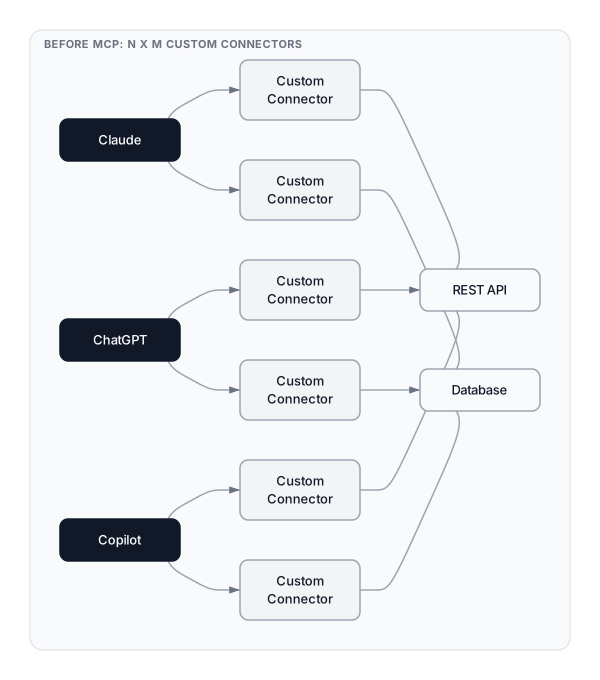 Click to expandThe N x M integration problem showing how custom connectors multiply across AI applications and data sources
This is exactly the problem that hit our running example: a customer support agent. The agent needs to pull tickets from Zendesk, look up customer records in Postgres, search knowledge base articles in Confluence, and send notifications through Slack. Without a standard protocol, each connection requires its own SDK, its own auth flow, its own error handling, and its own schema mapping.
MCP collapses this N x M problem into N + M. Each AI application implements one MCP client. Each data source implements one MCP server. They all speak the same protocol. Your support agent connects to four MCP servers using identical plumbing, and adding a fifth service means adding one server. The client code doesn't change.
Key Insight: MCP doesn't replace REST APIs. It wraps them. Your Zendesk MCP server calls the Zendesk REST API internally. The AI application no longer needs to know anything about Zendesk's specific API format. It just speaks MCP.
MCP Architecture: Hosts, Clients, and Servers
MCP follows a client-server architecture with three distinct participants.
The MCP Host is the AI application itself. Claude Desktop, VS Code with Copilot, your custom agent built with the Claude Agent SDK are all hosts. The host manages connections, routes tool calls, and feeds context to the LLM.
The MCP Client is a component inside the host that maintains a dedicated connection to a single MCP server. If the host connects to four servers, it instantiates four clients. Each client handles the JSON-RPC 2.0 communication for its server.
The MCP Server is the program that exposes data and capabilities. It can run locally (as a subprocess using stdio) or remotely (over Streamable HTTP). Each server advertises what it can do, and the client discovers those capabilities at connection time.
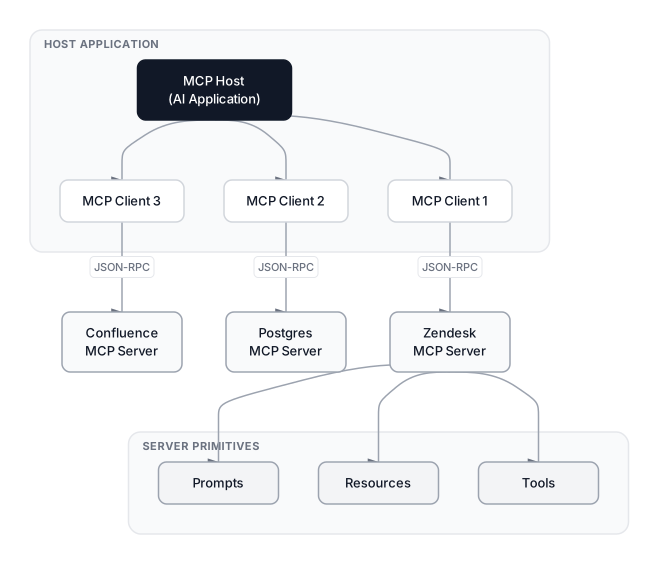 Click to expandMCP architecture showing Host, Clients, and Servers with the three primitives (Tools, Resources, Prompts)
The Three Primitives
Every MCP server exposes capabilities through three primitives:
| Primitive | Purpose | Discovery Method | Example (Support Agent) |
|---|---|---|---|
| Tools | Actions the LLM can execute | tools/list | create_ticket, update_status, send_slack_message |
| Resources | Read-only data for context | resources/list | Customer records, order history, KB articles |
| Prompts | Reusable interaction templates | prompts/list | Escalation template, refund response template |
For our support agent, the Zendesk server exposes tools like create_ticket and update_status. The Postgres server exposes resources containing customer records. The Confluence server exposes both resources (knowledge base articles) and prompts (response templates). The Slack server exposes tools for sending messages.
The host's LLM sees all these capabilities as a unified toolkit. When a customer asks "Where's my order?", the LLM can call the Postgres server's get_order_status tool, pull the relevant KB article from Confluence, and send a Slack notification to the fulfillment team. All three operations use the same protocol.
Pro Tip: The distinction between tools and resources matters. Tools perform actions (side effects), while resources provide read-only context. This separation lets the host implement different permission models: resources can be auto-approved, while tool calls might require user confirmation.
Building an MCP Server
Let's build a simplified version of the Zendesk MCP server from our support agent example. The Python SDK makes this straightforward.
from mcp.server.fastmcp import FastMCP

mcp = FastMCP("zendesk-support")

# Expose a tool: create a support ticket
@mcp.tool()
async def create_ticket(
    subject: str,
    description: str,
    priority: str = "normal",
    customer_email: str = ""
) -> str:
    """Create a new support ticket in Zendesk.

    Args:
        subject: Ticket subject line
        description: Detailed description of the issue
        priority: Priority level (low, normal, high, urgent)
        customer_email: Customer's email address
    """
    # In production, this calls the Zendesk REST API
    ticket_id = await zendesk_api.create_ticket(
        subject=subject,
        description=description,
        priority=priority,
        requester_email=customer_email
    )
    return f"Created ticket #{ticket_id}: {subject}"

# Expose a resource: recent tickets for a customer
@mcp.resource("tickets://{customer_id}/recent")
async def get_recent_tickets(customer_id: str) -> str:
    """Fetch the 10 most recent tickets for a customer."""
    tickets = await zendesk_api.list_tickets(
        requester_id=customer_id,
        limit=10
    )
    return format_tickets_as_markdown(tickets)

# Expose a prompt: escalation template
@mcp.prompt()
async def escalation_template(ticket_id: str, reason: str) -> str:
    """Generate an escalation message for a support ticket."""
    return f"""You are escalating ticket #{ticket_id}.

Reason for escalation: {reason}

Write a professional internal message to the tier-2 support team
explaining why this ticket needs immediate attention. Include the
ticket context and recommended next steps."""
The @mcp.tool() decorator automatically generates the JSON Schema from Python type hints. The LLM sees a clean interface: tool name, description, parameter types, and required fields. It doesn't need to know that the Zendesk REST API uses a completely different payload format underneath.
The TypeScript SDK follows a similar pattern using McpServer:
import { McpServer } from "@modelcontextprotocol/sdk/server/mcp.js";
import { z } from "zod";

const server = new McpServer({
  name: "zendesk-support",
  version: "1.0.0",
});

server.tool(
  "create_ticket",
  "Create a new support ticket in Zendesk",
  {
    subject: z.string(),
    description: z.string(),
    priority: z.enum(["low", "normal", "high", "urgent"]).default("normal"),
    customer_email: z.string().email().optional(),
  },
  async ({ subject, description, priority, customer_email }) => {
    const ticketId = await zendeskApi.createTicket({
      subject, description, priority,
      requesterEmail: customer_email,
    });
    return {
      content: [{ type: "text", text: `Created ticket #${ticketId}` }],
    };
  }
);
Client Configuration
On the host side, connecting to MCP servers is a configuration file. Here's the support agent's config for Claude Desktop:
{
  "mcpServers": {
    "zendesk": {
      "command": "npx",
      "args": ["-y", "@company/zendesk-mcp-server"],
      "env": {
        "ZENDESK_API_TOKEN": "your-token-here"
      }
    },
    "postgres": {
      "command": "npx",
      "args": ["-y", "@modelcontextprotocol/server-postgres"],
      "env": {
        "POSTGRES_CONNECTION_STRING": "postgresql://..."
      }
    },
    "slack": {
      "url": "https://mcp.slack.example.com/mcp",
      "headers": {
        "Authorization": "Bearer xoxb-your-slack-token"
      }
    }
  }
}
The first two servers (zendesk and postgres) run locally via stdio. The host spawns them as child processes. The slack server is remote, accessed over HTTP. The LLM doesn't know or care about this distinction.
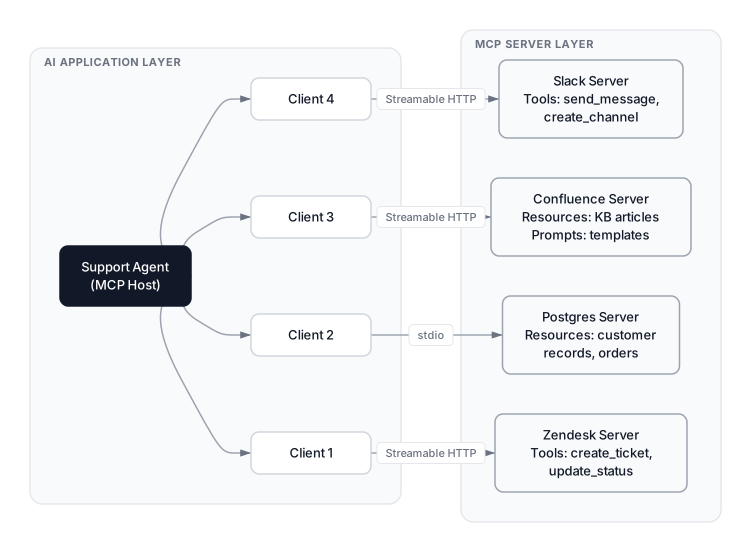 Click to expandCustomer support agent topology showing the MCP host connected to four servers via different transport protocols
Transport Protocols: stdio and Streamable HTTP
MCP supports two active transport mechanisms (plus one deprecated option).
| Transport | Communication | Use Case | Status |
|---|---|---|---|
| stdio | stdin/stdout streams | Local servers on same machine | Active, recommended for local |
| Streamable HTTP | HTTP POST + optional SSE | Remote servers, cloud deployment | Active, recommended for remote |
| SSE | HTTP GET + Server-Sent Events | Remote servers (legacy) | Deprecated since March 2025 |
stdio is the simplest transport. The host spawns the MCP server as a child process and communicates through standard input/output streams. Zero network overhead, zero authentication complexity. Our Postgres MCP server uses stdio because it runs on the same machine as the agent.
Streamable HTTP is the modern standard for remote MCP servers, introduced in the March 2025 spec revision. The client sends JSON-RPC requests via POST, and the server can respond with either a direct JSON response or upgrade to an SSE stream for long-running operations. This replaced the older dual-endpoint SSE transport.
SSE was the original remote transport but has been officially deprecated. Streamable HTTP is strictly better: single endpoint, supports both request-response and streaming patterns, and works with standard HTTP infrastructure without special configuration.
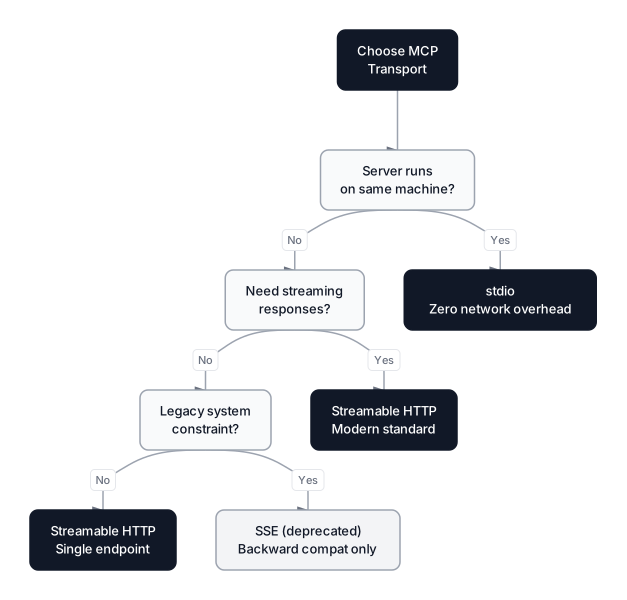 Click to expandDecision flowchart for choosing the right MCP transport protocol based on deployment requirements
Common Pitfall: Don't pick SSE for new projects. Older tutorials still show SSE examples, but the MCP spec deprecated it for good reasons. Streamable HTTP handles every use case SSE covered, with fewer moving parts.
The MCP Ecosystem in March 2026
MCP went from an Anthropic side project to the industry standard for AI-to-tool connectivity in about 16 months.
Key milestones:
- November 2024: Anthropic open-sources MCP with the initial specification
- March 2025: Streamable HTTP transport replaces SSE in the spec revision. OpenAI adopts MCP across the Agents SDK, Responses API, and ChatGPT desktop app.
- April 2025: Google DeepMind confirms MCP support in Gemini
- June 2025: Spec update adds elicitation (server-initiated user input), structured tool output schemas, and OAuth 2.1 authorization enhancements including resource indicators and protected resource metadata.
- September 2025: Official MCP Registry launches in preview for server discovery
- November 2025: Spec revision adds async Tasks, statelessness by default, server identity verification, and the extensions system
- December 2025: Anthropic donates MCP to the Agentic AI Foundation (AAIF) under the Linux Foundation
- January 2026: MCP Apps, the first official extension, launches with interactive UI components in tool responses
The server ecosystem has grown rapidly. PulseMCP tracks over 8,500 community servers. The official MCP Registry curates roughly 500+ verified servers, while broader directories count well over 1,800. Popular categories include databases (Postgres, MySQL, MongoDB), developer tools (GitHub, Jira, Linear), communication (Slack, Discord, email), and cloud platforms (AWS, GCP, Azure).
Official SDKs exist for 10 languages: Python, TypeScript, Java, Kotlin, C#, Swift, Go, Rust, Ruby, and PHP. The most popular community server, Context7 by Upstash, has over 48,000 GitHub stars. The MCP Inspector makes debugging straightforward: point it at any server and it visualizes every tool, resource, and prompt the server exposes.
Key Insight: The real turning point was when OpenAI, Google, and Microsoft all adopted MCP within six months. That created a network effect: build one MCP server, and it works with every major AI platform. That's why the ecosystem grew so fast.
The November 2025 Spec and MCP Apps
The 2025-11-25 specification was the biggest update since MCP launched. Three additions stand out.
Tasks let any MCP request become asynchronous. A server accepts a request, returns a task handle immediately, and publishes progress updates while work happens in the background. Tasks follow five lifecycle states: working, input_required, completed, failed, and cancelled. This matters for operations that take seconds or minutes, like running a database migration or waiting for external approval.
Statelessness by default removes the mandatory initialization handshake from previous versions. Each request can be self-contained. This makes it far easier to deploy MCP servers behind load balancers, in serverless environments, and as horizontally scaled services.
MCP Apps, announced in January 2026, is the first official extension. Tool calls can return interactive UI components (charts, forms, dashboards) that render directly in the conversation via sandboxed iframes. MCP Apps are currently supported by Claude, VS Code GitHub Copilot, Goose, and Postman.
Pro Tip: If your MCP server handles long-running operations, adopt the Tasks primitive immediately. Without it, clients either time out or hold open connections. Tasks give you a clean handle-based pattern that works across both stdio and Streamable HTTP transports.
MCP vs Traditional API Integration
If you've built AI agents with function calling, you might wonder why MCP is necessary. You can describe a REST API as a tool schema and let the LLM call it. That works, but it falls apart at scale.
| Dimension | REST API | MCP |
|---|---|---|
| Designed for | Human developers writing code | LLMs reasoning about capabilities |
| Discovery | Read docs, write integration code | tools/list at runtime, automatic |
| Schema format | OpenAPI (external to calls) | JSON Schema in every response |
| Communication | Request-response | Bidirectional JSON-RPC |
| Standardization | Per-service (every API is different) | One protocol for all services |
The biggest difference is runtime discovery. With REST, a developer reads Zendesk's API docs, writes a connector, and hardcodes the integration. With MCP, the LLM calls tools/list and dynamically learns what's available. If Zendesk adds a new endpoint, the MCP server advertises it automatically. No code change in the client.
The second difference is bidirectional communication. REST is one-way: client asks, server responds. MCP supports server-to-client messages through notifications and sampling. An MCP server can notify the client that available tools have changed, or even request an LLM completion from the client via sampling/createMessage.
REST still wins in plenty of situations. If a human developer is the client, REST is simpler. If you need a single API call with no discovery, REST is less overhead. The sweet spot for MCP is when an LLM needs to dynamically interact with multiple services, which is exactly the agentic AI pattern where MCP shines.
MCP and A2A: Complementary Protocols
MCP handles agent-to-tool communication. The A2A (Agent-to-Agent) Protocol, contributed by Google, handles agent-to-agent communication. Together, they form the connectivity layer of the agentic AI stack.
| Dimension | MCP | A2A |
|---|---|---|
| Purpose | Agent connects to tools, APIs, and data | Agents coordinate with other agents |
| Relationship | Agent-to-tool (vertical) | Agent-to-agent (horizontal) |
| Primary use | Tool discovery, data access, action execution | Task delegation, multi-agent orchestration |
| Governance | AAIF / Linux Foundation | AAIF / Linux Foundation |
Think of MCP as how an agent talks to its tools, and A2A as how agents talk to each other. Both protocols now live under the same Agentic AI Foundation, and most production agentic systems will use both.
Security and Authentication
Production MCP deployments need serious security. The MCP authorization specification standardizes authentication using OAuth 2.1 with PKCE (Proof Key for Code Exchange). The MCP server acts as an OAuth resource server that validates access tokens, while the client obtains tokens on behalf of the user. The spec mandates PKCE because many MCP clients run in environments where storing secrets securely is difficult: browser extensions, CLI tools, containerized agents.
Known Attack Vectors
Security research in 2025 exposed several MCP-specific attack patterns that the OWASP MCP Top 10 now catalogs:
- Tool poisoning. Malicious instructions embedded in tool descriptions that are invisible to users but visible to the LLM. The model follows hidden instructions and exfiltrates data.
- Rug pulls. A tool's description or behavior is silently altered after initial user approval. Mitigation: pin tool description hashes and alert on changes.
- Command injection. The AI agent constructs shell commands using untrusted input without proper sanitization. According to early security audits, a significant percentage of tested MCP server implementations had injection flaws.
- Token mismanagement. Hard-coded credentials, long-lived tokens, or secrets stored in model memory expose entire environments if compromised.
Key security practices:
- Short-lived access tokens with refresh token rotation
- Resource indicators (RFC 8707) to prevent cross-server token reuse
- Permission scoping with granular per-tool OAuth scopes
- Server identity verification, strengthened in the November 2025 spec
- Tool description pinning to catch rug pull attacks early
Common Pitfall: Don't skip OAuth for internal MCP servers. API keys as environment variables work for local dev, but production needs proper token-based auth with rotation. A compromised API key gives permanent access; a compromised OAuth token expires.
When to Use MCP (and When Not To)
Use MCP when:
- Your AI agent connects to 3+ external services
- You want tools to work across multiple AI platforms without rebuilding each integration
- You need dynamic tool discovery at runtime
- You're building infrastructure other teams will consume
Don't use MCP when:
- You have a single API call to make. The protocol overhead isn't worth it for simple cases.
- The client is a human developer, not an LLM. REST with good docs is still easier.
- You need sub-millisecond latency. JSON-RPC adds overhead compared to a direct REST call.
- Your existing function calling setup works and you're not scaling beyond it.
For our support agent, MCP is the right choice. Four services, multiple tool types, deployed on a platform that natively supports MCP. The protocol removes weeks of glue code and makes the agent portable across AI hosts.
Conclusion
MCP solved the right problem at the right time. AI agents were multiplying, each one needing connections to real-world systems, and every connection was a custom integration. The protocol's host-client-server architecture, with its three clean primitives (tools, resources, prompts), gave the industry a shared language for AI connectivity.
The practical impact is real. Instead of writing twelve custom connectors for our support agent, we configured four MCP servers and moved on to building actual agent logic. That's the promise: spend less time on plumbing, more time on intelligence.
If you're building agents, start with the fundamentals. Understand how function calling works before jumping to MCP. Learn the ReAct planning loop that drives most agent architectures. Then explore how MCP fits into the broader picture of how large language models actually work. The protocol is mature, the ecosystem is large, and the industry consensus is clear: there's no reason to keep writing custom connectors.
Frequently Asked Interview Questions
Q: What problem does MCP solve that REST APIs don't?
MCP solves the N x M integration problem for AI agents. With REST, each AI application needs custom code for each service. MCP standardizes the protocol so one client implementation works with any server, collapsing N x M into N + M. It also provides runtime tool discovery and bidirectional JSON-RPC communication that REST doesn't offer natively.
Q: Explain the three MCP primitives and give an example of each.
Tools are executable functions the LLM can invoke (e.g., create_ticket). Resources provide read-only context data (e.g., customer records from a database). Prompts are reusable interaction templates (e.g., an escalation response template). Each primitive has discovery methods that let the LLM learn what's available at runtime.
Q: When would you choose stdio transport over Streamable HTTP?
Use stdio when the MCP server runs on the same machine as the host. It launches as a child process communicating through standard I/O with zero network overhead. Use Streamable HTTP for remote servers, cloud deployments, and multi-tenant scenarios.
Q: How does MCP handle authentication in production?
MCP uses OAuth 2.1 with PKCE. The server validates access tokens while the client obtains them on behalf of the user. Best practices include short-lived tokens with refresh rotation, granular per-tool scoping, and resource indicators (RFC 8707) to prevent cross-server token reuse.
Q: What's the difference between MCP and A2A?
MCP handles agent-to-tool communication: connecting to databases, APIs, and services. A2A handles agent-to-agent communication: coordination, task delegation, and multi-agent orchestration. They're complementary protocols under the same Agentic AI Foundation, and most production agentic systems use both.
Q: What are tool poisoning and rug pull attacks in MCP?
Tool poisoning embeds malicious instructions in tool descriptions that are invisible to users but visible to the LLM, manipulating it into unauthorized actions. Rug pulls silently change a tool's description after user approval. Defend against both by pinning tool description hashes, verifying server identity, and restricting permissions with granular OAuth scopes.
Q: How would you architect MCP for a company with 20 microservices?
Each microservice gets its own MCP server wrapping its existing REST API, exposing operations as tools and data as resources. The agent host instantiates one client per server. For related services, combine them into a single server to reduce connection count. Register all servers in the MCP Registry for centralized discovery.
Q: What does the Tasks primitive add and why does it matter?
Tasks make any MCP request asynchronous. The server returns a task handle immediately and publishes progress updates. Tasks follow five lifecycle states: working, input_required, completed, failed, and cancelled. Without Tasks, long-running operations cause client timeouts or blocked connections.