
Most agent tutorials end at "hello world." They show you a chatbot that calls one tool, declare victory, and move on. That's fine for a demo, but it won't survive a production codebase with real security requirements, cost constraints, and failure modes.
The Claude Agent SDK changes the equation. Formerly the Claude Code SDK, it was renamed in late 2025 to reflect what it had become: a general-purpose agent runtime, not just a coding assistant. As of March 2026, the Python package sits at v0.1.48 on PyPI and the TypeScript package at v0.2.71 on npm. It gives you the same agent loop, tools, and context management that power Claude Code, packaged as a library you can embed in your own applications. You get built-in file operations, shell commands, web search, and MCP integration out of the box. You write the business logic. The SDK handles the agentic plumbing.
What follows is a complete code review agent built from scratch. It reads pull requests from GitHub, analyzes code quality, scans for security issues, and posts review comments. Along the way, you'll learn the SDK's core primitives: tools, hooks, MCP servers, subagents, and the patterns that make agents reliable in production.
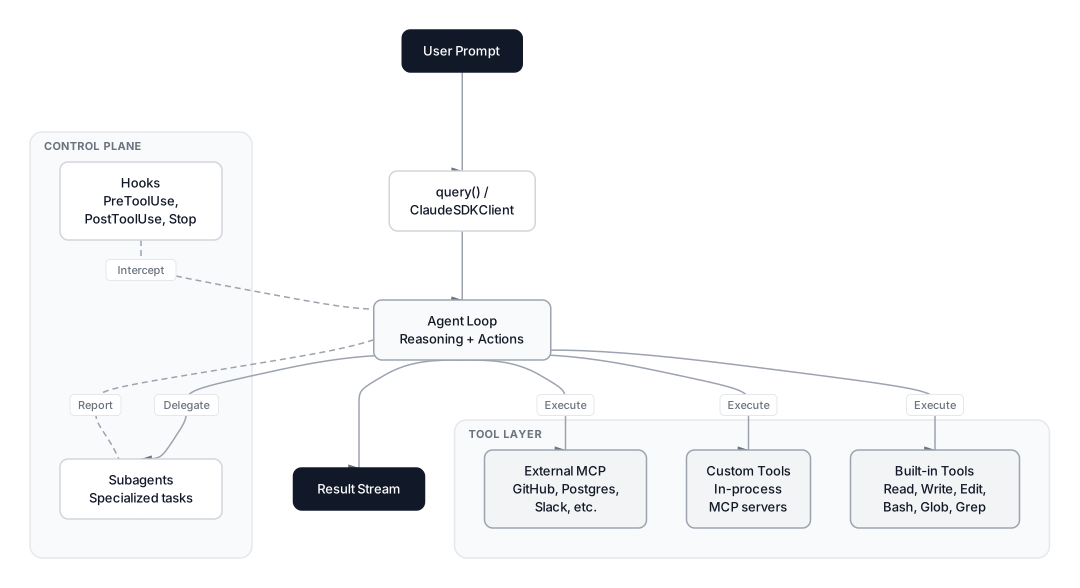 Click to expandClaude Agent SDK architecture showing the agent loop, tool layer, and control plane
What the Claude Agent SDK Actually Is
The Claude Agent SDK started life as the Claude Code SDK, the engine behind Anthropic's AI coding assistant. When Anthropic renamed it in late 2025, the change reflected reality: teams were already using it to build legal assistants, SRE bots, and research agents.
A key breaking change in v0.1.0: the SDK no longer loads Claude Code's system prompt or filesystem settings by default. Your agents get a minimal system prompt unless you explicitly request the claude_code preset or provide your own. This means predictable behavior in CI/CD and multi-tenant deployments.
The SDK wraps Claude's capabilities into two core interfaces:
| Interface | Style | Session | Best For |
|---|---|---|---|
query() | Simple function call | New session per call (resumable via session_id) | One-off tasks, CI/CD pipelines, batch processing |
ClaudeSDKClient | Class-based | Persistent session with explicit lifecycle control | Multi-turn conversations, interactive apps, stateful workflows |
Both interfaces support the full feature set: hooks, tools, MCP integration, subagents, and streaming via async iterators. The difference is ergonomic, not functional. query() is a standalone function you call and iterate over. ClaudeSDKClient gives you a class instance with methods for session management, making it easier to build long-running interactive applications where you need fine-grained control over the agent lifecycle. The built-in tool catalog includes Read, Write, Edit, Bash, Glob, Grep, WebSearch, WebFetch, AskUserQuestion, Agent (for spawning subagents), and NotebookEdit (for Jupyter notebooks), among others.
Key Insight: The Agent SDK is not an abstraction over the Anthropic Messages API. It's a full agent runtime with built-in tool execution. When Claude decides to read a file, the SDK reads the file. When Claude wants to run a shell command, the SDK runs it. You don't implement the tool loop yourself.
Setting Up the Code Review Agent
Install the SDK and set your API key:
pip install claude-agent-sdk
export ANTHROPIC_API_KEY=your-api-key
The SDK also supports Amazon Bedrock, Google Vertex AI, and Azure AI Foundry by setting the corresponding environment variables (CLAUDE_CODE_USE_BEDROCK=1, CLAUDE_CODE_USE_VERTEX=1, or CLAUDE_CODE_USE_FOUNDRY=1).
Here's the skeleton of our code review agent:
import asyncio
from claude_agent_sdk import query, ClaudeAgentOptions, ResultMessage


async def review_pull_request(pr_url: str):
    """Review a GitHub pull request for code quality and security issues."""

    options = ClaudeAgentOptions(
        system_prompt="""You are an expert code reviewer. Analyze the provided
        code changes for: code quality issues, security vulnerabilities,
        performance problems, and style inconsistencies. Be specific about
        line numbers and provide actionable suggestions.""",
        allowed_tools=["Read", "Glob", "Grep", "Bash"],
        max_turns=20,
    )

    async for message in query(
        prompt=f"Review the code changes in this PR: {pr_url}",
        options=options,
    ):
        if isinstance(message, ResultMessage):
            return message.content


result = asyncio.run(review_pull_request("https://github.com/org/repo/pull/42"))
print(result)
This agent already works. It can clone the repo, read diff files, grep for patterns, and produce a review. But it's limited to built-in tools and has no guardrails. Let's fix both.
Adding Custom Tools
The SDK lets you define custom tools as in-process MCP servers. Each tool is a Python function decorated with @tool, bundled into a server that runs inside your application with zero subprocess overhead.
Here are three custom tools for our code review agent:
from claude_agent_sdk import tool, create_sdk_mcp_server
from typing import Any
import json


@tool(
    "analyze_complexity",
    "Calculate cyclomatic complexity for a Python function",
    {"code": str, "function_name": str},
)
async def analyze_complexity(args: dict[str, Any]) -> dict[str, Any]:
    code = args["code"]
    func_name = args["function_name"]

    # Count decision points: if, elif, for, while, except, and, or
    decision_keywords = ["if ", "elif ", "for ", "while ", "except ", " and ", " or "]
    complexity = 1  # Base complexity
    for keyword in decision_keywords:
        complexity += code.count(keyword)

    risk = "low" if complexity <= 5 else "medium" if complexity <= 10 else "high"

    return {
        "content": [{
            "type": "text",
            "text": json.dumps({
                "function": func_name,
                "cyclomatic_complexity": complexity,
                "risk_level": risk,
                "recommendation": f"Consider refactoring"
                    if complexity > 10 else "Complexity acceptable",
            }),
        }]
    }


@tool(
    "check_security_patterns",
    "Scan code for common security anti-patterns",
    {"code": str, "language": str},
)
async def check_security_patterns(args: dict[str, Any]) -> dict[str, Any]:
    code = args["code"]
    findings = []

    patterns = {
        "SQL injection": ["execute(f\"", "execute(f'", ".format(", "% ("],
        "Hardcoded secrets": ["password =", "api_key =", "secret =", "token ="],
        "Unsafe deserialization": ["pickle.loads", "yaml.load(", "eval("],
        "Command injection": ["os.system(", "subprocess.call(shell=True"],
    }

    for vuln_type, indicators in patterns.items():
        for indicator in indicators:
            if indicator in code:
                findings.append({
                    "type": vuln_type,
                    "indicator": indicator,
                    "severity": "high" if vuln_type in
                        ["SQL injection", "Command injection"] else "medium",
                })

    return {
        "content": [{
            "type": "text",
            "text": json.dumps({
                "total_findings": len(findings),
                "findings": findings,
            }),
        }]
    }


@tool(
    "generate_review_comment",
    "Format a structured review comment for posting to GitHub",
    {"file_path": str, "line_number": int, "severity": str,
     "category": str, "message": str, "suggestion": str},
)
async def generate_review_comment(args: dict[str, Any]) -> dict[str, Any]:
    severity_labels = {"high": "CRITICAL", "medium": "WARNING", "low": "SUGGESTION"}
    label = severity_labels.get(args["severity"], "NOTE")

    formatted = (
        f"**[{label}]** {args['category']}\n\n"
        f"{args['message']}\n\n"
        f"**Suggested fix:**\n{args['suggestion']}"
    )

    return {
        "content": [{
            "type": "text",
            "text": json.dumps({
                "file": args["file_path"],
                "line": args["line_number"],
                "body": formatted,
            }),
        }]
    }


# Bundle all tools into an MCP server
review_tools = create_sdk_mcp_server(
    name="code-review",
    version="1.0.0",
    tools=[analyze_complexity, check_security_patterns, generate_review_comment],
)
Notice the naming convention. A tool called analyze_complexity on a server named code-review becomes mcp__code-review__analyze_complexity when Claude references it. You'll use this pattern in allowed_tools.
Pro Tip: Custom tools run in-process, not as separate server processes. This means zero startup overhead and direct access to your application's state, database connections, and configuration.
The Hooks System
Hooks are the SDK's safety net. They're callback functions that fire at specific points in the agent loop, letting you validate, block, modify, or log actions before and after they happen.
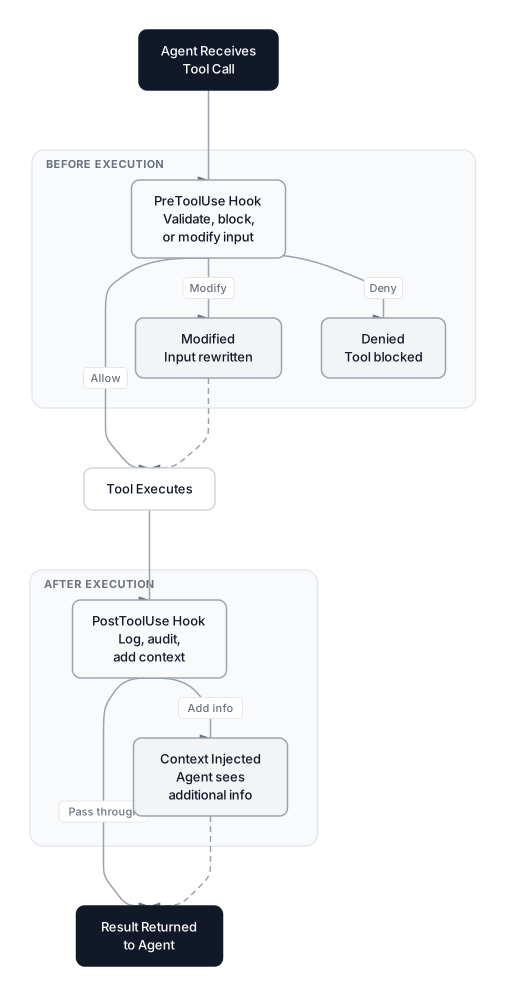 Click to expandHooks lifecycle showing PreToolUse and PostToolUse interception points
Here's the critical mental model: hooks don't replace permissions. They add a programmable layer on top. A PreToolUse hook can deny a tool call, modify its input, or inject context. A PostToolUse hook can log what happened or trigger follow-up actions. The SDK supports events including PreToolUse, PostToolUse, PostToolUseFailure, Stop, SubagentStart, SubagentStop, PreCompact, Notification, PermissionRequest, and UserPromptSubmit.
For our code review agent, we need three hooks: read-only enforcement, cost tracking, and audit logging.
from claude_agent_sdk import ClaudeAgentOptions, HookMatcher
import time

# Track token usage across the session
usage_tracker = {"input_tokens": 0, "output_tokens": 0, "tool_calls": 0}


async def enforce_read_only(input_data, tool_use_id, context):
    """Block any tool call that could modify files or run destructive commands."""
    tool_name = input_data.get("tool_name", "")

    # Block write operations entirely
    if tool_name in ["Write", "Edit"]:
        return {
            "systemMessage": "This is a read-only review. Do not modify files.",
            "hookSpecificOutput": {
                "hookEventName": input_data["hook_event_name"],
                "permissionDecision": "deny",
                "permissionDecisionReason": "Code review agent is read-only",
            },
        }

    # For Bash, block destructive commands
    if tool_name == "Bash":
        command = input_data.get("tool_input", {}).get("command", "")
        destructive = ["rm ", "mv ", "git push", "git commit", "chmod", "chown"]
        if any(cmd in command for cmd in destructive):
            return {
                "hookSpecificOutput": {
                    "hookEventName": input_data["hook_event_name"],
                    "permissionDecision": "deny",
                    "permissionDecisionReason": f"Destructive command blocked: {command}",
                },
            }

    return {}


async def track_usage(input_data, tool_use_id, context):
    """Log every tool call for observability."""
    usage_tracker["tool_calls"] += 1
    tool_name = input_data.get("tool_name", "unknown")
    print(f"[AUDIT] Tool call #{usage_tracker['tool_calls']}: {tool_name}")
    return {}


async def cost_guard(input_data, tool_use_id, context):
    """Stop the agent if it exceeds a tool call budget."""
    if usage_tracker["tool_calls"] > 50:
        return {
            "continue_": False,
            "systemMessage": "Tool call budget exceeded. Wrap up your review.",
        }
    return {}
Wire them into the agent options:
options = ClaudeAgentOptions(
    system_prompt="You are an expert code reviewer...",
    allowed_tools=[
        "Read", "Glob", "Grep", "Bash",
        "mcp__code-review__analyze_complexity",
        "mcp__code-review__check_security_patterns",
        "mcp__code-review__generate_review_comment",
    ],
    mcp_servers={"code-review": review_tools},
    hooks={
        "PreToolUse": [
            HookMatcher(matcher="Write|Edit|Bash", hooks=[enforce_read_only]),
            HookMatcher(hooks=[track_usage]),
            HookMatcher(hooks=[cost_guard]),
        ],
        "PostToolUse": [
            HookMatcher(hooks=[track_usage]),
        ],
    },
    max_turns=30,
)
Hooks execute in order. In this configuration, the read-only check runs first. If it denies the call, the subsequent hooks never fire. If it allows it, the usage tracker and cost guard run next. When multiple hooks or permission rules apply, deny takes priority over ask, which takes priority over allow.
For simpler permission scenarios, you don't always need custom hooks. The SDK provides two declarative options: disallowed_tools takes a list of tool names the agent cannot use (the inverse of allowed_tools), and can_use_tool is a callback function that receives each tool call and returns an approve/deny decision programmatically. Use disallowed_tools for static blocklists and can_use_tool when the decision depends on runtime context like the current user's role or the target file path.
Common Pitfall: Hooks match on tool names, not file paths or arguments. If you want to block writes to specific directories, you need to inspect tool_input.file_path inside your callback. The matcher field only filters by tool name. For argument-level filtering, can_use_tool is often cleaner than a full PreToolUse hook.
MCP Integration for GitHub Access
The real power of the code review agent comes from connecting to external services through MCP servers. For GitHub access, we'll use the official GitHub MCP server, which gives Claude direct access to pull request data, diffs, issues, and comments.
import os

options = ClaudeAgentOptions(
    system_prompt="""You are an expert code reviewer. For each PR:
    1. Fetch the PR details and changed files using GitHub MCP tools
    2. Read each changed file and analyze the diff
    3. Run security and complexity analysis on modified functions
    4. Generate structured review comments
    5. Post a summary review""",
    mcp_servers={
        "code-review": review_tools,
        "github": {
            "command": "npx",
            "args": ["-y", "@modelcontextprotocol/server-github"],
            "env": {"GITHUB_TOKEN": os.environ["GITHUB_TOKEN"]},
        },
    },
    allowed_tools=[
        "Read", "Glob", "Grep", "Bash",
        "mcp__code-review__*",
        "mcp__github__*",
    ],
    hooks={
        "PreToolUse": [
            HookMatcher(matcher="Write|Edit|Bash", hooks=[enforce_read_only]),
            HookMatcher(hooks=[cost_guard]),
        ],
    },
    max_turns=30,
)
Notice the wildcard mcp__github__* in allowed_tools. This grants access to all tools from the GitHub MCP server without listing each one individually.
The SDK supports three transport types for MCP servers: stdio (local processes communicating via stdin/stdout, as above), HTTP (cloud-hosted APIs), and SSE (streaming remote endpoints). You can also load server configuration from a .mcp.json file at your project root:
{
  "mcpServers": {
    "github": {
      "command": "npx",
      "args": ["-y", "@modelcontextprotocol/server-github"],
      "env": {
        "GITHUB_TOKEN": "${GITHUB_TOKEN}"
      }
    }
  }
}
Key Insight: When you have many MCP tools, their descriptions can eat into your context window. The SDK supports automatic tool search that loads tools on-demand instead of preloading everything. In auto mode (the default), it activates when MCP tool descriptions would consume more than 10% of the context window, reducing context usage by up to 95%. Customize the threshold with ENABLE_TOOL_SEARCH=auto:5 for a 5% trigger.
Multi-Agent Code Review
For complex PRs, a single agent trying to handle everything produces worse results than specialized agents working in parallel. The Claude Agent SDK supports subagents through the Task tool and AgentDefinition configuration.
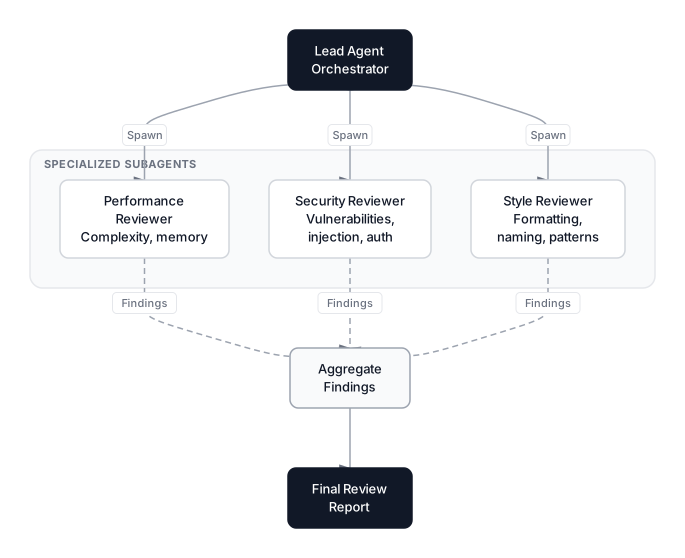 Click to expandMulti-agent code review pattern with specialized subagents
Each subagent runs in its own fresh conversation. Only its final message returns to the parent. This gives you context isolation (a research subagent can explore dozens of files without bloating the main conversation), parallelization, and per-subagent tool restrictions.
Here's how to set up a multi-agent code review system:
from claude_agent_sdk import query, ClaudeAgentOptions, AgentDefinition

options = ClaudeAgentOptions(
    system_prompt="""You are a lead code reviewer orchestrating a team of
    specialized reviewers. For each PR:
    1. Delegate style review to the style-reviewer agent
    2. Delegate security review to the security-reviewer agent
    3. Delegate performance review to the performance-reviewer agent
    4. Aggregate their findings into a final review""",
    allowed_tools=["Read", "Glob", "Grep", "Task", "mcp__code-review__*"],
    mcp_servers={"code-review": review_tools},
    agents={
        "style-reviewer": AgentDefinition(
            description="Reviews code for style, naming conventions, and patterns.",
            prompt="""Analyze code style: variable naming, function length,
            import organization, docstrings, and adherence to PEP 8.
            Report findings with severity levels.""",
            tools=["Read", "Glob", "Grep"],
            model="sonnet",
        ),
        "security-reviewer": AgentDefinition(
            description="Scans code for security vulnerabilities and anti-patterns.",
            prompt="""Scan for: SQL injection, XSS, hardcoded secrets, unsafe
            deserialization, command injection, path traversal, and insecure
            cryptography. Rate each finding as critical, high, or medium.""",
            tools=["Read", "Glob", "Grep", "mcp__code-review__check_security_patterns"],
        ),
        "performance-reviewer": AgentDefinition(
            description="Analyzes code for performance issues and complexity.",
            prompt="""Identify: O(n^2) or worse algorithms, unnecessary database
            queries, missing caching opportunities, memory leaks, and excessive
            complexity. Include Big O analysis where relevant.""",
            tools=["Read", "Glob", "Grep", "mcp__code-review__analyze_complexity"],
            model="sonnet",
        ),
    },
    max_turns=40,
)
Each subagent runs in its own context window with its own tool permissions. The model field lets you assign lighter models to quick tasks and heavier models to security-critical reviews. Subagents cannot spawn their own subagents, so don't include Task in a subagent's tools array.
You can track subagent activity with SubagentStart and SubagentStop hooks:
async def track_subagent(input_data, tool_use_id, context):
    agent_id = input_data.get("agent_id", "unknown")
    transcript = input_data.get("agent_transcript_path", "")
    print(f"[SUBAGENT] Completed: {agent_id} | Transcript: {transcript}")
    return {}

options.hooks["SubagentStop"] = [HookMatcher(hooks=[track_subagent])]
Production Deployment Patterns
Building the agent is one thing. Running it reliably at scale is another.
Session Management and Cost Control
For CI/CD integration, use query() for stateless, one-shot reviews. The max_budget_usd parameter sets a hard ceiling on API spend per query, which prevents runaway costs from complex PRs that trigger many tool calls. Pair it with output_format to get structured JSON responses directly, instead of parsing free-text output:
from claude_agent_sdk import query, ClaudeAgentOptions, ResultMessage

async def ci_review(pr_number: int, repo: str) -> dict:
    """Run a code review as part of CI/CD pipeline."""

    result = {"status": "unknown", "findings": [], "approved": False}

    async for message in query(
        prompt=f"Review PR #{pr_number} in {repo}.",
        options=ClaudeAgentOptions(
            allowed_tools=["Read", "Glob", "Grep", "Bash"],
            max_turns=20,
            max_budget_usd=0.50,
            permission_mode="acceptEdits",
            output_format="json",
        ),
    ):
        if isinstance(message, ResultMessage):
            result["review"] = message.content
            result["status"] = "completed"

    return result
For interactive applications where a human might ask follow-up questions about the review, use ClaudeSDKClient with session resumption. Capture the session_id from the init message, and resume later with ClaudeAgentOptions(resume=session_id):
from claude_agent_sdk import query, ClaudeAgentOptions, ResultMessage, InitMessage

async def interactive_review():
    session_id = None
    options = ClaudeAgentOptions(
        allowed_tools=["Read", "Glob", "Grep"],
    )

    # First pass: initial review
    async for message in query(
        prompt="Review the changes in src/auth.py",
        options=options,
    ):
        if isinstance(message, InitMessage):
            session_id = message.session_id
        if isinstance(message, ResultMessage):
            print(message.content)

    # Follow-up: agent remembers context from the first query
    async for message in query(
        prompt="What about the error handling in that module?",
        options=ClaudeAgentOptions(resume=session_id),
    ):
        if isinstance(message, ResultMessage):
            print(message.content)
Sandboxed Execution
For production deployments, run the agent inside a sandboxed container. This gives you process isolation, resource limits, network control, and ephemeral filesystems.
# Container-level isolation: restrict network to specific domains
options = ClaudeAgentOptions(
    allowed_tools=["Read", "Glob", "Grep", "Bash"],
    # The SDK respects network restrictions from the container
    # Set --network none on the Docker container, then use a
    # proxy to allowlist specific domains (GitHub API, etc.)
)
Anthropic's secure deployment guide recommends placing credentials outside the agent's boundary entirely. Run a proxy that injects API keys into requests so the agent never sees secrets directly.
Error Handling and Retries
The SDK streams messages as an async iterator. Check for error states in the result:
from claude_agent_sdk import query, InitMessage, ErrorMessage

async for message in query(prompt="Review the PR", options=options):
    # Check init message for MCP connection failures
    if isinstance(message, InitMessage):
        mcp_servers = getattr(message, "data", {}).get("mcp_servers", [])
        failed = [s for s in mcp_servers if s.get("status") != "connected"]
        if failed:
            print(f"MCP servers failed to connect: {failed}")

    # Check for execution errors
    if isinstance(message, ErrorMessage):
        print("Agent encountered an error during execution")
        # Implement retry logic or fallback
 Click to expandCode review agent workflow from PR trigger to review posting
When to Use the Claude Agent SDK
The SDK is the right choice in specific scenarios. It's not a universal hammer.
| Scenario | Claude Agent SDK | Other Frameworks |
|---|---|---|
| Code-aware tasks (review, refactor, debug) | Best choice. Built-in file/shell tools. | Requires custom tool implementation. |
| MCP ecosystem integration | Native support, in-process servers. | Varies by framework. |
| Single-model Claude deployment | Optimal. No unnecessary abstractions. | Better if you need multi-model support. |
| Complex multi-step workflows | Good, with subagents and hooks. | LangGraph offers finer state machine control. |
| Quick prototyping | Excellent. Minutes to working agent. | CrewAI is faster for role-based teams. |
When NOT to Use It
Don't reach for the Agent SDK when you need multi-model orchestration across providers (Gemini + Claude + GPT in the same pipeline). LangGraph or a custom orchestration layer will give you more flexibility. If you need visual workflow builders, tools like Flowise or Dify serve that market better. And if your "agent" is really just a single API call with structured output, the standard Anthropic Client SDK is simpler and cheaper.
Pro Tip: The Agent SDK is model-locked to Claude, but that's a feature, not a limitation. Claude's extended thinking, tool use accuracy, and instruction following are specifically optimized for the agent loop the SDK provides. You get better results than wrapping Claude in a generic framework.
Conclusion
The Claude Agent SDK gives you a production-ready agent runtime without the abstraction tax of heavyweight frameworks. The code review agent we built demonstrates the full stack: custom tools for domain-specific analysis, hooks for safety and observability, MCP servers for external integrations, and subagents for parallel specialization.
The key insight from building agents with this SDK: control matters more than capability. Any framework can call tools. The difference is whether you can block dangerous operations before they execute, track costs in real time, and recover gracefully when things go wrong. Hooks make that possible without fighting the framework.
If you're building AI agents that interact with code, APIs, or file systems, start here. If you're connecting agents across services, explore the A2A protocol for standardized agent-to-agent communication. And if you want to understand the function calling mechanics underneath, that article covers the foundation the SDK builds on.
Frequently Asked Interview Questions
Q: What is the difference between query() and ClaudeSDKClient in the Claude Agent SDK?
query() creates a new session for each call and returns an async iterator of messages, making it ideal for stateless CI/CD jobs. ClaudeSDKClient maintains a persistent session across multiple exchanges, preserving conversation history and context. Use query() with the resume option and a captured session_id to continue previous sessions without a persistent client.
Q: How do hooks differ from permissions in the Agent SDK?
Permissions (allowed_tools, permission_mode) define what tools the agent can access at configuration time. Hooks add a programmable runtime layer on top: a PreToolUse hook can inspect arguments, deny specific invocations, or modify inputs based on business logic that permissions alone can't express. When multiple hooks apply, deny takes priority over ask, which takes priority over allow.
Q: How would you prevent an AI agent from modifying production files during a code review?
Exclude Write and Edit from allowed_tools, then add a PreToolUse hook on Bash that inspects the command string and blocks destructive operations like rm, mv, and git push. For defense in depth, run the agent in a sandboxed container with a read-only filesystem mount.
Q: What are MCP servers and how do they extend agent capabilities?
MCP (Model Context Protocol) servers are standardized interfaces that expose tools and data sources to AI agents. In the Claude Agent SDK, you connect external MCP servers via stdio or HTTP transport, or define custom in-process servers using @tool and create_sdk_mcp_server. Tools follow the naming convention mcp__<server-name>__<tool-name>, and the SDK supports automatic tool search that lazily loads tools on-demand to save context window space.
Q: Describe a multi-agent architecture for code review. What are the tradeoffs?
A lead agent orchestrates specialized subagents for style, security, and performance review, each running in its own context window with limited tool permissions. The tradeoff is cost versus quality: three subagents consume roughly three times the tokens, but each specialist produces more focused findings than a single generalist agent. Subagents cannot spawn their own subagents, which prevents recursive depth explosions.
Q: How would you handle cost control for an autonomous agent in production?
Implement a PreToolUse hook that tracks cumulative tool calls and token usage, returning continue_: False when the budget is exceeded. Set max_turns on the agent options to cap reasoning cycles. For batch workloads, add session-level circuit breakers that pause processing if aggregate spend exceeds daily limits.
Q: What security considerations matter when deploying the Agent SDK in production?
Run agents in sandboxed containers with restricted network access, and use a proxy to inject credentials so the agent never sees API keys directly. Limit allowed_tools to the minimum required set and add PreToolUse hooks to block access to sensitive paths. Apply the principle of least privilege at three levels: restrict Bash commands, limit filesystem access to project directories, and control which MCP servers are authorized.
Q: What changed in the migration from Claude Code SDK to Claude Agent SDK?
The Python package was renamed from claude-code-sdk to claude-agent-sdk, and the options class from ClaudeCodeOptions to ClaudeAgentOptions. The key breaking change is that the SDK no longer loads Claude Code's system prompt or filesystem settings by default. Add setting_sources=["project"] to restore the old behavior when needed.