
Your churn prediction model scores 0.91 AUC on your laptop. The Jupyter notebook is clean, the features look great, and stakeholders are excited. Then the ask comes in: retrain weekly on 200 GB of fresh customer data, serve real-time predictions to the mobile app, and keep an audit trail for the compliance team. Your laptop fans spin up, the CSV won't fit in memory, and "production" suddenly feels very far away.
This gap between a working notebook and a production system is where most data science projects stall. Azure Machine Learning (Azure ML) exists to close it. It's Microsoft's cloud platform for managing the full machine learning lifecycle, and as of March 2026, it sits at the center of the broader Microsoft Foundry ecosystem alongside model hosting, agent services, and enterprise AI governance.
We'll build a customer churn prediction model from scratch on Azure ML throughout this article. Every code block, every configuration, and every deployment step uses the same churn scenario so you can follow along end to end. The SDK examples use azure-ai-ml v1.31 (the current release), and every snippet reflects the v2 API that Microsoft now treats as the only supported path forward.
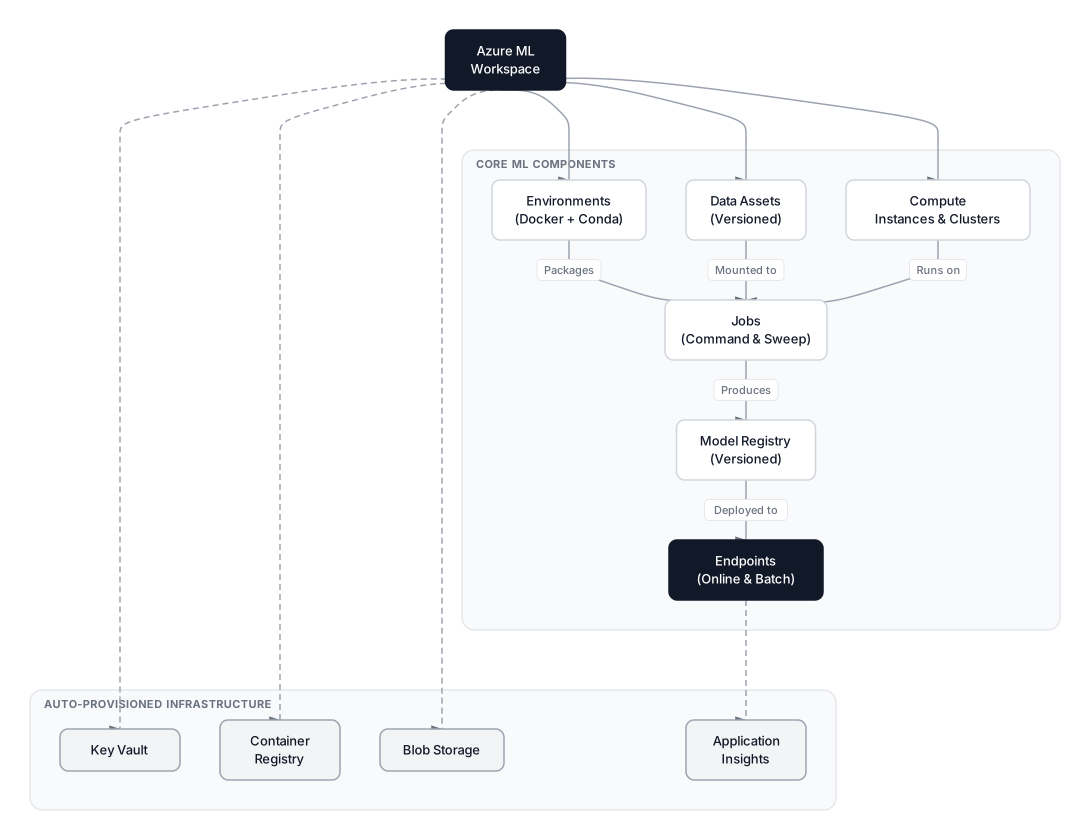 Click to expandAzure ML platform architecture showing workspace components and their relationships
Azure ML as a Machine Learning Operating System
Azure Machine Learning is a cloud service that decouples where you write code from where code executes. Instead of running training on your local CPU, you submit jobs to managed cloud clusters that scale up on demand and shut down when idle. The platform tracks everything: code versions, data snapshots, environment definitions, experiment metrics, and trained model artifacts.
Key Insight: Think of Azure ML not as a hosting service, but as a registry. It versions your data (Data Assets), your software stack (Environments), your training runs (Jobs), and your models (Model Registry). That versioning creates the audit trail that regulated industries like finance and healthcare require.
If you've used AWS SageMaker or Google Vertex AI, Azure ML fills the same role in the Microsoft ecosystem. The key differentiator is deep integration with VS Code, GitHub Actions, and the broader Azure identity and networking stack that many enterprises already run.
Where Azure ML Fits in Microsoft Foundry (March 2026)
At Ignite 2025, Microsoft rebranded Azure AI Studio to Azure AI Foundry, and in early 2026 the name shifted again to simply Microsoft Foundry. Azure ML is now a core service within Foundry, sitting alongside Foundry Models (a catalog of 11,000+ models including GPT-4o, Claude, Llama, and Mistral), Foundry Agent Service, and Foundry IQ (the evolution of Azure AI Search).
For traditional ML workloads like our churn model, you still work directly with Azure ML workspaces, compute clusters, and endpoints. The Foundry layer matters more when you need to orchestrate LLM-based agents, deploy foundation models from the catalog, or build apps that combine classic ML with generative AI. If your work is training scikit-learn or XGBoost models on tabular data, Azure ML is your primary interface.
The Workspace and Its Core Components
The Workspace is Azure ML's top-level organizational unit. When you create one, Azure automatically provisions four supporting resources behind the scenes:
| Supporting Resource | Purpose |
|---|---|
| Azure Blob Storage | Stores training data, logs, and model artifacts |
| Azure Container Registry | Holds Docker images for your environments |
| Azure Key Vault | Manages secrets, connection strings, and API keys |
| Application Insights | Monitors endpoint latency, errors, and request volume |
You don't configure these manually. Azure ML creates and wires them together during workspace provisioning. The workspace itself costs nothing; you pay only for the compute and storage you consume.
The Four Pillars
Every Azure ML workflow rests on four concepts:
-
Compute controls where code runs. Compute Instances are managed VMs for interactive development (essentially a hosted Jupyter server). Compute Clusters are autoscaling groups of VMs for training jobs that scale to zero when idle.
-
Data Assets are versioned pointers to your actual files in Blob Storage or Azure Data Lake. Instead of hardcoding paths, you reference
churn-dataset:3and Azure ML resolves the location. -
Environments define the software stack. Each environment bundles a Docker base image, a conda or pip specification, and environment variables. This guarantees your training code runs identically whether submitted today or six months from now.
-
Jobs tie everything together. A job says: "Run this script, with this data, in this environment, on this compute target." Azure ML packages your code, pulls the Docker image, mounts the data, executes the script, and streams metrics back to the Studio dashboard.
In Plain English: Imagine you're shipping a package. The Compute is the delivery truck, the Data Asset is the shipping label (it tells the truck where to find your stuff), the Environment is the packaging material (it protects and standardizes the contents), and the Job is the shipping order that ties truck, label, and packaging together into one action.
Connecting to Azure ML with the Python SDK v2
The azure-ai-ml package (SDK v2) replaced the legacy azureml-core (SDK v1). Microsoft ended v1 CLI support in September 2025, and SDK v1 reaches end of support on June 30, 2026. All new projects should use v2 exclusively.
pip install azure-ai-ml==1.31.0 azure-identity
The entry point is MLClient, which authenticates against your Azure Active Directory tenant and connects to a specific workspace:
from azure.ai.ml import MLClient
from azure.identity import DefaultAzureCredential

# DefaultAzureCredential checks (in order):
# 1. Environment variables  2. Managed Identity  3. Azure CLI login
# 4. VS Code credential     5. Azure PowerShell
credential = DefaultAzureCredential()

ml_client = MLClient(
    credential=credential,
    subscription_id="a1b2c3d4-e5f6-7890-abcd-ef1234567890",
    resource_group_name="rg-churn-prediction",
    workspace_name="ws-churn-prod"
)

print(f"Connected to workspace: {ml_client.workspace_name}")
# Output: Connected to workspace: ws-churn-prod
Common Pitfall: Tutorials written before 2025 often import from azureml.core. If you see from azureml.core import Workspace, that's the legacy SDK. Always check for from azure.ai.ml import MLClient to confirm you're on v2.
The DefaultAzureCredential chain is worth understanding. On your laptop, it picks up the Azure CLI login (az login). In a CI/CD pipeline, it reads environment variables (AZURE_CLIENT_ID, AZURE_TENANT_ID, AZURE_CLIENT_SECRET). On a Compute Instance or Azure VM, it uses Managed Identity. This means the same code works everywhere without credential changes.
Registering Data as Versioned Assets
Azure ML manages data through Datastores and Data Assets. A Datastore is a secure connection to a storage service (Blob Storage, Data Lake, SQL database). A Data Asset is a versioned reference to a specific file or folder within a Datastore.
For our churn model, we'll register the customer dataset so any compute cluster can access it by name instead of by URL:
from azure.ai.ml.entities import Data
from azure.ai.ml.constants import AssetTypes

churn_data = Data(
    path="./data/customer_churn.csv",          # Local path (gets uploaded)
    type=AssetTypes.URI_FILE,                   # Single file
    description="Customer churn dataset: 50K rows, 12 features, binary target",
    name="customer-churn-dataset",
    version="1"
)

ml_client.data.create_or_update(churn_data)
print("Data asset 'customer-churn-dataset:1' registered.")
When you register a local file, Azure ML uploads it to the workspace's default Blob Storage. Subsequent versions create new snapshots, so you always have a full history of your training data.
| Data Asset Type | Use Case | Example |
|---|---|---|
URI_FILE | Single CSV, Parquet, or JSON file | customer_churn.csv |
URI_FOLDER | Directory of images, multiple CSVs | data/images/ |
MLTABLE | Structured tabular data with schema | Auto-parsed, column-typed |
Pro Tip: For datasets over 1 GB, upload directly to Blob Storage using az storage blob upload or Azure Storage Explorer, then register the asset by pointing to the remote path instead of a local file. This avoids the SDK's upload timeout on large files.
Scaling Training with Compute Clusters
Compute Clusters are where Azure ML's value becomes obvious. A cluster starts at zero nodes, spins up when you submit a job, and scales back to zero when the job finishes. You pay only for the minutes your code actually runs.
from azure.ai.ml.entities import AmlCompute

cluster_name = "churn-training-cluster"

try:
    cluster = ml_client.compute.get(cluster_name)
    print(f"Found existing cluster: {cluster_name}")
except Exception:
    print(f"Creating cluster: {cluster_name}")
    cluster = AmlCompute(
        name=cluster_name,
        type="amlcompute",
        size="Standard_DS3_v2",       # 4 vCPUs, 14 GB RAM, ~\$0.29/hr
        min_instances=0,               # Scale to zero when idle
        max_instances=4,               # Max parallel nodes
        idle_time_before_scale_down=120  # Seconds before scaling down
    )
    ml_client.compute.begin_create_or_update(cluster)
VM Size Selection for ML Workloads
| VM Series | vCPUs | RAM | GPU | Price Range | Best For |
|---|---|---|---|---|---|
| Standard_DS3_v2 | 4 | 14 GB | None | ~$0.29/hr | Small tabular jobs |
| Standard_DS12_v2 | 4 | 28 GB | None | ~$0.37/hr | Medium datasets |
| Standard_NC6s_v3 | 6 | 112 GB | 1x V100 | ~$3.06/hr | Deep learning training |
| Standard_NC24ads_A100_v4 | 24 | 220 GB | 1x A100 | ~$3.67/hr | Large model fine-tuning |
Prices shown are approximate East US Linux pay-as-you-go rates as of early 2026. Check the Azure ML pricing page for current rates by region.
Key Insight: Azure ML also supports serverless compute (GA since late 2024), where you skip cluster creation entirely and let Azure manage VM provisioning per job. For sporadic workloads, serverless eliminates the need to pre-define cluster sizes. For predictable daily jobs, named clusters give you more control over costs and networking.
 Click to expandAzure ML training workflow from job submission to metric logging
Running a Training Job End to End
A Command Job is the fundamental unit of execution in Azure ML SDK v2. It tells the platform: "Take this script, mount this data, install these packages, and run it on that cluster." The training script itself is a standard Python file that accepts command-line arguments, with no Azure-specific imports required in the script logic.
The Training Script
# src/train_churn.py
import argparse
import pandas as pd
import numpy as np
from sklearn.model_selection import train_test_split
from sklearn.preprocessing import StandardScaler
from sklearn.ensemble import GradientBoostingClassifier
from sklearn.metrics import roc_auc_score, classification_report
import mlflow

def main():
    parser = argparse.ArgumentParser()
    parser.add_argument("--data", type=str, help="Path to input CSV")
    parser.add_argument("--n_estimators", type=int, default=200)
    parser.add_argument("--learning_rate", type=float, default=0.1)
    parser.add_argument("--max_depth", type=int, default=5)
    args = parser.parse_args()

    mlflow.start_run()

    # Load data (Azure ML mounts the Data Asset to this path)
    df = pd.read_csv(args.data)
    print(f"Dataset shape: {df.shape}")

    # Features and target
    feature_cols = ['tenure', 'monthly_charges', 'total_charges',
                    'contract_length', 'num_support_tickets',
                    'payment_method_encoded', 'internet_service_encoded',
                    'has_online_security', 'has_tech_support',
                    'has_streaming']
    X = df[feature_cols]
    y = df['churned']

    X_train, X_test, y_train, y_test = train_test_split(
        X, y, test_size=0.2, random_state=42, stratify=y
    )

    scaler = StandardScaler()
    X_train_scaled = scaler.fit_transform(X_train)
    X_test_scaled = scaler.transform(X_test)

    # Train
    model = GradientBoostingClassifier(
        n_estimators=args.n_estimators,
        learning_rate=args.learning_rate,
        max_depth=args.max_depth,
        random_state=42
    )
    model.fit(X_train_scaled, y_train)

    # Evaluate
    y_pred_proba = model.predict_proba(X_test_scaled)[:, 1]
    auc = roc_auc_score(y_test, y_pred_proba)
    print(f"AUC: {auc:.4f}")

    # Log to MLflow (Azure ML captures this automatically)
    mlflow.log_param("n_estimators", args.n_estimators)
    mlflow.log_param("learning_rate", args.learning_rate)
    mlflow.log_param("max_depth", args.max_depth)
    mlflow.log_metric("auc_score", auc)
    mlflow.sklearn.log_model(model, "churn_model")

    mlflow.end_run()

if __name__ == "__main__":
    main()
Notice that mlflow is the only non-standard import. Azure ML's compute instances and curated environments come with MLflow pre-installed, and Azure ML automatically configures the MLflow tracking URI to point at your workspace. Every metric you log appears in the Studio dashboard without any extra setup.
Submitting the Job
from azure.ai.ml import command, Input
from azure.ai.ml.constants import AssetTypes

job = command(
    code="./src",
    command=(
        "python train_churn.py "
        "--data ${{inputs.churn_data}} "
        "--n_estimators 200 "
        "--learning_rate 0.05 "
        "--max_depth 4"
    ),
    inputs={
        "churn_data": Input(
            type=AssetTypes.URI_FILE,
            path="azureml:customer-churn-dataset:1"
        )
    },
    environment="AzureML-sklearn-1.5-ubuntu22.04-py311-cpu@latest",
    compute="churn-training-cluster",
    display_name="churn-gbm-v1",
    experiment_name="churn-prediction-experiment"
)

returned_job = ml_client.jobs.create_or_update(job)
print(f"Job submitted. Studio URL: {returned_job.studio_url}")
Behind the scenes, Azure ML:
- Snapshots the
./srcfolder and uploads it - Pulls the Docker image specified by the curated environment
- Spins up a node in
churn-training-cluster - Mounts the data asset from Blob Storage into the container
- Executes the command
- Streams stdout, stderr, and MLflow metrics back to Studio
The curated environment AzureML-sklearn-1.5-ubuntu22.04-py311-cpu@latest ships with scikit-learn, pandas, numpy, MLflow, and common data science packages pre-installed. For custom dependencies, define a YAML environment:
from azure.ai.ml.entities import Environment

custom_env = Environment(
    name="churn-training-env",
    description="Custom environment for churn model with XGBoost",
    conda_file="./environment/conda.yml",
    image="mcr.microsoft.com/azureml/openmpi4.1.0-ubuntu22.04:latest",
)
ml_client.environments.create_or_update(custom_env)
Automating Hyperparameter Search with Sweep Jobs
Manual parameter tuning doesn't scale. Azure ML's Sweep Jobs run multiple training trials in parallel across your compute cluster, testing different hyperparameter combinations and tracking every result.
If you're familiar with grid or random search from Automating Hyperparameter Tuning, Azure's sweep jobs apply that same logic but distribute the work across multiple machines.
from azure.ai.ml.sweep import Choice, Uniform

# Start from the command job and parameterize its arguments
job_for_sweep = job(
    n_estimators=Choice(values=[100, 200, 300]),
    learning_rate=Uniform(min_value=0.01, max_value=0.3),
    max_depth=Choice(values=[3, 4, 5, 6]),
)

sweep_job = job_for_sweep.sweep(
    compute="churn-training-cluster",
    sampling_algorithm="bayesian",    # Smarter than random for <50 trials
    primary_metric="auc_score",
    goal="Maximize",
)

sweep_job.set_limits(
    max_total_trials=20,
    max_concurrent_trials=4,          # Uses all 4 nodes in the cluster
    timeout=7200                       # 2 hours max
)

returned_sweep = ml_client.jobs.create_or_update(sweep_job)
print(f"Sweep job submitted. URL: {returned_sweep.studio_url}")
Azure ML supports three sampling strategies:
| Strategy | How It Works | Best For |
|---|---|---|
grid | Exhaustive search over all combinations | Small parameter spaces (<50 combos) |
random | Random samples from parameter distributions | Large spaces, quick exploration |
bayesian | Uses prior trial results to pick smarter next trials | Medium spaces (20-100 trials) |
The Bayesian sampler is particularly effective here. After the first few random trials, it builds a surrogate model of the metric surface and focuses subsequent trials on regions likely to improve AUC. For our churn model with three parameters, 20 Bayesian trials typically find a near-optimal configuration.
Pro Tip: Set max_concurrent_trials equal to your cluster's max_instances to make full use of your compute budget. Each trial runs on a separate node, so 4 concurrent trials on a 4-node cluster means all nodes stay busy.
Registering and Versioning Models
After a sweep job finishes, you'll want to register the best model so it can be deployed. The Model Registry gives every model a name, version, description, and a link back to the job that produced it.
from azure.ai.ml.entities import Model
from azure.ai.ml.constants import AssetTypes

best_model = Model(
    path=f"azureml://jobs/{returned_sweep.name}/outputs/artifacts/paths/churn_model/",
    name="churn-prediction-model",
    description="GBM churn classifier, AUC 0.93, trained on customer-churn-dataset:1",
    type=AssetTypes.MLFLOW_MODEL,     # MLflow format for easy deployment
)

registered_model = ml_client.models.create_or_update(best_model)
print(f"Registered model: {registered_model.name} v{registered_model.version}")
The MLFLOW_MODEL type is important. MLflow-logged models include the model artifact, a conda environment spec, and a signature describing input/output schemas. This metadata lets Azure ML auto-generate a scoring script and environment for deployment, cutting the deployment setup from hours to minutes.
Deploying Models to Production Endpoints
Training a good model is half the work. Serving it reliably is the other half. Azure ML offers two endpoint types:
| Endpoint Type | Pattern | Latency | Example |
|---|---|---|---|
| Online (Managed) | Real-time REST API | Milliseconds | Score a user at login |
| Batch | Asynchronous file processing | Minutes to hours | Score 1M users nightly |
Managed Online Endpoints
A Managed Online Endpoint gives you a REST URL backed by Azure-managed infrastructure. You don't configure load balancers, TLS certificates, or OS patches. You provide the model and an optional scoring script; Azure handles everything else.
The real power is blue-green deployments. A single endpoint (one URL) can route traffic across multiple deployments (model versions). This lets you test a new model on 10% of traffic before rolling it out fully.
from azure.ai.ml.entities import (
    ManagedOnlineEndpoint,
    ManagedOnlineDeployment,
)

# 1. Create the endpoint (the stable URL)
endpoint = ManagedOnlineEndpoint(
    name="churn-prediction-endpoint",
    description="Real-time churn scoring for the mobile app",
    auth_mode="key"       # Options: "key", "aml_token", "aad_token"
)
ml_client.online_endpoints.begin_create_or_update(endpoint).result()

# 2. Deploy the model behind the endpoint
blue_deployment = ManagedOnlineDeployment(
    name="blue",
    endpoint_name="churn-prediction-endpoint",
    model="azureml:churn-prediction-model:1",
    instance_type="Standard_DS3_v2",
    instance_count=1,
)
ml_client.online_deployments.begin_create_or_update(blue_deployment).result()

# 3. Route 100% of traffic to the blue deployment
endpoint.traffic = {"blue": 100}
ml_client.online_endpoints.begin_create_or_update(endpoint).result()

print("Endpoint live. Invoke with REST or SDK.")
Once the endpoint is live, you send JSON payloads and get predictions back:
import json

sample_request = {
    "input_data": {
        "columns": ["tenure", "monthly_charges", "total_charges",
                     "contract_length", "num_support_tickets",
                     "payment_method_encoded", "internet_service_encoded",
                     "has_online_security", "has_tech_support",
                     "has_streaming"],
        "data": [[24, 79.50, 1908.0, 12, 3, 1, 2, 1, 0, 1]]
    }
}

response = ml_client.online_endpoints.invoke(
    endpoint_name="churn-prediction-endpoint",
    request_file=json.dumps(sample_request),
)
print(f"Churn probability: {response}")
# Output: Churn probability: [0.73]
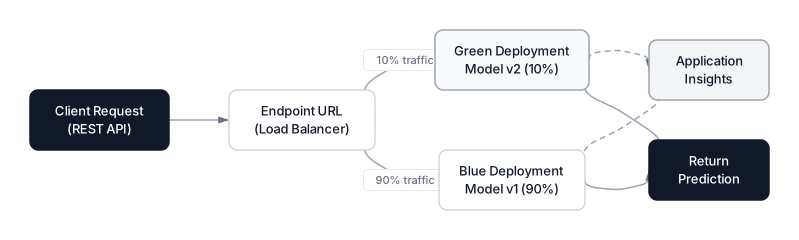 Click to expandManaged online endpoint architecture with blue-green deployment and traffic splitting
Rolling Out a New Model Version (Green Deployment)
When you retrain the churn model on newer data, deploy the updated model as a "green" deployment and gradually shift traffic:
green_deployment = ManagedOnlineDeployment(
    name="green",
    endpoint_name="churn-prediction-endpoint",
    model="azureml:churn-prediction-model:2",    # New version
    instance_type="Standard_DS3_v2",
    instance_count=1,
)
ml_client.online_deployments.begin_create_or_update(green_deployment).result()

# Shift 10% of traffic to the new model
endpoint.traffic = {"blue": 90, "green": 10}
ml_client.online_endpoints.begin_create_or_update(endpoint).result()
Monitor error rates and latency in Application Insights. If the green deployment performs well, increase its traffic to 100% and delete the blue deployment. If something goes wrong, roll back by setting blue to 100%.
Monitoring and Observability in Production
Deploying is not the finish line. Models degrade over time as real-world data shifts. Azure ML integrates with Application Insights to track three layers of observability:
Infrastructure metrics (automatically collected):
- Request latency (p50, p95, p99)
- HTTP error rates (4xx, 5xx)
- CPU and memory usage per instance
Model metrics (requires instrumentation in your scoring script):
- Prediction distribution drift
- Feature distribution drift
- Confidence score distributions
Business metrics (requires downstream integration):
- Churn prediction accuracy vs. actual churn events
- False positive cost (unnecessary retention offers)
# Enable data collection on the deployment
from azure.ai.ml.entities import DataCollector, DeploymentCollection

data_collector = DataCollector(
    collections={
        "model_inputs": DeploymentCollection(enabled=True),
        "model_outputs": DeploymentCollection(enabled=True),
    }
)

blue_deployment.data_collector = data_collector
ml_client.online_deployments.begin_create_or_update(blue_deployment).result()
With data collection enabled, Azure ML logs every request and response to Blob Storage. You can then build monitoring dashboards or trigger retraining pipelines when drift exceeds a threshold.
Common Pitfall: Data collection adds latency (typically 5-15 ms per request). For latency-sensitive endpoints, consider sampling (collect 10% of requests) rather than logging everything.
Azure ML Pricing in Practice
Azure ML itself is free. You pay for the Azure resources it consumes. Here's a realistic cost breakdown for our churn prediction project:
| Resource | Usage | Estimated Monthly Cost |
|---|---|---|
| Compute Instance (dev) | Standard_DS3_v2, 8 hrs/day, 20 days | ~$47 |
| Training Cluster | 4x Standard_DS3_v2, 2 hrs/week | ~$9 |
| Online Endpoint | 1x Standard_DS3_v2, 24/7 | ~$213 |
| Blob Storage | 50 GB data + models | ~$1 |
| Container Registry | Basic tier | ~$5 |
| Application Insights | Standard ingestion | ~$3 |
| Total | ~$278/month |
The online endpoint dominates costs because it runs 24/7. For staging environments or low-traffic endpoints, use min_instances=0 on the deployment to enable scale-to-zero (preview as of early 2026). For production, keep at least one instance warm to avoid cold-start latency.
Pro Tip: Use Azure Reserved Instances (1-year or 3-year commitment) on your endpoint VMs for 30-60% savings. For training clusters, Spot Instances (preemptible VMs) cut costs by up to 80%, though jobs may be interrupted and need to support checkpointing.
Azure ML vs. Vertex AI vs. SageMaker
Choosing a cloud ML platform is less about features (they're converging) and more about ecosystem fit. Here's how they compare for a project like our churn model:
| Dimension | Azure ML | Google Vertex AI | AWS SageMaker |
|---|---|---|---|
| Best IDE integration | VS Code (native extension) | Colab Enterprise | SageMaker Studio |
| SDK style | Declarative Python objects | REST-style + Pythonic wrappers | Session-based, verbose |
| AutoML | Strong GUI + SDK | Strong, research-backed | Autopilot (less intuitive) |
| Experiment tracking | MLflow (native) | Vertex Experiments | SageMaker Experiments |
| Foundation models | 11,000+ via Foundry | Model Garden | JumpStart |
| Serverless training | GA | GA | Serverless inference only |
| Identity system | Azure AD / Entra ID | Google IAM | AWS IAM |
| Estimated endpoint cost | ~$213/mo (DS3_v2) | ~$190/mo (n1-standard-4) | ~$200/mo (ml.m5.xlarge) |
For a detailed breakdown, see our AWS vs GCP vs Azure for Machine Learning comparison.
When to Choose Azure ML
- Your organization already runs on Microsoft 365, Azure AD, and Azure SQL
- You want first-class VS Code integration (manage clusters, submit jobs, and view metrics from the editor)
- You need enterprise-grade RBAC with Azure Active Directory and Managed Identity
- Your compliance team requires audit trails and private networking (Azure Private Link, managed VNets)
- You plan to combine traditional ML with foundation models through Microsoft Foundry
When NOT to Use Azure ML
Azure ML adds real value at scale, but it's not the right tool for every situation:
| Scenario | Why Azure ML Is Overkill | Better Alternative |
|---|---|---|
| Dataset under 1 GB, ad-hoc analysis | Workspace provisioning overhead exceeds time saved | Local Python + scikit-learn |
| Prototype or hackathon | Minutes matter more than reproducibility | Jupyter + local GPU |
| Team already deep on AWS/GCP | Cross-cloud complexity adds no value | SageMaker or Vertex AI |
| Budget under $100/month | Managed endpoints alone can exceed this | Azure Functions + pickle file |
| Pure LLM app (no custom training) | Foundation models don't need ML pipelines | Microsoft Foundry / Azure OpenAI directly |
| Open-source-first MLOps | Less native Kubeflow/Seldon support than GCP | Vertex AI + Kubeflow or self-hosted |
Key Insight: The tipping point is usually team size and retraining frequency. A solo data scientist retraining quarterly gets little from Azure ML. A team of five retraining weekly on 100+ GB data gets enormous value from the compute scaling, environment locking, and model versioning.
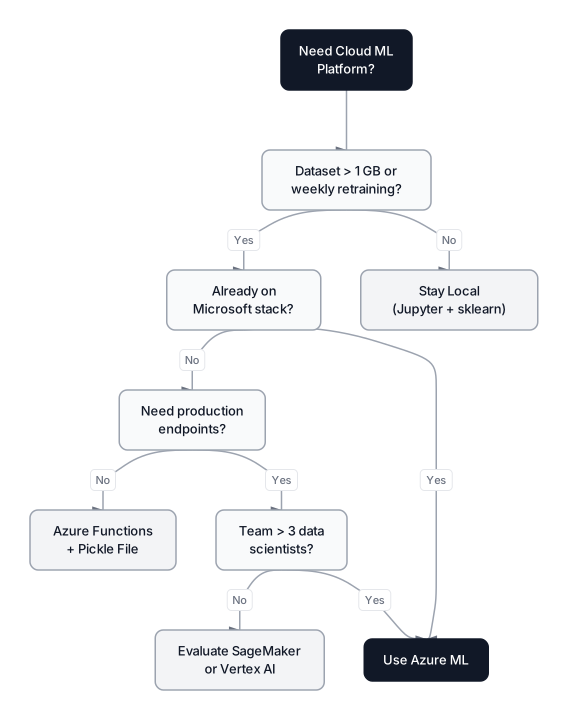 Click to expandDecision guide for choosing Azure ML based on team and project characteristics
Production Checklist for Azure ML Deployments
Before going live with our churn endpoint, here's the checklist that separates a demo from a production system:
Security
- Enable Managed Identity on compute and endpoints (no hardcoded secrets)
- Place the workspace in a managed VNet with private endpoints
- Use Azure Key Vault for all connection strings and API keys
- Enable Azure RBAC with least-privilege roles (ML Data Scientist, ML Compute Operator)
Reliability
- Set
instance_count >= 2on production online endpoints for redundancy - Enable autoscaling rules based on CPU use or request count
- Implement health probes in your scoring script
- Test blue-green rollback procedures before you need them
Cost Control
- Set
min_instances=0on training clusters (mandatory) - Tag all resources with cost-center and project metadata
- Set budget alerts in Azure Cost Management at 80% and 100% thresholds
- Review idle Compute Instances weekly (they're easy to forget)
Observability
- Enable Application Insights on all endpoints
- Log prediction distributions for drift detection
- Set up alerts for latency spikes (p99 > 500 ms) and error rate increases
- Schedule monthly model performance reviews against ground truth
When Azure ML Fits Your Stack
Azure Machine Learning turns the chaotic gap between a working notebook and a production system into a structured, repeatable process. By defining compute, data, environments, and jobs as versioned objects, you get reproducibility that a pile of Jupyter notebooks can never match.
The platform's deepest strength is ecosystem integration. If your org already runs on Azure AD, stores data in Azure SQL or Blob Storage, and uses VS Code as its primary editor, Azure ML removes friction at every step. The managed endpoint system with blue-green deployments gives you production serving without the DevOps overhead of Kubernetes, and the pricing model (pay only for compute you use) keeps costs proportional to actual value delivered.
For teams deciding between cloud ML platforms, our AWS vs GCP vs Azure comparison covers the full decision matrix. Once your model is in production, understanding ML metrics beyond accuracy becomes essential for monitoring real-world performance. And if your churn model uses gradient-boosted trees, our XGBoost classification guide covers the algorithmic details that Azure ML abstracts away.
The cloud isn't the hard part. The hard part is building a model worth deploying. Azure ML just makes sure you can actually ship it.
Frequently Asked Interview Questions
Q: What is the difference between Azure ML SDK v1 and SDK v2, and which should you use?
SDK v1 (azureml-core) uses a workspace-centric, imperative programming model. SDK v2 (azure-ai-ml) uses declarative Python objects that mirror the CLI and REST API structure, making it easier to version control and automate. SDK v1 reaches end of support June 30, 2026. All new projects should use v2 exclusively.
Q: How does Azure ML ensure reproducibility across training runs?
Azure ML versions three things independently: Data Assets (the exact dataset snapshot), Environments (the Docker image and package versions), and Jobs (the code, parameters, and compute configuration). Because each component is immutable and versioned, you can re-run any historical experiment and get identical results.
Q: Explain blue-green deployment in the context of Azure ML managed endpoints.
A managed online endpoint has a single URL that routes traffic to one or more named deployments. You deploy a new model version as a "green" deployment alongside the existing "blue" one, then gradually shift traffic (e.g., 10%, 50%, 100%) while monitoring error rates. If the new model underperforms, you route 100% back to blue instantly. The consumer never changes their API call.
Q: How would you handle a 500 GB training dataset on Azure ML?
Upload the data directly to Azure Blob Storage (not through the SDK upload, which times out). Register a Data Asset pointing to the remote blob path. Use a Compute Cluster with enough RAM per node (e.g., Standard_DS12_v2 at 28 GB). If the data still doesn't fit in memory, switch to distributed training with multiple nodes or use incremental learning (e.g., partial_fit in scikit-learn or LightGBM's streaming mode).
Q: What's the relationship between Azure ML and Microsoft Foundry?
Microsoft Foundry (formerly Azure AI Studio / Azure AI Foundry) is the umbrella platform for all Azure AI services. Azure ML is a core component within Foundry, providing compute management, experiment tracking, model registry, and endpoint serving. Foundry adds a model catalog (11,000+ models), agent orchestration, and enterprise governance on top. For custom ML training, you still work directly with Azure ML workspaces.
Q: How do you control costs when running multiple experiments on Azure ML?
Set min_instances=0 on all training clusters so they scale to zero when idle. Use Spot Instances for fault-tolerant training jobs (up to 80% savings). Set budget alerts in Azure Cost Management. Tag every resource with project and cost-center metadata. For hyperparameter sweeps, use Bayesian sampling instead of grid search to find good configurations with fewer trials.
Q: Your managed online endpoint's p99 latency spiked from 50 ms to 800 ms after a redeployment. How do you diagnose this?
Check Application Insights for the timeline of the spike relative to the deployment. Compare the new model's inference time (it may have more features or a larger tree ensemble). Check if the new Docker environment is pulling a heavier image with cold-start delays. Verify the instance type hasn't changed. If the model itself is slower, consider model optimization (pruning, quantization) or scaling to a faster VM size. Roll back to the previous blue deployment while investigating.
Q: When would you choose batch endpoints over online endpoints?
Batch endpoints are for high-volume, latency-tolerant workloads. If you need to score 10 million customers overnight for a marketing campaign, an online endpoint would be too expensive (you'd need many instances running for hours). A batch endpoint spins up a cluster, processes the file in parallel, writes results to Blob Storage, and shuts down. Use online endpoints only when the consumer needs a response in milliseconds.