
Your customer churn model hits 0.93 AUC on your laptop. The notebook looks clean, the feature engineering is tight, and the product team wants predictions served behind an API by next sprint. Then reality sets in: the production dataset is 80 GB, training needs a GPU, the endpoint must handle 500 requests per second, and someone asks about model versioning. Your laptop stops being a viable option very quickly.
AWS SageMaker closes that gap. It's Amazon's fully managed machine learning platform that decouples your code from infrastructure, letting you train on clusters of any size and deploy to autoscaling endpoints without writing a single line of Docker, Kubernetes, or Flask. As of March 2026, the platform has matured significantly with the launch of SageMaker Unified Studio (GA since March 2025), the SageMaker Python SDK v3.0 (released February 2026), and deep integration with the broader AWS analytics stack including Glue, Athena, and Redshift.
We'll build a customer churn prediction model from scratch throughout this article. Every code block follows the same scenario: ingesting churn data into S3, training an XGBoost model, tuning hyperparameters, deploying to a real-time endpoint, and monitoring predictions in production.
 Click to expandSageMaker end-to-end workflow from S3 data through training and deployment to monitoring
SageMaker's Architecture and Transient Compute Model
AWS SageMaker is a cloud ML platform that manages infrastructure for the entire machine learning lifecycle: data preparation, training, tuning, deployment, and monitoring. Instead of provisioning EC2 instances manually, installing CUDA drivers, and wiring up load balancers, you describe what you want and SageMaker handles the rest.
The core architectural insight is the transient compute model. When you call .fit() on an estimator, SageMaker spins up EC2 instances, pulls a Docker container from Elastic Container Registry (ECR), downloads your training data from S3, executes your code, uploads the resulting model artifact (model.tar.gz) back to S3, and immediately terminates the instances. You pay only for the seconds those machines ran.
Key Insight: This is the real cost advantage over managing your own EC2 fleet. A ml.p4d.24xlarge GPU instance costs $37.69/hour. If your training job finishes in 12 minutes, you pay for 12 minutes. With a self-managed instance, you'd pay for the full hour (or more, if you forget to shut it down at 2 AM).
The platform breaks into six major components:
| Component | What It Does |
|---|---|
| SageMaker Unified Studio | IDE with notebooks, experiments, and model management in one place |
| Training Jobs | Managed compute for model training with automatic shutdown |
| Feature Store | Centralized, versioned feature repository shared across teams |
| Model Registry | Version control for trained models with approval workflows |
| Endpoints | Managed inference infrastructure (real-time, batch, serverless, async) |
| Pipelines | CI/CD for ML: automated workflows from data processing to deployment |
If you've worked with Google Vertex AI or Azure Machine Learning, SageMaker fills the same role in the AWS ecosystem. The key differentiator is deeper integration with S3, Lambda, and the broader AWS networking and IAM stack that many organizations already depend on. For a detailed comparison, see our guide on AWS vs GCP vs Azure for Machine Learning.
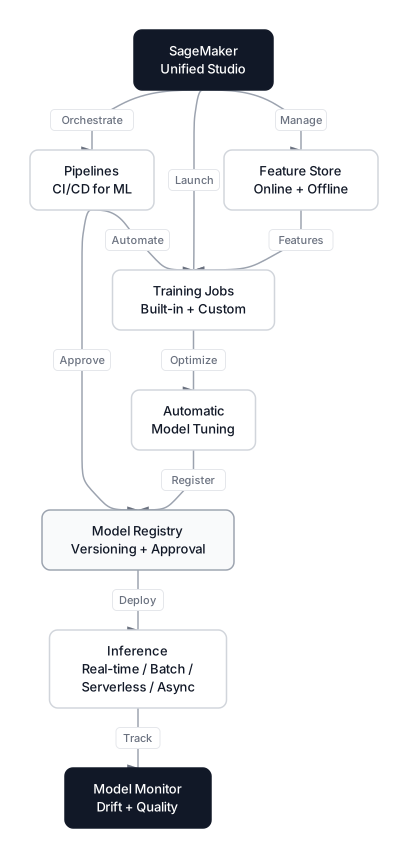 Click to expandSageMaker ecosystem showing Studio, Feature Store, Training, Inference, Pipelines, and Model Registry
Preparing Churn Data for Cloud Training
Before SageMaker can train on your data, that data must live in Amazon S3. Training instances cannot read files from your local drive; they mount S3 paths at startup and read from there.
Our running example uses a customer churn dataset with features like tenure, monthly charges, contract type, and support tickets. The target is a binary column indicating whether the customer churned. Here's how to prepare and upload it.
import pandas as pd
import sagemaker
import boto3

# Initialize session and get default bucket
session = sagemaker.Session()
bucket = session.default_bucket()
prefix = "churn-prediction"

# Load and prepare local data
df = pd.read_csv("customer_churn.csv")

# SageMaker's built-in XGBoost requires: target as first column, no headers
feature_cols = ["tenure", "monthly_charges", "total_charges",
                "contract_months", "support_tickets", "payment_delay_days",
                "num_products", "has_internet", "has_phone", "is_senior"]
train_data = df[["churned"] + feature_cols]

# 80/20 split
train_df = train_data.sample(frac=0.8, random_state=42)
val_df = train_data.drop(train_df.index)

# Save without headers (XGBoost requirement)
train_df.to_csv("train.csv", index=False, header=False)
val_df.to_csv("validation.csv", index=False, header=False)

# Upload to S3
train_path = session.upload_data("train.csv", bucket=bucket,
                                  key_prefix=f"{prefix}/train")
val_path = session.upload_data("validation.csv", bucket=bucket,
                                key_prefix=f"{prefix}/validation")

print(f"Training data: {train_path}")
print(f"Validation data: {val_path}")
Expected Output:
Training data: s3://sagemaker-us-east-1-123456789012/churn-prediction/train/train.csv
Validation data: s3://sagemaker-us-east-1-123456789012/churn-prediction/validation/validation.csv
Common Pitfall: Built-in SageMaker algorithms expect CSV data without headers and with the target as the first column. If you upload a standard pandas CSV, the model tries to learn from the string "churned" instead of the value 1, causing silent garbage predictions. Always double-check with head -1 train.csv before uploading.
For a deeper look at why the 80/20 split matters and how to avoid data leakage, see Why Your Model Fails in Production.
Training with Built-in Algorithms and Custom Scripts
SageMaker offers two paths for training: built-in algorithms that AWS maintains (XGBoost, Linear Learner, BlazingText, and others) and bring-your-own-script mode where you supply custom training code.
Built-in XGBoost Training
The Estimator class is the central object. You specify the algorithm container, the instance type, and hyperparameters. SageMaker handles everything else.
from sagemaker.image_uris import retrieve
from sagemaker.inputs import TrainingInput

# Get the XGBoost container URI (version 1.7-1 is current)
xgb_image = retrieve("xgboost", boto3.Session().region_name, "1.7-1")

# Define the estimator
xgb = sagemaker.estimator.Estimator(
    image_uri=xgb_image,
    role=sagemaker.get_execution_role(),
    instance_count=1,
    instance_type="ml.m5.xlarge",          # 4 vCPUs, 16 GB RAM
    output_path=f"s3://{bucket}/{prefix}/output",
    sagemaker_session=session
)

# Hyperparameters for churn classification
xgb.set_hyperparameters(
    max_depth=6,
    eta=0.15,
    gamma=4,
    min_child_weight=6,
    subsample=0.8,
    objective="binary:logistic",
    eval_metric="auc",
    num_round=200
)

# Point to S3 data
s3_train = TrainingInput(s3_data=train_path, content_type="csv")
s3_val = TrainingInput(s3_data=val_path, content_type="csv")

# Launch training
xgb.fit({"train": s3_train, "validation": s3_val})
Expected Output (truncated):
INFO:sagemaker:Creating training-job with name: sagemaker-xgboost-2026-03-04-14-30-00
[0]#011train-auc:0.8912#011validation-auc:0.8754
[50]#011train-auc:0.9341#011validation-auc:0.9112
[199]#011train-auc:0.9687#011validation-auc:0.9298
Training seconds: 87
Billable seconds: 87
An ml.m5.xlarge runs at $0.23/hour. That 87-second job costs about $0.006. Compare that to leaving a GPU notebook running overnight.
Bring-Your-Own-Script Mode
When built-in algorithms aren't enough, you write a standard Python training script and SageMaker injects it into a pre-built container with scikit-learn, PyTorch, or TensorFlow already installed.
Your script must follow three conventions:
- Read hyperparameters from command-line arguments (SageMaker passes them via
argparse) - Load data from
os.environ["SM_CHANNEL_TRAIN"](the mounted S3 path) - Save the model to
os.environ["SM_MODEL_DIR"](SageMaker uploads this to S3 automatically)
# train.py — Custom scikit-learn training script for churn
import argparse
import os
import pandas as pd
from sklearn.ensemble import GradientBoostingClassifier
from sklearn.metrics import roc_auc_score
import joblib

if __name__ == "__main__":
    parser = argparse.ArgumentParser()
    parser.add_argument("--n-estimators", type=int, default=200)
    parser.add_argument("--max-depth", type=int, default=5)
    parser.add_argument("--learning-rate", type=float, default=0.1)
    args = parser.parse_args()

    # SageMaker mounts S3 data here
    train_dir = os.environ["SM_CHANNEL_TRAIN"]
    train_df = pd.read_csv(os.path.join(train_dir, "train.csv"), header=None)

    y_train = train_df.iloc[:, 0]
    X_train = train_df.iloc[:, 1:]

    model = GradientBoostingClassifier(
        n_estimators=args.n_estimators,
        max_depth=args.max_depth,
        learning_rate=args.learning_rate
    )
    model.fit(X_train, y_train)

    # Save to the model directory
    model_dir = os.environ["SM_MODEL_DIR"]
    joblib.dump(model, os.path.join(model_dir, "model.joblib"))
Then launch it from your notebook:
from sagemaker.sklearn import SKLearn

sklearn_estimator = SKLearn(
    entry_point="train.py",
    role=sagemaker.get_execution_role(),
    instance_type="ml.m5.xlarge",
    framework_version="1.2-1",
    hyperparameters={
        "n-estimators": 300,
        "max-depth": 6,
        "learning-rate": 0.08
    }
)

sklearn_estimator.fit({"train": train_path})
This approach lets you bring any Python library, any preprocessing pipeline, and any model architecture. The container handles dependency installation; you focus on the data science.
Automated Hyperparameter Tuning with Bayesian Optimization
Manually picking max_depth=6 and eta=0.15 is educated guessing at best. SageMaker's Automatic Model Tuning uses Bayesian optimization to systematically search for the best hyperparameter combination.
Instead of grid search (which is exhaustive and slow) or random search (which is fast but aimless), Bayesian optimization builds a probabilistic model of how hyperparameters affect your objective metric. After each trial, it updates its belief about which regions of the search space are promising and chooses the next point accordingly.
The acquisition function that drives this decision, typically Upper Confidence Bound (UCB), balances exploitation and exploration:
Where:
- is the acquisition score for hyperparameter configuration
- is the predicted performance based on past trials
- is the uncertainty (how little we know about this region)
- controls the exploration-exploitation tradeoff (higher values explore more)
In Plain English: For our churn model, imagine you've tried five hyperparameter combinations and the best AUC so far is 0.93. The optimizer now asks: should I try something close to that 0.93 configuration (exploitation), or should I explore a region I haven't tested at all that might yield 0.95 (exploration)? The parameter decides how adventurous the search is.
For a thorough treatment of why manual tuning fails and how Bayesian optimization outperforms grid and random search, read Stop Guessing: The Scientific Guide to Automating Hyperparameter Tuning.
from sagemaker.tuner import (
    IntegerParameter, ContinuousParameter, HyperparameterTuner
)

hyperparameter_ranges = {
    "eta": ContinuousParameter(0.01, 0.5),
    "min_child_weight": IntegerParameter(1, 10),
    "max_depth": IntegerParameter(3, 10),
    "subsample": ContinuousParameter(0.5, 1.0),
    "gamma": ContinuousParameter(0, 10)
}

tuner = HyperparameterTuner(
    estimator=xgb,
    objective_metric_name="validation:auc",
    hyperparameter_ranges=hyperparameter_ranges,
    objective_type="Maximize",
    max_jobs=20,
    max_parallel_jobs=4
)

tuner.fit({"train": s3_train, "validation": s3_val})

# After tuning completes, retrieve the best model
best_estimator = tuner.best_estimator()
Running 20 tuning jobs in parallel on four ml.m5.xlarge instances finishes in roughly the time of five sequential runs, and the total cost stays under $2.00. That's a fraction of what an engineer's time costs to manually experiment with hyperparameters.
Deploying Models to Production Endpoints
A trained model sitting as a tarball in S3 is useless to your application. Deploying it to an endpoint creates a managed REST API that accepts data and returns predictions. SageMaker gives you four deployment options, and picking the right one matters for both cost and latency.
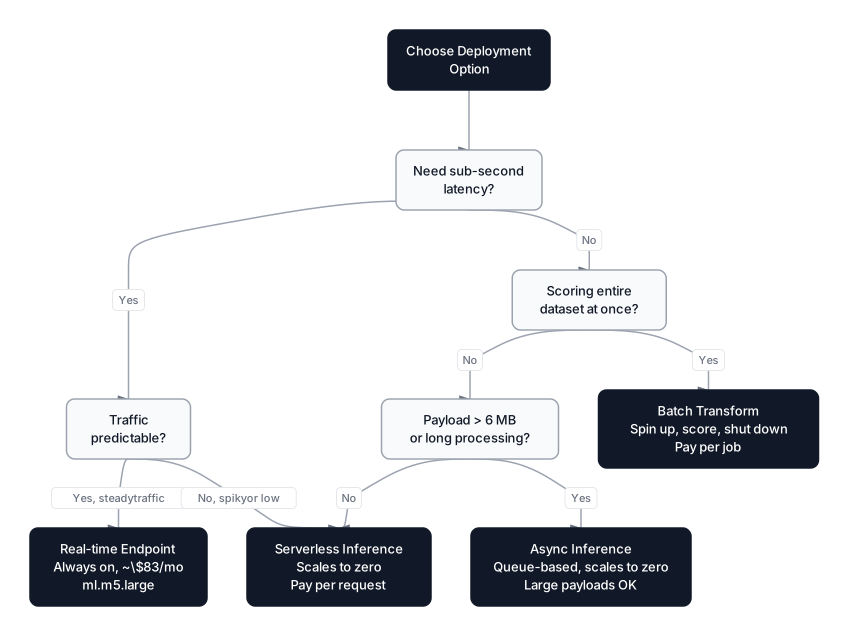 Click to expandSageMaker deployment options comparing real-time, batch, serverless, and async inference
| Option | Best For | Latency | Cost Model |
|---|---|---|---|
| Real-time Endpoint | Low-latency production APIs (< 100ms) | Milliseconds | Pay per instance-hour (always on) |
| Serverless Inference | Intermittent traffic, dev/staging | Seconds (cold start) | Pay per request + compute time |
| Batch Transform | Scoring entire datasets offline | Minutes to hours | Pay per instance-hour (job duration) |
| Async Inference | Large payloads, tolerant of delay | Seconds to minutes | Pay per instance-hour (scales to zero) |
Real-time Endpoint Deployment
For our churn model serving the mobile app, a real-time endpoint is the right choice:
predictor = xgb.deploy(
    initial_instance_count=1,
    instance_type="ml.m5.large",
    serializer=sagemaker.serializers.CSVSerializer()
)

# Simulate a live customer record
# tenure, monthly_charges, total_charges, contract_months,
# support_tickets, payment_delay_days, num_products,
# has_internet, has_phone, is_senior
test_record = "14,78.50,1099.00,1,3,8,2,1,1,0"

result = predictor.predict(test_record)
churn_probability = float(result.decode("utf-8"))
print(f"Churn probability: {churn_probability:.4f}")
Expected Output:
Churn probability: 0.7823
That customer has a 78% churn risk: short tenure, high monthly charges, and multiple support tickets. Time to send a retention offer.
Common Pitfall: Endpoints run 24/7 and bill continuously. An ml.m5.large costs about $83/month. Always run predictor.delete_endpoint() when you're done testing. For staging environments, consider serverless inference, which scales to zero when idle.
Serverless Inference for Cost-Sensitive Workloads
If your churn model handles a few hundred predictions per day rather than hundreds per second, serverless inference eliminates idle compute costs entirely:
from sagemaker.serverless import ServerlessInferenceConfig

serverless_config = ServerlessInferenceConfig(
    memory_size_in_mb=2048,
    max_concurrency=10
)

predictor = xgb.deploy(
    serverless_inference_config=serverless_config,
    serializer=sagemaker.serializers.CSVSerializer()
)
You pay only for the milliseconds your model processes each request. The tradeoff is cold-start latency: the first request after an idle period takes 2 to 6 seconds while SageMaker provisions the container.
Feature Store and SageMaker Pipelines
Production ML systems need more than training and serving. You need reproducible feature engineering, model versioning, and automated retraining. SageMaker Feature Store and Pipelines handle these concerns.
Feature Store
SageMaker Feature Store is a centralized repository for ML features that supports both batch and real-time access. Instead of each team member computing "days since last support ticket" differently in their notebooks, you compute it once, store it in the Feature Store, and everyone pulls the same value.
from sagemaker.feature_store.feature_group import FeatureGroup

churn_feature_group = FeatureGroup(
    name="churn-customer-features",
    sagemaker_session=session
)

# Define the schema
churn_feature_group.load_feature_definitions(data_frame=feature_df)

# Create the group (online + offline store)
churn_feature_group.create(
    s3_uri=f"s3://{bucket}/{prefix}/feature-store",
    record_identifier_name="customer_id",
    event_time_feature_name="event_time",
    role_arn=sagemaker.get_execution_role(),
    enable_online_store=True
)

# Ingest features
churn_feature_group.ingest(data_frame=feature_df, max_workers=4, wait=True)
The online store gives sub-10ms lookups for serving-time feature retrieval. The offline store (backed by S3 and queryable via Athena) provides point-in-time correct features for training, which prevents the subtle leakage that happens when you accidentally use future data to train on past events. For more on validating your model correctly and avoiding this trap, see Cross-Validation vs the Lucky Split.
SageMaker Pipelines
Pipelines automate the full workflow: process data, train, evaluate, and conditionally deploy. Think of it as CI/CD for machine learning.
from sagemaker.workflow.pipeline import Pipeline
from sagemaker.workflow.steps import TrainingStep, ProcessingStep
from sagemaker.workflow.conditions import ConditionGreaterThanOrEqualTo
from sagemaker.workflow.condition_step import ConditionStep
from sagemaker.workflow.step_collections import RegisterModel

# Step 1: Preprocess data
processing_step = ProcessingStep(
    name="PreprocessChurnData",
    processor=sklearn_processor,
    inputs=[ProcessingInput(
        source=raw_data_s3, destination="/opt/ml/processing/input"
    )],
    outputs=[ProcessingOutput(
        output_name="train", source="/opt/ml/processing/train"
    )],
    code="preprocess.py"
)

# Step 2: Train the model
training_step = TrainingStep(
    name="TrainChurnModel",
    estimator=xgb,
    inputs={
        "train": TrainingInput(
            s3_data=processing_step.properties
            .ProcessingOutputConfig.Outputs["train"]
            .S3Output.S3Uri
        )
    }
)

# Step 3: Conditionally register if AUC > 0.90
condition = ConditionGreaterThanOrEqualTo(
    left=training_step.properties.FinalMetricDataList[0].Value,
    right=0.90
)

register_step = RegisterModel(
    name="RegisterChurnModel",
    estimator=xgb,
    model_data=training_step.properties.ModelArtifacts.S3ModelArtifacts,
    content_types=["text/csv"],
    response_types=["text/csv"],
    approval_status="PendingManualApproval"
)

condition_step = ConditionStep(
    name="CheckAUCThreshold",
    conditions=[condition],
    if_steps=[register_step],
    else_steps=[]
)

# Assemble and run the pipeline
pipeline = Pipeline(
    name="ChurnPredictionPipeline",
    steps=[processing_step, training_step, condition_step],
    sagemaker_session=session
)

pipeline.upsert(role_arn=sagemaker.get_execution_role())
pipeline.start()
This pipeline reprocesses data, retrains the churn model, and only registers the new version if AUC exceeds 0.90. You can trigger it on a schedule (weekly retraining) or on an event (new data lands in S3).
When to Use SageMaker and When Not To
SageMaker isn't always the right answer. Here's a decision framework.
Use SageMaker when:
- Your team is already invested in AWS (S3, Lambda, IAM, VPC)
- You need managed training on GPU clusters without DevOps overhead
- Multiple data scientists share experiments, features, and models
- You need production endpoints with autoscaling and A/B testing built in
- Compliance requires an audit trail of training artifacts and model versions
Skip SageMaker when:
- You're training small models that fit on a single machine and your team has one or two people (the platform overhead isn't worth it)
- Your organization uses GCP or Azure as its primary cloud; cross-cloud ML platforms create unnecessary networking complexity
- You need maximum cost control on a tight budget: self-managed EC2 Spot Instances can be 60 to 90% cheaper than SageMaker managed training, though you take on the operational burden yourself
- Your workload is purely LLM inference with no custom training; Amazon Bedrock is a better fit for serving foundation models
Pro Tip: SageMaker Savings Plans reduce training and inference costs by up to 64% if you commit to a one- or three-year spend level. If your monthly SageMaker bill exceeds $1,000, investigate Savings Plans before optimizing instance types.
When SageMaker Fits the Team
SageMaker removes the infrastructure grind from machine learning. The transient compute model means you pay only for actual training time, Feature Store guarantees consistent features between training and serving, and Pipelines turn ad hoc experiments into automated, auditable workflows. SageMaker combines managed training, endpoints, model pipelines, feature storage, and the broader Unified Studio experience for production machine-learning workflows.
The hardest part of production ML is rarely the model itself. It's keeping features consistent, retraining on fresh data, monitoring for drift, and maintaining an audit trail. SageMaker addresses all of these, but only if you actually adopt the full stack: Feature Store, Pipelines, Model Registry, and Model Monitor. Using SageMaker just for training and deploying misses most of the value.
For a broader perspective on how SageMaker compares to its competitors, read AWS vs GCP vs Azure for Machine Learning. If you're evaluating Google Vertex AI or Azure Machine Learning alongside SageMaker, those articles cover the practical tradeoffs that matter more than any vendor benchmark.
Interview Questions
Q: What is the difference between SageMaker managed training and running training on a raw EC2 instance?
SageMaker managed training provisions instances, downloads data from S3, runs your code in a container, saves artifacts back to S3, and terminates the instances automatically. With raw EC2, you handle all of that yourself: installation, data transfer, GPU driver management, and remembering to shut down the instance. SageMaker costs roughly 20 to 40% more per hour but eliminates operational overhead and billing mistakes from forgotten instances.
Q: How does SageMaker handle the training-serving skew problem?
SageMaker addresses this through Feature Store, which provides the same features at training time (via the offline store) and serving time (via the online store with sub-10ms latency). When you use Feature Store consistently, the feature values your model sees during inference are computed identically to those it trained on. Without Feature Store, teams often have separate ETL jobs for training data and serving data, which introduces subtle differences that degrade model performance silently.
Q: When would you choose serverless inference over a real-time endpoint?
Choose serverless inference when traffic is intermittent or unpredictable. If your model receives 50 requests during business hours and zero at night, serverless scales to zero and you pay nothing during idle periods. A real-time endpoint bills continuously at roughly $83/month for an ml.m5.large. The tradeoff is cold-start latency of 2 to 6 seconds on the first request after an idle period, which makes serverless unsuitable for latency-sensitive production APIs.
Q: What happens when a SageMaker training job fails mid-run?
SageMaker terminates the instances and you pay only for the time consumed up to the failure. The logs are saved to CloudWatch, and any partial artifacts go to S3. You can enable checkpointing so that if a job fails after 80% completion, you resume from the last checkpoint rather than starting over. This is critical for multi-hour training runs on large datasets where a single hardware failure could waste hours of compute.
Q: How does SageMaker Pipelines differ from Airflow or Step Functions for ML workflows?
SageMaker Pipelines is purpose-built for ML: it natively understands training jobs, model registration, and approval workflows. Airflow and Step Functions are general-purpose orchestrators that require custom integrations for each SageMaker operation. Pipelines also tracks lineage automatically (which data produced which model), a feature you'd have to build manually with general orchestrators. That said, many teams use Airflow to trigger SageMaker Pipelines rather than replacing their existing orchestration entirely.
Q: Your deployed churn model's AUC dropped from 0.93 to 0.84 over three months. Walk through your debugging process.
Start with Model Monitor reports to check for data quality violations or distribution shifts. If customer behavior changed (new pricing plans, seasonal trends), the training data no longer represents production traffic. Next, compare feature importance between the original training set and recent inference data. If a feature like payment_delay_days shifted because the billing system changed its calculation, you need to retrain on recent data. Finally, evaluate whether the model architecture is still appropriate or whether new features could capture the changed patterns.
Q: How does SageMaker's Bayesian hyperparameter tuning decide which configuration to try next?
SageMaker builds a probabilistic surrogate model from completed trials and maximizes an acquisition function (typically Upper Confidence Bound) to select the next configuration. The function balances exploitation (trying values near known-good regions) with exploration (testing uncertain regions that might be better). This is far more sample-efficient than grid or random search because it uses information from every previous trial to decide where to search next.