
A fraud detection model sits in a Jupyter notebook. It scores 97% accuracy on test data. The team celebrates. Three months later, the model still hasn't reached production because nobody can figure out how to serve it at 10,000 requests per second, keep its features in sync with the training pipeline, or retrain it when new fraud patterns emerge.
Google Vertex AI exists to close that gap. It's Google Cloud's unified machine learning platform that brings data preparation, model training, experiment tracking, feature management, and production serving into a single environment. Instead of stitching together BigQuery, a Docker registry, a Kubernetes cluster, and a monitoring stack with fragile glue code, Vertex AI gives you one SDK and one console to move from raw data to a live API endpoint.
We'll build a fraud detection model from scratch on Vertex AI throughout this article, touching every major component along the way: AutoML for a quick baseline, custom training for full control, Feature Store to keep training and serving data consistent, Pipelines to automate the entire workflow, and Model Garden plus Agent Builder for the generative AI capabilities Google shipped in early 2026.
The Vertex AI Platform Architecture
Vertex AI is not a single tool. It's a collection of interoperable services that cover the entire machine learning lifecycle, from data ingestion to model monitoring in production.
Google launched Vertex AI in 2021 by merging its fragmented AI products (AI Platform Training, AI Platform Prediction, AutoML Vision, AutoML Tables, and several others) into one unified platform (official documentation). As of March 2026, the platform has expanded to include generative AI services, agent building tools, and over 200 models in its Model Garden.
The platform breaks down into five layers:
| Layer | Services | Purpose |
|---|---|---|
| Data | Managed Datasets, Feature Store, BigQuery integration | Prepare, store, and serve features |
| Training | AutoML, Custom Training Jobs, Hyperparameter Tuning | Build models with code or without |
| Management | Model Registry, Experiments, Model Evaluation | Track, version, and compare models |
| Serving | Endpoints, Batch Prediction, Provisioned Throughput | Deploy models for real-time or batch inference |
| GenAI & Agents | Model Garden, Agent Builder, Gemini API | Access foundation models and build AI agents |
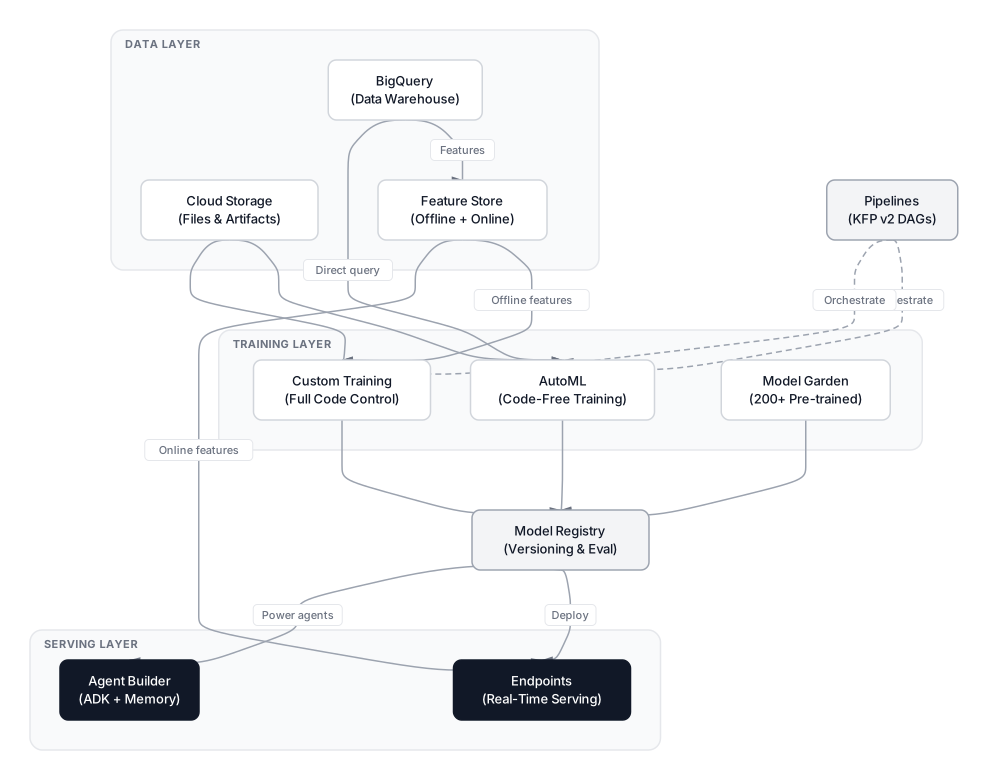 Click to expandVertex AI platform architecture showing data, training, management, serving, and GenAI layers
Key Insight: Vertex AI integrates deeply with BigQuery. You can train models directly on data sitting in BigQuery tables without ever copying it to Cloud Storage. For our fraud detection example, this means the same BigQuery table that powers analytics dashboards also feeds the training pipeline.
AutoML for Rapid Baseline Models
AutoML is Vertex AI's code-free training mode. You upload a dataset, point to a target column, set a training budget, and Google searches through dozens of algorithm architectures, tunes hyperparameters automatically, and returns the best model it found.
For our fraud detection scenario, AutoML is the first thing to try. Upload your transaction table (amount, merchant category, time since last transaction, distance from home, etc.) with a binary "is_fraud" label, give it a two-hour compute budget, and AutoML will test neural networks, gradient boosted trees, and ensembles to find the best performer.
What AutoML Actually Does Under the Hood
AutoML isn't magic. It runs a neural architecture search (NAS) process that explores model configurations within a predefined search space. For tabular data, it primarily evaluates:
- Gradient boosted decision tree ensembles (similar to XGBoost)
- Deep neural networks with various layer widths
- Ensemble combinations of the top-performing architectures
The training budget you specify (measured in node hours) controls how much of the search space AutoML explores. More budget means more configurations tested, but with diminishing returns after roughly 4 to 6 hours for tabular datasets.
from google.cloud import aiplatform

aiplatform.init(project="fraud-detection-prod", location="us-central1")

# Create a managed dataset from BigQuery
dataset = aiplatform.TabularDataset.create(
    display_name="fraud-transactions-2026",
    bq_source="bq://fraud-detection-prod.transactions.labeled_data"
)

# Launch AutoML training
job = aiplatform.AutoMLTabularTrainingJob(
    display_name="fraud-automl-baseline",
    optimization_prediction_type="classification",
    optimization_objective="maximize-au-prc",  # Better than AUC-ROC for imbalanced fraud data
)

model = job.run(
    dataset=dataset,
    target_column="is_fraud",
    budget_milli_node_hours=2000,  # 2 node hours
    model_display_name="fraud-automl-v1",
    training_fraction_split=0.8,
    validation_fraction_split=0.1,
    test_fraction_split=0.1,
)

print(f"Model resource: {model.resource_name}")
Pro Tip: For fraud detection and other heavily imbalanced datasets, set optimization_objective to maximize-au-prc (area under the precision-recall curve) instead of the default maximize-au-roc. AUC-ROC can look great on imbalanced data even when the model barely catches any fraud. Precision-recall forces AutoML to optimize for actually finding the rare class. For a deeper look at why accuracy alone can mislead you, see Why 99% Accuracy Can Be a Disaster.
AutoML Pricing
AutoML training for tabular data costs approximately $21.25 per node hour as of March 2026. A two-hour budget run costs around $42.50. Image and text models have different rates (image training starts at roughly $3.47 per node hour). Billing is in 30-second increments, so you pay only for actual compute consumed.
Custom Training for Full Control
AutoML gives you a baseline. Custom training gives you everything else: specific architectures, custom loss functions, distributed training across GPUs, and full reproducibility.
Custom training on Vertex AI works by packaging your training code into a container, then telling Vertex AI which machine type to run it on. You write the code, Vertex AI provisions the infrastructure, runs your job, shuts it down when finished, and saves the trained model artifact.
The Training Script
For our fraud detection model, let's build an XGBoost classifier with custom threshold tuning. This script runs inside the cloud container:
# train_fraud_model.py
import argparse
import pandas as pd
import xgboost as xgb
from sklearn.model_selection import train_test_split
from sklearn.metrics import classification_report, average_precision_score
import joblib
from google.cloud import storage, bigquery

def main(args):
    # 1. Load data from BigQuery
    client = bigquery.Client(project=args.project)
    query = f"""
        SELECT amount, merchant_category, time_since_last_txn,
               distance_from_home, is_international, is_fraud
        FROM `{args.bq_table}`
        WHERE transaction_date >= '{args.start_date}'
    """
    df = client.query(query).to_dataframe()

    # 2. Split
    X = df.drop("is_fraud", axis=1)
    y = df["is_fraud"]
    X_train, X_test, y_train, y_test = train_test_split(
        X, y, test_size=0.2, stratify=y, random_state=42
    )

    # 3. Train with scale_pos_weight for class imbalance
    fraud_ratio = (y_train == 0).sum() / (y_train == 1).sum()
    model = xgb.XGBClassifier(
        n_estimators=args.n_estimators,
        max_depth=args.max_depth,
        learning_rate=args.learning_rate,
        scale_pos_weight=fraud_ratio,
        eval_metric="aucpr",
        random_state=42,
    )
    model.fit(X_train, y_train, eval_set=[(X_test, y_test)], verbose=50)

    # 4. Evaluate
    y_pred = model.predict(X_test)
    y_proba = model.predict_proba(X_test)[:, 1]
    print(classification_report(y_test, y_pred))
    print(f"Average Precision: {average_precision_score(y_test, y_proba):.4f}")

    # 5. Save model artifact
    artifact_path = f"{args.model_dir}/model.joblib"
    joblib.dump(model, "model.joblib")

    # Upload to GCS
    storage_client = storage.Client()
    bucket_name = args.model_dir.replace("gs://", "").split("/")[0]
    blob_path = "/".join(args.model_dir.replace("gs://", "").split("/")[1:]) + "/model.joblib"
    bucket = storage_client.bucket(bucket_name)
    bucket.blob(blob_path).upload_from_filename("model.joblib")

if __name__ == "__main__":
    parser = argparse.ArgumentParser()
    parser.add_argument("--project", type=str, required=True)
    parser.add_argument("--bq-table", type=str, required=True)
    parser.add_argument("--start-date", type=str, default="2025-01-01")
    parser.add_argument("--n-estimators", type=int, default=500)
    parser.add_argument("--max-depth", type=int, default=6)
    parser.add_argument("--learning-rate", type=float, default=0.1)
    parser.add_argument("--model-dir", type=str, required=True)
    main(parser.parse_args())
Submitting the Job
Now we tell Vertex AI to run this script on a machine with enough muscle:
from google.cloud import aiplatform

aiplatform.init(
    project="fraud-detection-prod",
    location="us-central1",
    staging_bucket="gs://fraud-ml-staging"
)

job = aiplatform.CustomTrainingJob(
    display_name="fraud-xgboost-v2",
    script_path="train_fraud_model.py",
    container_uri="us-docker.pkg.dev/vertex-ai/training/scikit-learn-cpu.1-5:latest",
    requirements=["xgboost==2.1.3", "google-cloud-bigquery", "google-cloud-storage", "db-dtypes"],
    model_serving_container_image_uri="us-docker.pkg.dev/vertex-ai/prediction/sklearn-cpu.1-5:latest",
)

model = job.run(
    args=[
        "--project", "fraud-detection-prod",
        "--bq-table", "fraud-detection-prod.transactions.labeled_data",
        "--n-estimators", "500",
        "--max-depth", "6",
        "--learning-rate", "0.1",
        "--model-dir", "gs://fraud-ml-artifacts/models/xgboost-v2",
    ],
    model_display_name="fraud-xgboost-v2",
    machine_type="n1-standard-8",
    replica_count=1,
)
In Plain English: Think of CustomTrainingJob as hiring a contractor. You hand over the blueprints (train_fraud_model.py), specify the tools (container_uri with scikit-learn pre-installed), tell them which truck to drive (n1-standard-8 with 8 vCPUs and 30 GB RAM), and Vertex AI handles everything else. It spins up the machine, installs your requirements, runs your script, shuts down the machine, and registers the resulting model in Model Registry.
Machine Type Selection Guide
Choosing the right machine type directly affects both cost and training speed:
| Machine Type | vCPUs | RAM | Best For | Approx. Cost/hr |
|---|---|---|---|---|
n1-standard-4 | 4 | 15 GB | Small tabular models (<1M rows) | ~$0.19 |
n1-standard-8 | 8 | 30 GB | Medium tabular models (1M to 10M rows) | ~$0.38 |
n1-standard-16 | 16 | 60 GB | Large feature sets, ensemble methods | ~$0.76 |
n1-highmem-8 | 8 | 52 GB | Memory-heavy preprocessing | ~$0.47 |
a2-highgpu-1g | 12 | 85 GB + 1x A100 | Deep learning, fine-tuning | ~$3.67 |
For our fraud XGBoost model with a few million rows, n1-standard-8 is the sweet spot. GPU machines (a2-*) only make sense for deep learning frameworks like PyTorch or TensorFlow. XGBoost's tree_method="hist" runs faster on CPUs for most tabular datasets anyway.
Common Pitfall: GPU training bills add up fast. An A100 instance at $3.67/hour doesn't sound bad until you accidentally leave a hyperparameter tuning job running overnight with 20 parallel trials. That's $1,468 by morning. Always set max_run_seconds on custom jobs and watch the Cloud Console's billing alerts.
Hyperparameter Tuning at Scale
Manually tweaking max_depth and learning_rate is tedious. Vertex AI's Hyperparameter Tuning service automates this by running multiple training jobs in parallel, each with different parameter combinations, and using Bayesian optimization to converge on the best configuration.
from google.cloud import aiplatform
from google.cloud.aiplatform import hyperparameter_tuning as hpt

job = aiplatform.CustomJob.from_local_script(
    display_name="fraud-xgboost-hptune",
    script_path="train_fraud_model.py",
    container_uri="us-docker.pkg.dev/vertex-ai/training/scikit-learn-cpu.1-5:latest",
    requirements=["xgboost==2.1.3", "google-cloud-bigquery", "google-cloud-storage", "db-dtypes"],
    args=[
        "--project", "fraud-detection-prod",
        "--bq-table", "fraud-detection-prod.transactions.labeled_data",
        "--model-dir", "gs://fraud-ml-artifacts/models/hptune",
    ],
    machine_type="n1-standard-8",
)

hp_job = aiplatform.HyperparameterTuningJob(
    display_name="fraud-hptune-v1",
    custom_job=job,
    metric_spec={"average_precision": "maximize"},
    parameter_spec={
        "n-estimators": hpt.IntegerParameterSpec(min=100, max=1000, scale="linear"),
        "max-depth": hpt.IntegerParameterSpec(min=3, max=10, scale="linear"),
        "learning-rate": hpt.DoubleParameterSpec(min=0.01, max=0.3, scale="log"),
    },
    max_trial_count=20,
    parallel_trial_count=5,
)

hp_job.run()
Vertex AI uses Vizier (Google's internal hyperparameter optimization service, described in Golovin et al., 2017) for Bayesian optimization. After 20 trials, you'll typically see 90% of the improvement within the first 10 trials. The remaining 10 fine-tune the last few percentage points.
Feature Store: Solving Training-Serving Skew
Training-serving skew is one of the most common and hardest-to-debug production ML failures. It happens when the features your model sees during training differ from the features it receives during live prediction.
Consider our fraud detection model. During training, you compute "average transaction amount over the last 30 days" using a careful SQL query in BigQuery. In production, a different team writes real-time Python code to compute the same feature, but their logic handles edge cases differently (what about users with zero transactions?). The numbers diverge slightly, and the model's precision drops by 15% without anyone noticing until fraud losses spike.
Vertex AI Feature Store eliminates this problem by acting as the single source of truth for feature values.
How Feature Store Works
The current version of Feature Store (sometimes called Feature Store 2.0) is built directly on top of BigQuery. You define your feature computations in BigQuery, and Feature Store creates two synchronized serving layers:
- Offline Store (BigQuery): Historical feature values for training. When you ask "what was this user's average spend on January 15th?", BigQuery answers with point-in-time correct data.
- Online Store (Bigtable): The same features served at sub-millisecond latency for live predictions. Bigtable online serving became generally available in early 2026.
from google.cloud import aiplatform

# Create a Feature Online Store backed by Bigtable
online_store = aiplatform.FeatureOnlineStore.create_bigtable_store(
    "fraud-features-online",
    project="fraud-detection-prod",
    location="us-central1",
)

# Create a Feature View that syncs from BigQuery
feature_view = online_store.create_feature_view(
    "user_transaction_features",
    source=aiplatform.FeatureView.BigQuerySource(
        uri="bq://fraud-detection-prod.features.user_txn_features",
        entity_id_columns=["user_id"],
    ),
)

# Fetch features at serving time (sub-millisecond latency)
response = feature_view.read(key=["user_12345"])
print(response)  # Returns latest feature values for this user
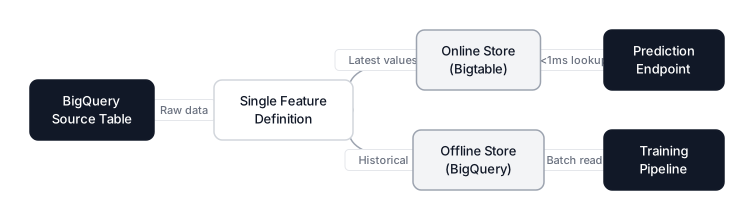 Click to expandVertex AI Feature Store architecture showing BigQuery offline store syncing to Bigtable online store
Key Insight: The critical property here is that the same feature definition produces both the historical training data and the real-time serving data. No more "two code paths" problem. If you update the feature logic, both stores update together.
Feature Store Pricing and Sunset Timeline
Feature Store online serving costs depend on the Bigtable instance size. A minimal single-node Bigtable cluster runs about $0.65/hour ($468/month). Google has announced that the legacy Feature Store (the pre-BigQuery version) will stop receiving new features after May 17, 2026, and will be fully sunset on February 17, 2027. New projects should use the BigQuery-native version exclusively.
Vertex AI Pipelines: Automating the Entire Workflow
Running training scripts manually works for experiments. Production requires automation. Vertex AI Pipelines lets you chain every step of your ML workflow into a directed acyclic graph (DAG) that runs automatically on a schedule or in response to triggers.
Pipelines are built using the Kubeflow Pipelines (KFP) SDK v2, which became generally available on Vertex AI in late 2025. Each step in the pipeline is a containerized component that receives inputs, produces outputs, and passes them to the next step.
Building a Fraud Detection Pipeline
Here's a complete pipeline that extracts data, trains our model, evaluates it, and only deploys if quality thresholds are met:
from kfp import dsl
from kfp.dsl import component, Input, Output, Model, Metrics, Dataset
from google.cloud import aiplatform

@component(
    base_image="python:3.11",
    packages_to_install=["google-cloud-bigquery", "pandas", "db-dtypes"],
)
def extract_data(
    project: str,
    bq_table: str,
    output_dataset: Output[Dataset],
):
    from google.cloud import bigquery
    import pandas as pd

    client = bigquery.Client(project=project)
    df = client.query(f"SELECT * FROM `{bq_table}`").to_dataframe()
    df.to_csv(output_dataset.path, index=False)

@component(
    base_image="python:3.11",
    packages_to_install=["xgboost", "scikit-learn", "pandas", "joblib"],
)
def train_model(
    dataset: Input[Dataset],
    n_estimators: int,
    max_depth: int,
    output_model: Output[Model],
    output_metrics: Output[Metrics],
):
    import pandas as pd
    import xgboost as xgb
    from sklearn.model_selection import train_test_split
    from sklearn.metrics import average_precision_score
    import joblib

    df = pd.read_csv(dataset.path)
    X = df.drop("is_fraud", axis=1)
    y = df["is_fraud"]
    X_train, X_test, y_train, y_test = train_test_split(X, y, test_size=0.2, stratify=y)

    fraud_ratio = (y_train == 0).sum() / (y_train == 1).sum()
    model = xgb.XGBClassifier(
        n_estimators=n_estimators, max_depth=max_depth,
        scale_pos_weight=fraud_ratio, eval_metric="aucpr",
    )
    model.fit(X_train, y_train)

    ap_score = average_precision_score(y_test, model.predict_proba(X_test)[:, 1])
    output_metrics.log_metric("average_precision", ap_score)
    joblib.dump(model, output_model.path)

@component(base_image="python:3.11")
def evaluate_gate(ap_score: float, threshold: float) -> bool:
    return ap_score >= threshold

@dsl.pipeline(name="fraud-detection-pipeline")
def fraud_pipeline(
    project: str = "fraud-detection-prod",
    bq_table: str = "fraud-detection-prod.transactions.labeled_data",
    n_estimators: int = 500,
    max_depth: int = 6,
    ap_threshold: float = 0.85,
):
    extract_task = extract_data(project=project, bq_table=bq_table)
    train_task = train_model(
        dataset=extract_task.outputs["output_dataset"],
        n_estimators=n_estimators,
        max_depth=max_depth,
    )
    # Only deploy if quality gate passes
    with dsl.Condition(
        train_task.outputs["output_metrics"].get("average_precision") >= ap_threshold
    ):
        # Deploy step would go here
        pass
Scheduling Pipelines
The Vertex AI Pipelines schedules API (now GA) lets you run pipelines on a cron schedule:
from google.cloud import aiplatform

aiplatform.init(project="fraud-detection-prod", location="us-central1")

# Create a recurring schedule: retrain every Monday at 3 AM UTC
schedule = aiplatform.PipelineJob(
    display_name="fraud-weekly-retrain",
    template_path="gs://fraud-ml-artifacts/pipelines/fraud_pipeline.json",
    pipeline_root="gs://fraud-ml-artifacts/pipeline-runs",
).create_schedule(
    cron="0 3 * * 1",
    display_name="weekly-retrain-schedule",
)
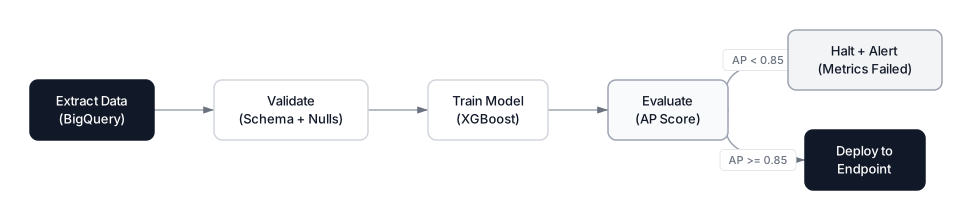 Click to expandVertex AI Pipelines workflow showing extract, train, evaluate gate, and conditional deploy steps
Pro Tip: Set max_concurrent_run_count=1 on your schedule to prevent overlapping runs. If Monday's training is still going when next Monday arrives (perhaps BigQuery data was late), the scheduler will skip rather than double-run and double-bill you.
Model Registry and Experiment Tracking
Vertex AI Model Registry tracks every model version your team trains. Each entry records the training job that created it, its evaluation metrics, the container image needed to serve it, and any custom labels you attach.
Combined with Vertex AI Experiments, you get full lineage tracking: which data, which code, which hyperparameters produced which model, and how that model performed on which test set.
from google.cloud import aiplatform

# Log an experiment run
aiplatform.init(experiment="fraud-detection-experiments")

with aiplatform.start_run("xgboost-v2-run-1") as run:
    run.log_params({
        "n_estimators": 500,
        "max_depth": 6,
        "learning_rate": 0.1,
        "scale_pos_weight": 577.3,
    })
    run.log_metrics({
        "average_precision": 0.923,
        "precision_at_1pct_fpr": 0.847,
        "recall_at_50pct_precision": 0.912,
    })

    # Register the best model
    model = aiplatform.Model.upload(
        display_name="fraud-xgboost-v2",
        artifact_uri="gs://fraud-ml-artifacts/models/xgboost-v2",
        serving_container_image_uri="us-docker.pkg.dev/vertex-ai/prediction/sklearn-cpu.1-5:latest",
        labels={"team": "fraud", "framework": "xgboost", "version": "2"},
    )
In the Vertex AI console, you can compare experiment runs side by side, filtering by metric thresholds to find the best model across all your trials. This replaces the ad hoc spreadsheets that most teams use to track experiments.
Deploying Models to Production Endpoints
Once your model is registered, deploying it to a real-time prediction endpoint takes a few lines:
endpoint = model.deploy(
    deployed_model_display_name="fraud-xgboost-v2-prod",
    machine_type="n1-standard-4",
    min_replica_count=2,
    max_replica_count=10,
    traffic_split={"0": 100},  # 100% traffic to this model version
)

# Make a prediction
prediction = endpoint.predict(
    instances=[{
        "amount": 2499.99,
        "merchant_category": 5,
        "time_since_last_txn": 0.3,
        "distance_from_home": 847.2,
        "is_international": 1,
    }]
)
print(prediction.predictions)  # [[0.94]]  High fraud probability
Traffic Splitting for Safe Rollouts
Vertex AI endpoints support traffic splitting, which lets you route a percentage of requests to a new model version while the existing version handles the rest:
endpoint.deploy(
    model=new_model,
    deployed_model_display_name="fraud-xgboost-v3-canary",
    machine_type="n1-standard-4",
    min_replica_count=1,
    max_replica_count=5,
    traffic_split={"0": 90, new_model.resource_name: 10},  # 10% canary
)
This canary deployment pattern lets you validate v3 on real traffic before committing fully. If fraud detection precision drops, roll back instantly by shifting traffic to 100% on the old model.
Endpoint Pricing
Endpoint costs depend on the machine type and replica count. A single n1-standard-4 replica runs about $0.19/hour ($137/month). With autoscaling between 2 and 10 replicas, expect $274 to $1,370/month depending on traffic. Billing is per-second, so you only pay for the replicas that are actually running.
For high-throughput generative AI workloads (Gemini, PaLM), consider Provisioned Throughput, which Google updated in early 2026 with multimodal support and model diversity options.
Model Garden and Generative AI
Vertex AI Model Garden is a curated library of over 200 models that you can deploy, fine-tune, or call via API. As of March 2026, it includes:
First-party Google models:
- Gemini 3.1 Pro (preview): Google's most advanced reasoning model, 1M token context window, improved software engineering and agentic capabilities
- Gemini 3 Flash (public preview): Fast, cost-effective model for agentic workloads
- Imagen 3: Text-to-image generation
- Chirp 3: Speech-to-text
Third-party models:
- Claude Opus 4.6 and Claude Sonnet 4.6 from Anthropic (GA on Vertex AI as of February 2026)
- Meta's Llama 3.2 family
- Mistral models
Open models:
- Google's Gemma 2 family
- Various community models deployable with one click
For our fraud detection system, Model Garden is relevant for the "explain this flag" feature. When the model flags a transaction, you can call Gemini to generate a human-readable explanation of why, using the transaction features and model output as context.
from vertexai.generative_models import GenerativeModel

model = GenerativeModel("gemini-3.1-pro")
response = model.generate_content(
    f"""A fraud detection model flagged this transaction with 94% confidence:
    - Amount: $2,499.99
    - Merchant category: Electronics
    - Time since last transaction: 18 minutes
    - Distance from home: 847 miles
    - International: Yes

    The user's typical transaction: $45-120, local, domestic.

    Write a 2-sentence explanation for the fraud analyst reviewing this alert."""
)
print(response.text)
Agent Builder: Building Intelligent Applications
Vertex AI Agent Builder, significantly expanded in early 2026, lets you build AI agents that combine foundation models with tools, memory, and governance controls. Recent additions include:
- Agent Designer (Preview): A low-code visual designer in the Cloud Console for designing and testing agents before writing code
- Agent Development Kit (ADK): Now supports Go, Python, and Java. Deploy agents to production with a single command
- Sessions and Memory Bank (GA): Short-term and long-term memory for agents to recall past conversations
- Observability Dashboard: Track token usage, latency, and error rates in the Agent Engine runtime
- Model Armor: Blocks prompt injection attacks and enforces safety policies
- Agent Identity: Ties agents to Cloud IAM for access management
For a fraud detection team, Agent Builder could power an internal chatbot that analysts use to query fraud patterns: "Show me the top 5 merchant categories with increasing fraud rates this quarter" with the agent calling BigQuery, running the analysis, and returning a formatted answer.
When to Use Vertex AI (And When Not To)
Vertex AI is a powerful platform, but it's not always the right choice. The decision hinges on your team size, existing cloud commitment, and workload complexity.
When Vertex AI is the Right Call
| Scenario | Why Vertex AI Fits |
|---|---|
| Your data already lives in BigQuery | Zero-copy training, Feature Store integration, no data migration costs |
| You need AutoML baselines fast | AutoML Tables is among the best automated ML services available |
| You're building with Gemini or Google models | Native access, lowest latency, tightest integration |
| You want one platform for classical ML and GenAI | Model Garden + custom training + Agent Builder under one roof |
| Your team is 3 to 15 ML engineers | Enough scale to justify the platform, small enough to benefit from managed services |
When to Look Elsewhere
| Scenario | Why Skip Vertex AI | Alternative |
|---|---|---|
| Datasets under 100 MB | GCP setup overhead isn't justified | Local scikit-learn + Jupyter |
| Quick weekend experiments | Learning curve slows iteration | Google Colab (free GPUs) |
| Multi-cloud or cloud-agnostic requirement | Vertex AI locks you into GCP | MLflow + Kubeflow on any cloud |
| Tight budget, small team | Managed services cost more than raw compute | Self-managed GCE instances + Docker |
| Data cannot leave your servers | Vertex AI is cloud-only | Kubeflow on-premises |
| Simple batch inference, no real-time | Endpoints are overkill | BigQuery ML or Cloud Functions |
Vertex AI vs. SageMaker vs. Azure ML
For a detailed comparison of all three major cloud ML platforms, see our guide on AWS vs GCP vs Azure for Machine Learning. The short version:
| Criterion | Vertex AI (GCP) | SageMaker (AWS) | Azure ML |
|---|---|---|---|
| Best integration | BigQuery, Colab | S3, Redshift | Azure Synapse |
| AutoML strength | Tables, Vision, NLP | Autopilot | Automated ML + Designer |
| Foundation model access | Gemini (native), Claude, Llama | Bedrock (separate service) | Azure OpenAI (GPT-5.3, o3) |
| Pipeline framework | KFP v2 (open source) | SageMaker Pipelines (proprietary) | Azure ML Pipelines + MLflow |
| Autoscaling speed | Aggressive, fast scale-to-zero | Slower cold starts | Moderate |
| Billing model | Per-second, node-hour abstractions | Per-second, instance-based | Per-minute |
Key Insight: Platform choice almost always follows existing cloud investment. If your company runs on GCP and stores data in BigQuery, Vertex AI is the obvious pick. The integration savings alone outweigh any feature differences. The same logic applies to AWS shops choosing SageMaker and Microsoft shops choosing Azure ML.
Production Considerations
Cost Estimation for Our Fraud Detection System
Here's what the full fraud detection pipeline costs monthly, assuming weekly retraining and moderate traffic:
| Component | Usage | Monthly Cost |
|---|---|---|
| AutoML baseline (one-time) | 2 node hours | ~$42 (one-time) |
| Custom training (weekly) | 4 runs x 1 hr x n1-standard-8 | ~$6 |
| Hyperparameter tuning (monthly) | 20 trials x 0.5 hr | ~$38 |
| Feature Store online (Bigtable) | 1-node cluster | ~$468 |
| Prediction endpoint | 2-4 replicas n1-standard-4 | ~$274 to $548 |
| Pipeline orchestration | ~10 runs/month | ~$5 |
| Total | ~$791 to $1,065/month |
The biggest cost driver is the Feature Store's Bigtable cluster, which runs 24/7. If you don't need sub-millisecond online serving, you can skip Feature Store and serve features from BigQuery directly (higher latency, but $468/month cheaper).
Quotas and Limits
Vertex AI enforces per-project quotas that can trip up teams scaling to production:
- Custom training: Default 8 concurrent training jobs, expandable via quota request
- Endpoints: Default 5 endpoints per region, expandable
- Pipeline runs: Default 100 concurrent runs
- Model upload size: 10 GB per artifact (increase via support ticket for larger models)
Request quota increases early. Google typically approves them within 1 to 2 business days, but getting caught by a quota limit during a production deployment is the kind of surprise nobody wants.
Security and Compliance
Vertex AI supports VPC Service Controls, Customer-Managed Encryption Keys (CMEK), and data residency controls. For regulated industries (finance, healthcare), ensure your Vertex AI resources run within a VPC perimeter and use CMEK for model artifacts. The Agent Builder now includes agent identity tied to Cloud IAM, which means every agent call carries auditable identity credentials.
When Vertex AI Fits Your Stack
Vertex AI now combines managed services for training, pipelines, feature management, deployment, and monitoring. The combination of BigQuery-native Feature Store, KFP v2 Pipelines, and per-second billing makes it particularly compelling for teams already invested in Google Cloud. Model Garden provides access to Google, partner, and open models alongside Vertex AI services for classical machine learning and generative AI workflows.
The practical takeaway is this: start with AutoML to establish a baseline you can benchmark against, then graduate to custom training jobs when you need specific architectures or loss functions. Use Feature Store from day one to avoid training-serving skew, and wrap everything in a Pipeline so retraining happens automatically.
If you're evaluating cloud ML platforms, start with our AWS vs GCP vs Azure comparison for the full picture. For a deep dive into the AWS alternative, see Mastering AWS SageMaker, and for Microsoft's offering, check out Azure Machine Learning: From Local Scripts to Production Scale.
Frequently Asked Interview Questions
Q: What problem does Vertex AI solve that individual GCP services don't?
Vertex AI unifies the ML lifecycle into a single platform where datasets, training jobs, model versions, and endpoints share the same SDK and project context. Before Vertex AI, Google offered separate services (AI Platform Training, AutoML Vision, AutoML Tables) that didn't share model registries or experiment tracking, forcing teams to build custom integration code between them.
Q: When would you choose AutoML over custom training on Vertex AI?
AutoML is the right starting point for establishing performance baselines, especially when domain expertise in model architecture is limited or when you need quick results. Custom training becomes necessary when you need specific loss functions, custom preprocessing that AutoML doesn't support, distributed training across multiple GPUs, or architectures not in AutoML's search space (like graph neural networks or custom transformer variants).
Q: How does Vertex AI Feature Store prevent training-serving skew?
Feature Store maintains a single feature definition that serves both the offline store (BigQuery, for training) and the online store (Bigtable, for real-time prediction). Because both stores derive from the same source, features are guaranteed to be computed identically. Without Feature Store, teams often have separate feature computation code for training (SQL batch queries) and serving (real-time Python), which inevitably diverge.
Q: How would you design a canary deployment for a new model version on Vertex AI?
Deploy the new model to the same endpoint as the existing model using the traffic_split parameter, routing 5 to 10% of requests to the new version. Monitor the canary's prediction distribution, latency, and downstream business metrics (for fraud detection: false positive rate, catch rate). If metrics hold or improve after a defined observation period, gradually shift traffic to 100%. If they degrade, set the canary to 0% traffic and investigate.
Q: What's the difference between Vertex AI Pipelines and a simple cron job running a Python script?
Pipelines provide step-level containerization (each step runs in its own isolated environment), DAG-based dependency management (steps execute only when their inputs are ready), built-in artifact tracking (every intermediate dataset is versioned and stored), conditional execution (skip deployment if evaluation metrics fail), and automatic retry with configurable backoff. A cron job gives you none of these, meaning failures are harder to diagnose, intermediate results are lost, and there's no audit trail of what ran, when, and with what inputs.
Q: Your Vertex AI endpoint latency increased from 50ms to 300ms after deploying a new model. What do you investigate?
First check if the new model artifact is significantly larger (larger model means longer inference). Then check if autoscaling is failing to provision enough replicas for current traffic. Look at the model's prediction code for any unintentional blocking calls (like fetching features synchronously). Finally, verify the serving container image matches the model framework version to rule out compatibility overhead.
Q: How would you reduce Vertex AI costs for a team running 50 training jobs per week?
Use preemptible VMs for training jobs that can tolerate interruption (hyperparameter tuning trials, for example), which reduces compute costs by 60 to 91%. Schedule training during off-peak hours. Right-size machine types by profiling actual CPU and memory use. Use n1-standard instead of n1-highmem when memory isn't the bottleneck. Consider committed use discounts if your workload is predictable and sustained.
Q: What role does Vertex AI Model Garden play in the generative AI stack?
Model Garden is the catalog where you browse, deploy, and fine-tune foundation models without managing infrastructure. It hosts Google's own models (Gemini, Imagen), third-party models (Claude from Anthropic), and open models (Llama, Gemma). You can deploy any Model Garden model to a Vertex AI endpoint with one click, or access them via API. For custom use cases, Model Garden models can be fine-tuned on your data using Vertex AI's tuning APIs.