
A 70-billion-parameter model requires about 140GB for FP16 weights alone. Four-bit quantization reduces the weight footprint to roughly 35GB before runtime overhead, which still exceeds the 24GB VRAM of a single RTX 4090. Running that model on consumer hardware therefore requires a smaller quantization, CPU or system-memory offload, or multiple devices, with quality and speed trade-offs that should be measured.
Quantization is how the open-source community made large language models usable on consumer hardware. Understanding it means understanding the tradeoffs between memory, speed, and quality that every practitioner running local models faces every day.
Numerical Precision and Why It Costs Memory
A neural network's "weights" are numbers — billions of floating-point values that encode what the model learned. The format those numbers are stored in determines how much memory the model occupies.
FP32 (32-bit float) uses 32 bits — four bytes — per weight. FP16 halves that to two bytes. INT8 halves it again to one byte. INT4 squeezes four weights into a single byte.
The relationship is direct: cut the bits, cut the memory proportionally.
The memory formula is:
Where:
- is the total number of model weights (e.g., 70 billion for Llama 3.1 70B)
- is the precision format: 16 for FP16, 8 for INT8, 4 for INT4
- $8$ converts bits to bytes
- converts bytes to gigabytes (1 GB = 1,073,741,824 bytes)
In Plain English: Think of weights as measurements on a ruler. FP32 is a ruler with millimeter markings — very precise, but the ruler is long. INT4 is a ruler with only 16 tick marks. You lose some precision, but you can fold it up and put it in your pocket. For a 70B model, going from FP16 to INT4 takes it from 140GB down to 35GB. Same model, same task, dramatically less storage.
Here's what those numbers look like across popular models and precisions:
| Model | FP16 | INT8 | Q4_K_M | Q3_K_M |
|---|---|---|---|---|
| Mistral 7B | 14 GB | 7 GB | 4.1 GB | 3.5 GB |
| Llama 3.1 8B | 16 GB | 8 GB | 4.7 GB | 3.9 GB |
| Qwen 2.5 14B | 28 GB | 14 GB | 8.4 GB | 7.0 GB |
| Llama 3.1 70B | 140 GB | 70 GB | 41 GB | 34 GB |
| Qwen 2.5 72B | 144 GB | 72 GB | 43 GB | 36 GB |
| Llama 3.1 405B | ~810 GB | ~405 GB | ~238 GB | ~198 GB |
Key Insight: Llama 3.1 70B drops from 140GB to 41GB with Q4_K_M — a 3.4x reduction. That's the difference between needing a server cluster and needing a single RTX 4090.
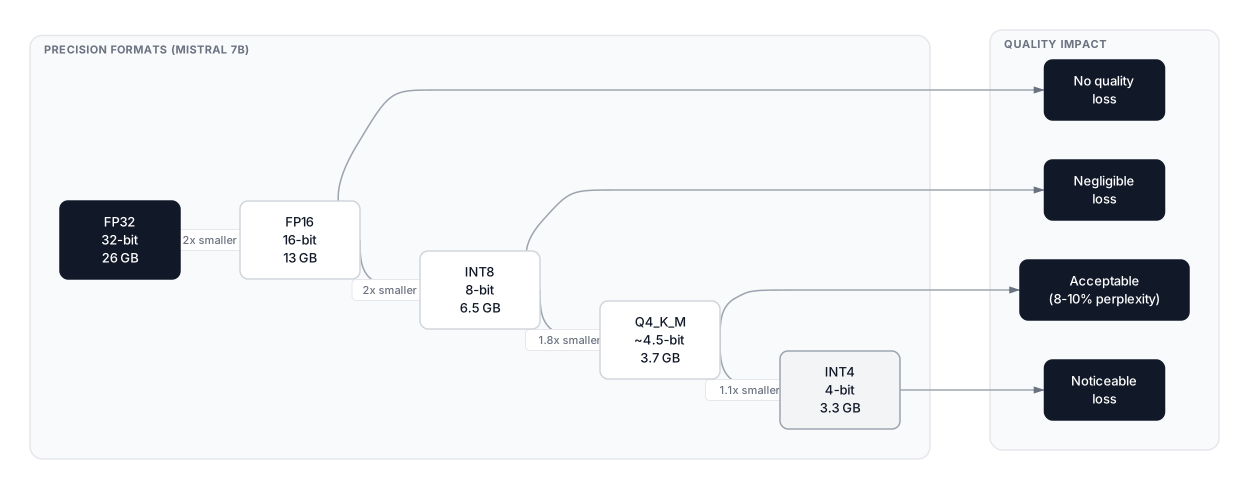 Click to expandMemory reduction across quantization formats for popular LLMs
The GGUF Format and K-Quants vs IQ-Quants
GGUF (GPT-Generated Unified Format) is the successor to GGML, developed for the llama.cpp project. It's a file container format — not just a quantization scheme — that stores both the quantized weights and the model's metadata in a single portable file. This is why it became the default format for tools like Ollama, LM Studio, and GPT4All.
What makes GGUF special is hardware flexibility: you can run a GGUF model entirely on CPU, split layers between CPU and GPU, or run fully on GPU. It works on Apple Silicon, NVIDIA GPUs, AMD GPUs, and CPU-only machines without recompilation.
K-Quants: The Reliable Baseline
K-quants apply different precision to different layer types within the model. Attention projections and output layers receive more bits; feed-forward layers receive fewer. This layer-aware approach gives K-quants better quality than naive uniform quantization at the same bit depth. The suffix indicates the variant:
| Name | Avg Bits/Weight | Size (7B) | Perplexity vs FP16 | Best For |
|---|---|---|---|---|
| Q2_K | 2.6 | 2.7 GB | +15% | CPU-only, extreme constraint |
| Q3_K_M | 3.4 | 3.5 GB | +7% | Tight VRAM, acceptable quality |
| Q4_K_M | 4.5 | 4.1 GB | +3–4% | Default sweet spot |
| Q4_K_L | 4.9 | 4.5 GB | +2–3% | Better quality than K_M |
| Q5_K_M | 5.7 | 5.0 GB | +1–2% | Best quality/size for coding |
| Q6_K | 6.6 | 5.9 GB | <1% | Near-lossless |
| Q6_K_L | 6.9 | 6.2 GB | <1% | Near-lossless, larger contexts |
| Q8_0 | 8.0 | 7.2 GB | <0.5% | Virtually indistinguishable from FP16 |
The _M suffix means "medium" — a balanced layer configuration. _S is smaller (slightly lower quality), _L is larger (slightly higher quality). Q6_K_L was added to llama.cpp in 2025 as an intermediate between Q6_K and Q8_0 for users with ample VRAM who want the best possible quality without the full overhead of 8-bit.
IQ-Quants: Importance-Matrix Quantization
IQ-quants are a newer generation that uses an importance matrix to guide which weights to preserve most carefully. The importance matrix records which weights have the most influence on output — a weight is "important" if a small change to it causes a large change in the model's predictions. With this information, the quantizer allocates more precision to high-impact weights and less to low-impact ones, achieving better quality at the same average bit depth.
| Name | Avg Bits/Weight | Size (7B) | Perplexity vs FP16 | Notes |
|---|---|---|---|---|
| IQ2_XXS | 2.1 | 2.2 GB | +20%+ | Extreme compression only |
| IQ3_XXS | 3.1 | 3.2 GB | +8% | Below Q3_K_M |
| IQ3_XS | 3.3 | 3.4 GB | +5–6% | Comparable to Q3_K_M |
| IQ3_S | 3.5 | 3.6 GB | +4–5% | Slightly better than Q3_K_M |
| IQ4_XS | 4.3 | 4.0 GB | +3–4% | Smaller than Q4_K_M, similar quality |
| IQ4_NL | 4.5 | 4.2 GB | +3% | Quality matches Q4_K_M |
IQ3_XS vs Q3_K_M: At the same 3.3 bits, IQ3_XS is roughly comparable to Q3_K_M in quality but slightly smaller — the importance matrix helps it squeeze more quality from fewer bits. IQ3_XS is a reasonable substitute when you need every megabyte.
IQ4_XS vs Q4_K_M: IQ4_XS is about 0.4 bits smaller than Q4_K_M (4.3 vs 4.5 bpw), which saves roughly 400MB on a 7B model, with near-identical perplexity. For a 70B model, that difference grows to 3–4GB — enough to tip a model from barely-not-fitting to fitting. Generation speed is slightly faster with IQ4_XS; prompt processing is slightly slower.
Pro Tip: IQ-quants require a good importance matrix (imatrix) file computed from calibration data. When downloading quantized models from Hugging Face, check whether the uploader used an imatrix — it's listed in the model card. A poorly calibrated IQ-quant can be worse than the equivalent K-quant.
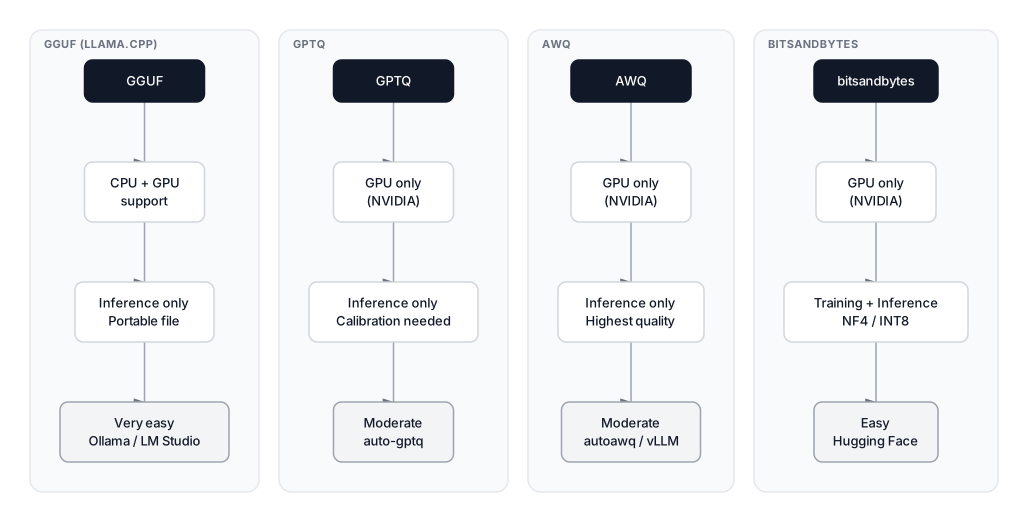 Click to expandComparison of GGUF, GPTQ, AWQ, and bitsandbytes formats
GPU-Optimized Formats: GPTQ, AWQ, and ExLlamaV2
For NVIDIA GPU inference, three formats compete on throughput and quality. All require CUDA and don't support CPU fallback.
GPTQ: Calibration-Based Quantization
GPTQ (Frantar et al., 2022) was the first method to achieve reliable 4-bit quantization of billion-parameter models. The key idea is calibration: GPTQ feeds 128 representative samples through the model and uses second-order gradient information to minimize quantization error layer by layer. This calibration step makes GPTQ weights more accurate than naive rounding.
GPTQ models are distributed as Hugging Face model repos and are used with auto-gptq or the transformers library. With the Marlin CUDA kernel, GPTQ reaches approximately 712 tokens/second on an A10G GPU for a 7B model — more than 2x faster than standard GPTQ due to reduced memory bandwidth pressure.
AWQ: Protecting the Weights That Matter
AWQ (Activation-Aware Weight Quantization, Lin et al., 2023) takes a different approach: not all weights contribute equally. Roughly 1% of weights drive large activations and have outsized effect on quality. Quantizing these aggressively causes disproportionate accuracy loss. AWQ identifies salient weights by observing activation magnitudes, then applies per-channel scaling to protect them before quantization.
The result: AWQ consistently retains approximately 95% of FP16 quality at 4 bits — about 3 percentage points better than GPTQ on MMLU benchmarks. Marlin-AWQ combines AWQ weights with the Marlin CUDA kernel for peak throughput: approximately 741 tokens/second on an A10G, making it the fastest 4-bit format available for NVIDIA hardware.
ExLlamaV2: The Mixed-Precision Specialist
ExLlamaV2 is a fast inference library built specifically for consumer NVIDIA GPUs, and its EXL2 quantization format is worth knowing about if you run on dedicated NVIDIA hardware. Like GPTQ, EXL2 uses calibration-based optimization. The key difference is granularity: EXL2 can mix different bit widths within a single model and within individual layers, allocating more bits to important components automatically.
EXL2 supports 2, 3, 4, 5, 6, and 8-bit quantization with fractional average bitwidths (e.g., 4.5 bpw, 5.5 bpw) — something GPTQ can't do. In benchmarks, EXL2 at 4 bpw consistently outperforms Q4_K_M on quality metrics, and ExLlamaV2 generates tokens roughly 40–70% faster than llama.cpp on the same NVIDIA hardware for models that fit entirely in VRAM.
The tradeoff: EXL2 requires NVIDIA CUDA and has no CPU fallback. It's the right choice when you're fully committed to NVIDIA hardware and want maximum performance for interactive use.
bitsandbytes: The Fine-Tuning Format
Bitsandbytes doesn't create exportable model files — it quantizes models on-the-fly in memory. Two formats matter:
LLM.int8() — 8-bit quantization with dynamic mixed-precision. It identifies outlier activations that cause quality loss and keeps those in FP16, quantizing the rest to INT8. Near-lossless quality at half the memory of FP16.
NF4 (Normal Float 4-bit) — designed specifically for QLoRA fine-tuning. NF4 uses a non-uniform distribution with more quantization levels near zero, where LLM weights cluster. This makes it information-theoretically optimal for normally distributed weights. Loading a 7B model in NF4 uses about 3.5GB of VRAM, leaving room for LoRA adapter weights and optimizer states. If you want to fine-tune on a consumer GPU, this is the path. See our guide to fine-tuning with LoRA and QLoRA for the full workflow.
HQQ: Fast, No-Calibration Quantization
Half-Quadratic Quantization (HQQ, Badri & Shaji, 2023) is gaining traction in 2025–2026 for one key property: it needs no calibration data. GPTQ and AWQ require running examples through the model; HQQ minimizes weight reconstruction error directly using a fast numerical optimizer, quantizing a 70B model in under 5 minutes versus 1–2 hours for GPTQ.
Quality-wise, HQQ at 4-bit is competitive with bitsandbytes NF4 and slightly better than standard INT4 quantization. It's now integrated into Hugging Face Transformers and vLLM. For practitioners who need to quantize their own models quickly — without access to calibration datasets — HQQ is the practical choice.
Format Comparison
| Format | Avg Bits | CPU Support | GPU Required | Speed (7B, A10G) | Best For |
|---|---|---|---|---|---|
| GGUF Q4_K_M | 4.5 | Yes | Optional | 80–120 tok/s | Local inference, Ollama |
| GGUF Q8_0 | 8.0 | Yes | Optional | 60–90 tok/s | High-quality local |
| GGUF IQ4_XS | 4.3 | Yes | Optional | 85–125 tok/s | Slightly smaller than Q4_K_M |
| GPTQ 4-bit | 4.0 | No | NVIDIA | ~712 tok/s (Marlin) | GPU inference server |
| AWQ 4-bit | 4.0 | No | NVIDIA | ~741 tok/s (Marlin) | Highest-throughput API |
| EXL2 4.0 bpw | 4.0 | No | NVIDIA | 2x llama.cpp | Best quality/speed NVIDIA |
| bitsandbytes NF4 | 4.0 | No | NVIDIA | Similar to INT4 | QLoRA fine-tuning |
| HQQ 4-bit | 4.0 | No | NVIDIA | Similar to NF4 | Fast self-quantization |
Speed Benchmarks by Hardware
Actual token generation rates vary with model size, context length, and backend. These figures are representative community benchmarks for Llama 3.1 8B at Q4_K_M:
| Hardware | VRAM | 8B Q4_K_M | 70B Q4_K_M | Notes |
|---|---|---|---|---|
| RTX 4090 | 24 GB | 130–150 tok/s | N/A (doesn't fit) | CUDA 12.8, llama.cpp |
| RTX 3090 | 24 GB | 110–130 tok/s | N/A (doesn't fit) | ~15% slower than 4090 |
| RTX 4070 Ti | 12 GB | 90–110 tok/s | N/A | 8B fits comfortably |
| M3 Max (96 GB) | Unified | 60–80 tok/s | 10–15 tok/s | Metal backend, Ollama |
| M4 Max (128 GB) | Unified | 80–100 tok/s | 14–20 tok/s | Best Apple Silicon |
| 2x RTX 4090 | 48 GB | 200+ tok/s | 25–40 tok/s | 70B fits fully in VRAM |
Key Insight: Apple Silicon's unified memory architecture lets it run the 70B model at all — something a single-GPU PC can't do cleanly. The bandwidth is lower than dedicated VRAM, but you get 10–15 tokens/second on a MacBook Pro M3 Max, which is usable for interactive work.
For the NVIDIA formats (GPTQ/AWQ/EXL2), speed is in a different league: Marlin-AWQ hitting 741 tokens/second on an A10G is not an interactive use case — it's a multi-user API serving hundreds of concurrent requests. These numbers reflect batched server throughput, not single-user generation.
Running Quantized Models
There are three tools worth knowing, ranked by complexity:
Ollama (recommended starting point): Downloads and runs GGUF models with a single command. Handles GPU detection, layer offloading, and serving automatically.
# Install (macOS/Linux)
curl -fsSL https://ollama.com/install.sh | sh

# Run Llama 3.1 8B — defaults to Q4_K_M
ollama run llama3.1

# Specify quantization level explicitly
ollama run llama3.1:8b-instruct-q5_K_M

# Run Qwen 2.5 72B (needs 48GB+ VRAM, or CPU offloading)
ollama run qwen2.5:72b

# List available quantizations for a model
ollama show --modelfile llama3.1
llama.cpp (maximum control): The reference implementation for GGUF inference. Compile from source for best performance, then use llama-cli for interactive mode or llama-server to expose an OpenAI-compatible API endpoint.
git clone https://github.com/ggerganov/llama.cpp
cd llama.cpp && make GGML_CUDA=1  # Enable CUDA support

# Convert a Hugging Face model to GGUF
python convert_hf_to_gguf.py /path/to/llama-hf/ --outfile llama.gguf

# Quantize to Q4_K_M
./llama-quantize llama.gguf llama-q4km.gguf Q4_K_M

# Or IQ4_XS with an importance matrix
./llama-quantize --imatrix imatrix.dat llama.gguf llama-iq4xs.gguf IQ4_XS

# Run the server with GPU offloading
./llama-server \
  --model llama-q4km.gguf \
  --n-gpu-layers 99 \
  --ctx-size 8192 \
  --port 8080
vLLM (production API server): Designed for high-throughput multi-user serving. Supports GPTQ and AWQ natively. If you're building an application that needs to serve hundreds of requests per minute, vLLM with AWQ outperforms llama.cpp on NVIDIA GPUs.
from vllm import LLM

# Load AWQ quantized model
llm = LLM(
    model="TheBloke/Mistral-7B-Instruct-v0.2-AWQ",
    quantization="awq",
    max_model_len=4096
)
Hardware Guide: VRAM to Models
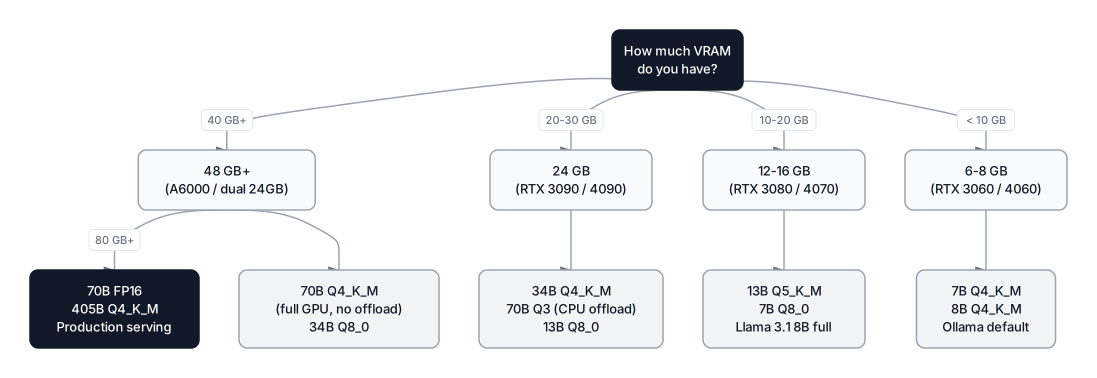 Click to expandVRAM decision guide for quantized LLM inference
| GPU VRAM | Models That Fit Fully | Recommended Format |
|---|---|---|
| 6 GB | 7–8B (Q4_K_M, tight) | Q4_K_M or IQ4_XS |
| 8 GB | 7–8B (Q4–Q5), 8B Q8_0 | Q5_K_M or Q8_0 |
| 12 GB | 7–8B (any), 13–14B Q4_K_M | Q5_K_M or Q8_0 for 7B |
| 16 GB | 13–14B (Q5–Q8), Qwen 2.5 14B | Q5_K_M or Q6_K |
| 24 GB | 34B Q4_K_M, 8B FP16 | Q4_K_M or Q5_K_M |
| 48 GB | 70–72B Q4_K_M (full GPU) | Q4_K_M or Q5_K_M |
| 80 GB | 70B FP16, 405B Q4_K_M | FP16 for 70B |
| 2x 80 GB | 405B Q5_K_M, 70B FP16 | Q5_K_M for 405B |
Models listed use the Llama 3.1 and Qwen 2.5 families as references. Memory estimates include a 15% buffer for KV cache at 8192-token context.
Common Pitfall: Many guides recommend Q3_K_M for 70B on a 24GB card, but they don't account for KV cache memory. A 8192-token context window with a 70B model takes an additional 6–10GB of VRAM for the KV cache. Leave a 4–6GB buffer beyond the model weights when estimating VRAM requirements for larger contexts.
The 1-Bit Frontier: BitNet b1.58
The quantization story took an unusual turn in 2025 when Microsoft released BitNet b1.58 — a model natively trained with ternary weights: every weight is constrained to {-1, 0, +1}. The name comes from log₂(3) ≈ 1.58 bits needed to represent three states.
BitNet b1.58 2B4T (2 billion parameters, trained on 4 trillion tokens) is the first open-source model at this precision level that's actually usable. It benchmarks competitively against standard 2B models and has a non-embedding footprint of only 0.4GB — versus 1.4GB for a comparable full-precision model. CPU decoding latency drops to 29ms per token on modern hardware.
The catch: BitNet's efficiency gains require the dedicated bitnet.cpp inference framework (built on llama.cpp internals). Running BitNet models through standard transformers loses all the performance advantages — you get a slow, memory-hungry model that behaves worse than a properly quantized FP16 model of the same size.
Microsoft's own model card is candid: they don't recommend BitNet b1.58 for production deployment yet, noting limited non-English support and an "elevated defect rate" on certain query types. The technology is real and the efficiency gains are genuine (2.4x to 6x speedup over llama.cpp on x86 CPUs), but BitNet is a research preview rather than a production tool as of early 2026.
What it signals: the industry is moving toward models designed for low-bit quantization from the ground up, not just post-training compression of FP16 models.
Picking the Right Quantization Level
The right choice depends on what you're optimizing for. This framework covers the common scenarios:
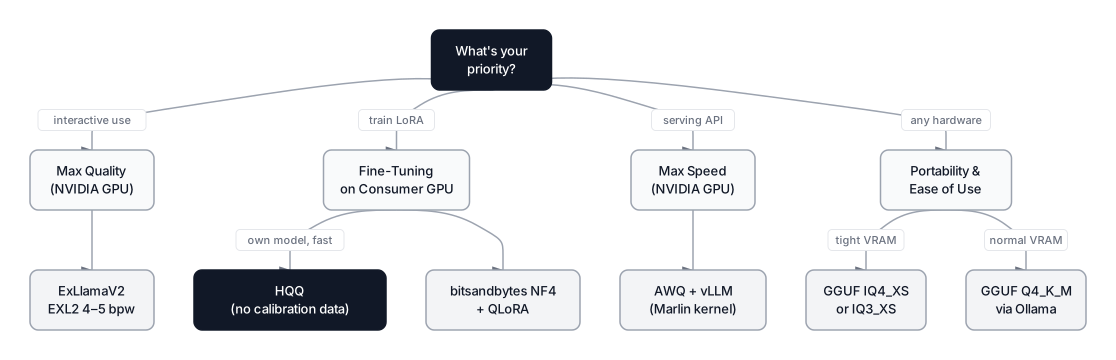 Click to expandQuantization format selection guide by use case
Maximize quality per byte (NVIDIA GPU): Use AWQ or EXL2. AWQ with Marlin kernel gives the best throughput for serving. EXL2 gives the best interactive quality for a single user on 4–6 bpw models.
Maximum portability and ease of use: GGUF Q4_K_M via Ollama. Works on any hardware, easy to swap models, comfortable for beginners and experts alike.
Tight on VRAM, need to fit a bigger model: Try IQ4_XS instead of Q4_K_M — you gain 3–4% of space at similar quality. If you need more, drop to IQ3_XS before Q3_K_M, since importance-matrix quantization holds quality better at lower bit depths.
Fine-tuning on consumer hardware: bitsandbytes NF4 with QLoRA. This is the only format that supports training, not just inference. A 13B model fine-tuned on a single RTX 3090 is achievable with this stack.
You want to quantize your own model quickly: HQQ. No calibration data needed, quantizes a 70B model in under 5 minutes, and quality is competitive with bitsandbytes NF4.
You need the absolute best quality at 4-bit on NVIDIA: EXL2 at 4.5–5.0 bpw with a quality imatrix. Slower to set up than AWQ, but quality at given bitwidth is hard to beat.
When Not to Quantize
Quantization isn't always the right answer. Three categories where quality loss is genuinely unacceptable:
Legal, medical, and compliance document analysis. Even 8-10% perplexity degradation can mean the model occasionally drops clauses, misreads negations, or hallucinates specific provisions. When accuracy is the entire point, use Q8_0 or FP16.
Embedding generation. Models used for semantic search and retrieval are extremely sensitive to precision loss. A 4-bit embedding model produces subtly shifted vector spaces that degrade retrieval quality in ways that are hard to debug. Keep embedding models at FP16 or INT8 minimum. Our overview of text embeddings and vector search explains why.
Inference on fine-tuned models. If you fine-tuned a model in FP16, run inference in FP16. The fine-tuning process optimized weights for that precision. Quantizing after fine-tuning reintroduces quantization error that wasn't present during training.
The general rule: use Q8_0 or FP16 when the task requires consistent precision across many inferences, and accept Q4_K_M or Q5_K_M for interactive and exploratory workloads.
Conclusion
Quantization transformed LLMs from datacenter software into tools you can run on a laptop. The ecosystem now has more options than ever: K-quants and IQ-quants for GGUF portability, GPTQ and AWQ for NVIDIA throughput, ExLlamaV2 for interactive quality on NVIDIA hardware, and HQQ for fast self-quantization. BitNet b1.58 points toward a future where models are designed for low-bit inference from the start rather than compressed after training.
For most developers, the practical starting point is Ollama with Q4_K_M. Move to Q5_K_M or IQ4_XS when quality starts to matter. Use EXL2 or AWQ when you're building a serving layer on dedicated NVIDIA hardware. Reach for bitsandbytes NF4 when you want to fine-tune.
The quality losses at Q4 and Q5 are real but small for conversational and coding tasks — typically 3–4% perplexity increase, imperceptible in most conversations. Where they matter — precision documents, embeddings, post-fine-tune inference — higher-bit formats are the right choice.
To understand how quantization fits into the broader workflow of building with open-source models, our open-source LLMs comparison guide covers the current Llama, Mistral, and Qwen families. And if you want to go deeper on the fine-tuning side, the guide to fine-tuning LLMs with LoRA and QLoRA walks through QLoRA end-to-end with bitsandbytes NF4.
Interview Questions
What is quantization and why does it reduce model memory?
Quantization reduces the numerical precision used to store model weights — from FP32 (4 bytes per weight) to INT8 (1 byte) or INT4 (0.5 bytes). Since memory usage scales linearly with bits per weight, a 4-bit quantized model uses roughly 4x less VRAM than its FP16 counterpart. The tradeoff is precision loss, which manifests as a small increase in perplexity.
What is the difference between K-quants and IQ-quants in GGUF?
K-quants (Q4_K_M, Q5_K_M, etc.) apply layer-aware quantization: attention and output layers get more bits, feed-forward layers get fewer, using a fixed heuristic. IQ-quants (IQ4_XS, IQ3_XS, etc.) go further by computing an importance matrix from calibration data, which maps which weights most influence output quality, and allocates precision accordingly. IQ-quants achieve slightly better quality at a given bitwidth but require a good imatrix file to realize that advantage — a poorly calibrated IQ-quant can be worse than the equivalent K-quant.
What is the difference between GPTQ and AWQ quantization?
GPTQ uses second-order gradient information (calibrated on a small dataset) to minimize reconstruction error layer by layer, making it more accurate than naive weight rounding. AWQ improves on this by identifying "salient" weights — the roughly 1% that drive large activations — and protecting them during quantization using per-channel scaling. AWQ consistently retains 2–3 percentage points more quality than GPTQ on MMLU and HumanEval benchmarks, and Marlin-AWQ is currently the fastest 4-bit inference kernel available at approximately 741 tokens/second on an A10G GPU.
What does Q4_K_M mean in a GGUF filename?
The Q4 indicates 4-bit quantization. The K indicates the k-quants algorithm, which applies different precision to different layer types — attention and output projections get more bits, feed-forward layers get fewer. The _M means "medium" configuration, resulting in an average of approximately 4.5 bits per weight across the full model. _S is slightly smaller (lower quality) and _L slightly larger (higher quality). IQ4_XS follows a different naming scheme: the I prefix indicates importance-matrix quantization, 4 is the approximate bit depth, and XS means "extra small" — a more aggressively compressed variant.
How does bitsandbytes NF4 differ from standard INT4 quantization?
Standard INT4 distributes 16 quantization levels evenly across the weight range. NF4 (Normal Float 4) uses a non-uniform distribution designed for normally distributed weights: more levels are placed near zero, where LLM weights cluster, and fewer at the extremes. This makes NF4 information-theoretically optimal for LLM weight distributions, recovering quality that standard INT4 loses. NF4 was introduced in the QLoRA paper (Dettmers et al., 2023) and is the standard for bitsandbytes-based fine-tuning.
Why does adding more context tokens increase VRAM usage beyond the model size?
The KV cache stores intermediate attention computations for all previous tokens, enabling autoregressive generation without recomputing them. KV cache size scales with 2 × layers × heads × head_dim × sequence_length × precision. For a 7B model with 8192-token context, this adds roughly 4–6GB on top of model weights. Longer contexts (32K, 128K) can add 15–30GB, which is why context length matters as much as model size when planning VRAM requirements.
When would you choose GGUF over AWQ for production serving?
GGUF is the right choice when you need CPU/GPU mixed inference, cross-platform support (macOS, Linux, Windows, AMD), or deployment without dedicated NVIDIA hardware. AWQ is better when you have dedicated NVIDIA infrastructure and need maximum throughput for concurrent requests — Marlin-AWQ consistently outperforms GGUF's CUDA backend on identical hardware. For a user-facing API on NVIDIA infrastructure, AWQ with vLLM is the standard choice.
What is the practical significance of ExLlamaV2 over standard GGUF for NVIDIA users?
ExLlamaV2 generates tokens roughly 40–70% faster than llama.cpp on equivalent NVIDIA hardware, and its EXL2 format supports fractional average bitwidths (4.5 bpw, 5.5 bpw) with mixed precision within layers — something K-quants and GPTQ can't match. At 4 bpw, EXL2 quality beats Q4_K_M measurably on perplexity. The tradeoff is complexity: EXL2 requires NVIDIA CUDA, has no CPU fallback, and the tooling is less beginner-friendly than Ollama. For an experienced developer running on a single NVIDIA GPU and wanting the best interactive experience, ExLlamaV2 is worth the setup cost.