
You run df.corr() in pandas, glance at a heatmap, and declare two features "correlated." Every data science course teaches this workflow, and it's dangerously incomplete. That single call computes Pearson correlation, a metric designed exclusively for linear relationships between continuous variables. Feed it a perfect quadratic curve, and it returns zero. Feed it survey rankings, and the result is meaningless. Feed it two categorical columns, and pandas won't even try.
Correlation analysis requires matching your measurement tool to your data. Throughout this article, we'll use a single running example, a housing dataset with square footage, sale price, energy costs, garage status, and neighborhood type, to show exactly where Pearson breaks and what to use instead.
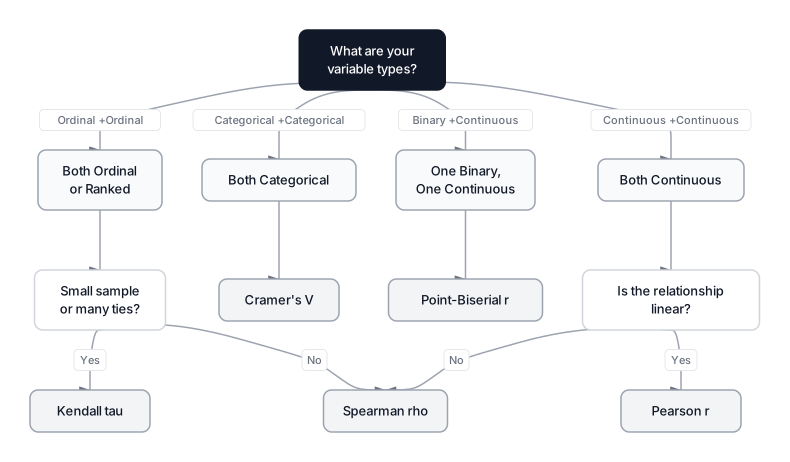 Click to expandCorrelation method selection guide for different variable types
The Pearson Correlation Coefficient
Pearson correlation () quantifies the strength and direction of a linear relationship between two continuous variables. It assumes that a unit increase in produces a proportional change in at a constant rate. When this linearity assumption holds, Pearson is the gold standard. When it doesn't, Pearson will confidently mislead you.
The Formula
Where:
- and are individual data points
- and are the sample means
- The numerator is the covariance between and
- The denominator normalizes the result to fall between $-1$ and $+1$
In Plain English: Pearson checks whether square footage and sale price move together proportionally. The numerator asks "when sqft is above average, is price also above average?" The denominator scales everything so the answer lands between $-1$ (perfect inverse) and $+1$ (perfect sync), regardless of whether you measure in square feet or square meters.
In our housing dataset, square footage and price have a strong linear relationship. Pearson captures this well. But energy cost has a U-shaped relationship with square footage (small and large homes cost more to heat/cool than mid-sized ones). Pearson stumbles here because it's looking for a straight line that doesn't exist.
The Zero Correlation Trap
This is the most dangerous failure mode in exploratory data analysis. Consider a perfectly deterministic relationship: .
Expected output:
Y = X^2 relationship
Pearson r: -0.000000
Actual relationship: perfectly deterministic (R^2 = 1.0 in non-linear space)
Pearson reports exactly zero. It says "no relationship" because it's hunting for a straight line while sitting on top of a perfect parabola. A scatter plot would make the pattern obvious in seconds, which is why you should always visualize before computing correlations.
Common Pitfall: A Pearson correlation of zero does NOT mean "no relationship." It means "no linear relationship." Always plot your data first. Anscombe's Quartet (1973) demonstrated this exact failure mode over fifty years ago, and data scientists still fall for it daily.
Spearman Rank Correlation for Monotonic Relationships
Spearman's rank correlation () assesses monotonic relationships, whether variables tend to move in the same direction, even if not at a constant rate. Instead of operating on raw values, it converts data into ranks (1st, 2nd, 3rd) and computes Pearson on those ranks. This makes it resilient to outliers and perfectly suited for ordinal data like survey ratings or ranked preferences.
The Formula
Where:
- is the difference between the rank of and the rank of
- is the number of observations
- The constant $6$ normalizes the result to the $[-1, +1]$ range
In Plain English: Spearman asks "does the house with the biggest square footage also have the highest price?" If the rank ordering matches perfectly, . If a mansion costs less than a studio (ranks reversed), those pairs push toward $-1$. It doesn't care whether the price increase is $10 or $100,000 per rank; only the ordering matters.
Pearson vs. Spearman on the Same Housing Data
Expected output:
Pearson r:  0.9872  (p = 8.94e-160)
Spearman r: 0.9853  (p = 4.63e-154)

Non-linear (sqft vs energy cost):
Pearson r:  0.5662
Spearman r: 0.3995
For the linear sqft-to-price relationship, both methods agree closely (0.987 vs. 0.985). For the U-shaped energy cost, both methods struggle. Pearson picks up part of the trend because larger homes do tend to have higher energy costs on average, but it's misleading. Neither method detects the true parabolic shape. This is where visualizing first matters more than any single number.
Pro Tip: Use Spearman as your default when you're unsure about linearity. It equals Pearson for genuinely linear data and outperforms it for monotonic-but-curved data. The only downside is slightly lower statistical power on truly normal, linear data.
 Click to expandCorrelation strength interpretation from negative one to positive one
Kendall's Tau for Small Samples and Tied Ranks
Kendall's Tau () is a non-parametric correlation based on concordant and discordant pairs rather than ranks. It produces more conservative estimates than Spearman and has better statistical properties when your sample size is small (under 30 observations) or when your data contains many tied values.
Concordant and Discordant Pairs
Pick any two data points and :
- Concordant: Both variables agree on the ordering ( and , or both less).
- Discordant: The variables disagree ( but ).
The Formula
Where:
- is the number of concordant pairs
- is the number of discordant pairs
- is the total number of unique pairs from observations
In Plain English: Kendall picks two houses at random and asks: "Does the bigger house cost more?" If this is true for 90% of pairs and false for 10%, the correlation is $0.90 - 0.10 = 0.80$. It's a direct probability interpretation: 80% more likely to find agreement than disagreement.
Kendall vs. Spearman in Practice
In our housing example, imagine two appraisers rank 12 properties. Their rankings nearly match, with a few swaps:
Expected output:
Spearman rho: 0.9720  (p = 0.0000)
Kendall tau:  0.8788  (p = 0.0000)

With n=12, Kendall gives a more conservative estimate.
Both detect strong agreement, but Kendall's 0.879 is more conservative than Spearman's 0.972. For small samples, this conservatism is a feature. Kendall's standard errors are better understood theoretically, making confidence intervals more reliable when you have fewer than 30 observations.
Key Insight: Kendall's Tau values are typically lower than Spearman's for the same data. Don't compare them directly. A Kendall of 0.7 represents roughly the same relationship strength as a Spearman of 0.85.
Point-Biserial Correlation for Binary Variables
Point-Biserial correlation is a specialized version of Pearson designed for one binary variable (yes/no, 0/1) and one continuous variable. While you could encode binary as 0/1 and run regular Pearson, Point-Biserial gives you the same number with a clearer interpretation: it measures whether the group means differ significantly.
Housing Example: Garage vs. Price
Does having a garage correlate with higher sale price? This is a classic binary-continuous pairing.
Expected output:
Point-Biserial r: 0.6261  (p = 1.06e-17)
Mean price (no garage):  $200,522
Mean price (with garage): $251,917
Difference: $51,396
The correlation of 0.63 tells us that garage status explains a meaningful portion of price variation. Homes with a garage sell for roughly $51,000 more on average. This is mathematically identical to running a two-sample t-test and checking whether the means differ, but expressed as a single correlation coefficient.
Common Pitfall: Point-Biserial only works when the binary variable is genuinely dichotomous (two natural categories). Don't use it on a continuous variable you've artificially split into two groups (like "above median" / "below median"). That destroys information and reduces statistical power. Use Pearson on the original continuous variable instead.
Cramér's V for Categorical Association
When both variables are categorical (neighborhood type, house style, school district), none of the previous methods apply. Cramér's V measures the strength of association between two nominal variables using the Chi-Square test as its foundation.
The Formula
Where:
- is the Chi-Square statistic from the contingency table
- is the total sample size
- is the number of columns (categories in variable 2)
- is the number of rows (categories in variable 1)
In Plain English: Cramér's V asks "does knowing the neighborhood tell you anything about the house style?" If Downtown homes are mostly condos and rural homes are mostly farmhouses, the categories aren't independent, and will be high. If every neighborhood has the same style mix, will be near zero.
Python Implementation
Cramér's V isn't available in pandas df.corr(). You need to build it from scipy.stats:
Expected output:
Cramers V: 0.7371
Contingency table:
Style         Colonial  Condo  Farmhouse  Modern  Ranch  Townhouse
Neighborhood
Downtown             0     52          0      26      0         12
Rural               16      0         17       0      9          0
Suburbs             21      0          0      16     31          0
A Cramér's V of 0.74 indicates strong association. The contingency table confirms it: condos are exclusively downtown, farmhouses are exclusively rural, and the style distributions differ sharply by neighborhood.
Common Pitfall: Cramér's V only outputs values between 0 and 1. Unlike Pearson, there's no "negative" direction because "Downtown" isn't the "opposite" of "Rural." They're simply different categories. The bias-corrected version above (adjusting ) prevents overestimation in small samples.
Choosing the Right Method
Picking the correct correlation metric is the most important step. The wrong method doesn't just give imprecise results; it gives misleading ones.
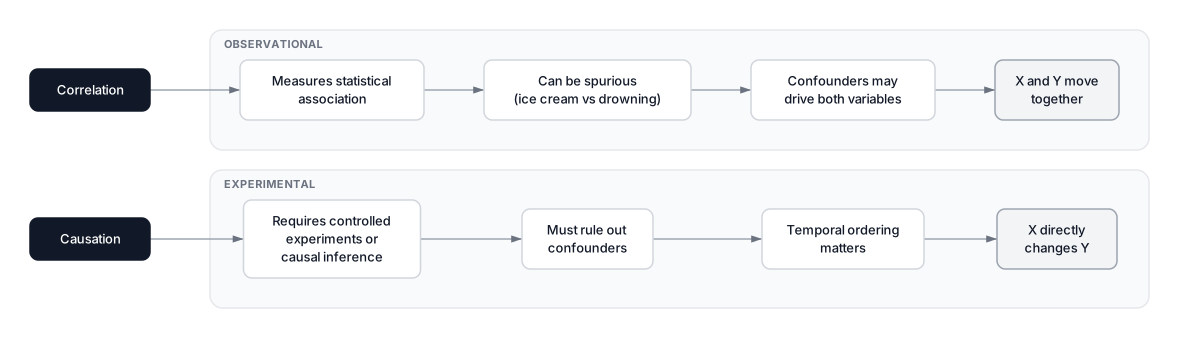 Click to expandCorrelation vs causation comparison showing observational vs experimental evidence
Method Comparison Table
| Metric | Variable Types | Detects | Resistant to Outliers | Output Range |
|---|---|---|---|---|
| Pearson | Continuous + Continuous | Linear only | No | $[-1, +1]$ |
| Spearman | Continuous or Ordinal | Monotonic | Yes | $[-1, +1]$ |
| Kendall | Ordinal or Small samples | Monotonic | Yes | $[-1, +1]$ |
| Point-Biserial | Binary + Continuous | Mean difference | No | $[-1, +1]$ |
| Cramér's V | Categorical + Categorical | Association | N/A | $[0, 1]$ |
Full Housing Dataset Comparison
Expected output:
Pair                   Method       r        Note
-------------------------------------------------------
sqft vs price          Pearson      0.9872   Linear
sqft vs price          Spearman     0.9853   Monotonic
sqft vs energy         Pearson      0.5665   Misses U-shape
sqft vs energy         Spearman     0.4014   Partial capture
bedrooms vs price      Kendall      0.8759   Tied ranks
has_pool vs price      Pt-Biserial  -0.1379  Binary vs cont.
The results tell a clear story. Sqft-to-price is strongly linear, so Pearson and Spearman agree. Sqft-to-energy shows moderate positive values for both, but a scatter plot would reveal the U-shape neither captures. Bedrooms have many tied ranks (lots of 3-bedroom homes), making Kendall appropriate. And pool ownership shows a small negative correlation with price, meaning pools don't actually predict higher prices in this dataset once you control for other factors.
When to Use Each Method (Decision Framework)
- Both variables continuous, relationship looks linear, no extreme outliers? Use Pearson.
- Continuous variables but curved or outlier-heavy data? Use Spearman.
- Ordinal variables (rankings, Likert scales) or sample size under 30? Use Kendall's Tau.
- One binary variable and one continuous? Use Point-Biserial.
- Both variables categorical (nominal)? Use Cramér's V.
When NOT to Use Correlation
Correlation, regardless of method, has limits you must respect:
- Non-monotonic relationships: If the pattern is U-shaped, sinusoidal, or otherwise non-monotonic, even Spearman fails. Use mutual information or distance correlation instead.
- Confounded variables: Ice cream sales and drowning rates correlate strongly. The confounder is summer heat. Correlation never implies causation. For causal claims, you need causal inference methods.
- Small correlations in large samples: With $n = 100,000$, even $r = 0.02$ becomes statistically significant. Significance doesn't mean practical importance. Always check effect size alongside the p-value.
Production Considerations
When running correlation analysis at scale, keep these practical notes in mind:
Computational complexity. Pearson runs in for a single pair. A full correlation matrix over features costs . Spearman adds an sorting step per pair. Kendall is per pair, which gets expensive above 10,000 observations.
Missing values. By default, df.corr() uses pairwise complete observations: for each pair, it drops only rows where either column is missing. This means different cells in your correlation matrix can use different subsets of data. If your dataset has significant missing values, either impute first or use listwise deletion for consistency.
Multiple testing. Computing a 20-feature correlation matrix means 190 unique pairs. At , you expect roughly 10 false positives by chance alone. Apply Bonferroni or Benjamini-Hochberg correction when scanning for significant correlations, especially in feature selection pipelines.
Conclusion
The right correlation metric depends entirely on what you're measuring. Pearson works when the relationship is linear and the data is clean. Spearman handles monotonic patterns and messy outliers. Kendall shines with small samples and tied ranks. Point-Biserial bridges the gap between binary and continuous variables. And Cramér's V handles the categorical pairs that every other method ignores.
The single most valuable habit you can build: always scatter-plot your data before computing any correlation. A five-second visual catches patterns, outliers, and non-linearities that no single number can represent. Anscombe showed this in 1973, and it remains the best advice in statistics.
For understanding how these correlations feed into model building, explore Feature Selection vs Feature Extraction. If outliers are distorting your correlations, our guide on statistical outlier detection covers every major approach. And for the hypothesis tests that sit behind many of these metrics, read Hypothesis Testing.
Frequently Asked Interview Questions
Q: A Pearson correlation of zero between two variables means there is no relationship. True or false?
False. Pearson only measures linear relationships. Two variables can have a perfect non-linear relationship (like ) and still show $r = 0$. Always visualize your data before concluding that variables are independent.
Q: When would you choose Spearman over Pearson in a real project?
Use Spearman when your data contains outliers, when the relationship is monotonic but not linear (e.g., exponential growth), or when you're working with ordinal data like customer satisfaction ratings. Spearman is more conservative and less sensitive to extreme values, making it the safer default for exploratory analysis.
Q: Your dataset has 50 features and you compute a full correlation matrix. How many unique pairwise tests are you running, and why does that matter?
You're running pairwise tests. At a significance level of 0.05, you'd expect about 61 false positives by pure chance. This is the multiple comparisons problem. Apply corrections like Bonferroni (divide by 1,225) or Benjamini-Hochberg (control false discovery rate) before declaring any pair "significantly correlated."
Q: How does Kendall's Tau differ from Spearman's rank correlation, and when is Kendall preferred?
Both measure monotonic relationships using ranks, but Kendall counts concordant and discordant pairs while Spearman uses rank differences. Kendall produces more conservative values and has better-understood statistical properties for small samples ($n < 30$). It also handles tied ranks more gracefully. The trade-off: Kendall is versus Spearman's , so it's slower on large datasets.
Q: You find a strong correlation ($r = 0.85$) between advertising spend and revenue. Can you conclude that increasing ad spend will increase revenue?
No. Correlation does not imply causation. The relationship could be confounded by a third variable (e.g., seasonal demand drives both higher ad budgets and higher revenue). To establish causality, you'd need a controlled experiment (A/B test), an instrumental variable, or a causal inference framework like difference-in-differences.
Q: Explain how Point-Biserial correlation relates to an independent samples t-test.
They test the same hypothesis from different angles. Point-Biserial measures the correlation between a binary variable (group membership) and a continuous variable (outcome). A significant Point-Biserial correlation is mathematically equivalent to a significant two-sample t-test. The value can even be computed directly from the t-statistic: .
Q: You want to measure the association between "department" (5 categories) and "performance rating" (1-5 scale). Which correlation method do you use, and why?
This depends on how you treat the performance rating. If it's ordinal (the gap between 1 and 2 may differ from 4 and 5), use Cramér's V since both variables are categorical. If you treat performance as a continuous interval variable, you could one-hot encode the department and run Point-Biserial for each department against performance, or use Spearman for rank-based analysis. Cramér's V is the most defensible choice because it makes the fewest assumptions.
Q: What is the difference between correlation and mutual information? When would you prefer mutual information?
Correlation (Pearson, Spearman, Kendall) measures specific types of monotonic or linear relationships. Mutual information measures any statistical dependency, including non-monotonic patterns like U-shapes or sinusoidal relationships. Prefer mutual information when you suspect complex, non-monotonic dependencies during feature selection, but be aware that it requires more data to estimate reliably and doesn't indicate direction (positive or negative).
Hands-On Practice
Standard correlation analysis often begins and ends with Pearson's coefficient, but real-world data requires a more subtle approach. In this analysis, we will load customer analytics data and apply specific correlation techniques suited for different data types: Pearson for linear relationships, Spearman for ranked data, Point-Biserial for binary-continuous pairs, and Cramér's V for categorical associations. This ensures we don't miss non-linear or category-based patterns hidden in the noise.
Dataset: Customer Analytics (Data Analysis) Rich customer dataset with 1200 rows designed for EDA, data profiling, correlation analysis, and outlier detection. Contains intentional correlations (strong, moderate, non-linear), ~5% missing values, ~3% outliers, various distributions, and business context for storytelling.
By moving beyond simple Pearson correlation, we uncovered specific insights: Spearman confirmed the rank-order strength of variables, Point-Biserial quantified the relationship between premium status and engagement, and Cramér's V measured the association between categorical segments. Using the correct statistical tool for your data type prevents misleading conclusions and builds a stronger foundation for predictive modeling.