
Picking a cloud ML platform is less about features and more about architectural fit. You aren't choosing a tool; you're choosing the ecosystem your team will live inside for the next three to five years. Get it wrong and you'll spend months writing glue code, fighting permissions, or watching budgets bleed on idle compute.
AWS holds roughly 30% of the global cloud market as of Q3 2025, with Azure at 20% and Google Cloud at 13% (Synergy Research Group). All three providers have poured billions into their machine learning stacks, but they've built them around fundamentally different philosophies. This guide breaks down those philosophies through a single running example: deploying an image classification model from prototype to production-scale endpoint across all three clouds. By the end you'll know which platform matches your team, your data, and your budget.
Platform Philosophies at a Glance
Each cloud provider designs its ML services around a specific user archetype. Understanding these archetypes saves more time than any feature comparison spreadsheet.
| Dimension | AWS SageMaker | Google Vertex AI | Azure ML |
|---|---|---|---|
| Philosophy | Builder's toolkit | Managed serverless | Enterprise integration |
| Target user | Engineering teams | Data-native teams | Microsoft shops |
| AutoML strength | White-box (code export) | Black-box (best accuracy) | Transparent (leaderboard UI) |
| MLOps approach | CI/CD pipelines | Kubeflow (portable) | Hybrid code + GUI designer |
| GenAI strategy | Marketplace (Bedrock) | First-party (Gemini) | Partner (OpenAI exclusive) |
| Top LLMs | Claude, Llama, Mistral | Gemini 3.1 Pro, Gemma | GPT-5, GPT-4o, DALL-E 3 |
| Hardware edge | Trainium/Inferentia chips | TPU v6 (Trillium) | NVIDIA H100/H200 clusters |
| Pricing model | Pay-per-second + Spot | Serverless + sustained use | Enterprise agreements + reserved VMs |
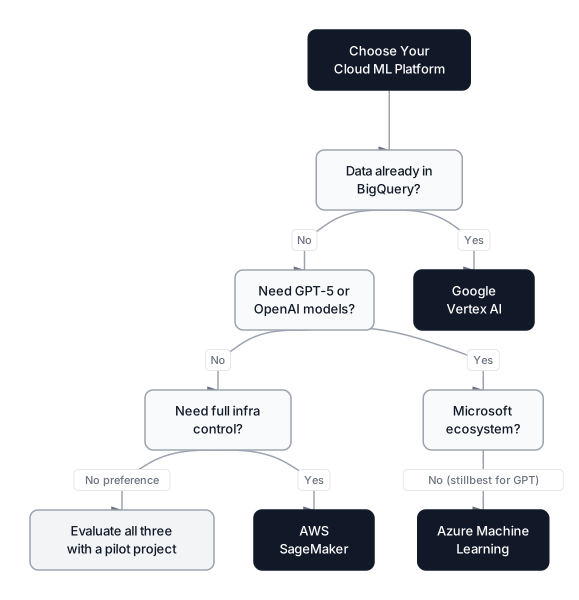 Click to expandCloud ML platform selection decision tree
Key Insight: Data gravity trumps feature lists. If your data lives in BigQuery, moving it to S3 just because SageMaker has a nicer notebook experience will cost more in data transfer fees and engineering time than any feature gap you're trying to close.
AWS SageMaker: The Builder's Cloud
Amazon SageMaker is a collection of modular services that data engineers wire together. It's not a single product; it's a toolkit. SageMaker Studio, Pipelines, Ground Truth, Feature Store, Inference, and Clarify each solve one piece of the ML lifecycle. You assemble them like building blocks.
Running Example: Image Classifier on SageMaker
To train our image classification model, you'd start a SageMaker training job with a custom Docker container or a built-in algorithm. Here's the SDK initialization and a training job submission:
import sagemaker
from sagemaker.pytorch import PyTorch

# Initialize session and IAM role
session = sagemaker.Session()
role = sagemaker.get_execution_role()
bucket = session.default_bucket()

print(f"Region: {session.boto_region_name}")
print(f"Default bucket: {bucket}")

# Define a PyTorch training job
estimator = PyTorch(
    entry_point="train.py",
    source_dir="src/",
    role=role,
    instance_count=1,
    instance_type="ml.p3.2xlarge",
    framework_version="2.2",
    py_version="py311",
    hyperparameters={
        "epochs": 25,
        "batch-size": 64,
        "learning-rate": 0.001,
    },
    use_spot_instances=True,        # Up to 90% savings
    max_wait=7200,                  # Max seconds to wait for spot
    max_run=3600,                   # Max training time
)

# Launch training (data must be in S3)
estimator.fit({"train": f"s3://{bucket}/datasets/imagenet-subset/"})
Notice the use_spot_instances=True flag. Spot instances on AWS can cut training costs by up to 90%, but your code needs to handle interruptions. SageMaker's managed spot training automatically checkpoints and resumes, which makes it the most mature spot-training implementation among the three providers.
SageMaker Unified Studio (2026)
AWS launched SageMaker Unified Studio in late 2025, and it changed the SageMaker experience significantly. Unified Studio brings together EMR, Glue, Athena, Redshift, Bedrock, and SageMaker AI into a single development environment. As of March 2026, it supports remote connections from the Kiro IDE, metadata sync with third-party catalogs (Atlan, Collibra, Alation), and AWS Glue 5.1 with Apache Spark 3.5.6.
In practice, this means you can query your data lake, build features, train a model, and deploy an endpoint without leaving one interface. That's a massive workflow improvement for teams that previously needed to context-switch between five different AWS consoles.
When to Choose AWS
- Your team has strong DevOps skills and wants full control over Docker, networking, and IAM
- You're already deep in S3, Lambda, and EMR
- You need the widest variety of open-source LLMs (Bedrock hosts Claude, Llama, Mistral, Cohere, and more)
- Cost optimization through Spot instances is a priority
When NOT to Choose AWS
- Your team prefers managed abstractions over infrastructure control
- You don't have a dedicated ML platform engineer to handle the IAM and VPC complexity
- You want a strong low-code/no-code experience for non-technical stakeholders
For a deeper walkthrough, see our guide on Mastering AWS SageMaker.
Google Vertex AI: The Researcher's Cloud
Vertex AI is Google's unified ML platform that consolidates what used to be separate services (AutoML, AI Platform, TFX) into a single, opinionated environment. Google's DNA is data and research, and it shows. Vertex AI leans heavily on serverless abstractions: you submit code and data, and Google handles provisioning, scaling, and teardown.
Running Example: Image Classifier on Vertex AI
The same image classifier on Vertex AI requires fewer infrastructure decisions. You don't pick instance types; you specify machine specs and let Vertex handle the rest:
from google.cloud import aiplatform

# Global initialization
aiplatform.init(
    project="my-gcp-project-id",
    location="us-central1",
    staging_bucket="gs://my-ml-staging-bucket",
)

# Define and submit a custom training job
job = aiplatform.CustomTrainingJob(
    display_name="image-classifier-v1",
    script_path="train.py",
    container_uri="us-docker.pkg.dev/vertex-ai/training/pytorch-gpu.2-2:latest",
    requirements=["torchvision==0.17"],
)

model = job.run(
    replica_count=1,
    machine_type="n1-standard-8",
    accelerator_type="NVIDIA_TESLA_T4",
    accelerator_count=1,
    args=["--epochs=25", "--batch-size=64", "--lr=0.001"],
)

# Deploy to an endpoint in one call
endpoint = model.deploy(
    machine_type="n1-standard-4",
    min_replica_count=1,
    max_replica_count=5,       # Autoscaling built-in
)
Two things stand out. First, deployment is a single model.deploy() call with autoscaling built in. On AWS, you'd separately create a model, an endpoint configuration, and then the endpoint itself. Second, Vertex AI natively integrates with BigQuery, which means if your training data lives there, you can reference it directly without staging to Cloud Storage first.
TPU v6 (Trillium) and Gemini Native Access
Google's hardware advantage is real. The TPU v6 (codenamed Trillium) delivers 4.7x peak compute per chip compared to the v5e, and it's what Google used to train Gemini 3.1 Pro entirely without NVIDIA GPUs. If your workloads involve large-scale training, especially for transformer-based models, TPUs on Vertex AI offer a cost-performance ratio that's hard to match. Gemini 3.1 Pro itself is available directly in Vertex AI's Model Garden with a 1M-token context window.
When to Choose GCP
- Your data lives in BigQuery and you want zero-friction data access
- You prefer serverless abstractions over infrastructure management
- You want the best AutoML accuracy (Vertex AI AutoML consistently wins on unstructured data tasks)
- Portability matters: Vertex AI Pipelines runs on Kubeflow, so you can move pipelines to on-premise or another cloud
- You want native access to Gemini models and TPU hardware
When NOT to Choose GCP
- You need fine-grained control over networking, container orchestration, or custom instance configurations
- Your team relies on open-source model variety (Bedrock still hosts more third-party LLMs than Vertex AI)
- You're a Microsoft-heavy organization (Active Directory, Office 365, Power BI)
For the full platform deep-dive, read our guide on Google Vertex AI.
Azure Machine Learning: The Enterprise Cloud
Azure ML is built for organizations that already run on Microsoft. It integrates directly with VS Code, GitHub Copilot, Power BI, and Azure Active Directory. More than any other platform, Azure bridges the gap between data scientists who code and business stakeholders who need visual explanations.
Running Example: Image Classifier on Azure ML
Azure's SDK v2 is more verbose than the other two, but it's highly structured. The declarative approach makes it easy to version and audit every configuration:
from azure.ai.ml import MLClient, command, Input
from azure.identity import DefaultAzureCredential

# Connect to workspace
ml_client = MLClient(
    DefaultAzureCredential(),
    subscription_id="<SUBSCRIPTION_ID>",
    resource_group_name="<RESOURCE_GROUP>",
    workspace_name="<WORKSPACE_NAME>",
)

# Define a training command job
training_job = command(
    code="./src",
    command="python train.py --epochs 25 --batch-size 64 --lr 0.001",
    environment="AzureML-pytorch-2.2-cuda12@latest",
    compute="gpu-cluster",
    inputs={
        "data": Input(
            type="uri_folder",
            path="azureml://datastores/training_data/paths/imagenet-subset/",
        )
    },
    instance_count=1,
)

# Submit and monitor
returned_job = ml_client.jobs.create_or_update(training_job)
print(f"Job submitted: {returned_job.studio_url}")
The studio_url in the output is significant. It gives you a link to Azure ML Studio where business stakeholders, project managers, or compliance officers can visually monitor the training run, inspect metrics, and review data lineage without touching code.
Azure OpenAI Service and GPT-5 Access
Azure's strongest competitive advantage in 2026 is its exclusive partnership with OpenAI. GPT-5 (with its mini, nano, and chat variants) is available on Azure through the Azure AI Foundry, complete with enterprise-grade content safety filters, private endpoints, and data residency guarantees. If your application depends on OpenAI's frontier models, Azure is the only cloud that provides them with SLA-backed enterprise support.
That said, GPT-4o is scheduled for retirement on September 30, 2026, with GPT-5 following on February 5, 2027. Azure's model lifecycle management means you need to plan for model migrations, which adds operational overhead.
When to Choose Azure
- You're a Microsoft shop (Office 365, Active Directory, Power BI, Teams)
- You need GPT-5 or other OpenAI models with enterprise compliance
- Your team includes non-technical stakeholders who benefit from visual designers and drag-and-drop pipelines
- Regulatory compliance and auditability are top priorities (Azure's governance tools are the strongest of the three)
When NOT to Choose Azure
- You want the widest open-source model selection (Bedrock wins here)
- Your team is pure Python, no Microsoft tooling, and prefers lightweight SDKs
- Pricing transparency is critical; Azure's Enterprise Agreement model can be opaque
For a complete Azure walkthrough, see Azure Machine Learning: From Local Scripts to Production Scale.
SDK Philosophy Comparison
The SDK is where your data scientists will spend most of their time. Each reflects its platform's broader architectural philosophy.
| Aspect | AWS (boto3 + SageMaker SDK) | GCP (Vertex AI SDK) | Azure (azure-ai-ml v2) |
|---|---|---|---|
| Initialization | Session + IAM role + S3 bucket | Project + location + staging bucket | Credential + subscription + resource group + workspace |
| Verbosity | Medium | Low | High |
| Design style | Imperative (do X, then Y) | Declarative + functional | Object-oriented + declarative |
| Deployment | 3 steps (model, config, endpoint) | 1 step (model.deploy()) | 2 steps (model + endpoint) |
| Learning curve | Steep (IAM, VPC knowledge required) | Moderate (Google Cloud concepts) | Moderate (Azure resource hierarchy) |
| IDE integration | JupyterLab, VS Code via SSH | Colab Enterprise, Workbench | VS Code native, GitHub Copilot |
Pro Tip: Don't evaluate SDKs by their "hello world" examples. Write the full workflow: data ingestion, training, evaluation, deployment, monitoring, and retraining. That's where the real friction emerges. A two-line deployment call means nothing if the monitoring setup takes 200 lines.
AutoML: Three Different Approaches
AutoML is the automated search for the best model architecture and hyperparameters. All three clouds offer it, but they've each built it around a different value proposition.
Google Vertex AI AutoML produces the highest accuracy on unstructured data (images, text, video) because Google applies transfer learning from its own massive pretrained models. The tradeoff is opacity: you get an endpoint, not the training code. For our image classifier, Vertex AutoML would likely outperform the other two out of the box.
AWS SageMaker Autopilot takes a white-box approach. Instead of just returning a model, Autopilot generates the Jupyter notebooks that produced it. You own the code. You can inspect every preprocessing step, every algorithm choice, every hyperparameter setting. For teams that need auditability or want to learn from the AutoML process, this is invaluable.
Azure Automated ML strikes the middle ground with the best UI. It runs dozens of algorithm/hyperparameter combinations and presents a ranked leaderboard with explainability built in. It's particularly strong for tabular data and time-series forecasting. The visual interface makes it accessible to analysts who aren't comfortable writing training scripts.
| Criteria | Vertex AI AutoML | SageMaker Autopilot | Azure Automated ML |
|---|---|---|---|
| Best data type | Images, text, video | Tabular (code generated) | Tabular, time series |
| Transparency | Low (black box) | High (notebooks exported) | Medium (leaderboard + explain) |
| Speed | Fast | Medium | Medium-slow |
| Customization | Limited post-training | Full (edit generated code) | Moderate (blocked features) |
MLOps and Pipeline Orchestration
MLOps is where "I trained a model in a notebook" becomes "this model retrains weekly, passes quality gates, and serves predictions at scale." Each platform takes a distinct approach.
Vertex AI Pipelines (Kubeflow)
Google's biggest MLOps advantage is portability. Vertex AI Pipelines runs Kubeflow Pipelines, an open-source standard. Write your pipeline once in Kubeflow's Python DSL, and you can run it on Vertex AI today, on-premise Kubernetes tomorrow, or on another cloud if you need to migrate.
For our image classifier, the pipeline would look like:
from kfp.v2 import dsl

@dsl.pipeline(name="image-classifier-pipeline")
def image_classifier_pipeline(
    dataset_uri: str,
    epochs: int = 25,
):
    preprocess_op = preprocess_component(dataset_uri=dataset_uri)
    train_op = train_component(
        processed_data=preprocess_op.outputs["processed_data"],
        epochs=epochs,
    )
    eval_op = evaluate_component(
        model=train_op.outputs["model"],
        test_data=preprocess_op.outputs["test_data"],
    )
    deploy_op = deploy_component(
        model=train_op.outputs["model"],
        accuracy=eval_op.outputs["accuracy"],
        threshold=0.92,
    )
SageMaker Pipelines (CI/CD-Centric)
AWS treats ML pipelines more like CI/CD workflows. SageMaker Pipelines integrates with EventBridge, so you can trigger retraining based on infrastructure events ("new data landed in S3," "model drift threshold exceeded"). It's the most natural fit for teams that already think in terms of GitHub Actions, Jenkins, or CodePipeline.
Azure ML Pipelines (Visual + Code)
Azure's pipeline designer lets you build DAGs visually in the Studio UI, then export them as Python code. This is the best option for hybrid teams where a data scientist writes the training logic and a business analyst needs to understand (and approve) the workflow before it goes to production.
 Click to expandML workflow comparison across AWS, GCP, and Azure platforms
Generative AI and LLM Access
The generative AI race has reshaped how teams choose cloud providers. As of March 2026, the model availability picture looks very different from even a year ago.
| Feature | AWS Bedrock | Vertex AI | Azure OpenAI |
|---|---|---|---|
| Frontier models | Claude 3.5 Sonnet/Opus, Llama 3 405B | Gemini 3.1 Pro (1M context), Gemma 2 | GPT-5, GPT-5-mini, GPT-4o |
| Open models | Llama 3, Mistral Large, Cohere Command R+ | Llama 3 (via Model Garden) | Llama 3 (limited), Phi-3 |
| Model count | 40+ foundation models | 20+ models | 15+ models |
| Custom fine-tuning | SageMaker JumpStart + Bedrock fine-tuning | Adapter tuning (PEFT), distillation | OpenAI fine-tuning API |
| Safety/guardrails | Bedrock Guardrails | Built-in safety filters + recitation checks | Azure AI Content Safety |
| Cost optimization | Intelligent Prompt Routing (30% savings), batch mode (50% savings) | Cached context (repeated prompt savings) | Provisioned throughput for predictable costs |
 Click to expandGenerative AI model access comparison across AWS, GCP, and Azure
Pricing Snapshot (March 2026, On-Demand)
| Model | Platform | Input (per 1M tokens) | Output (per 1M tokens) |
|---|---|---|---|
| Claude 3.5 Sonnet | AWS Bedrock | $3.00 | $15.00 |
| Claude 3.5 Haiku | AWS Bedrock | $0.25 | $1.25 |
| Gemini 3.1 Pro | Vertex AI | $1.25 | $5.00 |
| GPT-5 | Azure OpenAI | $5.00 | $15.00 |
| GPT-5-mini | Azure OpenAI | $0.40 | $1.60 |
| Llama 3 70B | AWS Bedrock | $2.65 | $3.50 |
Common Pitfall: Don't compare just input/output token prices. Factor in prompt caching (Vertex AI and Bedrock both offer it), batch processing discounts (Bedrock batch is 50% cheaper), and provisioned throughput pricing for steady-state workloads. A $5/M-token model with 40% caching savings can be cheaper than a $3/M-token model without it.
If you're building RAG applications on any of these platforms, our guide on Retrieval-Augmented Generation covers the retrieval architecture in depth. And for understanding how model selection affects output quality, see LLM Sampling: Temperature, Top-K, Top-P, and Min-P Explained.
Cost Optimization Deep Dive
Cloud ML bills add up fast. A single ml.p3.16xlarge instance on SageMaker costs roughly $36/hour. Multiply that by a hyperparameter sweep running overnight and you've burned through thousands before morning coffee. Each platform offers different levers to control spend.
Total Cost Formula
Where:
- is the total monthly cloud ML bill
- is the per-second compute rate for the instance type
- is total active compute time in seconds
- is the monthly storage cost (S3, GCS, or Azure Blob)
- is data egress and inter-region transfer fees
- is the cost of serving predictions (per-request or provisioned)
In Plain English: For our image classifier, the compute rate for a GPU instance multiplied by the hours spent training is the biggest cost driver. But the sneaky expenses are storage (keeping training datasets and model artifacts) and data transfer (moving data between regions or out to the internet). Inference costs compound over time as the model serves more requests in production.
AWS: Spot Instances and Savings Plans
AWS Spot instances offer up to 90% savings on training compute. SageMaker's managed spot training handles checkpointing and resumption automatically. For our image classifier, a 4-hour training job on an ml.p3.2xlarge drops from roughly $14 (on-demand) to about $1.50 (spot). The catch: spot instances can be interrupted with 2 minutes' notice, so your training script needs to save checkpoints frequently.
For inference, AWS Savings Plans commit you to a consistent compute spend (1 or 3 years) in exchange for 20-40% discounts. SageMaker also offers serverless inference for low-traffic endpoints, billing only for the milliseconds your model is actually computing.
GCP: Serverless Billing and Sustained Use
Vertex AI's serverless training and batch prediction bill by the second, only while code executes. There's no forgotten notebook instance burning $3/hour overnight. For sporadic workloads (weekly retraining, on-demand batch predictions), this model is substantially cheaper. Google also applies sustained use discounts automatically: if a VM runs for more than 25% of a month, the price drops incrementally.
Azure: Enterprise Agreements and Idle Shutdown
Azure ML doesn't charge for the platform itself; you pay for the underlying compute, storage, and inference. Azure's auto idle shutdown for compute instances turns off VMs after a configurable period of inactivity, which prevents the classic "forgot to stop the notebook" billing disaster. For organizations with existing Microsoft Enterprise Agreements, Azure often offers negotiated rates that aren't publicly listed.
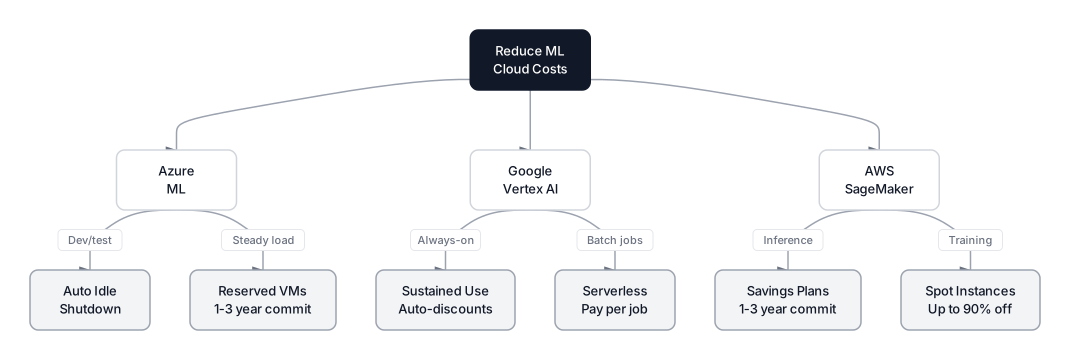 Click to expandCost optimization strategies across AWS, GCP, and Azure
| Cost Lever | AWS | GCP | Azure |
|---|---|---|---|
| Training discounts | Spot (up to 90% off) | Preemptible VMs (60-91% off) | Low-priority VMs (up to 80% off) |
| Inference savings | Savings Plans, serverless inference | Serverless prediction, autoscaling | Reserved instances, idle shutdown |
| Billing granularity | Per-second | Per-second | Per-second (some per-minute) |
| Free tier | 250 hrs notebook (first 2 months) | 5 GB prediction/month | $200 credit (first 30 days) |
| Pricing transparency | Public, detailed | Public, detailed | Often tied to EA negotiations |
Pro Tip: SageMaker instances (prefixed ml.) cost 20-40% more than equivalent raw EC2 instances for the same hardware, according to January 2026 US-East-1 pricing. If your team can handle the extra setup, running training on EC2 with your own container orchestration is cheaper. But the time cost of managing that infrastructure often exceeds the dollar savings unless you're running training jobs continuously.
Hardware and Accelerator Comparison
Custom silicon is becoming a real differentiator. All three providers now offer proprietary AI chips alongside NVIDIA GPUs.
| Hardware | Provider | Best For | Advantage |
|---|---|---|---|
| Trainium | AWS | Large-scale training | Up to 50% cheaper than comparable GPUs for supported frameworks |
| Inferentia2 | AWS | High-throughput inference | 4x throughput, 10x lower latency vs comparable GPU instances |
| TPU v6 (Trillium) | GCP | Transformer training | 4.7x peak compute vs v5e; trained Gemini 3 without NVIDIA |
| NVIDIA H100/H200 | All three | General GPU training | Universal compatibility, largest software ecosystem |
| AMD MI300X | Azure, GCP | Cost-effective training | Alternative to H100 at lower price point |
For teams training custom models at scale (not just fine-tuning), the choice of accelerator matters as much as the platform choice. AWS's Trainium chips require framework-specific optimizations (Neuron SDK), which adds friction. Google's TPUs are tightly integrated with JAX and TensorFlow but require code changes from PyTorch workflows. NVIDIA GPUs are the universal option but come at a premium.
Vendor Lock-In Risk Assessment
Lock-in is the hidden cost nobody accounts for during platform selection. Here's a practical assessment for each cloud.
Low lock-in areas (easy to migrate):
- Custom training code in PyTorch or TensorFlow (runs anywhere)
- Data stored in open formats (Parquet, CSV, JSON)
- Kubeflow pipelines (designed for portability)
High lock-in areas (painful to migrate):
- AutoML models (proprietary architectures, not exportable)
- Platform-specific SDKs for data pipelines (Glue, Dataflow, Data Factory)
- LLM API integrations (switching from GPT-5 to Gemini requires prompt rewriting and re-evaluation)
- Feature stores (SageMaker Feature Store, Vertex AI Feature Store, Azure ML Feature Store all use different APIs)
| Lock-In Risk | AWS | GCP | Azure |
|---|---|---|---|
| Training code | Low (Docker containers) | Low (standard frameworks) | Low (environments are portable) |
| Data pipelines | High (Glue, EMR, Kinesis) | High (Dataflow, BigQuery) | High (Data Factory, Synapse) |
| MLOps pipelines | Medium (SageMaker Pipelines) | Low (Kubeflow is open source) | Medium (Azure ML Pipelines) |
| Model serving | Medium (SageMaker endpoints) | Medium (Vertex endpoints) | Medium (Azure endpoints) |
| LLM APIs | Medium (Bedrock API) | Medium (Vertex GenAI API) | High (OpenAI partnership dependency) |
Key Insight: The safest strategy is to containerize everything. If your training code runs in a Docker container with a standard framework, you can move it between clouds in a day. The expensive parts to migrate are always the data pipelines and the orchestration layer, never the model code itself.
Real-World Decision Framework
Forget feature checklists. Here are the five questions that actually determine your platform choice:
1. Where does your data live today? If it's in BigQuery, choose GCP. If it's in S3, choose AWS. If it's in Azure Blob with Active Directory governance, choose Azure. Moving petabytes of data between clouds costs more than any platform premium.
2. What models does your application need? If you need GPT-5 with enterprise SLA, choose Azure. If you need the widest selection of open models, choose AWS Bedrock. If you want Gemini 3.1 Pro with grounding in Google Search results, choose GCP.
3. How technical is your ML team? Infrastructure-savvy engineers will thrive on AWS's modularity. Research-focused data scientists will prefer Vertex AI's managed abstractions. Mixed teams with both coders and analysts will benefit most from Azure's hybrid code/GUI approach.
4. What's your compliance environment? Healthcare (HIPAA), finance (SOC 2, PCI DSS), and government (FedRAMP) all have cloud-specific certifications. All three providers offer these, but Azure's compliance documentation is the most extensive, and its integration with Microsoft Purview for data governance gives it an edge in heavily regulated industries.
5. What's your 3-year budget model? Sporadic workloads with unpredictable demand favor GCP's serverless billing. Steady-state training and inference favor AWS Savings Plans. Large enterprises with existing Microsoft contracts often get the best deal on Azure through EA negotiations.
A Practical Cloud Selection Rule
There's no universally "best" cloud ML platform. AWS SageMaker gives engineering teams maximum control and the broadest model marketplace through Bedrock, but demands DevOps expertise to manage. Google Vertex AI emphasizes managed workflows and AutoML, while Azure Machine Learning emphasizes Microsoft ecosystem integrations and governance controls. Model availability, customization, and pricing vary by region and contract, so teams should compare the exact services and deployment requirements they intend to use.
The decision almost always comes down to data gravity and team composition. If you're starting fresh with no existing cloud commitment, run a two-week pilot on each platform with your actual workload. Feature comparison tables can't capture the friction of debugging a failed training job at 2 AM on an unfamiliar platform.
For related platform-specific guides, explore our deep-dives on Google Vertex AI, Azure Machine Learning, and AWS SageMaker. If you're building ML models on any of these platforms, our guide on XGBoost for Classification covers one of the most commonly deployed algorithms across all three clouds.
Frequently Asked Interview Questions
Q: Your team needs to deploy a model serving 10,000 requests per second with sub-100ms latency. Which cloud platform would you choose and why?
AWS SageMaker with Inferentia2 instances would be my first choice for this scenario. Inferentia2 is purpose-built for high-throughput, low-latency inference and delivers up to 4x throughput over comparable GPU instances. SageMaker's multi-model endpoints can further improve use. If the model is an LLM, I'd also evaluate Azure's provisioned throughput for guaranteed capacity, or Vertex AI's autoscaling endpoints if the traffic is bursty rather than sustained.
Q: How would you minimize costs for a weekly retraining job that takes 6 hours on a GPU instance?
I'd run the job on AWS Spot instances or GCP Preemptible VMs, which offer 60-90% discounts. Since the job runs weekly and has a defined duration, I'd configure SageMaker managed spot training with automatic checkpointing. If the job doesn't need GPU-specific framework features, Trainium on AWS or TPU on GCP could offer additional savings. The key is ensuring the training script saves checkpoints every 15-30 minutes so progress isn't lost on interruption.
Q: A colleague argues that cloud ML platforms create dangerous vendor lock-in. How do you respond?
Lock-in risk depends on which layer you're evaluating. Training code in standard frameworks (PyTorch, TensorFlow) is highly portable since it runs in Docker containers on any cloud. The real lock-in comes from data pipelines (Glue vs. Dataflow vs. Data Factory), MLOps orchestration, and LLM API integrations. I'd mitigate by containerizing all training code, storing data in open formats like Parquet, and using Kubeflow for pipelines if portability is a requirement.
Q: What's the difference between SageMaker Autopilot, Vertex AI AutoML, and Azure Automated ML?
They solve the same problem through different philosophies. SageMaker Autopilot generates the actual training notebooks (white-box), so you can inspect and modify every step. Vertex AI AutoML applies Google's transfer learning for the best accuracy on images and text, but it's a black box. Azure Automated ML runs a broad algorithm sweep and presents a ranked leaderboard with built-in model explainability. Choose Autopilot for auditability, Vertex AI for accuracy on unstructured data, and Azure for the best visual interface.
Q: You're advising a healthcare startup on cloud platform selection. They need HIPAA compliance and plan to use LLMs. What do you recommend?
Azure ML is the strongest choice here. It has the most comprehensive healthcare compliance certifications, and its integration with Microsoft Purview handles data governance requirements that HIPAA mandates. The Azure OpenAI Service provides GPT-5 access with enterprise-grade content safety filters and data residency guarantees, which matters for protected health information. AWS is a viable alternative with strong HIPAA support and broader LLM selection through Bedrock, but Azure's governance tooling is more mature for regulated industries.
Q: How do you evaluate the total cost of ownership for a cloud ML platform, beyond just compute pricing?
Total cost includes five components: compute (training and inference), storage (datasets and model artifacts), data transfer (egress and cross-region fees), platform overhead (SageMaker ML instances cost 20-40% more than raw EC2), and engineering time (managing infrastructure, debugging platform-specific issues). I'd also factor in time-to-production: if Vertex AI's managed abstractions get a model deployed two weeks faster than SageMaker, that engineering time savings has real dollar value.
Q: When would you use multiple cloud providers for a single ML system?
Multi-cloud makes sense when you need capabilities exclusive to different providers, like training on GCP TPUs but serving through Azure OpenAI for GPT-5 integration. It also applies when data residency laws require processing in specific regions where one provider has better coverage. The overhead of managing multiple clouds is significant, though, so I'd only recommend it when a single provider genuinely can't meet all requirements. Most teams overestimate the benefits and underestimate the operational complexity.