Gemini in Chrome Begins Rolling Out to UK Users
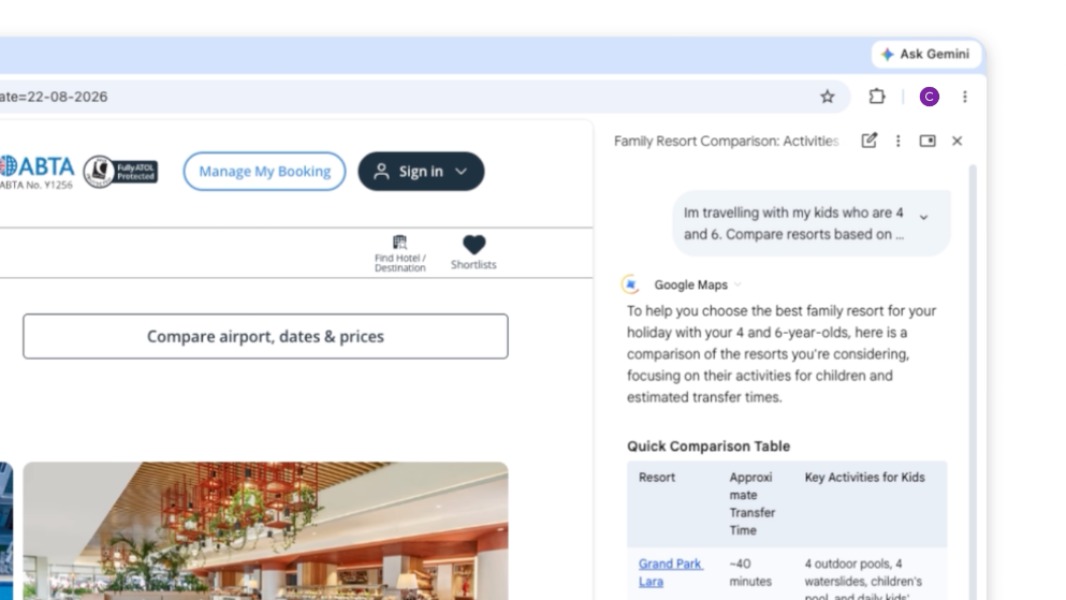
Google has begun rolling out Gemini in Chrome to users in the United Kingdom, bringing an AI assistant into the browser interface. The product can summarize pages, compare information across tabs, work with supported Google services, and create images from the sidebar. Independent reporting says Chrome discloses that the current tab, and other tabs a user shares, can provide content and URLs for answers. LDS examines the practical tradeoff: cross-tab context can reduce copying and switching, but teams should define what pages may be shared, review account and administrator controls, verify outputs against the underlying tabs, and avoid exposing confidential sessions by habit.
What happened
Google has begun rolling out Gemini in Chrome to users in the United Kingdom, bringing an AI assistant into the browser interface. Google's UK product page presents the feature as an integrated browsing assistant, while independent reports describe users beginning to see the control in Chrome. Availability can still be gradual, so not every eligible account or device will receive it simultaneously.
The product can summarize pages, compare information across tabs, work with supported Google services, and create images from the sidebar. These are product capabilities described by Google and reporters, not an independent accuracy or productivity benchmark.
Security context
Independent reporting says Chrome discloses that the current tab, and other tabs a user shares, can provide content and URLs for answers. That context is useful for comparison and synthesis, but it also changes the data boundary: a page that was merely open can become model input when shared. Account type, administrator policy, regional availability, and user settings can affect behavior.
| Workflow | Potential value | Control to verify |
|---|---|---|
| Page summary | Faster orientation | Compare claims with the original page |
| Cross-tab comparison | Less manual copying | Share only the tabs required for the task |
| Gmail or Calendar action | Reduced application switching | Confirm account, recipients, and final action |
| Image generation | Fast visual ideation | Check rights, disclosure, and factual context |
| Enterprise browsing | Consistent assisted workflows | Enforce administrator policy and auditability |
For practitioners
Organizations should treat browser-level assistants as a new integration surface. A useful rollout checklist covers permitted data classes, managed-profile policies, authentication boundaries, retention settings, prompt-injection exposure from web pages, and confirmation before any external action. Teams should test whether hidden page text, malicious instructions, or stale tabs can distort the answer.
For evaluation, measure task completion, correction rate, source traceability, sensitive-data incidents, and user time saved. A feature that produces faster drafts but requires extensive verification may shift work rather than remove it.
Editorial analysis
LDS sees the UK expansion as a distribution milestone more than a model breakthrough. The important change is that contextual AI moves closer to everyday browsing, where convenience and data governance collide. Cross-tab reasoning can be genuinely useful, but users need visible provenance and predictable sharing controls to know which page supported which claim.
What to watch
Watch rollout eligibility, enterprise controls, default sharing behavior, citation quality, defenses against page-based prompt injection, and whether Google separates browsing assistance from higher-risk actions with clear confirmation steps.
Key Points
- 1Google has begun rolling out Gemini in Chrome to users in the United Kingdom through the browser interface.
- 2The assistant can summarize pages, compare shared tabs, work with supported Google services, and create images from Chrome.
- 3LDS recommends explicit tab-sharing rules, source verification, managed-profile controls, and prompt-injection testing before organizational adoption.
Scoring Rationale
An impact score of 7.0 reflects a meaningful regional distribution expansion for contextual browser AI, tempered by gradual availability and governance questions.
Sources
Primary source and supporting public references used for this report.
Practice with real Ad Tech data
90 SQL & Python problems · 15 industry datasets
250 free problems · No credit card
See all Ad Tech problems