
You have 1,797 handwritten digits, each described by 64 pixel values. Plotting them in 2D should reveal ten clean groups, one per digit. PCA mashes them into an overlapping blob. t-SNE produces beautiful islands but scrambles the distances between them and takes minutes on anything larger than 100K rows.
UMAP (Uniform Manifold Approximation and Projection) fixes both problems. Published in 2018 by Leland McInnes, John Healy, and James Melville, UMAP grounds dimensionality reduction in algebraic topology instead of probability distributions. The result: an algorithm that runs in time, preserves global relationships t-SNE throws away, and ships with a transform() method that can embed new data without re-fitting. As of umap-learn 0.5.11 (January 2026), the library remains the most widely used non-linear projection tool in production data science and single-cell genomics alike.
Throughout this article, we will use the MNIST digits dataset as a running example to build every concept from scratch.
Dimensionality Reduction and the Manifold Hypothesis
Dimensionality reduction compresses high-dimensional data into fewer dimensions while retaining as much structure as possible. The manifold hypothesis says real-world data rarely fills its full feature space; instead, it lives on a lower-dimensional surface (a "manifold") embedded in that space.
Consider our digits. Each 8x8 image occupies a point in 64-dimensional space, but the actual variety of handwritten digits traces a much lower-dimensional surface. A "3" can slant, grow thick or thin, yet all its variants lie on a smooth manifold within that 64D cube. The goal is to flatten that manifold onto a 2D plane without tearing it.
PCA does this with a linear projection: it finds the two directions of maximum variance and discards the rest. On digits, that keeps only 21.6% of the variance and drops 5-NN classification accuracy from 94.4% to 51.4%. The curved manifold that separates a "3" from an "8" gets crushed.
 Click to expandUMAP algorithm pipeline from high-dimensional input through graph construction to low-dimensional embedding
Expected output:
Dataset: 1797 handwritten digits, 64 pixel features
Task: reduce 64 dims to 2 dims, then classify with 5-NN

5-NN on full 64D:    0.944 accuracy
5-NN on PCA 2D:      0.514 accuracy (21.6% variance retained)
5-NN on PCA 10D:     0.896 accuracy (58.9% variance retained)

Crushing 64 features into 2 with PCA destroys 46% of
classification power. Non-linear methods like UMAP preserve far
more structure in those 2 dimensions.
Key Insight: PCA's linear projection loses nearly half the classification signal when going from 64D to 2D. Non-linear methods like UMAP and t-SNE can preserve far more of the manifold's curved geometry in just two dimensions.
Local Metrics: How UMAP Adapts to Varying Density
UMAP handles varying data density by assigning every point its own personal distance scale. Dense neighborhoods get a short ruler; sparse regions get a stretched one. This adaptive scaling is the core idea that separates UMAP from naive distance-based methods.
Here is the precise mechanism. For each point , UMAP computes:
- : the distance to the nearest neighbor.
- : a scaling factor found via binary search so that the sum of neighbor weights equals .
The connection weight from to is then:
Where:
- is the directed connection strength from point to point
- is the distance between the two points in the original high-dimensional space
- is the distance from to its nearest neighbor (guarantees at least one connection with weight 1.0)
- is the local bandwidth that normalizes for density around
In Plain English: Subtracting means every point's nearest neighbor gets a weight of exactly 1.0, whether that neighbor is 0.9 units away (inside a tight cluster of digit-0 images) or 44.4 units away (an oddball digit-2 sitting alone). UMAP does not care about absolute isolation; it guarantees every point connects to something.
This is what makes UMAP density-invariant. In our digits dataset, the ratio between the most isolated point's and the least isolated point's is 47.5x. Without local metric normalization, those sparse points would float as disconnected islands and the embedding would be meaningless.
Expected output:
--- Local Metric Statistics (k=15) ---
Mean rho (nearest-neighbor dist): 3.689
Std  rho: 2.008
Min  rho: 0.936
Max  rho: 44.424
Ratio max/min: 47.5x

Point 0 (digit=0):
  rho (nearest neighbor dist): 2.3312
  sigma (approx, k-th neighbor): 3.7118

Neighbor | Distance | UMAP Weight
--------------------------------------
  877     | 2.3312   | 1.0000
  1541    | 3.0666   | 0.8203
  1167    | 3.0872   | 0.8157
  1365    | 3.1844   | 0.7947
  464     | 3.2440   | 0.7820
  ...     | ...      | ...
  812     | 3.7118   | 0.6894
Notice how the nearest neighbor (point 877, also a digit 0) gets weight 1.0 by construction, and the weight decays smoothly to 0.69 at the 15th neighbor. This exponential decay is controlled entirely by the local density around point 0.
Fuzzy Simplicial Sets: Building the High-Dimensional Graph
A fuzzy simplicial set is UMAP's version of a nearest-neighbor graph where each edge carries a probability of existing rather than a binary yes/no. This probabilistic framing comes from algebraic topology and is what gives UMAP its mathematical rigor (McInnes et al., 2018 arXiv paper).
The weight is directional: point 's view of point differs from point 's view of point , because each point has its own and . UMAP symmetrizes these directed weights using a fuzzy set union:
Where:
- is the symmetric edge weight (probability of connection) between points and
- is the directed weight from 's perspective
- is the directed weight from 's perspective
In Plain English: This is just the probability formula for "A or B": . If our oddball digit-2 (with ) considers a digit-4 its closest neighbor, it assigns weight 1.0. The digit-4, sitting in a dense cluster, barely notices the digit-2 and assigns weight 0.04. The fuzzy union gives $1.0 + 0.04 - 0.04 = 1.0$, so the connection survives. UMAP's graph is generous: if either side considers the other a neighbor, the bond stays.
This one-sided acceptance is critical. Without it, outliers would disconnect from the graph entirely, and the embedding would lose them.
Cross-Entropy Optimization: Attraction and Repulsion
UMAP optimizes the low-dimensional layout by minimizing the cross-entropy between the high-dimensional graph and the low-dimensional graph . This choice of loss function is the mathematical reason UMAP preserves global structure better than t-SNE.
Where:
- is the total cross-entropy cost
- is the high-dimensional edge probability (from the fuzzy simplicial set)
- is the low-dimensional edge probability (computed from embedded positions)
- The first term is the attraction force (active when is large)
- The second term is the repulsion force (active when is small)
In Plain English: t-SNE only has the first term, the attraction. It pulls neighbors together but never explicitly pushes non-neighbors apart. UMAP has both. Think of arranging our digit clusters on a table: t-SNE makes sure each group of 0s, 1s, 2s stays clustered, but it might stack the 3s right on top of the 8s. UMAP's repulsion term actively pushes the 3-cluster away from the 8-cluster, preserving the fact that 3 and 8 look more similar to each other than either does to 1.
The optimization itself uses stochastic gradient descent with negative sampling (not all pairs, just a random subset of non-neighbors per iteration), which is why UMAP runs so fast.
 Click to expandComparison of PCA, t-SNE, and UMAP across key properties including complexity, structure preservation, and transform support
UMAP vs t-SNE vs PCA: A Direct Comparison
Each method makes a different tradeoff between speed, structure, and usability. This table captures the practical differences that matter when choosing a method for real work.
| Property | PCA | t-SNE | UMAP |
|---|---|---|---|
| Type | Linear | Non-linear | Non-linear |
| Time complexity | Barnes-Hut, exact | ||
| Global structure | Preserved (linear only) | Lost (cluster distances meaningless) | Preserved (distances meaningful) |
| Local structure | Poor for non-linear data | Excellent | Excellent |
| transform() | Yes | No | Yes |
| Scales to 1M+ rows | Yes | Impractical | Yes (minutes) |
| Initialization | Deterministic (eigendecomp) | Random or PCA | Spectral (more stable) |
| Density handling | Global variance only | Perplexity-based (uniform) | Point-wise rho/sigma (adaptive) |
| Primary use | Feature reduction, noise removal | Small-dataset visualization | Visualization + preprocessing |
Common Pitfall: UMAP's global structure preservation does not mean distances are metric-space accurate like in PCA. The relative positioning of clusters is meaningful (a 3-cluster being near an 8-cluster means they share features), but you cannot measure absolute distances with a ruler. The improvement over t-SNE is significant; the distances are just not perfect.
UMAP in Python: The Complete Implementation
UMAP's Python library, umap-learn (version 0.5.11, January 2026), follows the scikit-learn API with fit(), transform(), and fit_transform(). Since umap-learn is not available in the browser runtime, the code below is display-only.
pip install umap-learn
import umap
import numpy as np
import matplotlib.pyplot as plt
from sklearn.datasets import load_digits
from sklearn.preprocessing import StandardScaler

digits = load_digits()
X_scaled = StandardScaler().fit_transform(digits.data)
labels = digits.target

# Default UMAP: n_neighbors=15, min_dist=0.1, metric='euclidean'
reducer = umap.UMAP(random_state=42)
embedding = reducer.fit_transform(X_scaled)

print(f"Input shape:  {X_scaled.shape}")   # (1797, 64)
print(f"Output shape: {embedding.shape}")  # (1797, 2)

plt.figure(figsize=(10, 8))
scatter = plt.scatter(
    embedding[:, 0], embedding[:, 1],
    c=labels, cmap='Spectral', s=5
)
plt.colorbar(scatter, label='Digit')
plt.title('UMAP Projection of MNIST Digits')
plt.xlabel('UMAP-1')
plt.ylabel('UMAP-2')
plt.show()
You will see ten distinct clusters with visually similar digits (1 and 7, 3 and 8) positioned closer together. This global arrangement is UMAP's key advantage over t-SNE.
Embedding New Data and Supervised Mode
UMAP's transform() method projects unseen data without re-fitting, something t-SNE cannot do. You fit once on training data and embed new samples as many times as needed:
reducer = umap.UMAP(random_state=42)
reducer.fit(X_train_scaled)
new_embedding = reducer.transform(X_test_scaled)
UMAP also accepts class labels via y=labels during training (supervised UMAP), which creates dramatically cleaner separation. A recent study (Ding et al., 2026, arXiv:2603.02275) confirmed supervised UMAP excels for classification but shows limitations for regression tasks.
Hyperparameter Tuning: n_neighbors, min_dist, and metric
UMAP has three critical hyperparameters. Getting them right is the difference between a clear, informative visualization and a confusing mess.
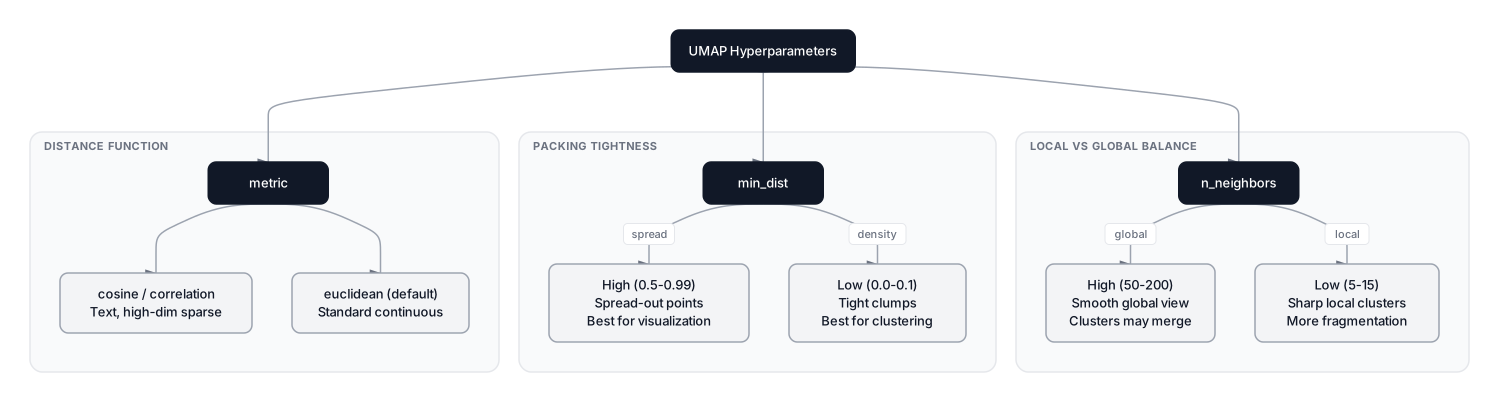 Click to expandUMAP hyperparameter effects showing n_neighbors controlling local vs global balance, min_dist controlling packing tightness, and metric controlling the distance function
n_neighbors (default: 15)
This controls the size of the local neighborhood UMAP considers when building the graph. It is the single most impactful parameter.
- Low (5 to 15): Emphasizes fine-grained local structure. Produces sharper, more fragmented clusters. Good for spotting sub-populations (e.g., different writing styles within digit-4 images).
- High (50 to 200): Emphasizes global topology. Clusters may merge, but the overall manifold shape becomes clearer. Better for seeing the big picture of how all ten digit classes relate.
min_dist (default: 0.1)
Controls the minimum distance between points in the output. This is a visual parameter, not a structural one.
- Low (0.0 to 0.1): Points clump tightly into dense balls. Best when using UMAP as a preprocessing step for DBSCAN or HDBSCAN clustering.
- High (0.5 to 0.99): Points spread out evenly. Better for visualization when you need to see individual data points.
metric (default: 'euclidean')
UMAP supports any distance function from scipy.spatial.distance plus custom callables. Common choices:
| Data Type | Recommended Metric |
|---|---|
| Continuous features (scaled) | euclidean |
| TF-IDF text vectors | cosine |
| Binary features | jaccard or hamming |
| Correlation patterns | correlation |
| Mixed types | mahalanobis |
Pro Tip: When using UMAP before DBSCAN or HDBSCAN clustering, set n_neighbors to 30 or higher and min_dist to 0.0. This produces tight, well-separated islands that density-based clustering algorithms can detect cleanly. It's a workflow used routinely in single-cell RNA sequencing analysis to identify cell types.
| Parameter | Default | Good Starting Range | Effect |
|---|---|---|---|
n_neighbors | 15 | 5 to 200 | Local vs global structure balance |
min_dist | 0.1 | 0.0 to 0.99 | Packing tightness |
n_components | 2 | 2 to 100 | Output dimensionality |
metric | euclidean | euclidean, cosine, etc. | Distance function |
random_state | None | 42 (fixed for reproducibility) | Initialization seed |
When to Use UMAP (and When Not To)
UMAP is the right tool for specific situations, and the wrong tool for others. Picking the wrong method wastes compute and produces misleading results.
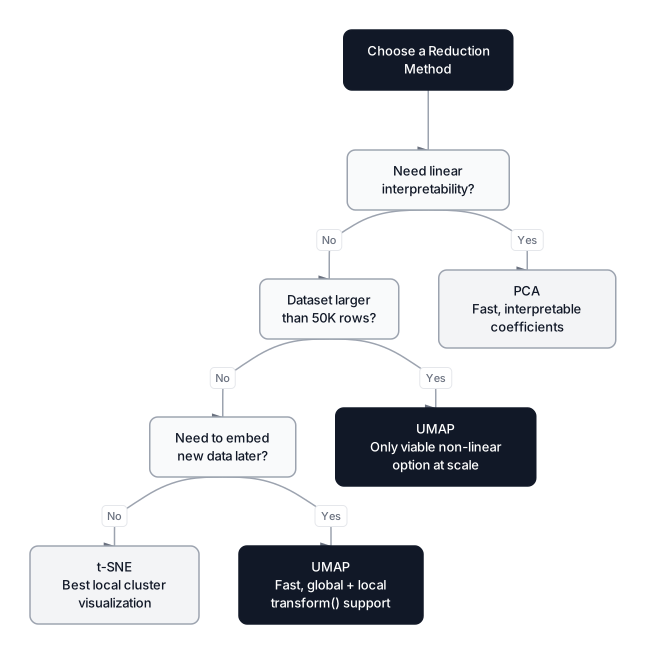 Click to expandDecision guide for choosing between PCA, t-SNE, and UMAP based on dataset size, interpretability needs, and embedding requirements
Use UMAP when:
- Visualizing datasets above 10K rows. t-SNE becomes painfully slow; UMAP stays fast. On 1M samples, UMAP finishes in minutes where t-SNE would take days.
- You need to embed new data later. UMAP's
transform()method is essential for production pipelines where the model fits once on training data and projects incoming samples. - Global structure matters. If knowing that cluster A is near cluster B (and far from cluster C) carries meaningful information, UMAP is the clear choice.
- Preprocessing for clustering. UMAP + HDBSCAN is the standard pipeline in single-cell genomics (Scanpy, Seurat v5) and is increasingly common in general-purpose ML.
- Feature extraction for classifiers. Reducing 500 features to 50 with UMAP, then feeding those into gradient boosting, often outperforms PCA-based reduction because UMAP preserves non-linear boundaries.
Do NOT use UMAP when:
- You need interpretable components. PCA gives you loadings, explained variance ratios, and linear coefficients. UMAP dimensions have no inherent meaning.
- Your data is genuinely linear. If PCA with 2 components explains 90%+ variance, there is no manifold to learn. Adding UMAP complexity buys nothing.
- Exact reproducibility is required. Despite
random_state, UMAP results can vary slightly across library versions and platforms. PCA is deterministic. - You are doing supervised regression preprocessing. Recent research (Ding et al., 2026) shows supervised UMAP's limitations with continuous targets. Stick with PCA or autoencoders.
- Tiny datasets (under 500 samples). The nearest-neighbor graph becomes unreliable with too few points, and there is not enough data to define a stable manifold.
Production Considerations
UMAP's computational profile makes it viable for production in ways t-SNE never was. Time complexity is through approximate nearest neighbors (NNDescent). On 100K samples, expect 30 to 60 seconds on a single CPU core. Memory is for the neighbor graph; at 1M samples with $k = 15$, that is roughly 120 MB, far cheaper than t-SNE's distance matrix.
For larger workloads, RAPIDS cuML provides a GPU-native UMAP implementation (NVIDIA Technical Blog) that handles 10M+ samples in seconds. A fitted reducer can be pickled and reloaded for transform() calls in deployment, just like any scikit-learn estimator.
Pro Tip: For datasets above 500K rows, switch to cuML's GPU implementation. With cuML, 5M-row datasets embed in under 10 seconds.
When UMAP Is the Right Map
UMAP's foundation in algebraic topology, specifically fuzzy simplicial sets and cross-entropy optimization, gives it a mathematical edge that translates into practical advantages: speed, global structure preservation, and the ability to embed new data. Understanding the / local metric, the fuzzy union symmetrization, and the attraction/repulsion balance in the loss function turns UMAP from a black-box visualization tool into something you can tune with confidence.
For the clustering pipeline that naturally follows UMAP embedding, explore our guides on DBSCAN and HDBSCAN. If you want to understand the linear baseline that UMAP improves upon, start with PCA: Reducing Dimensions While Keeping What Matters. And for the algorithm UMAP was built to replace, read our deep dive on t-SNE.
The best embedding is the one you actually understand. Now you do.
Frequently Asked Interview Questions
Q: Explain the difference between how t-SNE and UMAP preserve structure.
T-SNE minimizes KL divergence, which only penalizes placing neighbors far apart (attraction). It has no explicit term for keeping non-neighbors separated. UMAP minimizes cross-entropy, which includes both an attraction term for neighbors and a repulsion term that pushes non-neighbors apart. This repulsion term is why UMAP preserves global cluster distances better than t-SNE.
Q: What does the rho parameter represent in UMAP, and why is it important?
Rho () is the distance from point to its nearest neighbor. UMAP subtracts from all distances before computing edge weights, which guarantees every point connects to at least one neighbor with weight 1.0. This makes the algorithm density-invariant: a point in a sparse region is treated the same as one in a dense cluster, preventing disconnected components in the graph.
Q: Can UMAP be used for tasks other than visualization?
Yes. UMAP can reduce to any number of dimensions (n_components=50), not just 2 or 3. Common non-visualization uses include preprocessing features for gradient boosting or logistic regression, compressing embeddings for approximate nearest-neighbor search, and creating inputs for density-based clustering algorithms like HDBSCAN. Its transform() method makes it practical in production ML pipelines.
Q: Your UMAP embedding shows two clusters merged that you expected to be separate. How would you fix this?
Lower the n_neighbors parameter to focus more on local structure, which tends to fragment merged clusters. You could also lower min_dist to pack points more tightly, making boundaries sharper. If the merge persists, check if the data genuinely lacks separation in those classes, or try supervised UMAP by passing class labels to pull the groups apart.
Q: Why does UMAP use spectral initialization instead of random initialization?
Spectral initialization uses the eigenvectors of the graph Laplacian to place points in the low-dimensional space. This gives the optimizer a starting position that already reflects the global topology, so SGD converges faster and more consistently. Random initialization works but introduces more run-to-run variability and can trap the optimization in poor local minima.
Q: A colleague claims UMAP distances between clusters are "exact." Is this correct?
No. UMAP preserves the relative positioning of clusters much better than t-SNE, meaning if cluster A is genuinely closer to cluster B than to cluster C in the original space, that relationship usually holds in the UMAP plot. However, the absolute distances are still distorted by the non-linear projection. You cannot measure pixels on a UMAP plot and draw metric conclusions. For exact distances, use PCA.
Q: When would you choose t-SNE over UMAP despite UMAP's advantages?
T-SNE can produce slightly sharper local cluster boundaries on small datasets (under 10K samples) where speed is not a concern. If your only goal is visualizing tight clusters for a publication figure and you do not need to embed new data or preserve global structure, t-SNE with careful perplexity tuning still produces compelling visualizations. In practice, this is an increasingly rare use case.
Q: How does UMAP scale to million-row datasets compared to PCA and t-SNE?
PCA handles millions of rows in seconds via matrix decomposition. t-SNE is exact or with Barnes-Hut, but becomes impractical above 100K rows. UMAP is with a smaller constant factor. On 1M rows, expect 5 to 15 minutes on CPU, or seconds with RAPIDS cuML on GPU.
Hands-On Practice
Visualizing high-dimensional data often requires balancing global structure with local detail. In this tutorial. the fundamental concepts behind UMAP (Uniform Manifold Approximation and Projection) by manually dismantling the mathematical machinery it uses, specifically, how it handles varying data density using nearest neighbor graphs. Using the Wine Analysis dataset, we will compare PCA and t-SNE to understand the trade-offs UMAP solves, and then write code to inspect the 'local connectivity' that makes UMAP unique.
Dataset: Wine Analysis (High-Dimensional) Wine chemical analysis with 27 features (13 original + 9 derived + 5 noise) and 3 cultivar classes. PCA: 2 components=45%, 5=64%, 10=83% variance. Noise features have near-zero importance. Perfect for dimensionality reduction, feature selection, and regularization.
By dissecting the nearest neighbor graph, we've seen how UMAP adapts to data density, something standard distance metrics miss. Try experimenting with the k parameter (n_neighbors) in the code; increasing it forces the algorithm to consider a broader 'local' view, often preserving more global structure at the cost of local detail. In a production environment with the full umap-learn library, this n_neighbors parameter is your primary knob for balancing the focus between the forest (global) and the trees (local).