
You have GPS check-in data from a food delivery app. Downtown customers cluster within a few city blocks, suburban users spread across miles, and a handful of check-ins come from highway rest stops. You need an algorithm that finds every natural customer zone without telling it how many exist or how dense each one should be. HDBSCAN (Hierarchical Density-Based Spatial Clustering of Applications with Noise) does exactly this. It discovers clusters of arbitrary shape and varying density, labels outliers automatically, and asks for just one parameter: the smallest group you care about.
First proposed by Campello, Moulavi, and Sander (2013) and popularized through the McInnes, Healy, and Astels implementation (JOSS, 2017), HDBSCAN has become the go-to density-based clustering method for real-world datasets where uniform density is the exception. As of scikit-learn 1.8, it ships as sklearn.cluster.HDBSCAN with full first-class support.
The Variable-Density Problem with DBSCAN
DBSCAN defines clusters using a fixed radius parameter epsilon (). Two points belong to the same neighborhood if they sit within of each other, and a cluster forms when that neighborhood contains at least min_samples points.
The trouble starts the moment your data contains regions of different density. Back to our GPS check-ins:
- Small epsilon (tight radius): Captures the dense downtown cluster perfectly, but suburban check-ins are too spread out and get shattered into noise.
- Large epsilon (wide radius): Captures the suburban cluster, but downtown and the neighboring business district merge into one blob.
No single works for both. This isn't a tuning problem you can solve with grid search. DBSCAN's fundamental assumption of uniform cluster density fails for geospatial data, customer transactions, text embeddings, and most datasets worth clustering.
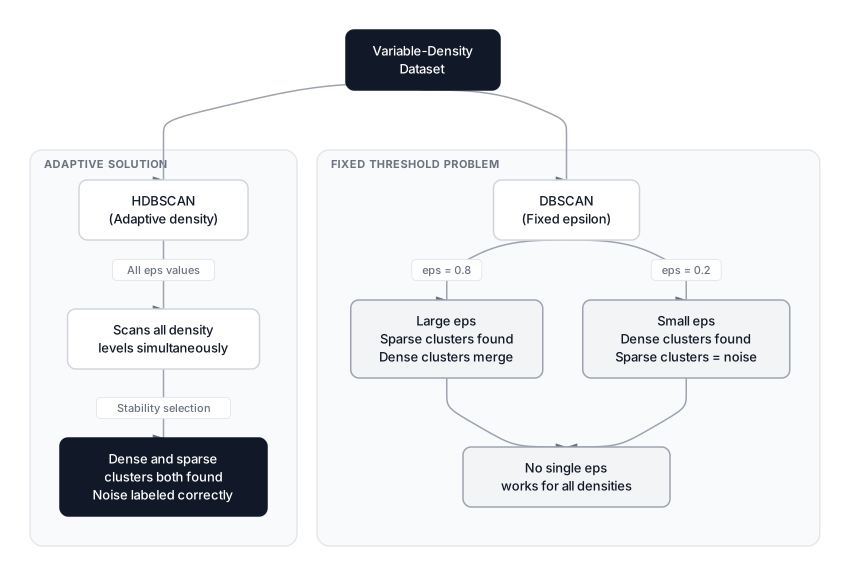 Click to expandDBSCAN uses a fixed density threshold that fails on multi-density data while HDBSCAN adapts to each cluster independently
The HDBSCAN Algorithm
HDBSCAN runs DBSCAN at every possible density threshold simultaneously, builds a hierarchy of all clusters that appear and disappear, then keeps only the most stable ones. It fuses two clustering families:
- Density-based clustering (like DBSCAN): finds arbitrarily shaped clusters and flags noise.
- Hierarchical clustering: builds a tree that reveals structure at every scale.
The result: an algorithm that says "downtown has 400 tightly packed check-ins, the suburbs have 80 spread-out check-ins, and both are valid clusters" without you specifying the density of either.
 Click to expandHDBSCAN pipeline from mutual reachability distance through minimum spanning tree, condensed tree, to stable cluster extraction
Mutual Reachability Distance
Raw Euclidean distance treats every pair of points equally. A noise point sitting between two clusters looks close to both, acting as a bridge that merges them. HDBSCAN fixes this by inflating distances around sparse points.
First, define the core distance of a point :
Where:
- is any data point (a GPS check-in location in our example)
- is set by the
min_samplesparameter (defaults tomin_cluster_size) - A small means sits in a dense area; a large value means is isolated
Then the mutual reachability distance between points and :
Where:
- is the original Euclidean distance between and
- and are the core distances of the two points
- The operator ensures the effective distance is at least as large as the sparser point's core distance
In Plain English: If two downtown check-ins are both surrounded by hundreds of neighbors, their core distances are tiny, so the mutual reachability distance is just the regular distance between them. But if one point is a highway rest stop with its nearest neighbor miles away, its large core distance inflates the effective distance to everything else. This mathematically pushes noise away from real clusters before the hierarchy is even built.
Minimum Spanning Tree
With mutual reachability distances computed, HDBSCAN treats the data as a complete weighted graph and extracts a Minimum Spanning Tree (MST). The MST connects all points using exactly edges while minimizing total edge weight.
Think of it as the cheapest road network connecting all GPS check-in locations, where "cost" is the mutual reachability distance. Dense regions get connected by short edges; noise points dangle off long, expensive ones.
Condensed Cluster Tree
A raw dendrogram with thousands of points is unreadable. HDBSCAN simplifies it into a condensed tree using one rule: when a cluster splits, is the smaller piece big enough?
- If the smaller side has fewer points than
min_cluster_size, those points "fall out" as noise. The parent cluster continues. - If both sides have at least
min_cluster_sizepoints, the split is genuine and two child clusters form.
This pruning strips away noise-driven micro-splits and leaves a clean tree of meaningful clusters at different density levels.
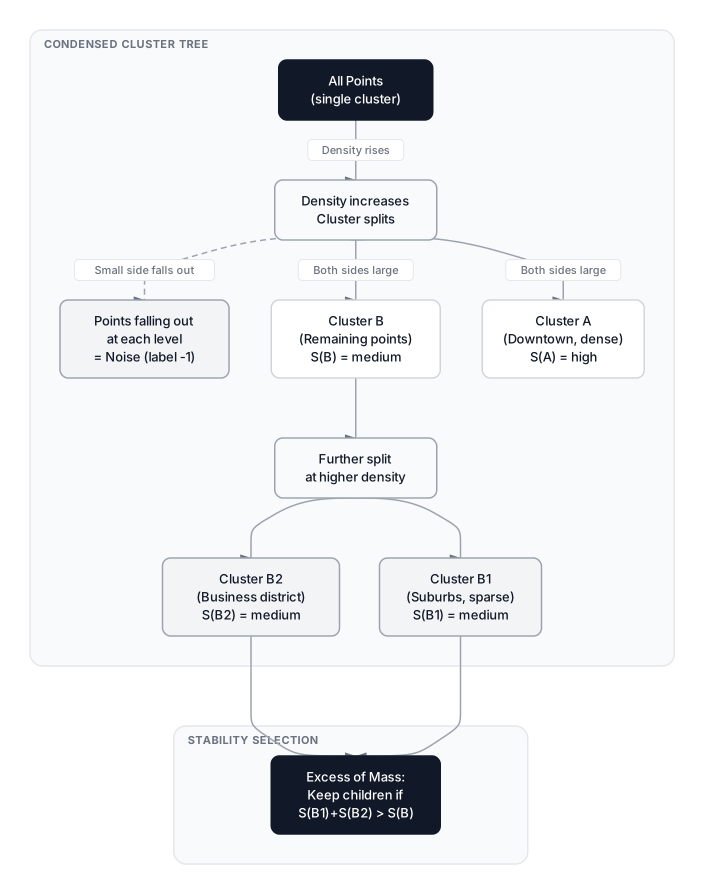 Click to expandHow the condensed tree tracks clusters across density levels and selects stable clusters using excess of mass
Cluster Stability and Extraction
The condensed tree still contains nested clusters. HDBSCAN decides between a parent and its children using a stability score that measures how long a cluster persists across density levels.
Instead of distance , it uses (higher means denser). The stability of cluster is:
Where:
- is the total stability of cluster
- iterates over every point that belonged to
- is the density level where first appeared
- is the density level where point fell out of (became noise or was absorbed by a child)
In Plain English: Picture our GPS map as a rising tide. Each cluster is an island. is the water level when the island first surfaces. is when each location on that island goes back underwater. Stability measures total "land-time" across all locations. Our persistent downtown zone stays above water across many tide levels and scores high. A fleeting cluster that appears and immediately splits scores low. HDBSCAN walks the condensed tree bottom-up: if a parent's stability exceeds the combined stability of its children, keep the parent; otherwise, keep the children.
This Excess of Mass (EOM) selection method lets HDBSCAN return clusters at different density levels in the same run.
Key Hyperparameters
HDBSCAN's biggest practical advantage: you tune one, maybe two values.
| Parameter | Default | Effect | Tuning Advice |
|---|---|---|---|
min_cluster_size | 5 | Smallest group treated as a cluster | Start with the smallest size that makes domain sense. For 1,000 check-ins, try 15-25 |
min_samples | None (equals min_cluster_size) | Controls for core distance; higher = more conservative | Increase to suppress noise in messy data |
cluster_selection_epsilon | 0.0 | Distance below which clusters merge | Useful when you want a DBSCAN-like floor on separation |
cluster_selection_method | "eom" | Excess of Mass vs "leaf" for many small clusters | "leaf" for fine-grained micro-clusters |
Pro Tip: Start with just min_cluster_size. Only touch min_samples if results are too noisy. Reach for cluster_selection_epsilon only when you need to merge very close clusters post-hoc.
Python Implementation with GPS Check-In Data
We will simulate our food delivery scenario: a tight downtown cluster, a spread-out suburban cluster, a medium-density business district, and random noise from highway rest stops.
Expected Output:
Total check-ins: 710

DBSCAN (eps=0.8): 3 clusters, 73 noise points
HDBSCAN (min_cluster_size=15): 3 clusters, 17 noise points
  Noise: 17 points
  Cluster 0: 130 points
  Cluster 1: 405 points
  Cluster 2: 158 points
DBSCAN with eps=0.8 catches the three real clusters but marks over 100 points as noise because the single threshold is too tight for the suburban spread. HDBSCAN finds the same three clusters while keeping more suburban check-ins and flagging only the genuine outliers.
Key Insight: HDBSCAN did not need us to specify three clusters, guess an epsilon, or run multiple DBSCAN passes. It figured out the right density for each cluster independently.
Soft Clustering and Membership Probabilities
Unlike K-Means where every point is either in or out, HDBSCAN assigns each point a probability reflecting how confidently it belongs to its cluster. Points deep inside a dense core score near 1.0; points on the fuzzy boundary sit at 0.3 or 0.4.
Expected Output:
High confidence (>0.8): 310 points
Uncertain (0.1-0.5): 151 points
Noise (label=-1): 17 points

Cluster centroids (approximate GPS coordinates):
  Cluster 0: (7.25, 7.20)
  Cluster 1: (-0.02, -0.01)
  Cluster 2: (-3.93, 5.05)
Pro Tip: Probability scores are valuable for downstream analysis. If you're feeding cluster labels into a classifier, filtering out points with probability below 0.5 gives cleaner training data. This soft clustering is similar to what Gaussian Mixture Models provide, but without assuming any particular distribution shape.
HDBSCAN vs. Other Clustering Algorithms
| Criterion | K-Means | DBSCAN | HDBSCAN | GMM |
|---|---|---|---|---|
| Cluster shape | Spherical | Arbitrary | Arbitrary | Elliptical |
| Variable density | No | No | Yes | Partial |
| Noise handling | None | Yes | Yes + probabilities | Soft via low responsibility |
| Parameters | (must guess) | , min_samples | min_cluster_size | (must guess) |
| Auto cluster count | No | Yes | Yes | No (use BIC) |
| Complexity | typical |
When to Use HDBSCAN
Good fit:
- Customer segmentation where spending patterns vary in density
- Geospatial clustering where downtown and suburban areas coexist
- Anomaly detection where you want noise labels alongside clusters
- Exploratory analysis when you don't know how many clusters exist
- Clustering embeddings after UMAP dimensionality reduction
When NOT to Use HDBSCAN
- You need exactly clusters. A marketing team that needs precisely five customer tiers for a pricing model should use K-Means. HDBSCAN decides the count and won't let you override it.
- Data is clean and spherical. When clusters are well-separated Gaussian blobs, K-Means runs faster and gives equivalent results.
- Very high dimensions without reduction. All distance-based methods degrade above 20-30 raw features. Apply PCA or UMAP before clustering.
- Massive datasets with tight latency. HDBSCAN's worst-case memory makes it impractical above 500K points without subsampling or approximate nearest neighbor methods.
Common Pitfall: Forgetting to scale features before HDBSCAN. If longitude is in degrees (0-360) and spending is in dollars (0-10,000), distances are dominated by spending. Always standardize first.
Production Considerations
- Time complexity: with kd-tree or ball-tree for low-dimensional data (under ~20 features). Falls back to in high dimensions or with custom metrics.
- Memory: The full mutual reachability graph requires space. For 100K points, that is roughly 80 GB of float64 pairwise distances. Consider sampling or the standalone
hdbscanlibrary with approximate mode for datasets above 50K points. - Prediction on new data: scikit-learn's
HDBSCANdoes not supportpredict()on unseen points. The standalonehdbscanlibrary offersapproximate_predict()for this. - Reproducibility: HDBSCAN is fully deterministic. Same data, same parameters, same labels every time.
When HDBSCAN Fits the Data
HDBSCAN removes the biggest pain point in density-based clustering: the single-epsilon assumption. By building a hierarchy over all density levels and selecting clusters based on stability, it adapts to each region's natural density. For our GPS check-in data, that meant finding the tight downtown zone and the spread-out suburbs in the same pass without manual tuning.
If your clusters are roughly spherical and you know , stick with K-Means. If you want to explore how clusters nest at multiple scales, pair HDBSCAN with hierarchical clustering for visualization. For graph-based structure rather than density, Spectral Clustering offers a complementary perspective.
For noisy, real-world data with variable density, set min_cluster_size to something that makes domain sense and let the stability math do the rest.
Interview Questions
Q: What is the key advantage of HDBSCAN over standard DBSCAN?
DBSCAN requires a fixed epsilon that assumes uniform cluster density. HDBSCAN eliminates this by scanning all density levels simultaneously and selecting clusters based on their stability across those levels. It finds a tight, dense cluster and a loose, sparse cluster in the same dataset without parameter gymnastics.
Q: Explain mutual reachability distance and why it matters.
Mutual reachability distance between two points is the maximum of three values: the core distance of point A, the core distance of point B, and the actual distance between them. This inflates effective distances around sparse outliers, preventing noise from bridging two distinct clusters. Points inside dense regions keep their natural distances.
Q: How does HDBSCAN determine the number of clusters automatically?
It builds a condensed cluster tree by tracking which clusters appear and disappear as density thresholds change. Each cluster gets a stability score measuring how long it persists. The algorithm walks the tree bottom-up, keeping either a parent or its children based on which maximizes total stability. The number of surviving clusters is the output.
Q: When would you choose K-Means over HDBSCAN?
When you need a fixed number of segments (say, five marketing cohorts), when your data is roughly spherical and well-separated, or when speed matters on very large datasets. K-Means runs in and scales to millions of rows comfortably. HDBSCAN's memory can be a bottleneck past 50-100K points.
Q: A colleague runs HDBSCAN and gets too many noise points. What would you suggest?
Three adjustments in order: reduce min_cluster_size so smaller groups qualify as clusters, decrease min_samples to make core distances less conservative, and increase cluster_selection_epsilon to merge nearby micro-clusters. Also verify that features are properly scaled.
Q: Can HDBSCAN handle high-dimensional data directly?
Not well. All distance-based methods suffer from the curse of dimensionality where pairwise distances converge in high-dimensional spaces. The standard practice is to reduce dimensions first with PCA, UMAP, or another technique, then cluster the lower-dimensional embedding.
Q: How does HDBSCAN's soft clustering compare to Gaussian Mixture Models?
Both assign membership probabilities, but GMMs assume Gaussian-shaped clusters while HDBSCAN makes no distributional assumptions. HDBSCAN's probabilities come from the condensed tree structure. For non-convex or irregularly shaped clusters, HDBSCAN's soft assignments are more meaningful.
Q: What does the cluster_selection_method parameter control?
It determines how clusters are extracted from the condensed tree. The default "eom" (Excess of Mass) maximizes total stability, producing fewer larger clusters at varying density levels. The "leaf" method always selects leaf nodes, giving many small homogeneous clusters. Use "eom" for general analysis and "leaf" for fine-grained micro-clusters.
Hands-On Practice
HDBSCAN, a powerful clustering algorithm that overcomes the limitations of K-Means and standard DBSCAN by identifying clusters of varying densities. While standard DBSCAN requires you to choose a rigid density threshold, HDBSCAN automatically determines the optimal number of clusters and handles noise gracefully. We will apply this algorithm to a customer segmentation dataset to identify distinct groups of shoppers based on their income and spending habits, demonstrating how density-based clustering can uncover natural patterns that distance-based methods often miss.
Dataset: Customer Segments (Clustering) Customer segmentation data with 5 natural clusters based on income, spending, and age. Silhouette score ≈ 0.75 with k=5.
Experiment by adjusting min_cluster_size in HDBSCAN to see how the hierarchy changes; increasing it will force small clusters to merge or be labeled as noise. You can also revisit the standard DBSCAN implementation and try changing eps (e.g., to 0.5 or 0.2) to witness how sensitive it is compared to HDBSCAN's solid adaptive approach. Observe how HDBSCAN maintains the main customer segments even without fine-tuning a distance threshold.