
Your support inbox holds thousands of tickets, and nobody has time to read them all. Somewhere in that pile sits the answer to why churn spiked, which feature request keeps returning, and whether customers are angry or just confused. Text mining converts raw strings into structured data you can query, chart, and act on. A revenue dashboard tells you what happened; text mining tells you why.
We work with one running example throughout: 12 customer support tickets for a SaaS product covering login issues, billing complaints, and dashboard feedback. Every technique gets applied to these same tickets so you can see how each method pulls a different insight from identical raw text.
Text Exploration Differs from Tabular Analysis
Text data requires different tools than spreadsheets because it is unstructured, sparse, and high-dimensional. A column labeled "MRR" holds one number per row. A column labeled "Ticket Body" holds a variable-length word sequence where meaning depends on order and context. You cannot compute the median of a paragraph; you must first translate linguistic patterns into numerical representations.
The typical pipeline follows four stages: Preprocess, Vectorize, Analyze, Interpret. Preprocessing (covered in Mastering Text Preprocessing) handles tokenization, stopword removal, and normalization. The remaining three stages are the focus here.
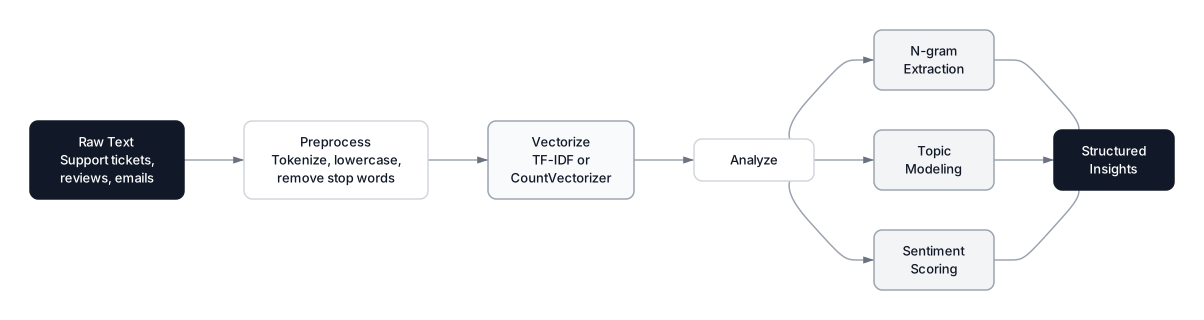 Click to expandEnd-to-end text mining pipeline from raw support tickets through vectorization and analysis to structured insights
| Stage | Input | Output | Key Tool |
|---|---|---|---|
| Preprocess | Raw ticket strings | Clean token lists | re, spaCy, NLTK |
| Vectorize | Token lists | Numeric matrix | TF-IDF, CountVectorizer |
| Analyze | Numeric matrix | Scores, clusters, topics | NMF, sentiment lexicons |
| Interpret | Model output | Business decisions | Charts, tables, reports |
Pro Tip: Stopword removal is context-dependent. For sentiment analysis, removing "not" or "no" flips meaning entirely, turning "not good" into "good." Always consider the downstream task before stripping words.
TF-IDF Scores What Actually Matters
TF-IDF (Term Frequency-Inverse Document Frequency) is a weighting scheme that measures how important a word is to a specific document relative to the entire collection. Words that appear everywhere get downweighted. Words that are rare across the corpus but frequent in one ticket get boosted. This is the foundation of most text mining pipelines, and understanding it well prevents you from chasing misleading signals.
The Formula
Where:
- is the number of times term appears in document
- is the total number of documents in the corpus
- is the number of documents that contain term
- is the natural logarithm, which compresses the rarity factor's scale
In Plain English: If a support ticket mentions "crashes" three times, that word matters to this ticket. But if every other ticket also says "crashes," the word is not distinctive. TF-IDF multiplies frequency by rarity: Importance = How often you say it times How few others say it. A word like "accountant" that only appears in one billing complaint gets a high score there, because it is uniquely informative.
Bag-of-Words vs. TF-IDF
Bag-of-words counts raw frequencies, while TF-IDF reweights those counts by inverse document frequency. The choice between them depends on the downstream algorithm.
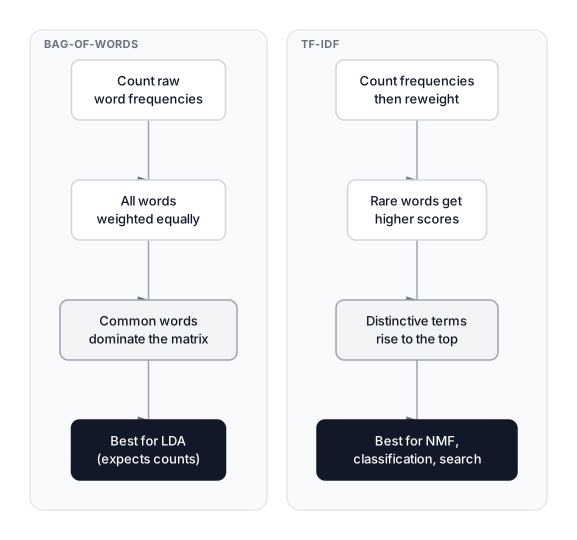 Click to expandSide-by-side comparison of Bag-of-Words counting raw frequencies versus TF-IDF boosting rare distinctive terms
| Criterion | Bag-of-Words | TF-IDF |
|---|---|---|
| Weighting | Equal (raw counts) | Rarity-adjusted |
| Common words | Dominate the matrix | Downweighted |
| Best paired with | LDA (expects integer counts) | NMF, classifiers, search |
| Interpretability | Direct frequency | Relative importance |
For a deeper comparison with neural approaches, see Text Embeddings. Start with TF-IDF when keyword overlap is sufficient; move to embeddings when synonyms and paraphrasing matter.
Computing TF-IDF on Support Tickets
Expected Output:
--- Ticket 1 (login/crash) ---
Top TF-IDF terms:
  access          0.407
  account         0.407
  crashes         0.407
  software        0.407
  update          0.407

--- Ticket 5 (billing) ---
Top TF-IDF terms:
  charged         0.438
  month           0.438
  plan            0.438
  twice           0.438
  subscription    0.377
"Login" does not top the list for Ticket 1 because it appears in all four login tickets, dragging down its IDF. Words like "crashes" and "software" appear only in that single ticket, so their scores are higher. TF-IDF surfaces what makes a document unique, not just what it mentions.
Sentiment Analysis Quantifies Emotional Tone
Sentiment analysis assigns a polarity score to text, from -1.0 (strongly negative) to +1.0 (strongly positive). Lexicon-based approaches maintain a dictionary of words with pre-assigned scores and aggregate them across a sentence. No training data needed, instant results, interpretable down to the word level.
The VADER Normalization Formula
VADER (Valence Aware Dictionary and sEntiment Reasoner), created by Hutto and Gilbert (2014), normalizes its raw sentiment sum like this:
Where:
- is the valence score of word , modified by intensifiers ("very") and negators ("not")
- is a normalization constant (set to 15 in the original VADER implementation)
- is the sum of all modified word scores in the sentence
- The denominator ensures the output stays bounded between -1 and +1
In Plain English: Think of a tug-of-war. Positive words pull right; negative words pull left. Intensifiers like "very" make the pull stronger; negators like "not" reverse direction. The formula sums all forces and squashes the result into -1 to +1, so a short ticket and a long essay produce comparable scores.
Common Pitfall: A mean sentiment score of 0.0 does not mean neutral feedback. It could be an equal mix of strongly positive and strongly negative tickets. Always check the full distribution.
Building a Minimal Lexicon Scorer
NLTK's VADER is not available in browser-based Python, but the core mechanism is straightforward. Here is a minimal scorer applied to our SaaS tickets:
Expected Output:
Ticket                                                               |  Score
--------------------------------------------------------------------------------
Login page crashes after the software update. Cannot access my ac... | -0.30
Billing charged me twice this month for the same subscription pla... | -0.30
Dashboard redesign looks fantastic and page loading speed is much... | +0.60
Login password reset emails never arrive. Already tried multiple ... | -0.30
Dashboard report scheduling saves our analytics team hours of wor... | +0.30
Ticket 3 scores +0.60 because "fantastic" and "faster" both contribute positive signal. Ticket 1 scores only -0.30 despite describing a crash: "cannot" negates the next word ("access"), which is not in our lexicon, so the negation has no effect. In production, VADER's 7,500-word lexicon handles these edge cases far better, but the principle is identical.
Topic Modeling Reveals Hidden Themes
Topic modeling algorithms discover groups of words that co-occur frequently across documents and assign each document a mixture of those groups. Instead of reading 10,000 tickets, you get three or four themes like "login issues," "billing errors," and "dashboard feedback," each defined by characteristic words.
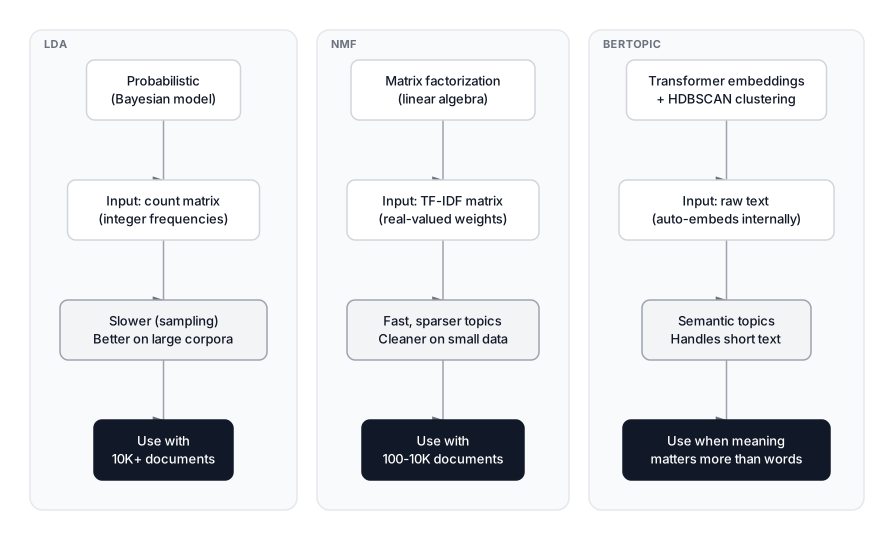 Click to expandComparison of LDA, NMF, and BERTopic approaches to topic modeling with key differences and use cases
NMF vs. LDA for Topic Discovery
Two classical algorithms for topic modeling are Latent Dirichlet Allocation (LDA) and Non-negative Matrix Factorization (NMF). Both take a document-term matrix as input and produce a topics-by-words matrix and a documents-by-topics matrix.
| Criterion | LDA | NMF |
|---|---|---|
| Foundation | Probabilistic (Bayesian) | Linear algebra (factorization) |
| Input | Count matrix (integers) | TF-IDF matrix (preferred) |
| Coherence on small data | Often noisy | More stable |
| Speed | Slower (sampling) | Faster (direct) |
| When to choose | Large corpora (>10K docs) | Smaller corpora, cleaner topics |
For short-text or large-scale topic modeling, BERTopic (transformer embeddings plus HDBSCAN) has become the preferred tool as of 2026. But for medium-length text like support tickets, NMF remains hard to beat.
The NMF Factorization
NMF decomposes the TF-IDF matrix into two lower-rank matrices:
Where:
- is the document-term matrix of shape , with documents and unique terms
- is the document-topic matrix of shape , showing how much each ticket belongs to each of the topics
- is the topic-term matrix of shape , showing which words define each topic
- All values in and are non-negative, making the decomposition interpretable as additive parts
In Plain English: Imagine each ticket is a recipe. NMF figures out there are three base ingredients (topics): "login words," "billing words," and "dashboard words." Each ticket is a mix of ingredients: a billing refund ticket might be 95% billing topic and 5% login topic. Non-negativity means you only add topics, never subtract, which is why results feel natural.
Extracting Topics with NMF
Expected Output:
Discovered Topics:
  Topic 1: dashboard, work, analytics, page, custom
  Topic 2: billing, subscription, plan, charged, twice
  Topic 3: login, update, account, crashes, software

Dominant topic per ticket:
  Ticket  1 -> Topic 3  Login page crashes after the software update. Cannot ac...
  Ticket  2 -> Topic 3  Login authentication fails every Monday morning. Our wh...
  Ticket  3 -> Topic 3  Login password reset emails never arrive. Already tried...
  Ticket  4 -> Topic 3  Login two factor code stopped working since the latest ...
  Ticket  5 -> Topic 2  Billing charged me twice this month for the same subscr...
  Ticket  6 -> Topic 2  Billing invoice PDF has the wrong tax rate. Our account...
  Ticket  7 -> Topic 2  Billing subscription renewed at the old price despite a...
  Ticket  8 -> Topic 2  Billing refund request from three weeks ago still has n...
  Ticket  9 -> Topic 1  Dashboard redesign looks fantastic and page loading spe...
  Ticket 10 -> Topic 1  Dashboard CSV export handles one hundred thousand rows ...
  Ticket 11 -> Topic 1  Dashboard report scheduling saves our analytics team ho...
  Ticket 12 -> Topic 1  Dashboard custom date filters on the analytics page fin...
NMF cleanly separates our 12 tickets into three themes: dashboard feedback (Topic 1), billing issues (Topic 2), and login problems (Topic 3). Every ticket maps to the correct cluster. With thousands of real tickets, experiment with 5 to 20 topics and use coherence scores () to find the right .
N-Grams Capture Context Single Words Miss
A unigram analysis treats "not" and "good" as independent signals. A bigram captures "not good" as a single unit with completely different meaning. N-grams (sequences of adjacent words) preserve local context that word-level analysis misses.
| N-gram Type | Example | Why It Matters |
|---|---|---|
| Unigram | "not", "good" | Ambiguous in isolation |
| Bigram | "not good" | Clear negative signal |
| Bigram | "password reset" | Compound concept |
| Trigram | "two factor authentication" | Specific feature reference |
Extracting Bigrams from Tickets
Expected Output:
Top 12 Bigrams:
  "access account": 1
  "accountant caught": 1
  "ago processed": 1
  "analytics page": 1
  "analytics team": 1
  "app upgrade": 1
  "applying discount": 1
  "arrive tried": 1
  "authentication fails": 1
  "billing charged": 1
  "billing invoice": 1
  "billing refund": 1
With only 12 tickets, every bigram appears once. In a real dataset of thousands, "password reset" might appear hundreds of times while "accountant caught" stays rare. That frequency difference tells you which complaints are systemic versus one-off.
Key Insight: Adding bigrams to a TF-IDF feature set typically boosts classification accuracy by 5 to 15% over unigrams alone. Use ngram_range=(1, 2) in your vectorizer to include both.
When to Use Text Mining and When NOT To
Use text mining when:
- You have hundreds or thousands of text documents to process
- You need to categorize, score, or cluster text automatically
- Stakeholders want data-backed answers to "what are customers saying?"
Do NOT use text mining when:
- Your corpus is under 50 documents. Manual reading is faster and more accurate.
- The text is highly domain-specific jargon without a custom lexicon. Generic sentiment tools will fail.
- You need to detect sarcasm or cultural context. Bag-of-words methods are blind to these.
For inconsistent spellings across tickets, Fuzzy Matching handles deduplication.
Production Considerations
Scaling from 12 tickets to 12 million introduces real constraints. TF-IDF vectorization runs in where is documents and is vocabulary size; sparse matrix storage keeps memory manageable. NMF adds where is topics and is iterations, so expect 30 to 60 seconds for 1M documents. For LDA at scale, use learning_method='online' in scikit-learn's LatentDirichletAllocation.
Keep memory in check by setting max_features=10000 and min_df=5 in your vectorizer. scikit-learn returns sparse matrices by default, so 500K documents with 50K terms fits comfortably in a few GB.
Conclusion
Text mining converts unstructured support tickets into queryable, chartable data. TF-IDF gives you each document's signature words by balancing frequency against rarity. Sentiment scoring assigns a polarity number so you can track customer mood and flag urgent complaints. Topic modeling with NMF discovers themes automatically without anyone reading a single ticket.
The practical approach: combine these methods in one pipeline. Vectorize with TF-IDF, run NMF to discover topics, and score sentiment within each topic. That answers both "what are people talking about?" and "how do they feel about it?" For turning these results into compelling stakeholder narratives, see Data Storytelling. To combine text features with tabular data in predictive models, Text Embeddings covers the neural approach that picks up where TF-IDF leaves off.
Interview Questions
Q: What is the difference between TF-IDF and bag-of-words, and when would you prefer one over the other?
Bag-of-words counts raw term frequencies; TF-IDF reweights those counts by inverse document frequency to penalize common terms. Use TF-IDF for classification or keyword extraction. Plain bag-of-words is preferable only as input to LDA, which expects integer counts.
Q: A product manager asks you to analyze 50,000 support tickets. Walk through your approach.
Preprocess (lowercase, tokenize, remove stopwords), then vectorize with TF-IDF. Run NMF with 5 to 15 topics and evaluate coherence scores to pick the right . Score sentiment per ticket, then cross-tabulate sentiment by topic to find which themes drive the most negative feedback. Present the top actionable findings with specific ticket examples.
Q: Why does LDA use count vectors while NMF works better with TF-IDF?
LDA is a probabilistic generative model that interprets matrix entries as word counts drawn from multinomial distributions. TF-IDF values are real-valued weights, not counts, violating those assumptions. NMF factorizes any non-negative matrix, and TF-IDF's downweighting of common terms gives NMF cleaner topic separation.
Q: Your sentiment model returns a mean score of 0.0 across all tickets. Does that mean customers are neutral?
Not necessarily. It could be genuinely neutral tickets, or an equal mix of strongly positive and strongly negative ones canceling out. Plot a histogram and compute standard deviation. Low standard deviation confirms neutrality; high standard deviation signals polarization the mean hides.
Q: How do you choose the number of topics in topic modeling?
Evaluate coherence scores across a range of values (typically 3 to 20) and look for the elbow. Always supplement with manual inspection: read the top 10 words per topic and verify they form a coherent theme. Domain expertise matters more than any automated metric.
Q: When would you use BERTopic instead of NMF or LDA?
BERTopic excels for semantic topic grouping (beyond word co-occurrence), short texts like tweets or chat messages, and dynamic topic modeling over time. It requires more compute than NMF but often finds more meaningful topics in noisy data.
Q: What are the main limitations of lexicon-based sentiment analysis?
Lexicon methods fail on sarcasm ("oh great, another broken feature"), domain-specific language (a "sick beat" in music is positive), and implicit sentiment with no explicit sentiment words ("the package arrived in 47 pieces"). For these cases, a fine-tuned transformer classifier substantially outperforms any lexicon.
Hands-On Practice
Let's apply the text exploration techniques from this article to real product reviews. We'll analyze word frequencies, explore sentiment patterns, and discover hidden topics using only browser-compatible libraries.
Dataset: Product Reviews Text Analysis 800 product reviews across Electronics, Kitchen, Clothing, and Sports categories with pre-computed text features including sentiment scores, word counts, and engagement metrics.
This hands-on exercise demonstrates the complete text exploration workflow: from basic frequency analysis to sentiment distribution, N-gram context, topic discovery with LDA, and TF-IDF for category-specific vocabulary. All without specialized NLP libraries - just pandas, sklearn, and matplotlib!