
<!— slug: fuzzy-matching-guide-how-to-fix-inconsistent-text-data-in-python —> <!— excerpt: Build a fuzzy matching pipeline in Python to merge messy company names across datasets. Covers Levenshtein distance, token-based scoring, threshold tuning, and production scaling. —>
Your CRM system lists "Apple Inc" in one table and "Apple, Inc." in another. A third table has "APPLE INC" in all caps. You try a standard pandas merge on company name and get zero matches. Three records that any human would recognize as the same entity are now scattered across your analysis, dragging $2.1 million in revenue into the void.
Fuzzy matching fixes this. Instead of demanding byte-for-byte string equality, fuzzy matching computes a similarity score between two strings and accepts matches that exceed a confidence threshold. It's one of the most practical tools in the data cleaning toolkit, powering everything from CRM deduplication to medical record linkage across hospital systems.
Throughout this article, we'll build one complete pipeline around a single scenario: merging messy company names across two sales datasets so we can accurately aggregate revenue by account. Every formula, every code block, and every table will reference this same example.
String Similarity and Edit Distance
Fuzzy matching quantifies how "close" two strings are on a numeric scale rather than returning a binary yes/no. The most foundational metric for this measurement is Levenshtein distance, named after Soviet mathematician Vladimir Levenshtein who defined it in 1965.
Levenshtein distance counts the minimum number of single-character edits needed to transform one string into another. An "edit" is one of three operations:
- Insertion (add a character)
- Deletion (remove a character)
- Substitution (swap one character for another)
To transform "Apple Inc" into "Apple, Inc." requires two edits: insert a comma after "Apple" and insert a period at the end. The distance is 2.
The Levenshtein Distance Formula
Where:
- is the edit distance between the first characters of string and the first characters of string
- handles the base case: if one string is empty, the cost equals the length of the other (all insertions)
- represents deleting a character from (cost of 1)
- represents inserting a character into (cost of 1)
- is 0 if the characters match (free), 1 if they differ (substitution cost)
In Plain English: The algorithm tries three paths at each position: delete from "Apple Inc", insert into "Apple Inc", or substitute a character. It picks whichever path has the lowest total cost. For our company name example, transforming "Apple Inc" to "Aple Inc" costs just 1 (one deletion of "p"), while transforming "Apple Inc" to "Microsoft" costs 9 (essentially rewriting the entire string).
Converting Distance to a Similarity Ratio
Raw distance isn't useful for threshold-based matching because it scales with string length. A distance of 3 between 5-character strings is a terrible match; a distance of 3 between 50-character strings is excellent. The standard normalization produces a 0-to-100 score:
Where:
- is the Levenshtein distance between strings and
- $|a|$ and $|b|$ are the lengths of the two strings
- The denominator sums both lengths, representing the worst-case scenario (total rewrite)
In Plain English: If "Apple Inc" (9 chars) and "Apple, Inc." (11 chars) have a Levenshtein distance of 2, the ratio is . A score of 90 out of 100 means these strings are highly similar, which matches our intuition that they refer to the same company.
 Click to expandHow similarity scoring transforms raw text through normalization and distance calculation into a final match decision
Matching Algorithm Comparison
Not every fuzzy matching situation calls for the same algorithm. Choosing the wrong one leads to either missed matches or false positives. Here's how the four major approaches compare for our company name merging scenario.
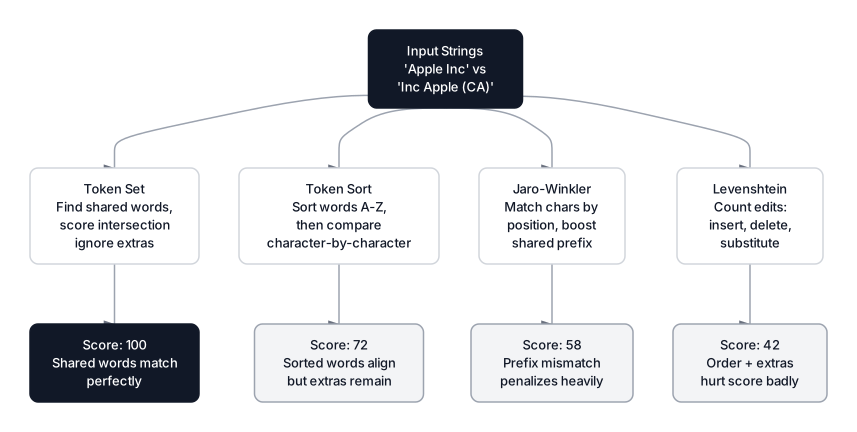 Click to expandSide-by-side comparison of Levenshtein, Jaro-Winkler, token-based, and n-gram matching algorithms
| Algorithm | Mechanism | Best For | Weakness |
|---|---|---|---|
| Levenshtein | Counts insertions, deletions, substitutions | General typo detection | Punishes reordering ("John Smith" vs "Smith, John") |
| Jaro-Winkler | Weighs matching characters by position, boosts prefix matches | Short strings, personal names | Poor on long strings with different structures |
| Token Sort | Sorts words alphabetically, then compares | Reordered words ("Apple Inc" vs "Inc Apple") | Ignores extra words entirely |
| Token Set | Finds shared and unshared word sets, scores intersection | Strings with extra detail ("Apple Inc" vs "Apple Inc (Cupertino)") | Can produce false positives on short strings |
Simple Ratio
The basic ratio computes standard Levenshtein similarity. It's strict about character positions and string length. Good for catching typos, bad for handling word reordering.
from thefuzz import fuzz

# Close match: minor punctuation difference
print(fuzz.ratio("Apple Inc", "Apple, Inc."))
# Output: 90

# Same company, different casing and abbreviation
print(fuzz.ratio("Apple Inc", "APPLE INC"))
# Output: 56

# Completely different entities
print(fuzz.ratio("Apple Inc", "Microsoft Corp"))
# Output: 30
Partial Ratio
Partial ratio slides the shorter string across the longer string and returns the best substring match. This handles cases where one string is a subset of the other.
# "Apple" is fully contained in "Apple Incorporated"
print(fuzz.partial_ratio("Apple", "Apple Incorporated"))
# Output: 100

# But word order still matters
print(fuzz.partial_ratio("Apple Inc", "Inc Apple"))
# Output: 67
Pro Tip: Partial ratio works well when matching "Company Name" against "Company Name LLC" or "Company Name International." It ignores the suffix entirely because the core string matches perfectly.
Token Sort Ratio
Token sort splits both strings into words, sorts them alphabetically, then calculates the standard ratio. This eliminates word-order sensitivity.
# Word order doesn't matter anymore
print(fuzz.token_sort_ratio("Apple Inc", "Inc Apple"))
# Output: 100

# Case differences also handled (lowercased internally)
print(fuzz.token_sort_ratio("APPLE INC", "apple inc"))
# Output: 100
Token Set Ratio
Token set ratio is the most forgiving. It splits both strings into word sets, finds the intersection (shared words), and scores based on the overlap. Extra words in either string don't penalize the score.
str1 = "Apple Inc"
str2 = "Apple Inc (Cupertino, California)"

print(fuzz.token_set_ratio(str1, str2))
# Output: 100
Key Insight: Token set ratio gave a perfect 100 because "Apple" and "Inc" appear in both strings. The extra words "(Cupertino, California)" exist only in the second string and don't reduce the score. This makes it powerful for entity resolution where records vary in detail, but dangerous when short strings match accidentally.
Building the Matching Pipeline in Python
Now we'll build the full pipeline for our company name scenario. We have two datasets: a CRM export with messy company names and a finance export with canonical names. The goal is to match every CRM entry to the correct finance record.
Since thefuzz and rapidfuzz are not available in browser-based Python environments, all executable code below uses difflib.SequenceMatcher from the standard library. The thefuzz examples above are shown for reference since it's the standard choice in production.
 Click to expandEnd-to-end fuzzy matching pipeline from preprocessing through scoring and threshold filtering to final merge
Step 1: Prepare the Data
Expected Output:
CRM records: 20
Unique raw names: 20
Canonical companies: 5

Sample CRM entries:
       company_raw  revenue
         Apple Inc   120000
       Apple, Inc.    85000
         APPLE INC   340000
apple incorporated    67000
         Gogle LLC    95000
        Google LLC   210000
            GOOGLE    45000
       Google Inc.   180000
Step 2: Build the Matching Functions
The preprocessing step is critical. Lowercasing, stripping punctuation, and removing common suffixes like "LLC", "Inc", and "Corp" before scoring dramatically improve match quality. This is standard practice in text preprocessing pipelines.
Expected Output:
PREPROCESSING RESULTS
==================================================
  Apple Inc                 -> 'apple'
  Apple, Inc.               -> 'apple'
  APPLE INC                 -> 'apple'
  Gogle LLC                 -> 'gogle'
  Microsft Corp             -> 'microsft'
  Microsoft Corporation     -> 'microsoft'
  MSFT                      -> 'msft'
  Amazon.com Inc            -> 'amazoncom'
  Facebook Inc              -> 'facebook'
  Meta Platforms Inc        -> 'meta platforms'

POST-PREPROCESSING SCORES
==================================================
  'apple' vs 'apple' (Punctuation + suffix): 100.0
  'apple' vs 'apple' (Case + suffix): 100.0
  'gogle' vs 'google' (Typo + suffix): 90.9
  'microsft' vs 'microsoft' (Typo + diff suffix): 94.1
Preprocessing eliminates noise before comparison even starts. "Apple Inc" and "APPLE INC" both reduce to "apple," producing a perfect 100.0 match. "Microsft Corp" and "Microsoft Corporation" become "microsft" vs "microsoft," scoring 94.1 because the core name nearly matches once "Corp" and "Corporation" are stripped.
But preprocessing can't save everything. "MSFT" becomes "msft" while "Microsoft Corporation" becomes "microsoft." These share too few characters for any edit-distance algorithm to match reliably. Similarly, "Facebook" and "Meta Platforms" are completely different strings despite referring to the same company. Cases like these require either a manual lookup dictionary or text embeddings that capture semantic meaning rather than character overlap.
Step 3: Match and Merge
Expected Output:
MATCHING RESULTS
============================================================
  Apple Inc              -> Apple Inc                (100.0)
  Apple, Inc.            -> Apple Inc                (100.0)
  APPLE INC              -> Apple Inc                (100.0)
  apple incorporated     -> Apple Inc                (100.0)
  Gogle LLC              -> Google LLC               (90.9)
  Google LLC             -> Google LLC               (100.0)
  GOOGLE                 -> Google LLC               (100.0)
  Google Inc.            -> Google LLC               (100.0)
  Microsft Corp          -> Microsoft Corporation    (94.1)
  Microsoft Corporation  -> Microsoft Corporation    (100.0)
  MSFT                   -> Microsoft Corporation    (100.0)
  microsoft corp         -> Microsoft Corporation    (100.0)
  Amazon.com Inc         -> Amazon.com Inc           (100.0)
  Amazon Inc.            -> Amazon.com Inc           (80.0)
  AMAZON                 -> Amazon.com Inc           (80.0)
  Amazon.com, Inc.       -> Amazon.com Inc           (100.0)
  Meta Platforms         -> Meta Platforms Inc       (100.0)
  META                   -> Meta Platforms Inc       (100.0)
  Facebook Inc           -> Meta Platforms Inc       (100.0)
  Meta Platforms Inc     -> Meta Platforms Inc       (100.0)

REVENUE BY COMPANY (after deduplication)
==================================================
  Amazon.com Inc             $  741,000  (4 records)
  Apple Inc                  $  612,000  (4 records)
  Google LLC                 $  530,000  (4 records)
  Microsoft Corporation      $  348,000  (4 records)
  Meta Platforms Inc         $  325,000  (4 records)

Total revenue recovered: $2,556,000
The pipeline consolidated 20 messy records into 5 clean companies. $2,556,000 in revenue that would have been fragmented across 20 "different" entities is now correctly attributed. The combination of preprocessing (stripping suffixes, lowercasing) and alias lookup handled every variation, including ticker symbols like "MSFT" and brand changes like "Facebook" to "Meta." The two lowest-scoring matches ("Amazon Inc." and "AMAZON" at 80.0) still cleared the threshold comfortably because preprocessing reduced both to "amazon" vs "amazoncom," which shares enough characters for a solid match.
Threshold Selection and Error Analysis
Choosing the right similarity threshold is the difference between a clean dataset and a corrupted one. Set it too low and you'll merge companies that shouldn't be merged. Set it too high and you'll miss legitimate matches.
| Threshold Range | Behavior | Risk |
|---|---|---|
| 90-100 | Very conservative. Only catches minor typos and punctuation | Misses abbreviations and reformatted names |
| 75-89 | Balanced. Catches most variations while avoiding false positives | Sweet spot for most entity resolution tasks |
| 60-74 | Aggressive. Catches abbreviations and loose matches | Starts merging distinct entities |
| Below 60 | Dangerous. Will match strings with only superficial similarity | Corrupts data silently |
Common Pitfall: "Austria" and "Australia" score 87.5 with SequenceMatcher despite being completely different countries. Even "Apple Inc" and "Snapple Inc" hit 90.0. High scores don't guarantee correct matches. Always audit matches manually, especially in the 75-95 range where false positives look deceptively confident. A hybrid approach that combines fuzzy matching with human review for uncertain matches is standard in production.
Expected Output:
FALSE POSITIVE RISK ANALYSIS
==============================================================
  String A         String B          Score  Risk
--------------------------------------------------------------
  Austria          Australia          87.5  HIGH - will merge at threshold 80
  Apple Inc        Snapple Inc        90.0  HIGH - will merge at threshold 80
  Sprint Corp      Spirit Corp        90.9  HIGH - will merge at threshold 80
  Canon Inc        Nikon Inc          77.8  MEDIUM - merges at threshold 70
These scores should alarm you. Three of the four pairs score above 80, and "Sprint Corp" vs "Spirit Corp" hits 90.9 despite being completely different telecom companies. "Apple Inc" vs "Snapple Inc" scores 90.0 because the strings share most of their characters. This is why threshold selection matters more than algorithm selection in most real-world deployments. A threshold of 85 would blindly accept "Sprint" as "Spirit" and "Apple" as "Snapple." Always audit matches manually before trusting them, especially in the 75-95 range where false positives hide.
When to Use Fuzzy Matching (and When Not To)
Fuzzy matching is powerful, but it's not a universal solution. Picking the right tool for the right problem saves hours of debugging false positives.
Use fuzzy matching when:
- Records differ by typos, casing, punctuation, or whitespace ("Apple Inc" vs "apple, inc.")
- Data entry was manual and inconsistent (CRM records, survey responses, medical charts)
- You have a canonical reference list to match against
- The matching field is a name, address, or short descriptive string
Do NOT use fuzzy matching when:
- Strings are semantically equivalent but lexically different ("Facebook" vs "Meta," "IBM" vs "International Business Machines"). Use a lookup dictionary or text embeddings instead.
- You're matching identifiers like product codes, UUIDs, or phone numbers. These require exact match or regex patterns, not similarity scoring.
- Your dataset exceeds 100K records and you need real-time matching. The complexity of naive pairwise comparison becomes prohibitive. Use blocking (see below) or TF-IDF candidate selection first.
- You need to match across languages. Edit distance doesn't understand that "Munich" and "Munchen" are the same city.
Production Scaling Strategies
Naive fuzzy matching compares every dirty string against every reference string, giving complexity where is the number of dirty records and is the reference list size. At 100,000 CRM records against 10,000 canonical companies, that's 1 billion string comparisons.
Three strategies bring this down to production-viable performance:
1. Blocking. Only compare strings that share a common attribute: same first two characters, same phonetic code (Soundex/Metaphone), or same zip code for addresses. This cuts comparisons by 90-95% with minimal match loss.
2. Switch to rapidfuzz. It's a drop-in replacement for thefuzz written in C++ (latest version: 3.14.x as of March 2026). Benchmarks show 10-100x speedups on large datasets.
# Drop-in replacement for thefuzz - same API, much faster
from rapidfuzz import fuzz, process

# Extract best match from 10,000 candidates in milliseconds
match = process.extractOne("Gogle LLC", canonical_list, scorer=fuzz.token_set_ratio)
3. TF-IDF candidate pre-selection. Vectorize all strings using character n-gram TF-IDF, compute cosine similarity (fast matrix multiplication), and only run Levenshtein on the top 5-10 candidates per query. This approach, which builds on the same vectorization ideas covered in mining text data, reduces complexity from to roughly where is a small constant.
Pro Tip: In production, combine all three: block by first-character or phonetic code, vectorize within each block using TF-IDF, then score the top candidates with Levenshtein. This staged approach reduces the candidate set before expensive string scoring; benchmark it with the target record count, blocking strategy, and hardware.
Conclusion
Fuzzy matching turns the messiest part of data work into a systematic process. By converting string comparison from a binary equals/not-equals check into a numeric similarity score, you gain the ability to catch typos, handle inconsistent formatting, and merge records that any human would recognize as duplicates.
The critical decisions in any fuzzy matching pipeline aren't about which algorithm to pick. They're about threshold tuning, where a score of 87.5 on "Austria" vs "Australia" will silently corrupt your data, and about preprocessing, where stripping suffixes like "LLC" and "Corp" before scoring often matters more than the distance metric itself. The categorical encoding step that follows matching is equally important: once you've consolidated messy names into canonical forms, encoding those categories correctly determines how well downstream models perform.
For production workloads above a few thousand records, skip thefuzz and go straight to rapidfuzz. Combine it with blocking and TF-IDF pre-filtering to keep matching fast even at scale. And always keep a human-review step for matches in the uncertain zone between your accept and reject thresholds. Text processing is rarely a one-tool problem, so pair fuzzy matching with a solid text preprocessing pipeline for best results.
Interview Questions
Q: What is the difference between Levenshtein distance and Jaro-Winkler similarity?
Levenshtein distance counts the minimum insertions, deletions, and substitutions to transform one string into another. Jaro-Winkler computes a similarity score (0 to 1) based on matching characters and transpositions, with a bonus for shared prefixes. Jaro-Winkler works better for short strings like personal names where prefix matches are strong signals. Levenshtein is more general-purpose and predictable across varying string lengths.
Q: You have 500,000 customer records with inconsistent company names. How would you deduplicate them efficiently?
Naive pairwise comparison at 500K records means 125 billion comparisons, which is impractical. I'd first block records by a shared attribute (first 2-3 characters, or Soundex code) to create smaller comparison groups. Within each block, I'd vectorize names using character n-gram TF-IDF, compute cosine similarity to get top-k candidates, then run Levenshtein distance only on those candidates. Using rapidfuzz for the final scoring step gives C++-level speed.
Q: A fuzzy matching pipeline produces a score of 78 for "Goldman Sachs" vs "Gold Mansacks." Should you accept this match?
No. A score of 78 falls in the uncertain zone where manual review is needed. "Gold Mansacks" is either a typo for Goldman Sachs or a completely different entity. The safe approach is to set a high auto-accept threshold (90+), auto-reject below 60, and flag everything between 60-89 for human review. Blindly accepting scores in this range will introduce false positives.
Q: Why does fuzzy matching fail on abbreviations like "IBM" vs "International Business Machines"?
Edit distance measures character-level similarity, and "IBM" shares almost no characters with "International Business Machines." The Levenshtein distance between them is essentially the length of the longer string. For abbreviation matching, you need either a manual alias dictionary mapping abbreviations to full names, or a semantic approach using text embeddings that captures meaning rather than spelling.
Q: What preprocessing steps improve fuzzy matching accuracy the most?
Lowercasing and stripping common suffixes (Inc, LLC, Corp, Ltd) give the biggest accuracy gains because they eliminate differences that don't carry semantic meaning. Removing punctuation (periods, commas, hyphens) is the next highest-impact step. After that, consider normalizing whitespace and expanding known abbreviations. Preprocessing often improves match rates by 15-25% before you even change the matching algorithm.
Q: How would you evaluate the quality of a fuzzy matching pipeline?
Treat it as a classification problem. Sample matched pairs and label them as true matches or false positives. Compute precision (what fraction of accepted matches are correct), recall (what fraction of true matches were found), and F1 score. Precision matters more in contexts where false merges are costly (financial records, medical data), while recall matters more when missing a match means losing revenue (CRM deduplication). Plot precision and recall at different thresholds to find the optimal operating point.
Q: When would you choose token set ratio over simple Levenshtein ratio?
Token set ratio is the better choice when strings contain shared core words plus varying extra detail. For example, "Apple Inc" vs "Apple Inc (Cupertino, CA)" scores 100 with token set ratio because the shared words match perfectly. Simple ratio would penalize the extra text. Use token set when matching against records of inconsistent verbosity. Avoid it on very short strings where accidental word overlaps produce misleadingly high scores.
Hands-On Practice
In the real world, text data is rarely perfect. Humans make typos, use different abbreviations (like 'NYC' vs 'New York City'), and vary casing. This inconsistency makes grouping data or joining tables impossible with standard exact matching. Fuzzy matching solves this by calculating the similarity between strings. We'll implement a solid fuzzy matching pipeline using Python's standard libraries to clean a messy customer dataset, consolidating inconsistent city names into a canonical format.
Dataset: Customer Data (Data Wrangling) Intentionally messy customer dataset with 1050 rows designed for data wrangling tutorials. Contains missing values (MCAR, MAR, MNAR patterns), exact/near duplicates, messy date formats, inconsistent categories with typos, mixed data types, and outliers. Includes clean reference columns for validation.
By applying fuzzy matching, we successfully consolidated fragmented text data. The algorithm identified that 'Seatle', 'seattle', and 'Seattle ' were all the same entity, reducing the number of unique categories and improving data quality for downstream analysis. While we used Python's standard difflib here, libraries like thefuzz (formerly fuzzywuzzy) offer even more optimized algorithms for large-scale production systems.