
You load a CSV of transaction records. The date column looks fine at first glance. Then you run pd.to_datetime() and six out of seven rows come back as NaT. The column has ISO strings mixed with Unix timestamps, written-out months, European day-first ordering, and one cell that just says "not-a-date". Welcome to messy date parsing in Python, the problem that wastes more data-cleaning hours than missing values and duplicate rows combined.
This guide walks through a single messy transaction dataset from first glance to fully parsed datetime64 column. Every code block, every diagram, and every formula references the same data so you can follow the logic end to end. By the time you reach the conclusion, you will have a repeatable three-step pipeline that handles mixed formats, ambiguous locales, timezones, and cyclical feature engineering for ML.
The Three Layers of Date Parsing Problems
Date parsing breaks down because time representation is a human convention, not a physical constant. Unlike temperature or mass, dates vary by geography (month-day vs. day-month), by language (October vs. Octobre vs. Oktober), and by encoding (ISO string vs. Unix integer vs. written English). Computers need a single canonical representation, but real-world data rarely provides one.
Every messy date column contains some combination of three distinct failure modes:
| Problem | Example | What Goes Wrong |
|---|---|---|
| Format inconsistency | 2024-03-15 vs 03/15/2024 vs March 15, 2024 | Parser expects one format, gets another |
| Ambiguity | 01/02/2024 | January 2nd (US) or February 1st (UK)? |
| Missing context | 14:00:00 with no timezone | Is that 2 PM in New York or London? |
The first two cause parsing failures or NaT values. The third is worse: it produces results that look correct but silently corrupt your analysis by days, months, or hours.
 Click to expandDate parsing pipeline from raw strings through type detection, format-mixed parsing, and validation to clean datetime64
The Running Example: A Messy Transaction Log
Every technique in this article operates on the same dataset: seven transaction records with dates stored in wildly different formats. This mirrors what you would encounter pulling data from multiple payment gateways into a single analytics table.
Expected Output:
Raw 'date_raw' column:
 id       date_raw
101     2024-03-15
102     03/20/2024
103 March 25, 2024
104     1711929600
105     15-04-2024
106    Apr 20 2024
107     not-a-date

dtype: object
The dtype is str (displayed as object in older pandas versions). Python treats every value as text, meaning you cannot sort by date, compute time deltas, or extract month numbers until you convert to datetime64.
Pro Tip: Always run df.dtypes immediately after loading a CSV. If your date column shows object or str, pandas is treating it as plain text. You cannot perform any time-based analysis until you fix this.
Why Naive Parsing Fails on Mixed Formats
Pandas pd.to_datetime() is the primary date conversion function in Python's data ecosystem. When every row follows the same format, it works instantly. But throw mixed formats at it without guidance, and pandas 3.0 (released January 2026) defaults to strict format inference that rejects anything it cannot confidently parse.
Expected Output:
 id       date_raw     parsed
101     2024-03-15 2024-03-15
102     03/20/2024        NaT
103 March 25, 2024        NaT
104     1711929600        NaT
105     15-04-2024        NaT
106    Apr 20 2024        NaT
107     not-a-date        NaT

Parsed: 1/7
Failed (NaT): 6
Only one row survived. The errors='coerce' parameter converts unparseable values to NaT (Not a Time) instead of crashing, but that still leaves six rows without dates. The Unix timestamp 1711929600 failed because pandas expected a string, the written months failed because the default parser in pandas 3.0 uses strict format matching, and not-a-date is genuinely invalid.
Key Insight: In pandas 3.0, the default datetime resolution changed from nanoseconds to microseconds, and format inference became stricter. If you upgraded from pandas 1.x or 2.x and suddenly see more NaT values, this is why. Use format='mixed' to restore the flexible per-element parsing behavior.
The Three-Step Parsing Pipeline
Handling mixed-format date columns reliably requires separating the problem into three distinct steps: detect numeric timestamps, parse string dates with format='mixed', and report failures. This approach, described in the pandas time series documentation, handles every format in our transaction dataset.
Step 1: Separate Unix Timestamps from String Dates
Unix timestamps are integers (seconds since January 1, 1970), not strings. Mixing them with text dates confuses every parser. The fix is simple: use pd.to_numeric() with errors='coerce' to detect which rows are numbers, then process them separately.
Step 2: Parse String Dates with format='mixed'
For the remaining string dates, format='mixed' tells pandas to attempt format inference on each element individually. This is slower than specifying a single format, but necessary when formats vary row to row.
Step 3: Handle Failures
After both passes, any remaining NaT values are genuinely unparseable. Log them, investigate, and decide whether to drop or manually correct.
Expected Output:
Unix timestamps detected: 1
String dates: 6

 id       date_raw     parsed
101     2024-03-15 2024-03-15
102     03/20/2024 2024-03-20
103 March 25, 2024 2024-03-25
104     1711929600 2024-04-01
105     15-04-2024 2024-04-15
106    Apr 20 2024 2024-04-20
107     not-a-date        NaT

Parsed: 6/7
Six out of seven rows parsed correctly. The only failure is the genuinely invalid not-a-date string, which is exactly the behavior we want. The Unix timestamp 1711929600 correctly resolved to April 1, 2024.
Common Pitfall: The threshold > 1_000_000_000 works because Unix timestamps for dates after September 2001 are all above one billion. If your data contains years stored as integers (like 2024), this check prevents them from being misinterpreted as Unix timestamps from 1970.
Explicit Formats and the strftime Code Reference
When you know the exact format of your dates, specifying it explicitly with the format parameter is both faster and safer than relying on inference. The Python datetime documentation defines the format codes that pandas also accepts.
| Code | Meaning | Example |
|---|---|---|
%Y | Four-digit year | 2024 |
%m | Zero-padded month | 03 |
%d | Zero-padded day | 15 |
%H | 24-hour hour | 14 |
%M | Minutes | 30 |
%S | Seconds | 00 |
%B | Full month name | March |
%b | Abbreviated month | Mar |
%A | Full weekday name | Friday |
%I | 12-hour hour | 02 |
%p | AM/PM | PM |
If every date in your column looks like 03/20/2024, you can parse the entire column in one call:
pd.to_datetime(df['date_col'], format='%m/%d/%Y')
This avoids the overhead of per-element inference and catches format violations immediately rather than silently producing wrong results. In production pipelines processing millions of rows, explicit formats can be 5-10x faster than format='mixed' because pandas compiles the format string into a single parsing rule applied to every row.
Pro Tip: When loading CSVs, pandas read_csv accepts a date_format parameter (replacing the deprecated date_parser in pandas 3.0). Use pd.read_csv('data.csv', parse_dates=['date_col'], date_format='%Y-%m-%d') to parse dates at load time rather than in a separate step.
The Ambiguous Date Trap
The string 01/02/2024 means January 2nd in the United States and February 1st in most of Europe, Asia, and South America. This is a silent killer in data science because it produces a valid date either way. No error, no NaT, just wrong data that shifts your analysis by weeks or months.
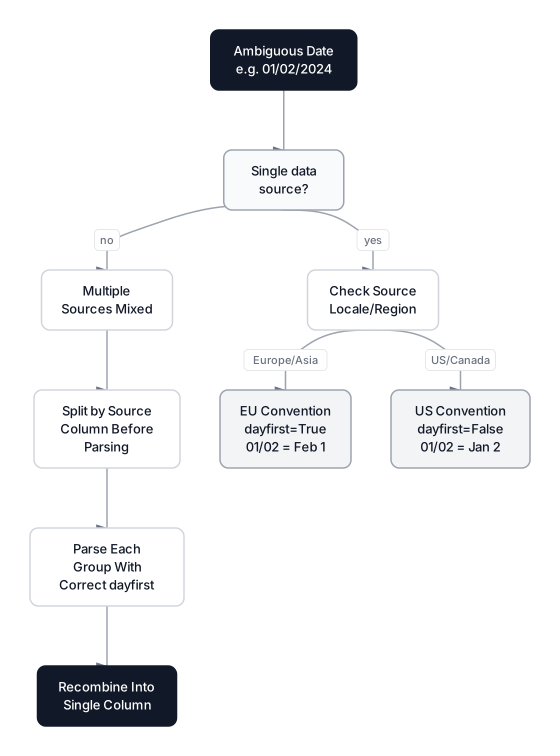 Click to expandDecision tree for resolving ambiguous date formats based on data source locale
The dayfirst parameter in pd.to_datetime() controls how pandas interprets ambiguous dates:
Expected Output:
       raw dayfirst=False (US) dayfirst=True (EU)
01/02/2024    January 02, 2024  February 01, 2024
03/04/2024      March 04, 2024     April 03, 2024
05/06/2024        May 06, 2024      June 05, 2024
Every single row produces a different date depending on the setting. If your transaction data comes from a US payment processor, dayfirst=False is correct. If it comes from a European system, you need dayfirst=True.
Common Pitfall: Never mix US and EU dates in the same column without a secondary indicator. If your CSV combines data from New York and London offices, split the rows by office first, parse each group with the correct dayfirst setting, then recombine. Guessing wrong on 100,000 rows means silently corrupting thousands of dates.
When dayfirst Is Not Enough
Some datasets contain dates where day and month values exceed 12, making them unambiguous. 15/04/2024 can only be April 15th because there is no 15th month. But 01/02/2024 remains ambiguous. A practical heuristic: if any date in your column has a first number greater than 12, the column is day-first. If any has a second number greater than 12, it is month-first. If neither exceeds 12, you need metadata from the data source.
Timezone Handling: Naive vs. Aware Timestamps
A timezone determines the absolute point in time a timestamp represents. The string 2024-03-15 14:00:00 means 2 PM, but 2 PM where? Without a timezone, comparing timestamps from different sources is meaningless. Pandas distinguishes between two types:
- Naive timestamps have no timezone information. This is the default when you parse dates.
- Aware timestamps include a UTC offset (like
-04:00for US Eastern).
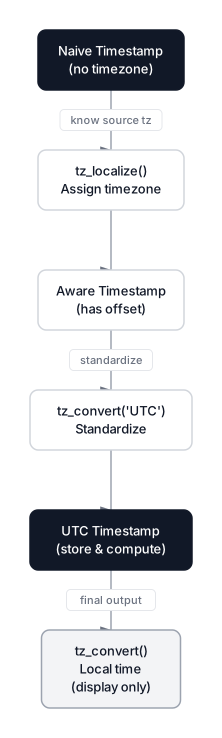 Click to expandTimezone conversion flow from naive to aware to UTC for storage and back to local for display
The golden rule of timestamp engineering: store and process everything in UTC; convert to local time only for display.
Expected Output:
Naive:    2024-03-15 14:00:00
New York: 2024-03-15 14:00:00-04:00
UTC:      2024-03-15 18:00:00+00:00
London:   2024-03-15 18:00:00+00:00
Tokyo:    2024-03-16 03:00:00+09:00

All represent the same instant:
NY unix:     1710525600.0
UTC unix:    1710525600.0
Tokyo unix:  1710525600.0
Notice that tz_localize() asserts a timezone for a naive timestamp ("this was recorded in New York"), while tz_convert() recalculates what time it is in another zone. The Unix timestamps are identical because all four represent the same physical moment.
The Daylight Saving Time Edge Case
On March 10, 2024, clocks in the US Eastern timezone sprang forward from 2:00 AM to 3:00 AM. The time 02:30 AM simply did not exist that day. Trying to localize a nonexistent time raises an error unless you handle it explicitly:
Expected Output:
Error: NonExistentTimeError: 2024-03-10 02:30:00
With nonexistent='shift_forward': 2024-03-10 03:00:00-04:00
The nonexistent='shift_forward' parameter pushes the time to the next valid instant. The ambiguous parameter handles the reverse problem in autumn when clocks fall back and the same time occurs twice. In production data pipelines, always set both parameters to avoid crashes during DST transitions.
dateutil: The Flexible Alternative
The python-dateutil library (version 2.9.0, bundled with pandas) provides dateutil.parser.parse(), which handles natural language dates that even format='mixed' struggles with. It parses ordinals ("25th"), weekday names, and various separator styles without any format specification.
Expected Output:
  March 25, 2024                 -> 2024-03-25 00:00
  25th of March, 2024            -> 2024-03-25 00:00
  Mar 25 2024 3:30 PM            -> 2024-03-25 15:30
  2024-03-25T15:30:00            -> 2024-03-25 15:30
The downside is speed. dateutil.parser.parse() processes one string at a time and is roughly 10-50x slower than vectorized pd.to_datetime() with an explicit format. Use it as a fallback for the handful of rows that format='mixed' cannot handle, not as your primary parser.
When to Use Each Parsing Approach
Choosing the right tool depends on your data uniformity and scale. Here is a decision framework:
| Scenario | Approach | Why |
|---|---|---|
| All dates in one format | pd.to_datetime(col, format='%Y-%m-%d') | Fastest, strictest, catches violations |
| All ISO 8601 with varying precision | pd.to_datetime(col, format='ISO8601') | Optimized fast path in pandas 3.0 |
| Multiple string formats mixed | pd.to_datetime(col, format='mixed', errors='coerce') | Per-element inference, handles most patterns |
| Unix timestamps mixed with strings | Separate with pd.to_numeric first | Numeric and string parsing have different APIs |
| Natural language ("25th of March") | dateutil.parser.parse() via .apply() | Most flexible, but 10-50x slower |
| Production pipeline, millions of rows | Explicit format per source system | Fastest and safest at scale |
Key Insight: The best date parsing code is code that never needs format='mixed'. If you control the data sources, enforce ISO 8601 at ingestion. If you inherit messy data, clean it once and store the result in a standardized format. The three-step pipeline is a recovery tool, not a permanent architecture.
Cyclical Feature Engineering for Dates
Machine learning models treat month numbers as continuous values. If you feed a model month=1 (January) and month=12 (December), it calculates the distance as $|12 - 1| = 11$. In reality, January and December are adjacent, separated by a single day. The same problem applies to hours (23:00 is close to 00:00), days of the week (Sunday is next to Monday), and calendar quarters.
The fix is cyclical encoding: map each time component onto a circle using sine and cosine.
Where:
- is the current time value (e.g., month number 1 through 12)
- is the period length (e.g., 12 for months, 24 for hours, 7 for weekdays)
- and produce coordinates on a unit circle
- Both components are needed because alone cannot distinguish month 2 from month 10
In Plain English: Think of a clock face. Instead of numbering months 1 through 12 on a straight line, you place them around a circle. Sine gives the vertical position and cosine gives the horizontal position. January (month 1) and December (month 12) end up right next to each other on the circle, which is exactly how time works. A model using these features correctly learns that late-December behavior is similar to early-January behavior.
Expected Output:
 month    sin    cos
     1  0.500  0.866
     2  0.866  0.500
     3  1.000  0.000
     4  0.866 -0.500
     5  0.500 -0.866
     6  0.000 -1.000
     7 -0.500 -0.866
     8 -0.866 -0.500
     9 -1.000 -0.000
    10 -0.866  0.500
    11 -0.500  0.866
    12 -0.000  1.000

Euclidean distance (Jan vs Dec, cyclical): 0.5176
Euclidean distance (Jan vs Dec, raw ints):  11
With cyclical encoding, January and December are 0.52 apart instead of 11. That is the difference between a model that learns seasonal patterns correctly and one that treats year boundaries as discontinuities. This technique is covered in greater depth in the Feature Engineering Guide.
Production Considerations at Scale
Performance by Method
| Method | 100K rows | 1M rows | Notes |
|---|---|---|---|
Explicit format (format='%Y-%m-%d') | ~50 ms | ~500 ms | Fastest; use when format is known |
format='ISO8601' | ~60 ms | ~600 ms | Fast path for ISO variants |
format='mixed' | ~200 ms | ~2 s | Per-element inference overhead |
dateutil.parser.parse via .apply() | ~3 s | ~30 s | Avoid at scale; use as targeted fallback |
These benchmarks are approximate and vary by hardware. The key takeaway: explicit formats are an order of magnitude faster than flexible parsing. In production ETL, parse each source system's dates with an explicit format and reserve format='mixed' for ad-hoc analysis.
Memory: datetime64 Resolution in Pandas 3.0
Pandas 3.0 changed the default datetime resolution from nanoseconds (datetime64[ns]) to microseconds (datetime64[us]). Both use 8 bytes per value, but microsecond resolution extends the representable range from 1678-2262 to approximately 290,000 BC-290,000 AD. If you work with historical data or far-future projections, this matters.
Common Deployment Pitfalls
- Assuming UTC. If your database stores naive timestamps and your application assumes UTC, every query from a non-UTC timezone returns wrong results.
- Parsing at query time. Parse dates once during ETL, not on every dashboard refresh. Store results as proper
TIMESTAMP WITH TIME ZONEin your database. - Ignoring DST transitions. A 24-hour window starting at midnight on a DST transition day contains 23 or 25 hours, not 24. Aggregations by calendar day can miss or double-count data.
Conclusion
Messy dates boil down to three problems: format inconsistency, locale ambiguity, and missing timezone context. The three-step pipeline shown throughout this article handles all three: separate Unix timestamps with pd.to_numeric(), parse string dates with format='mixed', and report failures as NaT. For production workloads, replace format='mixed' with explicit format strings for each data source and store everything in UTC.
The dayfirst parameter deserves special attention because it produces valid-looking but silently wrong results. Any time you process dates from international sources, check the source locale before parsing. When building ML features from cleaned dates, use cyclical sine/cosine encoding so your model treats December and January as neighbors rather than endpoints of a number line.
For the next steps in your data preparation workflow, the Data Cleaning Workflow covers the full pipeline beyond dates, including missing values, duplicates, and type coercion. If your cleaned dates feed into time series analysis, Time Series Fundamentals covers trends, seasonality, and stationarity testing. And when you need to transform your cleaned data into compelling visualizations, Data Storytelling shows how to turn timestamps into narratives that drive decisions.
Frequently Asked Interview Questions
Q: A CSV column contains dates in five different string formats plus Unix timestamps. How do you parse it into a single datetime column?
Separate the problem into two passes. First, use pd.to_numeric(col, errors='coerce') to identify numeric rows (Unix timestamps), then parse them with pd.to_datetime(numeric_vals, unit='s'). For the remaining string rows, use pd.to_datetime(string_vals, format='mixed', errors='coerce'). Combine the results and investigate any NaT values left over.
Q: What is the difference between tz_localize() and tz_convert() in pandas?
tz_localize() assigns a timezone to a naive (timezone-unaware) timestamp without changing the clock time. It says "this timestamp was recorded in this timezone." tz_convert() recalculates the clock time for an already-aware timestamp into a different timezone. You must localize before you can convert.
Q: The string 01/02/2024 appears in your dataset. How do you determine whether it means January 2nd or February 1st?
Check the data source documentation or metadata for locale information. If unavailable, look for unambiguous dates in the same column where the first number exceeds 12 (like 15/04/2024), which confirms day-first ordering. If all values have both numbers below 13, you cannot determine the format from the data alone and need external confirmation.
Q: Why should you store timestamps in UTC rather than local time?
UTC avoids two problems: daylight saving time transitions (where local time jumps forward or back, creating gaps or duplicates) and cross-timezone comparisons (where "3 PM" means different absolute moments in different cities). Storing in UTC gives every timestamp a single unambiguous meaning, and you only convert to local time for user-facing display.
Q: A model trained on month numbers (1-12) performs poorly at year boundaries. What is the likely cause and fix?
The model treats months as linear integers, so it sees December (12) and January (1) as maximally distant when they are actually adjacent. The fix is cyclical encoding: compute sin(2 * pi * month / 12) and cos(2 * pi * month / 12) as two features. This maps months onto a circle where December and January are neighbors.
Q: Your ETL pipeline parses dates correctly in development but produces NaT values in production after upgrading pandas. What changed?
Pandas 3.0 (January 2026) made format inference stricter by default. Code that relied on lenient parsing in pandas 1.x or 2.x now rejects formats it previously accepted. The fix is to add format='mixed' for flexible parsing or, better, specify explicit format strings for each data source.
Q: How do you handle a DST "spring forward" gap where your data contains timestamps like 02:30 AM on March 10, 2024?
That time does not exist in the US Eastern timezone. Calling tz_localize('America/New_York') raises a ValueError. Use the nonexistent parameter: tz_localize('America/New_York', nonexistent='shift_forward') pushes the timestamp to the next valid instant (3:00 AM), or nonexistent='NaT' marks it as missing for investigation.
Hands-On Practice
Date parsing is often the most frustrating part of data cleaning. A single column can contain ISO formats ('2023-01-01'), US formats ('01/02/2023'), text ('Jan 1st'), and raw Unix timestamps (1672531200) mixed together. We'll use Python and Pandas to clean a messy dataset, handle mixed data types (strings vs. numbers), and transform dates into cyclical features (Sine/Cosine) suitable for machine learning.
Dataset: Customer Data (Data Wrangling) Intentionally messy customer dataset with 1050 rows designed for data wrangling tutorials. Contains missing values (MCAR, MAR, MNAR patterns), exact/near duplicates, messy date formats, inconsistent categories with typos, mixed data types, and outliers. Includes clean reference columns for validation.
Separating Unix timestamps from formatted strings lets the workflow parse each representation explicitly before combining the results. Encoding month with sine and cosine features preserves its cyclical structure, so December and January remain adjacent rather than distant integers.