
A data cleaning pipeline separates professionals from amateurs. Amateurs open a CSV, eyeball a few rows, call .dropna(), and wonder why their model produces garbage three weeks later. Professionals treat data cleaning as engineering: profile the dataset, fix structural problems first, standardize content, handle gaps deliberately, then validate everything before a single row touches a model.
The workflow is straightforward: profile, deduplicate, standardize, fix types, handle missing values, validate. Skip a step and you pay for it later. Clean them in the wrong order and you create new problems while fixing old ones. This guide walks through all six stages using a single messy e-commerce orders dataset, from the first .info() call to a validated DataFrame ready for feature engineering.
 Click to expandData cleaning pipeline from raw input through six stages to validated output
The Running Example: Messy E-Commerce Orders
Every cleaning concept in this article uses one dataset so you can track how each step transforms the same rows. This synthetic DataFrame mirrors real problems you would find merging records from a web app, a CRM export, and a legacy CSV: mixed date formats, currency symbols jammed into numbers, inconsistent casing, a duplicate row, and scattered nulls.
Expected Output:
Shape: (13, 6)
   order_id   customer_name       category    order_date   amount  rating
0  ORD-1001   Alice Johnson    Electronics    2025-01-15   $49.99     4.5
1  ORD-1002       bob smith    electronics    01/22/2025   129.50     3.0
2  ORD-1003  CAROL WILLIAMS           Elec  Jan 30, 2025  $299.00     NaN
3  ORD-1004    dave  brown        Clothing    2025-02-05    15.75     5.0
4  ORD-1005       Eve Davis       clothing    02/14/2025   $89.99     2.5
5  ORD-1006    Frank Miller       CLOTHING  Feb 20, 2025    42.00     NaN
6  ORD-1007    grace wilson  Home & Garden    2025-03-01  $199.99     4.0
7  ORD-1008      HANK MOORE  home & garden    03/10/2025     7.50     1.0
Row 0 and row 8 are the same order. "Electronics", "electronics", and "Elec" all mean the same category. The amount column mixes strings like "$49.99" with bare numbers like "129.50". Row 11 has a null customer name, null date, and null amount. These are not edge cases; this is what real data looks like before anyone touches it.
Step 1: Profile Before You Touch Anything
Data profiling is the diagnostic phase where you measure the damage before prescribing treatment. Jumping straight to cleaning without profiling is like prescribing medication before running blood work. For a thorough profiling toolkit, see Data Profiling: The 10-Minute Reality Check Your Dataset Needs.
Expected Output:
Null counts per column:
order_id         0
customer_name    1
category         1
order_date       1
amount           1
rating           3
dtype: int64

Duplicate rows: 1

Category variants: ['Electronics', 'electronics', 'Elec', 'Clothing', 'clothing', 'CLOTHING', 'Home & Garden', 'home & garden', 'Books', 'books']
Amount dtype: object
That profile reveals five problems in under a second: one full duplicate row, nulls scattered across five columns, 10 string variants for just 4 real categories, and the amount column stored as str instead of float. Now you know exactly what to fix and in what order.
Key Insight: The str dtype on amount is the smoking gun. Any arithmetic on that column (mean, median, sum) either throws an error or silently returns nonsense. Profiling exposes these silent type mismatches before they corrupt downstream calculations.
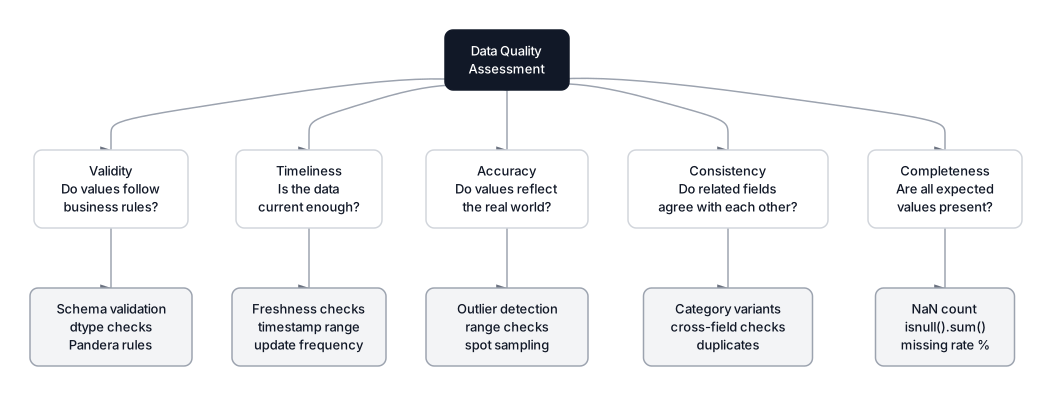 Click to expandData quality dimensions: completeness, consistency, accuracy, timeliness, and validity
Step 2: Remove Duplicates
Deduplication comes first because every downstream step (counting nulls, computing medians, training models) produces wrong numbers if duplicates inflate the dataset. In our e-commerce data, row 8 is an exact copy of row 0. If both enter a churn model, you have leaked information and given that customer twice the weight during training.
Expected Output:
Rows before: 13
Rows after:  12
Removed:     1 duplicate(s)
Common Pitfall: drop_duplicates() only catches exact row matches. If two records represent the same transaction but differ by a trailing space in the customer name, they survive this step. That is why you standardize strings after dedup for exact matches, and consider fuzzy matching for near-duplicates in production.
| Duplicate Type | Detection Method | When to Use |
|---|---|---|
| Exact match | df.drop_duplicates() | Default first pass |
| Subset match | df.drop_duplicates(subset=['order_id']) | One column is the unique key |
| Near-duplicate | Fuzzy matching (Levenshtein, Jaccard) | Typos, spacing variants, abbreviations |
Step 3: Standardize Text and Categories
Inconsistent strings are the most common data quality issue in production datasets. "Electronics", "electronics", and "Elec" should be one category. Without standardization, your model treats these as three separate features after categorical encoding, diluting the signal from each.
The fix has two parts: normalize casing and whitespace first, then map abbreviations and typos to canonical values.
Expected Output:
Names after cleanup:
['Alice Johnson', 'Bob Smith', 'Carol Williams', 'Dave Brown', 'Eve Davis', 'Frank Miller', 'Grace Wilson', 'Hank Moore', 'Iris Taylor', 'Jack Anderson', 'Eve Davis']

Category value counts:
category
Electronics      4
Clothing         3
Home & Garden    2
Books            2
Name: count, dtype: int64
Notice " dave brown " (leading space, double internal space) becomes "Dave Brown". The regex \s+ collapses any run of whitespace into a single space, and .strip() removes leading and trailing spaces. The category_map dictionary handles the abbreviation "Elec" that .title() alone cannot fix.
In production datasets with hundreds of variants, manual mapping does not scale. The Fuzzy Matching Guide covers how to automate this with libraries like thefuzz and recordlinkage. For text-heavy columns that need more than casing fixes, see Mastering Text Preprocessing.
Pro Tip: After cleaning, convert low-cardinality string columns to the pandas category dtype. A column with 1 million rows but only 4 unique categories stores just 4 strings plus an integer index instead of 1 million full strings. Memory usage drops by 90% or more.
Step 4: Fix Data Types
Type errors are silent killers. An amount column stored as strings means df['amount'].mean() either throws an error or returns nonsense. A date column stored as strings means you cannot sort chronologically, compute time deltas, or extract month/year features for your model.
Expected Output:
Before: object
After:  float64
Mean:   $115.50
Median: $64.25

Date dtype: datetime64[ns]
Range: 2025-01-15 00:00:00 to 2025-04-01 00:00:00
Missing dates: 1
In Plain English: The regex [$,] matches any dollar sign or comma character. str.replace swaps every match with an empty string, turning "$49.99" into "49.99" and "1,250.00" into "1250.00". Then pd.to_numeric converts the clean string to a float. The errors='coerce' parameter is the safety valve: when pandas encounters a value it cannot convert (like None), it writes NaN instead of crashing the pipeline. The same logic applies to pd.to_datetime with format='mixed', which tells pandas to try each row's format individually rather than expecting a single format across the column.
For the full deep dive into ambiguous dates, Unix timestamps, and timezone handling, see Mastering Messy Dates in Python.
Step 5: Handle Missing Values
Missing data handling is not a single decision. Different columns call for different strategies depending on why the data is missing and how you plan to use that column. The statistical literature defines three mechanisms, and knowing which one applies dictates the right response.
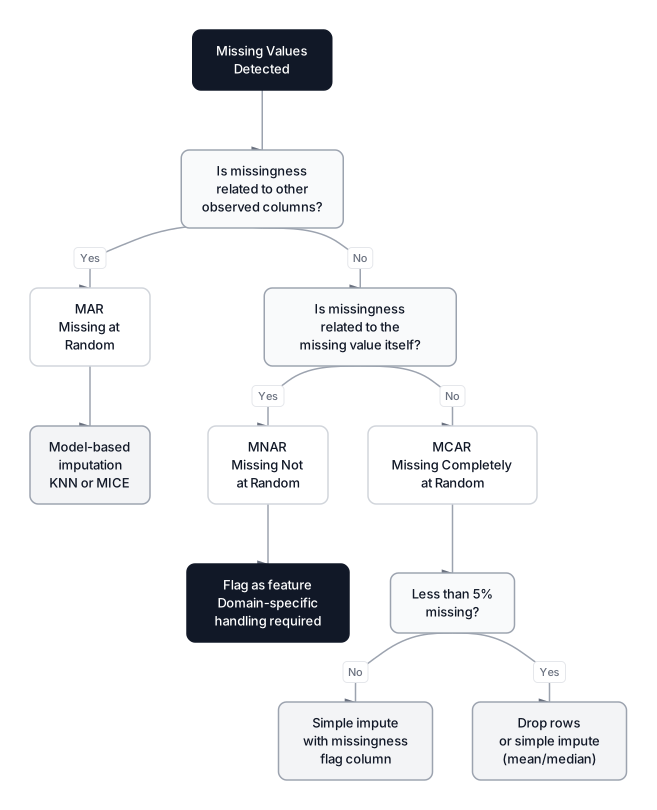 Click to expandDecision guide for handling missing data based on MCAR, MAR, and MNAR mechanisms
| Mechanism | Definition | Example | Recommended Strategy |
|---|---|---|---|
| MCAR (Missing Completely at Random) | Missingness is unrelated to any variable | Sensor battery dies randomly | Drop rows or simple imputation |
| MAR (Missing at Random) | Missingness depends on observed columns | High-income users skip the "income" field | Model-based imputation (KNN, MICE) |
| MNAR (Missing Not at Random) | Missingness depends on the missing value itself | Low ratings are more likely to be left blank | Flag missingness as a feature; domain-specific handling |
| Strategy | When to Use | Trade-off |
|---|---|---|
| Drop rows | Missingness is random, less than 5% of data | Loses information |
| Fill with median | Numeric column, moderate missing rate | Preserves distribution center, distorts variance |
| Fill with mode | Categorical column | May overrepresent the dominant category |
| Flag + fill | Missingness itself is informative | Adds a column, increases dimensionality |
| Model-based (KNN/MICE) | Missingness depends on other columns | Slower, more accurate |
For our e-commerce dataset, amount and rating are numeric with few missing values, so median imputation works. The customer_name and category nulls cannot be meaningfully imputed, so dropping those rows is the correct call.
Expected Output:
Missing values before:
customer_name    1
category         1
amount           1
rating           3
dtype: int64

Filled amount NaN with median: $64.25
Filled rating NaN with median: 3.5
Dropped rows with null name or category

Missing values after:
customer_name    0
category         0
amount           0
rating           0
dtype: int64

Final shape: (10, 4)
For advanced imputation techniques like KNN imputation or MICE (Multiple Imputation by Chained Equations), see Missing Data Strategies.
Common Pitfall: Filling missing values before splitting into train/test sets causes data leakage. The median of the full dataset includes information from the test set. Always fit your imputer on the training set only, then transform both sets with imputer.fit_transform(X_train) and imputer.transform(X_test).
Step 6: Validate the Cleaned Output
Cleaning without validation is like editing code without running tests. The data might look correct (right types, no NaNs) but still contain logically impossible values. A rating of 6.0 on a 1-to-5 scale, a negative order amount, or a date from the year 1900 caused by a parsing misfire all survive type conversion just fine.
Expected Output:
  All amounts positive: PASS
  Ratings in [1.0, 5.0]: PASS
  No null dates: PASS
  No null names: PASS
  Dates in expected range: PASS

Final dtypes:
customer_name            object
category                 object
amount                  float64
rating                  float64
order_date       datetime64[ns]
dtype: object
For production pipelines, Python assert statements work for quick scripts but get stripped when running with the -O flag. Libraries like Pandera and Great Expectations provide schema-level validation that logs failures, generates reports, and integrates with orchestration tools like Airflow and Dagster.
Pro Tip: Great Expectations has become the standard for data quality validation in production pipelines as of 2026. It automates validation and generates shareable HTML reports showing exactly which expectations passed and failed on each data refresh.
When to Clean, When to Impute, and When to Drop
This six-step workflow fits most tabular data cleaning scenarios. But not every situation needs the full treatment, and not every problem has the same solution.
| Scenario | Recommendation |
|---|---|
| One-off exploratory analysis | Steps 1 through 3 are usually enough |
| Recurring data pipeline | Automate all six steps; add schema validation |
| Streaming or real-time data | Validate per-record on arrival; batch dedup periodically |
| Text-heavy datasets (NLP) | Add a dedicated text preprocessing stage |
| Time-series data | Sort by timestamp first; be careful imputing across time gaps |
| Datasets with more than 50% missing | Re-evaluate the data source before investing in cleaning |
When deciding between cleaning, imputing, and dropping:
- Clean when the underlying value exists but is recorded wrong (casing, formatting, abbreviations). The real data is there; it just needs normalization.
- Impute when the value is genuinely absent but you can estimate it from other columns or rows. Median imputation preserves the distribution center. KNN or MICE captures relationships between features. Always fit on training data only.
- Drop when the missing rate is low (under 5%), the missingness is random, and losing a few rows will not bias the sample. Also drop when a value simply cannot be estimated (a missing customer name, for example).
Key Insight: Cleaning code should live in functions or a pipeline class, not scattered across notebook cells. When the next data drop arrives in three months, you want clean_orders(df) to run in one call, not a 40-cell notebook you hope still works.
Production Scaling Considerations
For datasets under 1 million rows, pandas handles the entire workflow in seconds. Beyond that, watch for these bottlenecks:
- String operations (
str.replace,str.strip) process each cell as a Python object. On 10M rows, a singlestr.replace()call takes 5 seconds or more. pd.to_datetimewithformat='mixed'infers each row's format individually. Specifyformat=explicitly when your dates follow one pattern; it runs 10x faster than mixed-format inference.- Deduplication on wide DataFrames hashes every column per row. If the unique key is just
order_id, passsubset=['order_id']to skip hashing the other columns. - Memory: pandas stores strings as Python objects at 50 to 100 bytes per cell. A 10M-row city column eats 500MB to 1GB of RAM. Converting cleaned low-cardinality columns to
pd.Categoricalcuts this by 90%. - Alternatives: For pipelines above 10M rows, Polars processes string columns 3 to 5x faster than pandas on the same hardware, with lazy evaluation that avoids intermediate copies.
Conclusion
Data cleaning follows a predictable sequence: profile, deduplicate, standardize, fix types, handle gaps, validate. Every shortcut in this pipeline shows up later as a silent model bug or a wrong business metric. The e-commerce orders dataset we cleaned went from 13 messy rows with mixed types and duplicates to 10 validated rows with correct dtypes, consistent categories, and zero nulls.
The most important habit is making the pipeline reproducible. A notebook cell that runs df['category'] = df['category'].str.title() once is useless the moment your data source adds a new abbreviation. Codify every cleaning step, add assertions, and run the pipeline on every data refresh. For the next step in your data preparation, Outlier Detection shows when to remove, cap, or keep extreme values. And when you are ready to turn clean columns into powerful model signals, Data Profiling ensures you are not misinterpreting your distributions before feature engineering begins.
Build the pipeline once. Run it on every data drop. Your models will thank you.
Interview Questions
Q: Walk me through your data cleaning workflow for a new dataset.
I start by profiling: check shape, dtypes, null counts, duplicates, and value distributions. Then I fix structural issues (duplicates, column names) before content issues (inconsistent categories, mixed types). Missing values get handled based on the mechanism (MCAR, MAR, MNAR) and the column's role in the model. Finally, I validate that all business rules hold before the data enters any downstream process.
Q: How do you decide between dropping and imputing missing values?
It depends on three factors: the percentage missing, the missingness mechanism, and the column's importance. If less than 5% of a non-critical column is missing at random, dropping is fine. For key features with patterned missingness (like income being missing more often for younger users), model-based imputation like KNN or MICE preserves the relationship between columns. I also create a binary "was_missing" flag when missingness itself might carry a signal.
Q: What is the risk of imputing before splitting into train and test sets?
Data leakage. The imputation statistics (mean, median) end up computed using test set observations, which means your model indirectly sees test data during training. The fix is to fit the imputer on the training set only, then use transform() on the test set with those same fitted statistics.
Q: How would you handle a categorical column with 500 misspelled variants of 20 real categories?
First, normalize casing and whitespace. That usually collapses 500 variants to around 100. Then use fuzzy string matching (Levenshtein distance) to group similar strings and map them to canonical values. For extreme cases, clustering TF-IDF vectors of category names can automate the grouping. The final mapping dictionary should be reviewed by a domain expert before deploying to production.
Q: Your pipeline processes 50 million rows daily and one corrupt file crashes it. How do you prevent that?
Row-by-row validation with error capture. Each record passes through schema checks (Pandera or Great Expectations), and failures get routed to a dead-letter queue rather than killing the pipeline. Valid records continue through. I would also add upstream checks: file-level validation for expected columns, approximate row count, and file size before parsing starts.
Q: What is the difference between structural and content data quality issues?
Structural issues affect the DataFrame itself: wrong column names, wrong dtypes, duplicate rows, inconsistent schemas across files. Content issues live inside cells: misspelled categories, mixed date formats, outliers, logically impossible values. Fix structural issues first because content cleaning depends on having the correct structure in place.
Q: When would you NOT clean the data and instead go back to the source?
When more than half the rows have critical columns missing, when the schema changes between files with no documentation, or when values are clearly from a different domain (a table of customer orders filled with temperature readings). At that point, cleaning is a waste of time. The right move is to talk to the data engineering team or the upstream system owner to fix the data at the source.
Hands-On Practice
In this interactive tutorial, we will implement the data cleaning pipeline described in the article. We'll start with a raw dataset containing common real-world issues: inconsistent string formatting, currency symbols in numerical columns, and mixed date formats.
We will programmatically clean these features using Pandas, handle missing values, and finally train an XGBoost classifier to demonstrate how clean data enables machine learning models to function correctly.
Dataset: Customer Data (Data Wrangling) Intentionally messy customer dataset with 1050 rows designed for data wrangling tutorials. Contains missing values (MCAR, MAR, MNAR patterns), exact/near duplicates, messy date formats, inconsistent categories with typos, mixed data types, and outliers. Includes clean reference columns for validation.
By systematically cleaning the data, we transformed raw text and inconsistent formats into usable numerical features. The 'income' column was successfully parsed from strings like '$72,000' to floats, and categorical variations in 'city' were unified. This process allows algorithms like XGBoost to ingest the data without errors and identify the most important predictors, such as income and age, as shown in the feature importance plot.