
A five-row preview can hide defects elsewhere in a large dataset. A full profile should check sentinel values, ranges, missingness, and distribution shifts before expensive training begins.
Data profiling is the mechanical inspection you run before writing a single line of modeling code. Think of it like buying a used car: you wouldn't hand over the cash after a quick glance at the paint. You'd check the mileage, look under the hood, and ask about that suspicious rattle coming from the engine. Profiling does the same thing for your dataset, examining structure, statistical health, and hidden relationships to catch problems that .head() will never show you.
We'll build a complete profiling workflow using one consistent example: a messy used car dataset with sentinel values, mixed types, label fragmentation, and disguised missing data. Every code block and formula maps back to this same dataset.
The Three Pillars of Data Profiling
Data profiling is the systematic technical analysis of a dataset's structure, quality, and content before any modeling begins. Unlike exploratory data analysis, which hunts for business insights and visual patterns, profiling focuses on metadata hygiene and schema correctness. It answers one question: "Is this data what I think it is?"
A thorough profile examines three dimensions. Skip any one of them, and you leave a blind spot in your pipeline.
 Click to expandThree pillars of data profiling: structure discovery, content analysis, and relationship detection
Structure Discovery checks the skeleton. Are your dates actually datetime64 objects or strings? Does the price column contain numeric values or has someone mixed in the word "Missing"? How many nulls exist, and do they cluster in specific rows?
Content Analysis examines the flesh. What do the distributions look like? Are the min/max values physically plausible? Is a feature so skewed that it needs transformation before modeling? How many unique values does each categorical column have?
Relationship Detection maps the nerves. Which features correlate strongly enough to be redundant? Are there functional dependencies (if country equals "USA", is currency always "USD")? Do exact duplicates exist?
In Plain English: Profiling is a medical checkup (blood pressure, heart rate, weight), while EDA is the doctor asking "where does it hurt?" You need the checkup numbers to interpret the symptoms.
Structure Discovery
Structure discovery validates that your data's format matches your expectations. This is where you catch type mismatches, null patterns, and schema violations that would crash a model downstream.
Here's the used car dataset. It's intentionally messy: sentinel values in mileage, string "Missing" markers in price, inconsistent capitalization in color, and injected duplicate rows.
Shape: (208, 7)
Memory: 44.3 KB

Data Types:
car_id       int64
year         int64
mileage      int64
price          str
color          str
fuel_type      str
engine_hp    int64

Null Counts (non-zero only):
fuel_type    22

Exact duplicate rows: 8

Red Flags Found:
  Mileage has 9 sentinel values (-999)
  Price has 13 string 'Missing' values
  Engine HP has 18 suspicious zeros
  Price column dtype: str (should be numeric)
Four distinct problems surface in under a second. The price column is stored as a string because someone mixed "Missing" markers into numeric data. Mileage contains -999 sentinel values that would drag every statistical summary into nonsense territory. Engine HP has 18 zeros that might be legitimate (electric vehicles?) or disguised nulls. And fuel_type has 22 genuine NaN values.
Common Pitfall: Profiling tools count NaN nulls, but they don't detect "logical nulls." A column with zero NaN entries can still be full of -999, 0, "N/A", or "Unknown" values that function identically to missing data. Always check histograms for suspicious spikes at boundary values.
Pro Tip: In pandas 3.0 (February 2026), the default string dtype is Arrow-backed (str instead of object). This is more memory-efficient and faster for string operations, but it also means .select_dtypes(include=['object']) no longer catches string columns. Use .select_dtypes(include=['string']) or check pd.api.types.is_string_dtype() instead.
Content Analysis
Content analysis moves beyond schema checks into statistical profiling. This is where you measure distributions, spot outliers, and quantify spread to determine whether your features carry enough signal for modeling.
The most important metric here is standard deviation (), which measures how far data points typically sit from the mean.
Where:
- is an individual data point (e.g., one car's mileage)
- is the mean of all values in the column
- is the total number of observations
- squares the distance so negative and positive deviations don't cancel out
- The square root brings units back to the original scale (miles, not "squared miles")
In Plain English: Standard deviation asks, "On average, how far is each car's mileage from the fleet average?" If is huge, you've got everything from barely-driven weekend cars to cross-country haulers. If it's near zero, the column is almost constant and probably useless for prediction.
Beyond spread, two distribution shape metrics appear in every profiling report:
Skewness measures asymmetry. Our mileage column is right-skewed because most cars cluster at lower mileage while a few high-mileage outliers create a long right tail.
Kurtosis measures tail heaviness, essentially an outlier detector condensed into one number.
Where:
- is an individual data point
- is the mean and is the standard deviation
- The fourth power aggressively amplifies extreme values ( but )
- Subtracting 3 sets a normal distribution to kurtosis of 0 (called "excess kurtosis")
In Plain English: High kurtosis on our mileage column means "expect the unexpected." A few cars with 150,000+ miles are pulling the tails far from the center. This warns you: outlier-sensitive models like linear regression will be disproportionately influenced by those extreme values.
--- Statistical Profile (clean values only) ---

mileage:
  Mean:         42,453.2
  Median:       37,606.0
  Std Dev:      26,216.0
  Skewness:        2.045
  Kurtosis:        6.230
  Min:             7,541
  Max:           185,739

engine_hp:
  Mean:            197.1
  Median:          196.0
  Std Dev:          49.9
  Skewness:        0.272
  Kurtosis:       -0.145
  Min:                76
  Max:               353

--- Skewness Interpretation ---
Mileage skewness = 2.045
  Highly right-skewed: most cars cluster at lower mileage
  with a long tail of high-mileage vehicles.
  Consider log transform before modeling.

--- Cardinality Check ---
Raw unique colors: 8
color
Silver     31
White      30
silver     30
Blue       30
Red        24
Black      23
black      21
WHITE      19

After normalization: 5
color
silver    61
white     49
black     44
blue      30
red       24
The mileage column has a skewness of 2.045, which is highly right-skewed. A log transform would compress that long tail and bring the distribution closer to normal. Engine HP, by contrast, is nearly symmetric (skewness 0.272) and needs no transformation.
The cardinality check reveals label fragmentation: "Black", "black", "White", "WHITE", and "silver " (with a trailing space) are treated as separate categories. After normalizing case and stripping whitespace, 8 apparent colors collapse to 5 actual colors. A model trained on the raw column would split signal across fragmented labels, weakening every prediction.
Key Insight: If a categorical column has nearly as many unique values as rows, it's probably an ID column or needs special encoding (hash encoding or target encoding). A column like car_id with 200 unique values across 200 rows carries zero generalizable signal.
Relationship Detection
Relationship detection reveals how columns interact: correlations that signal redundancy, dependencies that encode business rules, and duplicate rows that inflate metrics.
--- Correlation Matrix ---
            year  mileage  engine_hp  price
year       1.000   -0.971      0.006  0.858
mileage   -0.971    1.000      0.004 -0.836
engine_hp  0.006    0.004      1.000  0.329
price      0.858   -0.836      0.329  1.000

--- Key Correlations with Price ---
  year        : +0.858 (Strong positive)
  mileage     : -0.836 (Strong negative)
  engine_hp   : +0.329 (Moderate positive)

--- Near-Duplicate Column Check ---
  year <-> mileage: -0.971 (consider dropping one)
  year <-> price: 0.858 (consider dropping one)
  mileage <-> price: -0.836 (consider dropping one)

--- Duplicate Analysis ---
Total rows: 205
Exact duplicates: 5
Unique rows: 200
The correlation between year and mileage is -0.971. This makes sense: newer cars have fewer miles. But feeding both into a linear model creates severe multicollinearity. You'd keep one and drop the other, or combine them into a single "age-adjusted mileage" feature.
The engine_hp to price correlation of 0.329 is moderate. This is genuinely useful signal, not redundancy. Keep it.
Pro Tip: Pearson correlation only captures linear relationships. Two features with a Pearson near zero might have a strong nonlinear relationship. Always plot suspicious pairs as scatterplots before concluding they're independent. Spearman rank correlation catches monotonic nonlinear patterns that Pearson misses entirely.
| Check | What It Catches | Action |
|---|---|---|
| $|r| > 0.9$ | Near-duplicate columns | Drop one, or combine |
| $|r| > 0.7$ with target | Strong predictors | Keep, but verify causal direction |
| $|r| > 0.7$ between features | Multicollinearity | Drop one for linear models |
| Exact duplicate rows | Data collection errors | Deduplicate before splitting |
| Functional dependencies | Business rule violations | Validate with domain expert |
Automating Profiling at Scale
Manual profiling builds intuition, but it doesn't scale. When you're ingesting 50 tables with 200 columns each, you need automation. The Python ecosystem offers excellent tools for this, each suited to different stages of the pipeline.
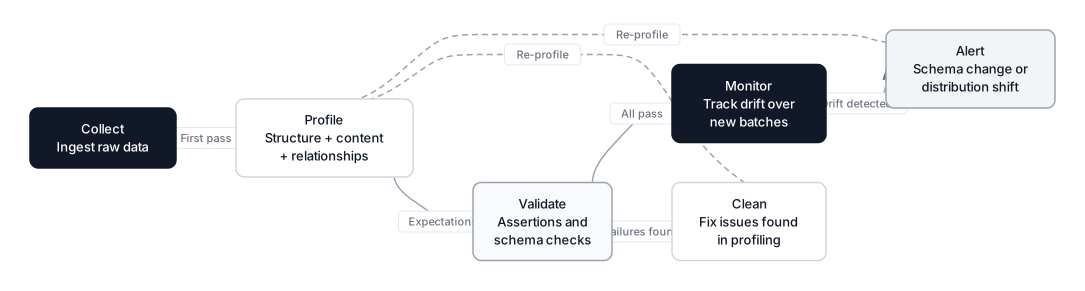 Click to expandData profiling lifecycle from collection through monitoring with feedback loops
ydata-profiling (Formerly pandas-profiling)
ydata-profiling 4.18 generates a full HTML report from a single line of code. As of January 2026, it supports Spark DataFrames for datasets that don't fit in memory.
from ydata_profiling import ProfileReport

# One line generates a comprehensive HTML report
profile = ProfileReport(df, title="Used Car Profiling Report")
profile.to_file("car_profile.html")
The report's Warnings section is the most valuable part. It flags constant columns (zero variance), high correlation pairs, high cardinality features, and skewed distributions. The Missing Values matrix visualizes whether nulls cluster in patterns, which determines whether your missing data strategy should use MCAR, MAR, or MNAR imputation.
Great Expectations for Pipeline Validation
Great Expectations 1.10 takes a different approach: instead of generating reports, it defines expectations (assertions) about your data and fails loudly when they're violated.
import great_expectations as gx

context = gx.get_context()
ds = context.sources.add_pandas("car_data")
asset = ds.add_dataframe_asset("cars", dataframe=df)
batch = asset.build_batch_request()

validator = context.get_validator(batch_request=batch)

# Define expectations
validator.expect_column_values_to_be_between("mileage", min_value=0, max_value=300000)
validator.expect_column_values_to_not_be_null("price")
validator.expect_column_values_to_be_in_set(
    "fuel_type", ["Gasoline", "Diesel", "Hybrid", "Electric"]
)

results = validator.validate()
print(f"Validation passed: {results.success}")
This is where profiling transitions from exploration to enforcement. In production, Great Expectations runs as a step in your Airflow or Prefect DAG, catching schema changes and distribution drift before bad data reaches your model.
Pandera for Schema Validation
Pandera 0.29 offers a lighter-weight alternative using Python type annotations to define DataFrame schemas:
import pandera as pa

schema = pa.DataFrameSchema({
    "year": pa.Column(int, pa.Check.in_range(2000, 2026)),
    "mileage": pa.Column(int, pa.Check.greater_than(0)),
    "engine_hp": pa.Column(int, pa.Check.in_range(50, 1000)),
})

# Raises SchemaError on violation
validated_df = schema.validate(df)
Key Insight: Think of profiling tools in three tiers. Manual pandas profiling for learning and small datasets. ydata-profiling for automated one-shot audits. Great Expectations or Pandera for continuous validation in production pipelines. Most mature teams use all three at different stages.
Profiling in Production
Profiling isn't a one-time event before your first model training. It's a recurring checkpoint at every stage where data enters or transforms.
 Click to expandComparison of data profiling tools: manual pandas, ydata-profiling, and Great Expectations
| Stage | Goal | What to Check |
|---|---|---|
| Ingestion | Validation | Schema changes, null rates, row counts, file corruption |
| Post-cleaning | Verification | Did "NY" and "New York" actually merge? Are sentinel values gone? |
| Pre-modeling | Feature selection | Zero-variance columns, highly correlated pairs, cardinality |
| Production | Monitoring | Distribution shift vs. training data, new categories, volume anomalies |
Data Contracts
The data contracts pattern, which gained significant traction in 2025, formalizes agreements between data producers and consumers. A contract specifies expected schema, freshness guarantees, and quality thresholds. When a profiling check detects a violation, it triggers an alert rather than silently corrupting downstream models.
Tools like Soda Core with SodaGPT (its AI-powered assistant, released late 2025) let you write data quality checks in natural language that compile to SQL assertions:
# soda check for used_cars
checks for used_cars:
  - row_count > 0
  - missing_count(price) < 5%
  - invalid_count(mileage) = 0:
      valid min: 0
  - schema:
      fail:
        when required column missing: [car_id, year, mileage, price]
Distribution Drift Detection
The most insidious production failure isn't a crashed pipeline; it's silent drift. Your model was trained on 2023 data where the average used car price was $28,000. In March 2026, that average shifted to $31,500 due to supply chain changes. The model still runs, still returns predictions, but those predictions are quietly degrading.
Population Stability Index (PSI) is the standard metric for quantifying drift:
- PSI < 0.1: No significant shift
- 0.1 < PSI < 0.25: Moderate shift, investigate
- PSI > 0.25: Significant shift, retrain
Production profiling catches this before customers notice.
When to Profile and When Not To
Profile when:
- You receive a new dataset from any source
- An upstream table's schema might have changed
- Your model's performance degrades without code changes
- You're merging data from multiple sources (especially when handling messy dates)
- Before any feature engineering or model training
Don't over-profile when:
- You own the data generation code and have unit tests covering schema
- The dataset is a well-known benchmark (Iris, MNIST) with stable documentation
- You're iterating on model hyperparameters without changing the data
Common Pitfall: Some teams profile once during initial development and never again. This is like getting a physical exam at age 25 and assuming the results hold at 45. Data ages. Sources change. Schema evolves. Production profiling must be continuous.
Conclusion
Data profiling is the ten minutes that saves ten weeks. By systematically checking structure, content, and relationships before modeling, you catch the problems that .head() hides: sentinel values masquerading as real data, string types where numbers should be, label fragmentation splitting signal across duplicate categories, and correlated features that inflate variance in your coefficients.
The workflow is straightforward. Start with manual pandas profiling to build intuition about what clean data looks like. Graduate to automated tools like ydata-profiling for full-dataset audits. Lock down quality in production with Great Expectations or Pandera assertions. Monitor for drift so your model doesn't silently degrade as the world changes around it.
Once your data passes profiling, you're ready for the real work: feature engineering and telling compelling stories with your findings. But skip the profile, and every downstream decision rests on assumptions nobody verified.
Frequently Asked Interview Questions
Q: What is the difference between data profiling and exploratory data analysis?
Data profiling focuses on technical metadata: schema validation, null counts, data types, cardinality, and basic statistical summaries. EDA focuses on business-relevant patterns: trends, clusters, and relationships that inform modeling decisions. Profiling asks "is this data structurally sound?" while EDA asks "what story does this data tell?" In practice, profiling comes first and feeds into EDA.
Q: You discover a column with zero null values but a suspicious spike at zero in the histogram. What do you do?
This is a "logical null" pattern where missing values were imputed with zero during data collection or ETL. Check with the data owner whether zero is a valid value for that column. For a feature like engine_hp, zero is almost certainly a disguised missing value. For daily_revenue, zero might be legitimate (the store was closed). Replace logical nulls with actual NaN before imputation so your missing data strategy handles them correctly.
Q: How would you detect label fragmentation in a categorical column with 10,000 unique values?
Start by normalizing case and stripping whitespace, then compare unique counts before and after. If the count drops significantly, you have fragmentation. For fuzzy matches ("New York" vs "New Yrk"), use edit distance (Levenshtein) to cluster similar strings. The recordlinkage or fuzzywuzzy libraries automate this. In production, enforce a controlled vocabulary at ingestion time rather than fixing downstream.
Q: When would you use Pearson correlation versus Spearman correlation during profiling?
Pearson measures linear relationships and assumes normally distributed data. Spearman measures monotonic relationships (including nonlinear ones) using rank ordering. During profiling, Spearman is generally safer because real-world data rarely follows perfect linearity. If Pearson shows low correlation but Spearman shows high correlation, the relationship is nonlinear and you should investigate with scatterplots.
Q: Your profiling report shows a feature with a kurtosis of 15. What does this mean for modeling?
A kurtosis of 15 (excess kurtosis) indicates extremely heavy tails with frequent extreme outliers. Standard assumptions of normality will not hold. This affects linear regression coefficients (outliers exert outsized influence), distance-based models like KNN (outliers dominate distance calculations), and gradient-based optimizers (large gradients from extreme values). You'd consider a log or Box-Cox transform, or switch to outlier-resistant models like tree-based methods.
Q: How do you profile data quality in a production pipeline that processes 10 million rows per hour?
Full statistical profiling on every batch is too expensive. Instead, profile a random sample (1% to 5%) for distribution statistics, but run exact checks (schema, null rates, row counts) on the full batch. Use tools like Great Expectations integrated into your orchestrator (Airflow, Prefect) so validation runs as a pipeline step. Track PSI (Population Stability Index) on key features to detect distribution drift. Alert on anomalies rather than generating full reports.
Q: A feature has 95% of values as the same category. Should you drop it?
Not automatically. A feature with 95% "No" and 5% "Yes" has low variance but could still be highly predictive if those 5% correlate strongly with the target (think fraud detection where only 2% of transactions are fraudulent). Calculate mutual information or chi-squared with the target before dropping. If mutual information is near zero, the feature is genuinely uninformative and safe to remove.
Hands-On Practice
As the article emphasizes, relying solely on .head() is the most expensive mistake in data science. Before feeding data into any model, we must perform a 'mechanical inspection', checking structure, content, and relationships. While automated tools exist, understanding how to profile manually with Pandas and Matplotlib is crucial for developing data intuition. The following code implements the 'Three Pillars of a Complete Profile' (Structure, Content, Relationship) on the Customer Analytics dataset to uncover hidden issues like skewness, outliers, and disguised missing values.
Dataset: Customer Analytics (Data Analysis) Rich customer dataset with 1200 rows designed for EDA, data profiling, correlation analysis, and outlier detection. Contains intentional correlations (strong, moderate, non-linear), ~5% missing values, ~3% outliers, various distributions, and business context for storytelling.
This manual profiling workflow acts as your 'reality check.' The describe() output reveals the statistical spread, while the histograms visualize skewness that a simple average would hide. The cardinality check helps identify if a column like region is clean or if it suffers from label fragmentation (e.g., 'NY' vs 'New York'). By running these checks before modeling, you ensure your algorithms aren't learning from noise or structural errors.