Microsoft Updates Edge UI Toward Copilot Design
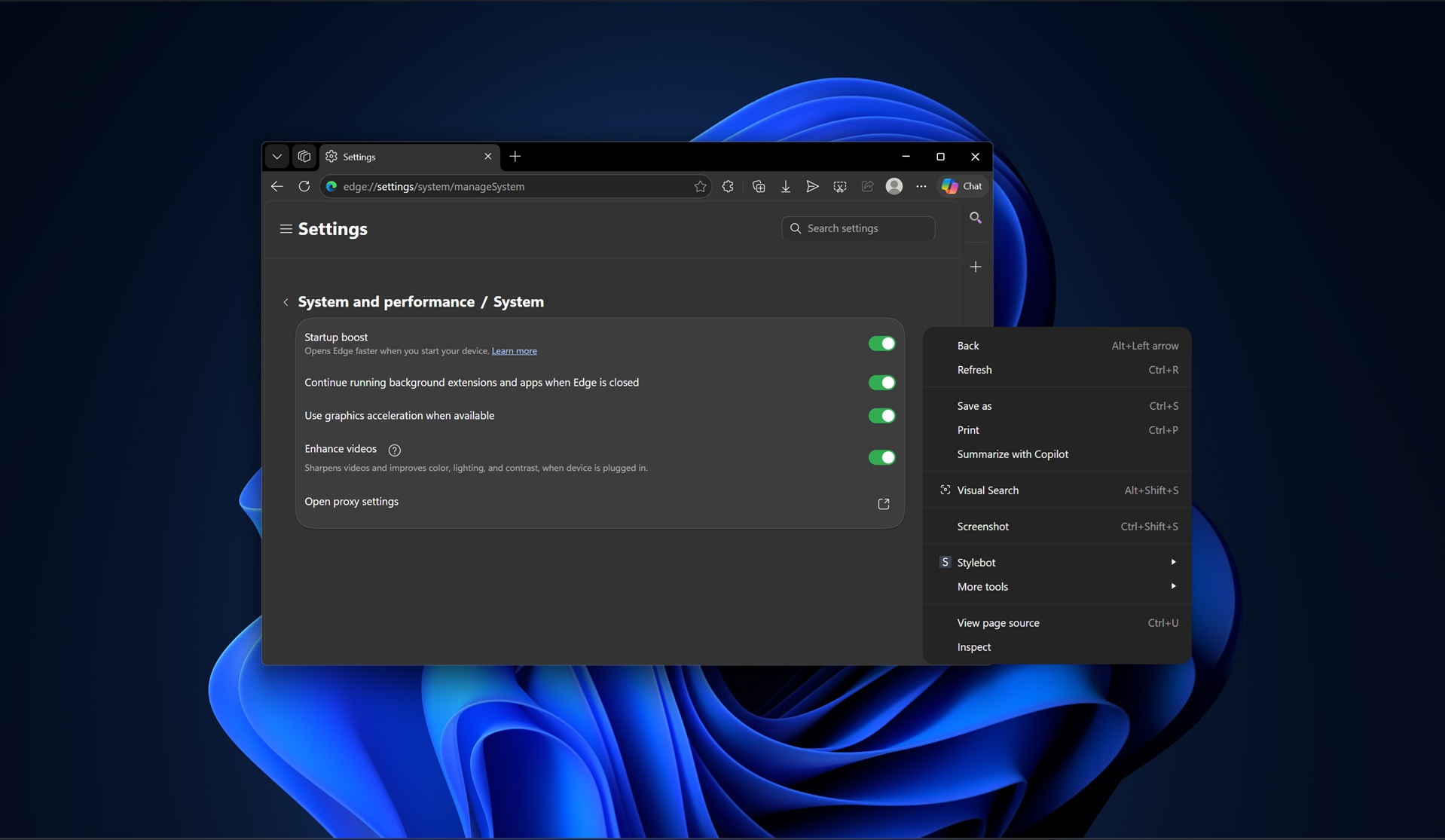
Microsoft is rolling Copilot's visual language into Microsoft Edge, with preview builds showing fuller rounded corners, pill-shaped elements, and iOS-like toggles. The change appears in Canary and Dev builds and affects context menus, the settings surface, and the new tab page, aligning Edge's look with the standalone Copilot app. The integration follows prior work showing Copilot runs on Edge via mscopilot.exe and Edge WebView2, and some previews do not provide an easy opt-out. For practitioners this signals a push toward a unified, AI-first UX across Windows and web properties, with implications for extension UI, theming, enterprise control, and accessibility testing.
What happened
Microsoft is progressively applying the Copilot design language to Microsoft Edge in 2026, with early Canary and Dev builds showing noticeably softer, fuller rounded corners, pill-shaped components, and iOS-style toggle switches. The visual update touches core browser surfaces including context menus, settings, and the new tab page, and several outlets observed the change appearing regardless of whether Copilot Mode is enabled.
Technical details
Edge preview builds replace the classic Fluent-derived assets with a Copilot-aligned palette and geometry. Observed technical artifacts include:
- •Fuller rounded corners applied across menus and settings panels, producing contiguous curvature instead of segmented corner radii
- •New toggle control styles with colored pill backgrounds reminiscent of iOS switches
- •A Copilot-like new tab layout that surfaces a prompt and modular Copilot modules when Copilot features are active
The Copilot app itself runs as mscopilot.exe and leverages Edge WebView2, which helps explain how the Copilot UI and Edge visuals converge. Reports from Pureinfotech and XDA also show the Copilot web experience and the Copilot Windows app reuse Edge rendering, so UI parity is an engineering byproduct of shared runtime and assets.
Context and significance
This is a deliberate UX consolidation, not a cosmetic experiment. Microsoft has signaled an intention to make Windows and its services more agentic, with Copilot as a central interaction layer. Unifying the visual language reduces cognitive friction for users moving between Copilot and Edge, and it creates a single, recognizable face for Microsoft AI features. For developers and designers this matters because it changes the baseline styling and interaction metaphors users expect from Microsoft-branded web UIs and extensions.
From a platform perspective, the move highlights two trends: first, product teams are standardizing on a shared component set rooted in the browser runtime; second, UI changes become a distribution and policy concern when they are rolled into browser updates that may be hard for end users to opt out of. Some outlets note users cannot easily disable the Copilot-like UI in current previews, which raises enterprise management and user-preference questions.
What to watch
Expect a staged rollout from Canary to Dev and then Stable, accompanied by admin controls for managed environments or group policy options for enterprise customers. Track these immediate impacts:
- •Extension and web developers should test for visual regressions and click-target changes caused by updated radii and toggles
- •Accessibility teams must retest contrast, focus order, and hit areas for the new controls
- •Enterprise admins should watch for policy knobs to opt out or pin prior styling, and for documentation on Copilot integration behavior
The change is UI-first, but it signals deeper product convergence between Edge and Microsofts AI tooling. Developers and IT teams should begin validation now to avoid surprises when the update reaches broader channels.
Key Points
- 1Edge adopts Copilot visuals, aligning browser UI with Microsofts AI assistant, reducing user friction across products.
- 2Shared runtime (mscopilot.exe, Edge WebView2) makes UI parity efficient, but limits easy opt-out for some preview builds.
- 3Impacts extend to extension developers, accessibility testing, and enterprise manageability; validate styling and policies now.
Scoring Rationale
This is a notable product-level design consolidation that signals Microsoft is standardizing an AI-first UI across browser and OS surfaces. It affects developer and enterprise workflows but does not change core AI capabilities, so the impact is significant but not industry-shaking.
Sources
Public references used for this report.
Practice with real FinTech & Trading data
90 SQL & Python problems · 15 industry datasets
250 free problems · No credit card
See all FinTech & Trading problems