Google Expands Gemini in Chrome Across Asia-Pacific
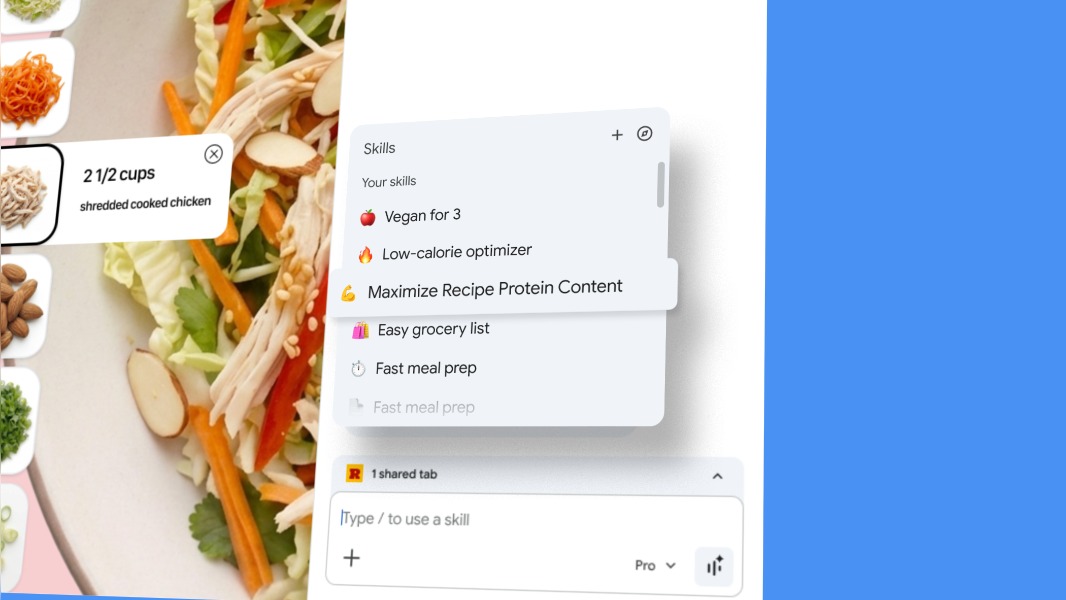
Google is rolling out Gemini in Chrome to users across seven Asia-Pacific markets: Australia, Indonesia, Japan, the Philippines, Singapore, South Korea, and Vietnam. The feature lands on desktop and iOS browsers in most countries, with Japan excluded from the iOS rollout. Gemini in Chrome provides a persistent sidebar accessible via the Ask Gemini control, bringing contextual tab-aware assistance, multi-tab comparison, web image transformation using Nano Banana 2, and integrations with Gmail, Calendar, Maps, and YouTube. The experience also leverages Personal Intelligence to retain conversational context and includes built-in safeguards for sensitive actions. The expansion standardizes Chrome as a delivery surface for Gemini features across APAC and signals Google pushing deeper OS- and app-level integrations for web-based AI agents.
What happened
Google is expanding Gemini in Chrome to users in Australia, Indonesia, Japan, the Philippines, Singapore, South Korea, and Vietnam, enabling a tab-aware, sidebar-based assistant on desktop and iOS in most markets. The rollout brings Chrome access to the same integrated assistant functionality Google previously launched in the US, Canada, India, New Zealand, and Canada, and leverages updated model capabilities including Gemini 3.1 and image transformation via Nano Banana 2 where available.
Technical details
The interface exposes Gemini through the Ask Gemini shortcut at the top right of Chrome, opening a persistent side panel that is aware of the active tab and open tabs. Key capabilities include:
- •Summarization and multi-tab comparison that uses context from the current page and other open tabs
- •Deep integrations with first-party services, enabling actions like adding events to Calendar, drafting and sending messages with Gmail, checking locations with Maps, and extracting insights from YouTube content
- •Web image transformation driven by Nano Banana 2 accessible from the side panel through text prompts
- •Context retention via Personal Intelligence, allowing the assistant to remember past conversational context for more tailored responses
- •Platform availability on desktop (Mac, Windows, Chromebook Plus) and iOS in the region, with Japan excluded from the iOS release for now
The rollout notes emphasize built-in security and confirmation prompts for sensitive actions, and Chrome settings allow users to control or remove the shortcut via Chrome Settings > AI innovations > Gemini in Chrome.
Context and significance
This expansion continues Google's play to make Chrome a primary surface for web-based AI agents rather than confining advanced models to standalone apps. By integrating Gemini into the browser chrome, Google reduces friction for cross-app workflows and positions its assistant to mediate common productivity tasks directly during browsing. The inclusion of Nano Banana 2 for image editing in the side panel also signals tighter coupling between multimodal model capabilities and browser UX.
For practitioners, the move is notable on several fronts. Front-end engineers should expect more browser-level AI hooks and event flows where the assistant reads and acts on page content. Product managers need to reckon with deeper ecosystem lock-in risks when assistant actions touch Gmail, Calendar, and Maps. Privacy and security engineers will want to audit the confirmation flows and data retention policies for Personal Intelligence and cross-tab context sharing.
What to watch
Adoption metrics and any region-specific privacy disclosures, plus whether Google opens developer hooks for third-party integrations or retains the assistant strictly for first-party services. Also watch for the Japan iOS rollout timing and any localization gaps that affect model behavior in APAC languages.
Key Points
- 1Google deploys Gemini in Chrome across seven APAC markets, standardizing a tab-aware assistant on desktop and mostly on iOS.
- 2Deep integrations with Gmail, Calendar, Maps, and Nano Banana 2 image transforms turn Chrome into an AI-first productivity surface.
- 3Personal Intelligence and side-panel context raise important privacy and UX questions for engineers and product teams to audit.
Scoring Rationale
This is a notable product expansion that affects how web-based AI agents are consumed and integrated into workflows. It is not a frontier model release, but it materially changes Chrome's role as an AI delivery surface and has meaningful implications for developers, privacy engineers, and product teams.
Sources
Public references used for this report.
Practice with real Ad Tech data
90 SQL & Python problems · 15 industry datasets
250 free problems · No credit card
See all Ad Tech problems