Design-to-code AI stack charts Figma-to-code flow
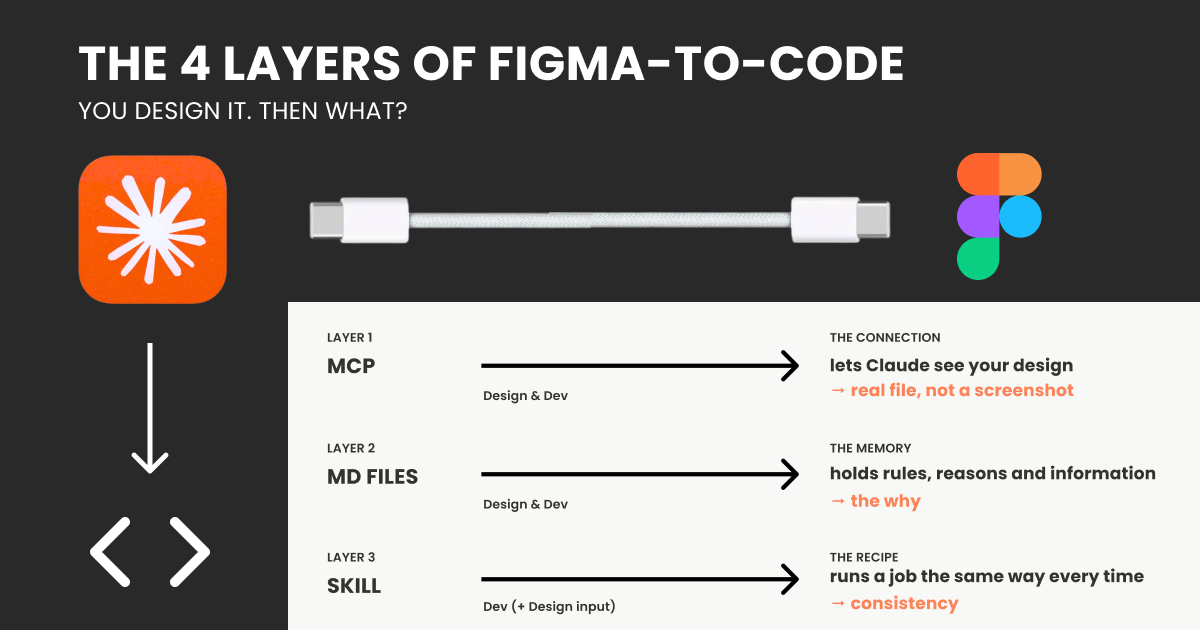
A UX Collective feature published July 3, 2026 on uxdesign.cc - "You design it. Then what? A clear map of the Figma-to-code AI mess" - argues that automating the handoff from Figma designs to production code is a multi-layer integration problem, not a single AI capability. For practitioners, the piece's core value is a taxonomy: a connectivity layer built on MCP (Model Context Protocol, often compared to a USB-C-style connector) that lets tools like Claude reach design files, a context-assembly layer, and a translation layer that turns visual layouts into working front-end code. According to the article, demo videos hide this complexity by showing only the cleanest layer. The guide offers no packaged fix, only a scoping framework for teams planning design-to-code automation.
For engineering and design-ops teams, the useful signal in this piece is a taxonomy, not a tool: treating Figma-to-code as an integration project splits the problem into distinct, separately-testable layers (connectivity, context, and translation), which changes how teams scope effort, choose tooling, and budget QA time rather than expecting a single AI call to bridge design and production code.
What happened
A UX Collective article published July 3, 2026 on uxdesign.cc maps what it calls the "Figma-to-code AI mess," arguing that impressive demo videos obscure a multi-layer integration problem. The piece explains MCP (Model Context Protocol) as a connectivity standard - often compared to a USB-C-style connector - that lets an AI assistant such as Claude access external files like Figma designs, which it otherwise cannot see.
Technical context
The article's decomposition maps to three separately engineered layers: a connectivity layer (MCP or a similar adapter) that exposes design files to a model; a context-assembly layer that decides what design tokens, component references, and layout data to include in a prompt; and a translation layer that converts that visual and structural information into framework-specific, production-ready code. Teams building similar pipelines typically need bespoke middleware to normalize design artifacts and schema maps for their component libraries.
For practitioners
The operational takeaway is to invest in reliable connectors, deterministic extraction of design tokens, and staged validation - comparing rendered output against source designs - rather than assuming a single LLM call will produce production-ready components. The article does not offer a packaged solution; it provides a scoping framework for teams planning this kind of automation.
What to watch
Watch for emerging MCP-style adapters for major design systems, tooling that codifies component mappings between Figma and specific front-end frameworks, and whether design tools begin shipping first-party integrations that reduce the current reliance on ad hoc connectors.
Key Points
- 1Figma-to-code automation requires stacking connectivity, context-assembly, and translation layers rather than relying on one AI model or demo.
- 2Demo videos typically show only the cleanest layer, masking the engineering work needed to reproduce results on real production codebases.
- 3Teams should invest in deterministic design-token extraction, component mapping, and staged validation before expecting reliable Figma-to-code output.
Scoring Rationale
Single-sourced practitioner explainer that usefully reframes Figma-to-code automation as a multi-layer integration problem rather than a single-model capability; valuable scoping guidance for teams but not a product launch or research result, and the primary source could not be independently re-fetched (Medium/uxdesign.cc blocked scraping), so framing and score stay conservative.
Sources
Public references used for this report.
Practice interview problems based on real data
1,625 SQL & Python problems across 15 industry datasets — the exact type of data you work with.
Try 250 free problems