
You just pulled 50,000 order records from a REST API. Each record is a tree: customer objects nested inside orders, arrays of line items nested inside customers, discount codes nested inside line items. You call pd.DataFrame() and get a DataFrame where half the columns contain raw dictionaries and lists. Nothing is filterable, nothing is joinable, nothing is usable.
That gap between hierarchical JSON and flat, tabular pandas DataFrames trips up even experienced engineers. The pd.json_normalize() function in pandas 3.0 (released January 2026) handles most of the heavy lifting, but knowing when to reach for record_path, when to use .explode(), and when to write a custom flattener is what separates a five-minute solution from an afternoon of frustration.
This guide uses a single running example throughout: an e-commerce API returning order records with nested customer details, shipping addresses, line items, and review metadata. Every code block, every diagram, every table references this same dataset.
The structural mismatch between JSON and DataFrames
JSON organizes data as a tree. A single order record can contain a customer object, which holds an address object, which holds a coordinates object. Each level adds depth, and there's no requirement that sibling records share the same shape.
DataFrames are the opposite. They're strictly two-dimensional grids: every row has the same columns, and every cell holds a scalar value. When you pass nested JSON to pd.DataFrame(), pandas doesn't recursively unpack anything. It stores inner dictionaries and lists as opaque Python objects inside cells.
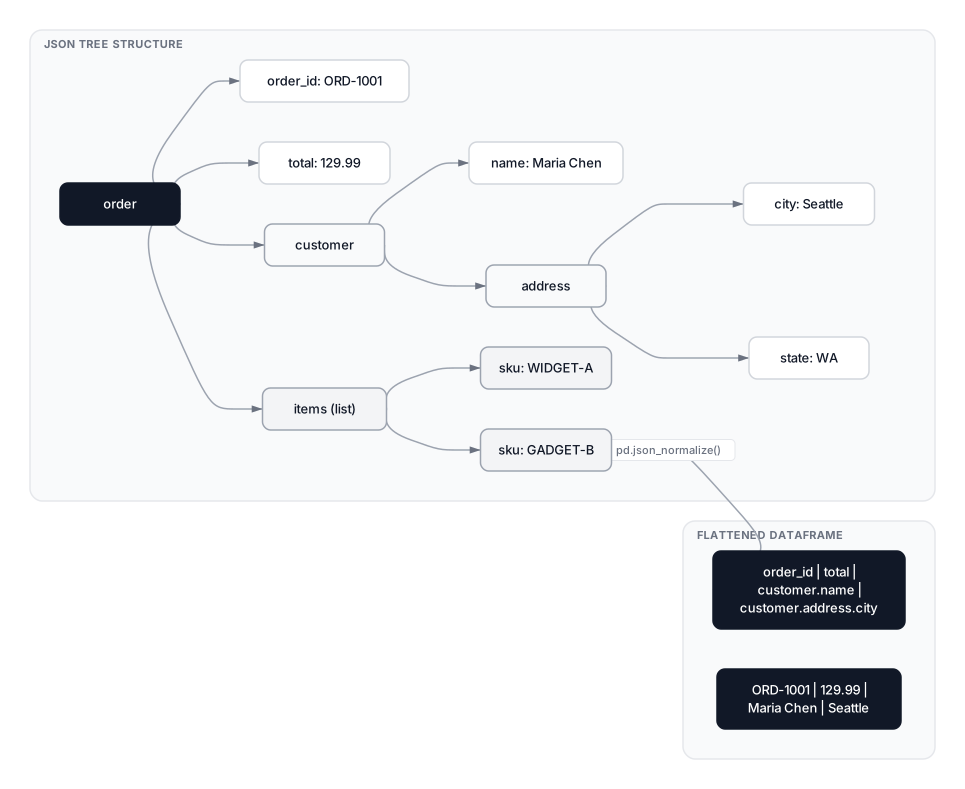 Click to expandJSON tree structure versus flat DataFrame grid after json_normalize
Here's the problem in action with our e-commerce data:
Expected output:
order_id     object
total       float64
customer     object
items        object
dtype: object

customer column value: <class 'dict'>
items column value: <class 'list'>
The customer column holds a dictionary. The items column holds a list of dictionaries. You can't filter by city, group by customer name, or calculate revenue per SKU until these nested structures become proper columns. That's exactly what pd.json_normalize() fixes.
Key Insight: The object dtype in pandas is a catch-all. When you see it on a column that should contain structured data, it almost always means you have nested dicts or lists that need flattening.
The e-commerce dataset we'll flatten
Before jumping into techniques, let's define the complete dataset we'll reference through every section. Three orders, each with nested customer info, variable-length item lists, and optional reviews:
Expected output:
Orders: 3
Total items across all orders: 5
Total reviews across all orders: 3
This dataset covers the patterns you'll hit in production: nested dicts (customer, address), variable-length arrays (items, reviews), and missing data (ORD-1002 has zero reviews).
Flattening nested dictionaries with pd.json_normalize
pd.json_normalize() is the primary tool for converting hierarchical JSON into flat DataFrames. It recursively unpacks nested dictionaries and joins key names with a dot separator by default. The function lives at the top level of pandas, so you call pd.json_normalize(), not pd.io.json.json_normalize() (the old import path was deprecated in pandas 1.0 and removed in pandas 2.0).
Expected output:
['order_id', 'total', 'status', 'items', 'reviews', 'customer.name', 'customer.email', 'customer.address.city', 'customer.address.state', 'customer.address.zip']
Every nested dictionary (customer, customer.address) was unpacked into dot-separated column names. The items and reviews columns stayed as lists because json_normalize only auto-flattens dictionaries, not lists. That distinction matters: dicts represent attributes of the same entity (a customer's properties), while lists represent one-to-many relationships (an order's items).
Pro Tip: The sep parameter changes the delimiter between nested keys. For SQL-compatible column names, pass sep='_' to produce customer_address_city instead of customer.address.city. In pandas 3.0, when you pass a Series to json_normalize(), it now retains the original Series index instead of resetting to a RangeIndex, a behavior change from pandas 2.x worth noting in production code.
The complete json_normalize parameter reference
Here's every parameter the function accepts, as of pandas 3.0 documentation:
| Parameter | Type | Default | Purpose |
|---|---|---|---|
data | dict, list of dicts, or Series | required | The JSON data to flatten |
record_path | str or list of str | None | Path to the nested list to expand into rows |
meta | list of str or list of lists | None | Parent fields to carry into child rows |
meta_prefix | str | None | Prefix for meta column names |
record_prefix | str | None | Prefix for record column names |
errors | 'raise' or 'ignore' | 'raise' | How to handle missing meta keys |
sep | str | '.' | Separator for nested key names |
max_level | int or None | None | Maximum nesting depth to flatten |
Expanding nested lists with record_path
Lists inside JSON records represent one-to-many relationships. One order has many items. One customer has many reviews. These can't be flattened into a single row without either duplicating parent data or losing child records.
The record_path parameter tells json_normalize() which list to expand. Each element in that list becomes its own row:
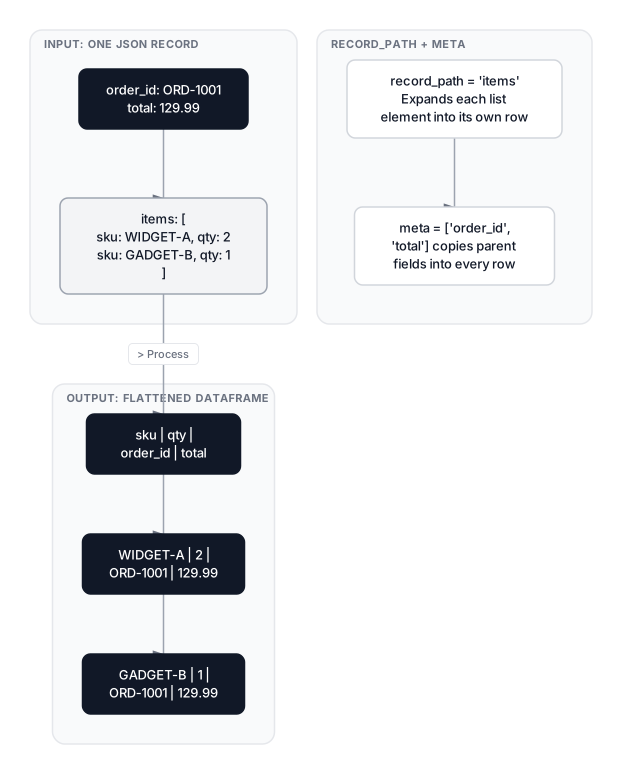 Click to expandHow record_path and meta expand nested JSON lists into DataFrame rows
Expected output:
        sku  qty  price
0  WIDGET-A    2  29.99
1  GADGET-B    1  70.01
2  WIDGET-A    1  29.99
3   CABLE-C    3   5.00
4  GADGET-B    3  70.01
Five items across three orders, each on its own row. But there's a problem: we've lost all order context. Which item belongs to which order? That's what meta fixes.
Preserving parent context with meta
The meta parameter specifies which fields from the parent record should be copied into every child row. Think of it as an automatic left join between the parent and child data:
Expected output:
        sku  qty  price  order_id      status   total customer.name
0  WIDGET-A    2  29.99  ORD-1001     shipped  129.99    Maria Chen
1  GADGET-B    1  70.01  ORD-1001     shipped  129.99    Maria Chen
2  WIDGET-A    1  29.99  ORD-1002   delivered    45.0  James Okafor
3   CABLE-C    3   5.00  ORD-1002   delivered    45.0  James Okafor
4  GADGET-B    3  70.01  ORD-1003  processing   210.5  Priya Sharma
Two syntax patterns here: scalar fields like order_id go as plain strings, while nested fields like customer.name go as a list-within-the-list: ["customer", "name"].
The record_prefix parameter prevents column name collisions when record fields share names with meta fields:
Expected output:
['item_sku', 'item_qty', 'item_price', 'order_id']
Controlling depth with max_level
Production APIs often nest data five or six levels deep. Flattening everything produces dozens of sparse columns, many of which you don't need. The max_level parameter limits recursion depth:
Expected output:
All levels: ['order_id', 'total', 'status', 'items', 'reviews', 'customer.name', 'customer.email', 'customer.address.city', 'customer.address.state', 'customer.address.zip']
Max level 1: ['order_id', 'total', 'status', 'items', 'reviews', 'customer.name', 'customer.email', 'customer.address']
With max_level=1, the customer.address column stays as a dictionary instead of being split into three columns. This is useful when you only care about top-level customer info and want to avoid 20 address-related columns you'll never touch.
Common Pitfall: max_level only controls dict flattening depth. It has zero effect on lists. If you have a list at level 1, it stays as a list regardless of max_level. You still need record_path or .explode() for lists.
Handling missing and inconsistent keys
APIs are rarely consistent. One record might include a loyalty_tier field while another omits it. One customer might have a phone while another doesn't. By default, pd.json_normalize() raises a KeyError when a meta field is missing from any record.
The errors parameter controls this:
Expected output:
  sku  qty  price  order_id customer.name customer.loyalty_tier
0  X1    1   10.0  ORD-2001         Alice                  gold
1  X2    2   20.0  ORD-2002           Bob                   NaN

Missing values per column:
sku                      0
qty                      0
price                    0
order_id                 0
customer.name            0
customer.loyalty_tier    1
dtype: int64
With errors='ignore', missing metadata fields become NaN instead of crashing your pipeline. This is non-negotiable for production ETL where API schemas aren't guaranteed to be uniform.
Warning: errors='ignore' silently swallows missing data. Always follow it with df.isna().sum() to catch unexpected nulls. A field that's NaN in 95% of records might indicate a schema change upstream that you should investigate, not just ignore.
Using explode for list columns already in a DataFrame
Sometimes you receive data that's already partially normalized. Maybe you loaded it from a database column that stores JSON arrays, or you ran json_normalize on the top level but still have list columns left over. The .explode() method handles this case without re-running the full normalization:
Expected output:
After explode:
   order_id                          items
0  ORD-1001  {'sku': 'WIDGET-A', 'qty': 2}
1  ORD-1001  {'sku': 'GADGET-B', 'qty': 1}
2  ORD-1002   {'sku': 'CABLE-C', 'qty': 3}

Fully flattened:
   order_id       sku  qty
0  ORD-1001  WIDGET-A    2
1  ORD-1001  GADGET-B    1
2  ORD-1002   CABLE-C    3
The explode() then json_normalize() pattern is useful when you can't go back to the raw JSON source, or when you only want to flatten one specific column without re-processing the entire dataset.
Pro Tip: Since pandas 1.3, .explode() supports multiple columns at once: df.explode(["items", "reviews"]). But the lists in each column must have the same length per row, which is rarely the case in practice. For independent lists, explode them separately and merge back.
Custom flattening for irregular structures
pd.json_normalize() works when the JSON structure is predictable. But real-world data often isn't. The same field might be a list in one record, a string in another, and absent in a third. When json_normalize can't handle the inconsistency, a custom flattening function gives you full control:
Expected output:
order_id  total     status customer_name    customer_email    city state  item_count  total_quantity  review_count  avg_rating
ORD-1001 129.99    shipped    Maria Chen [email protected] Seattle    WA           2               3             1         5.0
ORD-1002  45.00  delivered  James Okafor [email protected]  Austin    TX           2               4             0         NaN
ORD-1003 210.50 processing  Priya Sharma [email protected] Chicago    IL           1               3             2         3.5
This approach trades the convenience of json_normalize for explicit control over every output column. It's the right choice when you need computed fields (like avg_rating) or when the JSON schema varies too wildly for automatic normalization. The .get() method with default values prevents KeyError on missing keys.
Key Insight: Custom flattening isn't a fallback; it's often the better choice for analytics. You're building exactly the DataFrame you need for analysis rather than normalizing everything and then selecting, renaming, and aggregating afterward.
Combining multiple normalized DataFrames
Most analysis requires data from several nested levels at once. The pattern is to normalize each level separately, then merge on the shared key. This mirrors how relational databases handle one-to-many relationships: each level becomes its own table, and foreign keys tie them together.
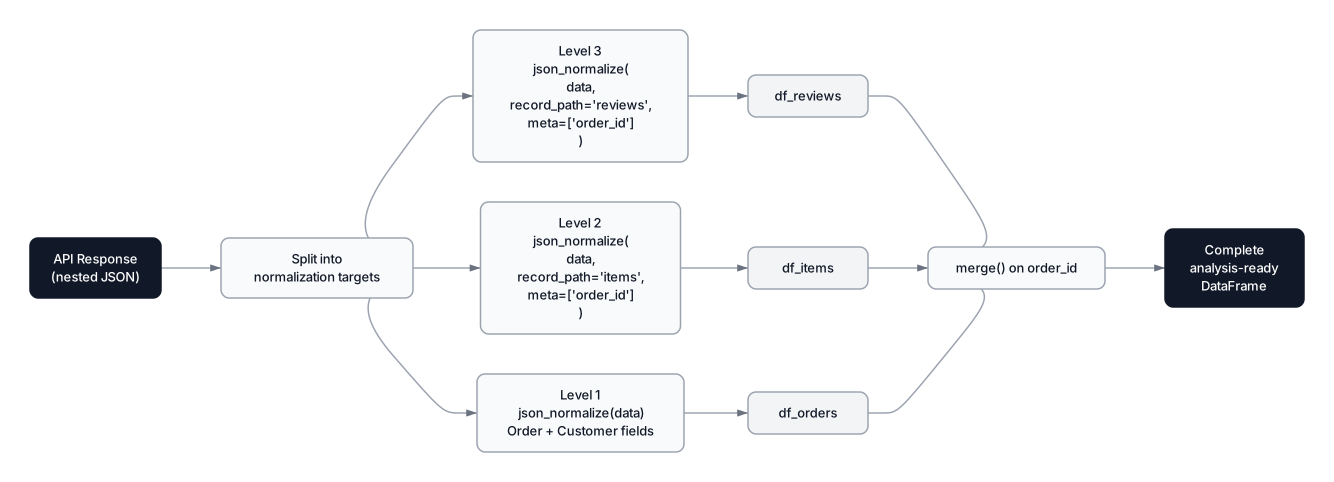 Click to expandNormalize-then-merge pipeline for multi-level JSON flattening
Expected output:
Items with order context:
order_id item_sku  item_price customer.name  total
ORD-1001 WIDGET-A       29.99    Maria Chen 129.99
ORD-1001 GADGET-B       70.01    Maria Chen 129.99
ORD-1002 WIDGET-A       29.99  James Okafor  45.00
ORD-1002  CABLE-C        5.00  James Okafor  45.00
ORD-1003 GADGET-B       70.01  Priya Sharma 210.50

Reviews:
 review_rating   review_text  review_verified order_id
             5 Fast shipping             True ORD-1001
             4  Good quality             True ORD-1003
             3  Arrived late            False ORD-1003
Notice that ORD-1002 (James Okafor) has no reviews, so it doesn't appear in df_reviews. If you need all orders including those with zero reviews, use a left join from orders to reviews.
Nested arrays inside nested arrays
Some APIs nest arrays inside arrays. An order contains items, and each item contains a list of applied discounts. This double-nesting requires a two-step approach: normalize the outer list, then explode() and normalize the inner list.
Expected output:
After step 1 (item level):
     sku  price order_id
WIDGET-A  29.99 ORD-4001
GADGET-B  70.01 ORD-4001

After step 3 (fully flattened):
order_id      sku  price    code  amount
ORD-4001 WIDGET-A  29.99  SAVE10     3.0
ORD-4001 WIDGET-A  29.99 LOYALTY     1.5
ORD-4001 GADGET-B  70.01     NaN     NaN
The pattern generalizes: for N levels of nested lists, you repeat the normalize-explode-normalize cycle N-1 times.
Production patterns for large JSON files
JSON is verbose. Repeated key names in every record mean that a 500 MB CSV equivalent can balloon to 2-3 GB as JSON. Loading the entire file with json.load() allocates everything into memory at once. Here's how to handle scale.
Line-delimited JSON with chunked reading
For large files, use line-delimited JSON (one JSON object per line, file extension .jsonl) with pd.read_json():
import pandas as pd

# Read a large .jsonl file in chunks of 10,000 records
chunk_iter = pd.read_json(
    "large_orders.jsonl",
    lines=True,
    chunksize=10_000
)

frames = []
for chunk in chunk_iter:
    # Each chunk is a DataFrame -- normalize, filter, transform
    normalized = pd.json_normalize(chunk.to_dict(orient="records"))
    frames.append(normalized)

df_all = pd.concat(frames, ignore_index=True)
The chunksize parameter returns an iterator instead of loading everything. Memory usage stays proportional to chunk size, not file size. For a 2 GB JSONL file on a 16 GB laptop, chunksize=10_000 typically keeps memory under 500 MB.
Faster parsing with orjson
Python's built-in json module is pure Python (with some C acceleration). For high-throughput pipelines, orjson, a Rust-based JSON parser, is roughly 6x faster for loads() and 10x faster for dumps() compared to the standard library (benchmarks from orjson 3.10, December 2025):
import orjson
import pandas as pd

# Parse JSON ~6x faster than json.loads()
with open("large_orders.jsonl", "rb") as f:
    records = [orjson.loads(line) for line in f]

df = pd.json_normalize(records)
Selective field extraction
When you need only a few fields from deeply nested structures, skip json_normalize entirely and extract directly. This avoids building the full column hierarchy:
import json
import pandas as pd

results = []
with open("large_orders.jsonl", "r") as f:
    for line in f:
        record = json.loads(line)
        results.append({
            "order_id": record["order_id"],
            "customer_name": record["customer"]["name"],
            "item_count": len(record.get("items", []))
        })

df = pd.DataFrame(results)  # ~3-5x faster than normalize-then-select
Performance comparison
| Approach | Use Case | Relative Speed | Memory |
|---|---|---|---|
pd.json_normalize() | Full schema needed | 1x (baseline) | High — builds all columns |
Custom .get() extraction | Few fields needed | 3-5x faster | Low — only stores target fields |
orjson + json_normalize | Full schema, big files | ~2-3x faster | Same as baseline |
Chunked read_json() | Files > 1 GB | Streaming | Bounded by chunk size |
| Convert to Parquet first | Repeated analysis | 10-50x faster reads | Compact columnar format |
Pro Tip: If you're going to analyze the same JSON dataset more than once, convert it to Parquet on first load: df.to_parquet("orders.parquet"). Subsequent reads with pd.read_parquet() are 10-50x faster and use far less memory because Parquet is columnar and compressed.
When to flatten JSON (and when not to)
Not every nested JSON structure needs flattening. Here's the decision framework:
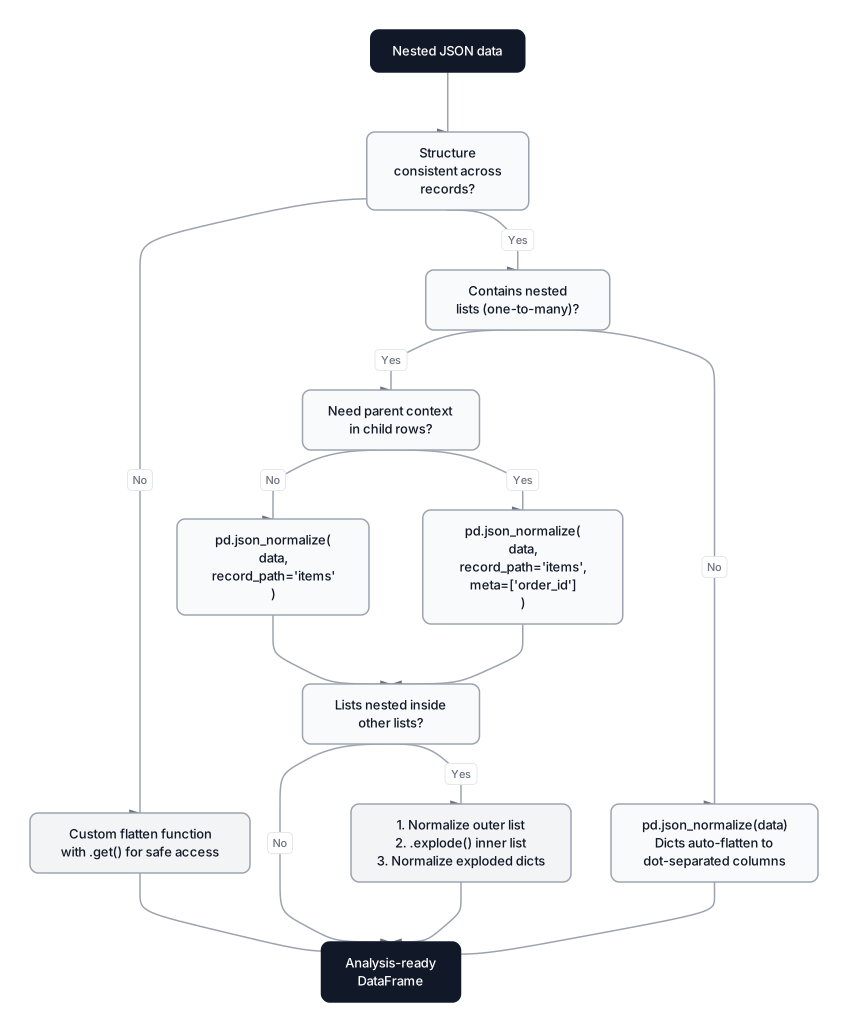 Click to expandDecision flowchart for choosing the right JSON flattening strategy
When to flatten
- You need to filter, group, or join on nested fields. If you're writing
df[df["customer.address.state"] == "WA"], those fields need to be proper columns. - You're feeding data into scikit-learn, XGBoost, or any ML model. Models expect flat feature matrices. Nested dicts aren't features.
- You're building dashboards or reports. BI tools work with flat tables, not nested structures.
- You're doing aggregations across the nested level. Revenue per SKU, average rating per customer, count of items per order — all require flattened data.
When NOT to flatten
- You're just passing data through to another API. If your pipeline receives JSON and sends it to another service unchanged, flattening and re-nesting wastes cycles.
- The nested structure IS the feature. In NLP or graph problems, the hierarchical structure itself carries information. Flattening destroys it.
- You're storing it for later and don't know the query patterns yet. Store raw JSON in a document database (MongoDB, DynamoDB) or as JSONB in PostgreSQL. Flatten on read, not on write.
- The nesting is 8+ levels deep and you only need 2 fields. Manual
.get()extraction is cleaner than normalizing 50 columns to use 2.
| Scenario | Approach | Why |
|---|---|---|
| ML feature engineering | Full json_normalize | Models need flat numeric/categorical arrays |
| Dashboard/reporting | Normalize + merge | BI tools expect tabular data |
| Quick EDA on a few fields | Custom .get() extract | Faster, less memory, no schema noise |
| ETL passthrough | Don't flatten | Unnecessary round-trip transformation |
| Store-then-query | Keep as JSON, flatten on read | Avoids premature schema commitment |
Conclusion
Flattening nested JSON into pandas DataFrames is fundamentally about choosing the right tool for the structure you're facing. pd.json_normalize() handles the majority of cases: nested dicts become dot-separated columns automatically, record_path expands one-to-many lists into rows, and meta preserves parent context. For inconsistent schemas, errors='ignore' prevents crashes while isna().sum() catches silent data loss.
The trickier cases (arrays nested inside arrays, schemas that vary record to record, computed aggregates) need the explode-then-normalize pattern or a custom flattening function. Neither approach is inherently better; they solve different problems. Production pipelines almost always combine both: json_normalize for the predictable 80% and custom functions for the irregular 20%.
Once your JSON is flat, the next step is making sure the flattening didn't introduce issues. Run a Data Profiling pass to catch unexpected nulls and type mismatches. If the flattened data has gaps from missing keys, the strategies in Missing Data Strategies will help you decide between dropping, imputing, or flagging. And when your JSON contains text fields like product reviews or descriptions, Mastering Text Preprocessing covers the full pipeline from raw strings to clean, analysis-ready features.
Frequently Asked Interview Questions
Q: What's the difference between pd.json_normalize() and pd.DataFrame() when working with nested JSON?
pd.DataFrame() creates a DataFrame where nested dictionaries and lists remain as opaque Python objects inside cells, so you can't filter or aggregate on them. pd.json_normalize() recursively unpacks nested dictionaries into dot-separated column names, turning {"customer": {"name": "Alice"}} into a customer.name column with the scalar value "Alice". Use DataFrame() for already-flat data; use json_normalize() for anything with nesting.
Q: How do you handle one-to-many relationships in JSON when flattening to a DataFrame?
Use the record_path parameter to tell json_normalize which list to expand into rows. Each list element becomes its own row. Combine it with the meta parameter to carry parent-level fields (like order_id) into every child row. This is equivalent to an automatic left join between the parent record and its child list.
Q: Your JSON API returns records where some have a "phone" field and others don't. json_normalize crashes. How do you fix it?
Set errors='ignore' in json_normalize(). This fills missing metadata fields with NaN instead of raising a KeyError. After normalization, always check df.isna().sum() to quantify how much data is missing per column. If a field is missing in most records, it may indicate a schema version change you should investigate.
Q: When would you write a custom flattening function instead of using json_normalize?
Three situations: (1) the JSON schema varies significantly between records (a field is a string in one record, a list in another), (2) you need computed/aggregated fields like average rating or item count rather than raw values, or (3) you only need 3-4 fields from a deeply nested 50-column structure and want to avoid the overhead of full normalization. Custom functions using .get() with defaults are also more explicit and easier to debug in production.
Q: How do you flatten arrays nested inside arrays? For example, orders containing items, and each item containing a list of discounts.
Use a two-step process: first call json_normalize with record_path="items" and meta=["order_id"] to get one row per item. Then call .explode("discounts") on the resulting DataFrame to expand the inner list, followed by pd.json_normalize() on the exploded discount dictionaries to split them into proper columns. This pattern generalizes to any depth of list nesting.
Q: A 3 GB JSON file crashes your kernel when you try to load it. What's your approach?
Three options depending on context. First, convert to line-delimited JSON (.jsonl, one object per line) and use pd.read_json("file.jsonl", lines=True, chunksize=10_000) to stream it in bounded-memory chunks. Second, if you control the pipeline, switch to Parquet for repeated analysis: it's columnar, compressed, and 10-50x faster to read. Third, if you only need a few fields, read line-by-line with json.loads() and extract directly into a list of flat dicts, which avoids building the full nested structure in memory.
Q: What's the difference between explode() and record_path in json_normalize?
record_path works on raw JSON data (lists of dicts) during the initial normalization step. explode() works on a DataFrame column that already contains lists. If you still have the raw JSON, record_path with meta is cleaner because it handles the parent-child join in one call. If you already have a DataFrame with list columns (from a database query or partial normalization), explode() is the right tool.
Q: How would you handle a JSON field that's sometimes a list and sometimes a single value?
Standardize it before normalization. Wrap single values in a list: field = field if isinstance(field, list) else [field]. This ensures consistent structure so json_normalize or .explode() won't break. In a custom flatten function, handle this with a type check: items = order.get("items", []) followed by if isinstance(items, dict): items = [items].