WordPress Debuts my.WordPress.net Browser AI Sandbox
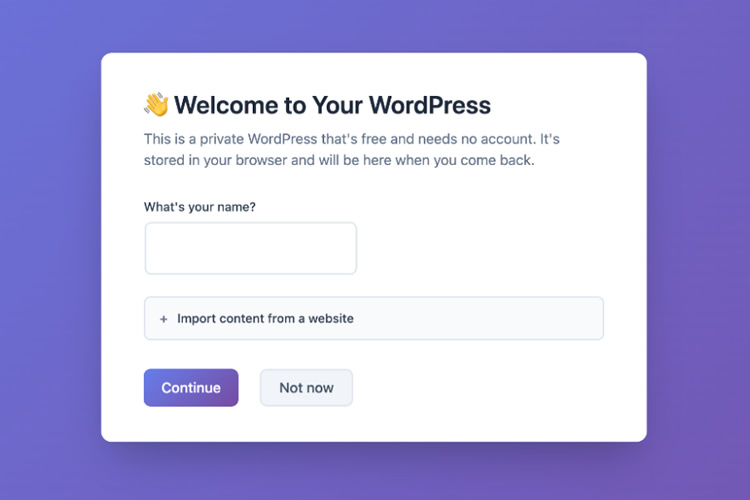
WordPress launched a private, browser-based workspace called my.WordPress.net that runs a full WordPress instance client-side and stores data locally, according to reporting by ubos.tech and Bluehost. The environment is powered by the experimental WordPress Playground and WebAssembly, which let users spin up an isolated site without hosting, domain registration, or server setup (dev.to, Bluehost). my.WordPress.net includes an integrated AI Assistant and an App Catalog; Speckyboy documents steps to install the workspace, add the AI Assistant app, and connect it to external models such as ChatGPT and Claude. ubos.tech reports each instance begins with roughly 100 MB of browser storage persisted in IndexedDB and can be exported as a JSON backup for migration to a hosted WordPress site.
What happened
According to ubos.tech, WordPress launched my.WordPress.net, a private browser workspace that runs a full WordPress installation entirely in the browser and stores data locally. Reporting by Bluehost and dev.to explains the environment is powered by WordPress Playground and uses WebAssembly (WASM) to execute PHP and WordPress client-side. Speckyboy published a hands-on guide showing how to install a workspace, add the AI Assistant app, and connect third-party models including ChatGPT and Claude for content-generation experiments.
Technical details
Per dev.to and Bluehost, the browser runtime compiles PHP via WebAssembly and persists site state in the browser's storage layer (IndexedDB). ubos.tech reports each private instance starts with about 100 MB of storage, and users can export a JSON backup to import into a traditional host later. Speckyboy's walkthrough documents the in-workspace Apps catalog and demonstrates installing the "AI Assistant" app, adding an API key, and issuing prompts to generate or edit content locally.
Editorial analysis
For practitioners, browser-native WordPress environments lower the friction for rapid prototyping, plugin/theme testing, and iterative content workflows. Industry-pattern observations note that running runtimes in the browser via WebAssembly has matured enough to support full-stack developer workflows, enabling experiments that previously required local VMs or ephemeral cloud sandboxes.
Context and significance
Industry context: my.WordPress.net combines two converging trends: lightweight, client-side runtimes and integrated AI tooling. The product matters because it converts a traditionally server-bound CMS into a disposable, private sandbox suitable for exploratory AI integrations. Observers have framed this as part of a broader movement toward local-first tooling and low-friction experimentation for creators and developers (dev.to, Bluehost, ubos.tech).
Practical implications for workflows
Editorial analysis: Teams and individual practitioners can use the workspace to test plugins, validate block themes, and experiment with AI-driven content generation without touching production data. Speckyboy's step-by-step guide illustrates how to connect an external model API and run prompts against the local site, which is helpful for validating prompt engineering, content templates, and CMS automation hooks before deployment.
Limitations and data persistence
ubos.tech and Bluehost both emphasize that because site data lives in the browser, it is device- and browser-bound and may be lost if storage is cleared. The reported 100 MB default storage makes the workspace best suited to text-heavy prototypes and small media libraries; larger production assets require export and migration. Speckyboy also highlights that apps and plugins behave like standard WordPress plugins inside the workspace, but persistence and cross-device continuity depend on explicit export/import.
What to watch
For practitioners: monitor how WordPress exposes programmatic APIs or CLI hooks for WordPress Playground instances, whether official tooling simplifies export/import workflows, and whether the App Catalog adds vetted AI integrations with secure credential handling. Industry-pattern observations suggest adoption will hinge on clear documentation for plugin authors, safeguards for API keys, and tooling to replicate realistic server-side conditions for plugin testing.
Bottom line
Editorial analysis: my.WordPress.net is a practical, low-friction sandbox that makes it straightforward to prototype AI-assisted CMS workflows client-side. For developers and content teams, it reduces setup overhead for experimentation while introducing trade-offs in storage, portability, and the need to validate behaviors in a production-like server environment.
Key Points
- 1my.WordPress.net runs a full WordPress instance client-side using WebAssembly, reducing setup friction for prototyping and tests.
- 2Integrated AI Assistant and Apps Catalog let users connect external models like ChatGPT or Claude for local prompt experiments.
- 3Because data lives in the browser (IndexedDB) with roughly 100 MB default storage, portability and persistence require explicit export/import.
Scoring Rationale
Notable tooling update: the browser-native WordPress sandbox lowers friction for prototyping AI integrations and developer workflows. The change is practical for practitioners but not a frontier-model or infrastructure breakthrough.
Sources
Public references used for this report.
Practice interview problems based on real data
1,625 SQL & Python problems across 15 industry datasets — the exact type of data you work with.
Try 250 free problems