OpenClaw DIY Command Terminal Reframes Agent Workflows
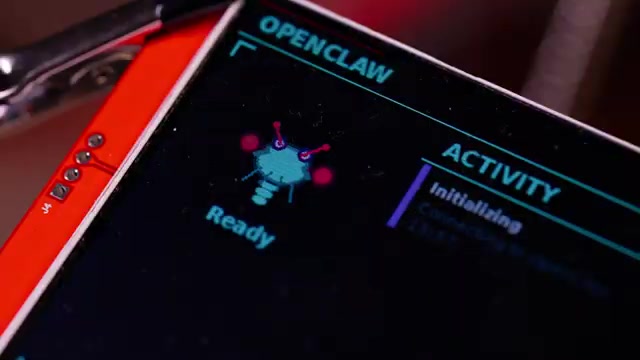
Hackster.io and BitRebels report that maker Lewis Menelaws built an OpenClaw "command terminal" that surfaces agent-suggested actions to a deskside device for human approval. The build uses a Raspberry Pi 4, two small displays, tactile buttons and a custom enclosure, with parts costing roughly 35 to 40 USD, per Hackster.io and BitRebels. The terminal queues OpenClaw-detected tasks and waits for manual confirmation rather than delivering ambient chat notifications, which the coverage frames as a design choice to reduce distraction. Both pieces note practical constraints: wiring and display compatibility issues, hosting and uptime trade-offs, and potential API-cost implications for running a continuous agent heartbeat.
What happened
Hackster.io reports that maker Lewis Menelaws built an OpenClaw command terminal that presents OpenClaw agent outputs as a queue for human approval rather than ambient chat notifications. BitRebels describes the same two-screen setup and frames the design as shifting agent output into a single-task review workflow. Both sources list the hardware: a Raspberry Pi 4, a 4-inch LCD activity panel, a 2.8-inch touchscreen for action buttons, push buttons and rotary encoders, and a custom enclosure. Hackster.io and BitRebels give the parts cost as roughly 35 to 40 USD.
Technical details
Per the project coverage, the terminal runs a continuous OpenClaw process that scans for urgent messages and queues items to the desk device. The screens used were designed for Arduino and ESP32, which led to complicated wiring and adapter work when integrating with the Raspberry Pi, according to Hackster.io. BitRebels highlights trade-offs around isolating the agent from the maker's personal environment and maintaining reliable uptime; both sources note that API usage and hardware limitations are practical constraints to account for.
Editorial analysis - technical context
Devices that externalize human-in-the-loop controls tend to prioritize low-latency, predictable I/O and resilient host connectivity. Industry-pattern observations: low-cost builds using single-board computers commonly encounter driver and wiring complexity when adapting small hobbyist displays, and continuous agent polling can increase API costs and operational surface area compared with on-demand interactions.
Context and significance
reporting frames the OpenClaw terminal as an interface design experiment rather than a commercial product. For practitioners, the concept highlights a design axis for integrating agents into workflows: trade visibility and decision throughput against engineering effort for containment, uptime, and cost control.
What to watch
- •Adoption of similar physical control surfaces for agent workflows in maker communities and startups.
- •Hardware choices that reduce wiring complexity, for example displays with native Raspberry Pi drivers.
- •Signals about how agent frameworks expose approval hooks or lightweight webhook patterns that reduce continuous polling costs.
Key Points
- 1A desk-mounted OpenClaw terminal turns agent outputs into a curated approval queue, reducing ambient notification noise.
- 2Building the device is low-cost, around 35 to 40 USD, but integration work rises when using hobbyist displays not native to the host board.
- 3Industry-pattern observation: human-in-the-loop physical interfaces trade engineering complexity and uptime requirements for clearer decision throughput.
Scoring Rationale
A practical maker demo that highlights human-in-the-loop interface design and low-cost hardware trade-offs. Useful to practitioners as a prototype pattern, but not a paradigm-shifting release.
Sources
Public references used for this report.
Practice interview problems based on real data
1,625 SQL & Python problems across 15 industry datasets — the exact type of data you work with.
Try 250 free problems