OpenAI Adds ChatGPT Integration to Microsoft PowerPoint
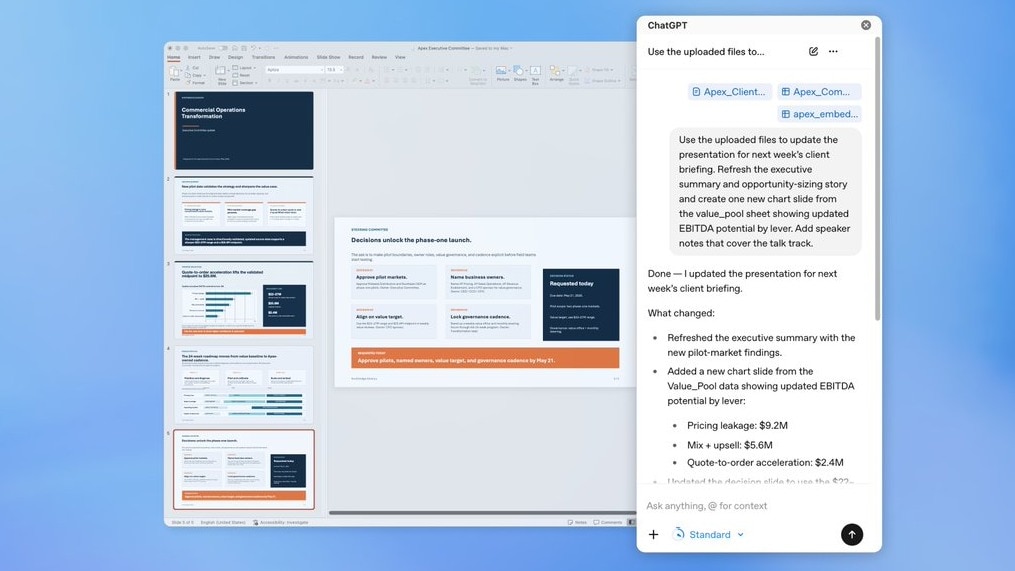
Per the ChatGPT for PowerPoint app page, OpenAI launched a beta add-in that embeds a ChatGPT sidebar inside Microsoft PowerPoint, enabling users to create, edit, and refine slide decks without leaving the app. (India Today; ChatGPT app page). The add-in can ingest notes, documents, spreadsheets, images, and existing presentations and generate structured slides that remain editable in PowerPoint, according to the app listing and India Today reporting. (ChatGPT app page; India Today). Engadget reports the beta is available to most users, including free-tier accounts and ChatGPT Business subscribers, and can pull content from connected services such as Gmail, Outlook, and SharePoint. (Engadget). For practitioners, in-app LLM assistants typically reduce iteration time on slide drafting but raise questions about provenance, version control, and reuse of organizational assets.
What happened
Per the ChatGPT for PowerPoint app page, OpenAI released a beta add-in that embeds a ChatGPT sidebar inside Microsoft PowerPoint, letting users create, edit, and polish slide decks from within the PowerPoint UI. (ChatGPT app page). India Today reports that users can upload meeting notes, documents, spreadsheets, images, or existing presentations and ask the assistant to transform those inputs into a structured, editable deck. (India Today). Engadget reports the feature is available to most users, including free access tier accounts and ChatGPT Business subscribers, and can access connected services like Gmail, Outlook, and SharePoint to pull source material. (Engadget).
Technical details
Per the ChatGPT app listing and OpenAI developer documentation, the integration is presented as a workspace sidebar that accepts uploads and natural-language prompts and returns slide content that remains editable inside PowerPoint. (ChatGPT app page; developers.openai.com). The OpenAI developers site also documents programmatic approaches to generating and manipulating slide decks using Codex and the slides system skill, which suggests a developer-facing path for automated deck generation outside the UI as well. (developers.openai.com).
Capabilities reported across sources include:
- •transforming raw notes and documents into structured slide sequences, with sections like executive summary and risks (India Today);
- •generating new slides and reorganizing content while preserving editability in PowerPoint (India Today; The Verge snippet);
- •integrating content from connected cloud services such as Gmail, Outlook, and SharePoint (Engadget).
Industry context
Context and significance
What to watch
Editorial analysis
Integrations that embed LLM assistants directly into office applications have become a common vendor pattern, with rivals such as Anthropic offering similar slide-generation capabilities through Claude and Google integrating Gemini with Google Slides, per public coverage. (Engadget; The Verge). For ML practitioners and platform teams, that pattern shifts the surface area for model-driven UX into conventional productivity software, increasing the importance of robust input sanitization, content provenance tracking, and deterministic regeneration paths for reproducibility.
For data scientists and ML engineers, the PowerPoint add-in is not a model release, but it is a consequential productization step that brings generative capabilities into a high-volume, business-facing workflow. Because slide decks are often condensed artifacts used in decision-making, the addition of an LLM assistant inside PowerPoint raises practitioner-relevant concerns about accuracy of synthesized claims, automated citation or source-tracing, and how to embed guardrails into shared templates and enterprise flows. Organizations already experimenting with LLMs in spreadsheets and documents will find a similar governance and integration checklist applies here. (The Verge; India Today; developers.openai.com).
Observers should track enterprise controls such as admin-level access, audit logs, and source attribution features in the marketplace listing and in Microsoft Marketplace policy updates. (Microsoft Marketplace snippet). Also monitor how the integration handles confidential uploads from corporate storage like SharePoint, whether it surfaces provenance metadata in generated slides, and how rate limits and tokenization costs are surfaced to IT and data teams. Finally, watch competitive moves: public reporting notes Anthropic and Google already offer related capabilities, so comparative evaluations of output quality, safety filters, and data handling will matter for procurement decisions. (Engadget; The Verge).
Key Points
- 1OpenAI launched a beta ChatGPT add-in for Microsoft PowerPoint that creates and edits slide decks from uploaded notes and documents.
- 2The integration can ingest files and pull content from services like Gmail, Outlook, and SharePoint, widening enterprise data surface area for LLMs.
- 3Industry pattern: embedding assistants in office apps speeds drafting but increases demands for provenance, governance, and reproducibility controls.
Scoring Rationale
This is a notable product integration that brings generative AI into a widely used productivity workflow, relevant to engineers and platform teams. It is not a new model or foundational shift, so the impact is significant but not industry-shaking.
Sources
Public references used for this report.
Practice interview problems based on real data
1,625 SQL & Python problems across 15 industry datasets — the exact type of data you work with.
Try 250 free problems